I tried the WAN failover guide from the MikroTik wiki and it was not working for me and involved adding a lot of routes that were always unavailable/not working.
This one involved net watch and using static routes, but it seems like it’s not working either. Basically even if the main ISP (71.146 etc) is up, it’s keeping the connection from working and it’s still pinging over my 5G Hotspot (ether2/ISP2).
On that guide he mentions Host1 and GW1. I assume GW1 = 71.146.120.1 and then Host1 would be the static IPv4?
For my backup/ISP2 that would be Host2 being 192.168.12.188 and GW2 being 192.168.12.1?
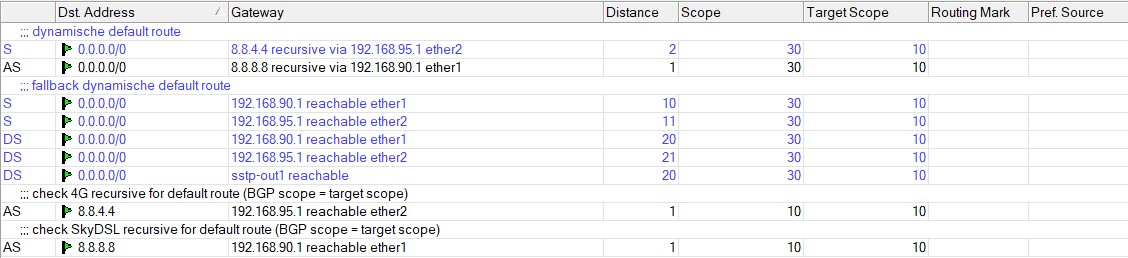
My “simple” implementation … (distance 10,11 is failover if checks don’t work, distance 20,21 are DHCP routes used with ‘other’ ISP connections )
“Failover” requires different distances. (Not like “load balancing”)
.
Thank you so much, I copy pasted it, modifying 192.168.90.1 to 71.146.120.1, then 192.168.95.1 to 192.168.12.1.
That was it, it immediately worked when I tested. Yanked the fiber out of the ONT to simulate the ethernet still being powered from ONT to RB, but the internet is suffering an “outage” on ISP1. Within 1 minute it switched to my ISP2, then after I reconnected, it took about 1 minute then it switched back to ISP1/fiber ONT.
No need for complex mangle or anything. You are amazing, thank you for your time. Do you accept donations via crypto?
After going to ROS 7, it seems this is not working for me. If my main ISP goes out, it isn’t switching to the WAN2 automatically. I think it’s not successfully pinging google.
After going to ROS 7, it seems this is not working for me.
Scope /target scope rules are different for ROS 7 . Where in ROS6 they can be equal , in ROS7 they must obey extra rules and being “less than”.
Target scope < Scope < Target scope … confusing. It’s some combination of this requirement, but unclear what exactly must be “less than”.
Ok about Target Scope, but what is the Scope field then used for in ROS7 ???
I define the resolving routes by the low enough Scope field in ROS 6. (In ROS6 Scope is lower or equal than the Target Scope of the recursive route. Scope=10 comes from the BGP routing default)
Your “I” para makes it all Scope=10, so I get lost in the selection rules used by ROS. (Extra Target Scope check for the resolving route is new by ROS7 … to avoid resolving loops MT says)
Hi BPWL according to my information scope has no play in Recursive Routing.
The only thing one has to do is respect the general rule which is the same for RoS6 or RoS7 which is for individual routes the scope must be equal to or less than the target scope.
Hence you will note that is true in all the routes I have put there.
scope must be equal to or less than the target scope.
That’ the part I didn’t see in para I. Default static routes come with a scope =30. (At least in ROS6). So not only rhe target-scope must be set but also the scope for the resolving routes
So now I see 2 rules:
scope resolving route <= target-scope recursive route (to be selected as potential resolver)
target scope resolving route < target scope recursive route (new in ROS 7)
If this is correct, then also this should work. (“Nexthops” not cleaned up after removing these in ROS7 ???)
FARTHEST ROUTE: SCOPE= (doesnt matter) / TARGET SCOPE=Y+2
CLOSER ROUTE: SCOPE= Y+2 or less / TARGET SCOPE=Y+1
CLOSEST ROUTE: SCOPE=Y+1 or less / TARGET SCOPE=Y (gateway=ISP)
INTERNAL ROUTE: ( within router, scope is not used, no recursive action at all )
Where the farthest route has the highest Target Scope and it decreases by one for each step as you move closer to the router.
Similarly as one gets closer to the direct route on the router (ISP gateway) the scope on the closer route must be equal to or less than the previous route’s target scope.
Thus we have two relationships to consider for routes that flow into each other.
Flat approach —> Recursive Route to Resolving Route. (DNS gateway to ISP gateway). Nested approach → Recursive Route to Recursive Route to Resolving Route (BOGUS address to DNS Gateway to ISP Gateway).
…
{As you can see TS as you get closer to the router decreases by 1, (twelve to eleven) and the scope of the next route is equal to or less than the TS of the previous route (twelve compared to ten).}
{Its also very easy to avoid confusion, simply set all scopes to 10, and ensure the final TS (at the ISP gateway is no less than 10) }
… They document like Pythia, the Oracle of Delphi .
.
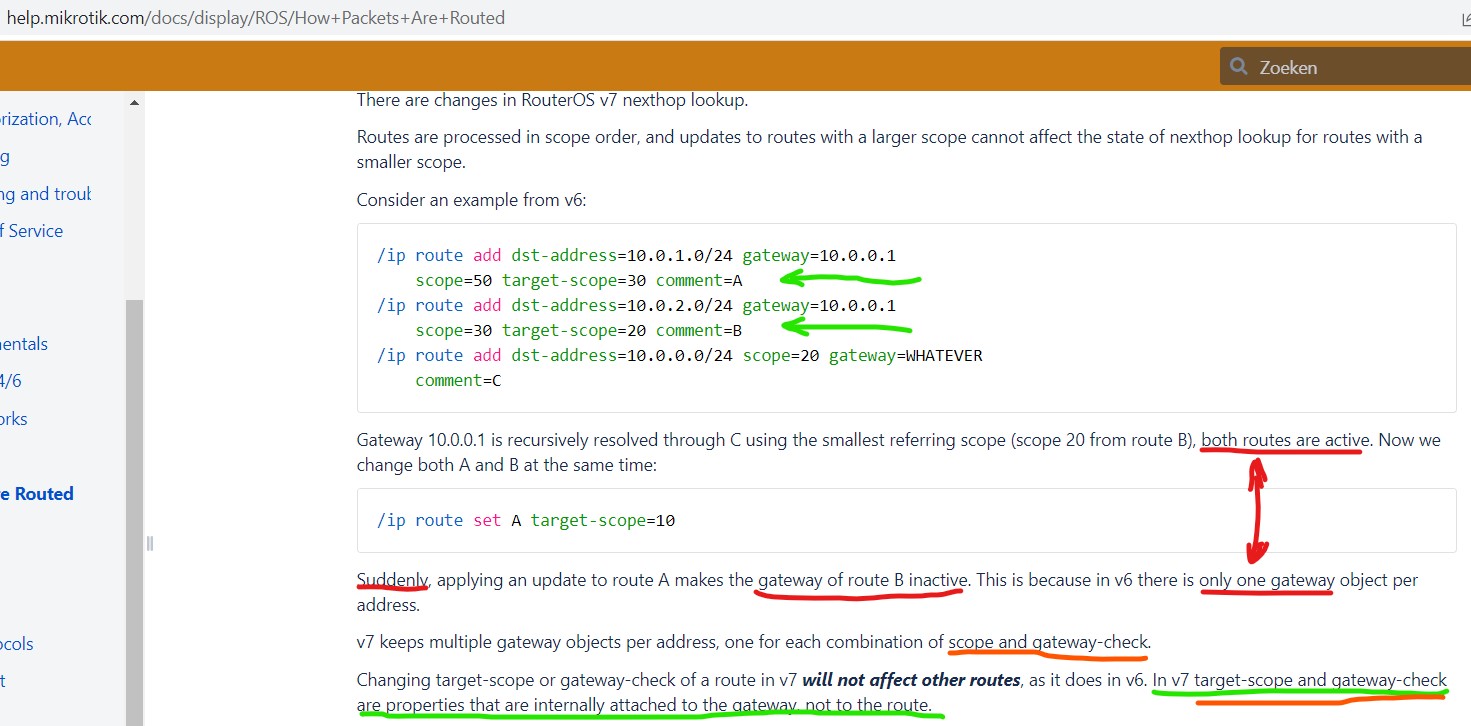
If the target-scope is now an attribute of the gateway, not of the route, what is then the “target-scope” of gateway “10.0.0.1” in the above exemple. Is it 20 or 30 ???
And what is it now “scope” or “target-scope” that is now attached to the gateway?
Check out my post above, I think it answers all your questions!!! At least how to apply scope and target scope.
As to your latest doc v7 query. EFF NOSE??
I have the standalone (non-recursive) SecondaryISP route different (using a default static route with scope=30 and target-scope=10, so it uses local attached networks (which have default scope=10 and target-scope=5)).
Target-scope=30 is also working for local network connections as it is greater than the scope 10.