I have CCR1009-7G-1C-1S+ and wAP ac (for wireless).
Most of settings are by default. CCR1009 gateway is 192.168.0.1 and wAP ac gateway is 192.168.88.1.
Question 1:
how can I get ip address(same gateway “192.168.0.1”) from CCR1009 when I connect to wireless?
wAP ac setting is “Home AP Dual” mode.
Question 2:
I have printer which support wifi connection. I set ip address for printer using wireless (192.168.88.xx).
My PC connected from CCR1009 and ip address is 192.168.0.xx (different gateway).
When I install printer driver, it couldn’t detect printer (I think because of different gateway).
How can I connect wireless printer in this situation?
I need to use 2GHz and 5GHz both wifi.
Quickset have CPE, PTP Bridge AP, PTP Bridge CPE, WISP AP, Home AP Dual, and CAP.
Only Home AP Dual has 2GHz and 5GHz.
My wAP ac get ip 192.168.0.200 from CCR1009.
I unchecked DHCP server and unchecked NAT setting and I can't connect to internet.
My notebook still get ip address from 192.168.88.xx range, not from CCR1009 (192.168.0.xx).
What am I missing?
I attached my quickset configuration
-- My full configuration --
aug/24/2018 00:04:10 by RouterOS 6.42.6
software id =
model = RouterBOARD wAP G-5HacT2HnD
serial number =
/interface bridge
add comment=defconf name=bridge
/interface wireless
set [ find default-name=wlan2 ] band=5ghz-a/n/ac channel-width=
20/40/80mhz-Ceee disabled=no distance=indoors frequency=auto mode=
ap-bridge ssid=sweethome wireless-protocol=802.11
/interface list
add comment=defconf name=WAN
add comment=defconf name=LAN
/interface wireless security-profiles
set [ find default=yes ] authentication-types=wpa-psk,wpa2-psk mode=
dynamic-keys supplicant-identity=MikroTik wpa-pre-shared-key=
wpa2-pre-shared-key=
add authentication-types=wpa-psk,wpa2-psk eap-methods=""
management-protection=allowed mode=dynamic-keys name=home
supplicant-identity="" wpa-pre-shared-key= wpa2-pre-shared-key=
1234567890
/interface wireless
set [ find default-name=wlan1 ] band=2ghz-b/g/n channel-width=20/40mhz-Ce
disabled=no distance=indoors frequency=auto mode=ap-bridge
security-profile=home ssid=mollyhome wireless-protocol=802.11
/ip hotspot profile
set [ find default=yes ] html-directory=flash/hotspot
/ip pool
add name=dhcp ranges=192.168.88.10-192.168.88.254
/ip dhcp-server
add address-pool=dhcp disabled=no interface=bridge name=defconf
/interface bridge port
add bridge=bridge comment=defconf interface=wlan1
add bridge=bridge comment=defconf interface=wlan2
/ip neighbor discovery-settings
set discover-interface-list=LAN
/interface list member
add comment=defconf interface=bridge list=LAN
add comment=defconf interface=ether1 list=WAN
/ip address
add address=192.168.88.1/24 comment=defconf interface=wlan2 network=
192.168.88.0
/ip dhcp-client
add comment=defconf dhcp-options=hostname,clientid disabled=no interface=
ether1
/ip dhcp-server network
add address=192.168.88.0/24 comment=defconf gateway=192.168.88.1
/ip dns
set allow-remote-requests=yes
/ip dns static
add address=192.168.88.1 name=router.lan
/ip firewall filter
add action=accept chain=input comment=
"defconf: accept established,related,untracked" connection-state=
established,related,untracked
add action=drop chain=input comment="defconf: drop invalid" connection-state=
invalid
add action=accept chain=input comment="defconf: accept ICMP" protocol=icmp
add action=drop chain=input comment="defconf: drop all not coming from LAN"
in-interface-list=!LAN
add action=accept chain=forward comment="defconf: accept in ipsec policy"
ipsec-policy=in,ipsec
add action=accept chain=forward comment="defconf: accept out ipsec policy"
ipsec-policy=out,ipsec
add action=fasttrack-connection chain=forward comment="defconf: fasttrack"
connection-state=established,related
add action=accept chain=forward comment=
"defconf: accept established,related, untracked" connection-state=
established,related,untracked
add action=drop chain=forward comment="defconf: drop invalid"
connection-state=invalid
add action=drop chain=forward comment=
"defconf: drop all from WAN not DSTNATed" connection-nat-state=!dstnat
connection-state=new in-interface-list=WAN
/ip firewall nat
add action=masquerade chain=srcnat comment="defconf: masquerade"
ipsec-policy=out,none out-interface-list=WAN
/system clock
set time-zone-name=Asia/Seoul
/system routerboard settings
set silent-boot=no
/tool mac-server
set allowed-interface-list=LAN
/tool mac-server mac-winbox
set allowed-interface-list=LAN
The best (but maybe not the easiest) way is to remove all config and write it from scratch.
If you want to stick to QuickSet…
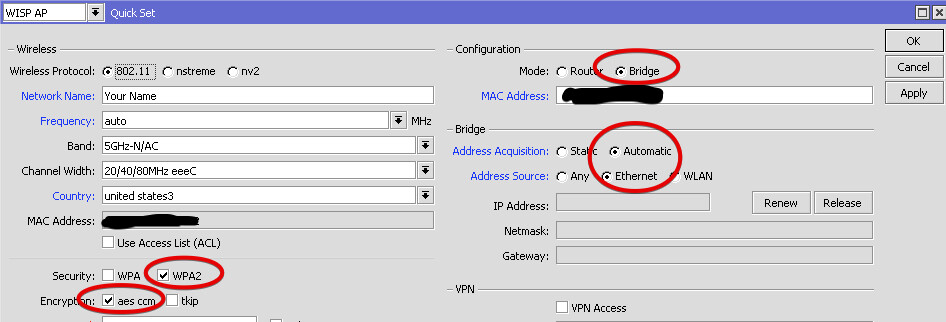
Well, you can’t do it all with QuickSet only, but the closest you can get is WISP AP mode.
The only thing you will need to add manually - are settings for the second radio.
Thanks for your help.
I changed your settings by instruction.
Here is my configuration. I don’t know why wireless setting already exist 2ghz band.
Anyway, my phone and laptop can’t connect to 5ghz wireless after change settings.
I can only connect 2ghz band right now.
What am I wrong?
Try changing “Channel width” for 5Ghz back to “20/40/80mhz-Ceee”.
Can be, that your devices don’t like the XXXX setting.
Apart from that I see many parts from previous config, that are still present, but not needed anymore.
They are not actually active, but It’s better to delete or modify them.
Interfaces → Interface Lists: move ether1 to list LAN
IP → DHCP Server: delete existing DHCP server entry and network entry
IP → Pool: delete entry
Bridge → Filters: remove the only entry
IP → DNS: uncheck “Allow remote requests” and remove the only entry in “Static”
xvo You are a star!
The script will work perfectfly for me.
I have a Mikrotik router connected to the internet with a static IP and is also a DHCP server.
I want to set up 16 WAP ac around a large area.
I want each WAP to have a static IP (easier to manage/maintain)
I want the WAP clients to obtain IP from the DHCP server on the router. Or is it better the WAP to issue an IP?
Thank you in anticipation
I'll start by saying, I'm a noob and bought my first MikroTik device to get my feet wet. WAP AC (RouterBOARD wAP G-5HacT2HnD)
I learned quickly that it didn't function as I had hoped out of the box and correctly having my Netgear Cable modem / router perform the DHCP, wasn't just clicking a couple buttons. I wan't to thank you all for the great information in this forum. I plan on buying more MikroTik devices and playing more. I'm looking for advice and tips on getting the best performance out of the WAP AC as a simple Dual Band Bridge AP. Currently, I am doing just that and I believe I have it quite generic where I can plug it into any DHCP network. I'm exporting the config for review and looking for pointers. I think I will purchase another and possibly a couple different devices for mesh projects.