Hello We have a problem, as we think with the MikroTik router. On all PCs of this network, booking.com does not open correctly. The letter has a screenshot where you can see the problem. Also attached settings of our router. We tried to change the MTU and MSS, but it gave no results. This problem appears on all PCs on the network that have different browsers and different versions of Windows. Tell us how you can solve this problem?
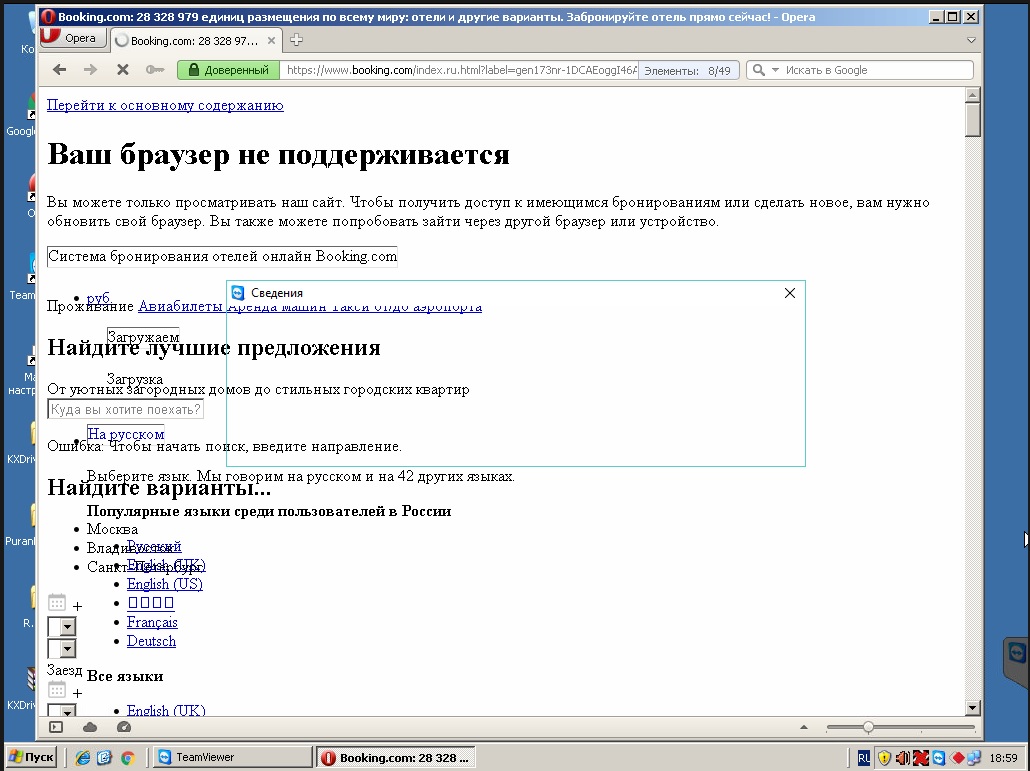
mar/14/2019 12:35:36 by RouterOS 6.43.8
software id = 02HJ-NLIL
model = 951G-2HnD
serial number = 642E07D26
/interface bridge
add fast-forward=no mtu=1500 name=bridge1
/interface ethernet
set [ find default-name=ether1 ] speed=100Mbps
set [ find default-name=ether2 ] speed=100Mbps
set [ find default-name=ether3 ] speed=100Mbps
set [ find default-name=ether4 ] speed=100Mbps
set [ find default-name=ether5 ] speed=100Mbps
/interface list
add name=WAN
add name=LAN
/interface wireless security-profiles
set [ find default=yes ] authentication-types=wpa2-psk eap-methods=“” mode=
dynamic-keys supplicant-identity=MikroTik wpa-pre-shared-key=werfgsdfgsdfg
wpa2-pre-shared-key=rtwertwert
add authentication-types=wpa2-psk eap-methods=“” mode=dynamic-keys name=Corp
supplicant-identity=“” wpa-pre-shared-key=xxxxx wpa2-pre-shared-key=
edfwsewer
/interface wireless
set [ find default-name=wlan1 ] band=2ghz-onlyn channel-width=20/40mhz-eC
disabled=no frequency=2462 mode=ap-bridge mtu=1460 name=Corp
security-profile=XXXXX ssid=Corp-RT wireless-protocol=802.11
add keepalive-frames=disabled mac-address=66:D1:54:33: master-interface=
Corp multicast-buffering=disabled name=Public ssid=Public-RT
wds-cost-range=0 wds-default-cost=0
/ip pool
add name=dhcp_pool0 ranges=10.9.1.2-10.9.1.200
add name=pool1 ranges=192.168.0.10-192.168.0.200
/ip dhcp-server
add add-arp=yes address-pool=dhcp_pool0 authoritative=after-2sec-delay
disabled=no interface=bridge1 name=dhcp1
add address-pool=pool1 authoritative=after-2sec-delay disabled=no interface=
Public name=pub
/queue simple
add max-limit=512k/512k name=queue3 target=10.9.1.28/32
add max-limit=512k/512k name=queue4 target=10.9.1.27/32
add max-limit=512k/512k name=queue5 target=10.9.1.9/32
add max-limit=768k/768k name=queue6 target=10.9.1.32/32
add max-limit=512k/512k name=queue7 target=10.9.1.15/32
/queue type
add kind=pcq name=download-pcq pcq-classifier=dst-address
pcq-dst-address6-mask=64 pcq-rate=1M pcq-src-address6-mask=64
add kind=pcq name=upload-pcq pcq-classifier=src-address pcq-dst-address6-mask=
64 pcq-rate=1M pcq-src-address6-mask=64
/queue simple
add name=queue1 queue=upload-pcq/download-pcq target=10.9.1.13/32
add burst-limit=1M/1M burst-threshold=1M/1M burst-time=1s/1s dst=ether1
max-limit=1M/1M name=queue2 queue=upload-pcq/download-pcq target=
10.9.1.17/32 time=0s-1d,sun,mon,tue,wed,thu,fri,sat
/snmp community
set [ find default=yes ] addresses=82.162.xx.yyy/32,10.9.1.0/24
/interface bridge port
add bridge=bridge1 interface=ether2
add bridge=bridge1 interface=Corp
add bridge=bridge1 interface=ether3
add bridge=bridge1 interface=ether4
add bridge=bridge1 interface=ether5
/interface list member
add list=LAN
add interface=ether1 list=WAN
add interface=bridge1 list=LAN
/ip address
add address=95.154.cc.vv/21 interface=ether1 network=95.154.cc.0
add address=10.9.1.1/24 interface=ether2 network=10.9.1.0
add address=192.168.0.1/8 interface=ether2 network=192.0.0.0
/ip dhcp-server lease
add address=10.9.1.2 client-id=1:0:1c:c0:0:87:73 mac-address=00:1C:73
server=dhcp1
add address=10.9.1.3 client-id=1:50:e5:49:4 mac-address=
50:E5:49:40: server=dhcp1
add address=10.9.1.103 mac-address=38:EA:A7:6B server=dhcp1
add address=10.9.1.13 always-broadcast=yes client-id=1:0:1c:c0:
mac-address=00:1C:C0:17 server=dhcp1
add address=10.9.1.12 client-id=1:98:cb:63:c7:2 mac-address=
98:CB:63:C7:02 server=dhcp1
add address=10.9.1.251 client-id=1:fc:3f::40 mac-address=
FC:3:40 server=dhcp1
add address=10.9.1.27 client-id=1:4c:66:f:b2 mac-address=
4C:66F:B2 server=dhcp1
add address=10.9.1.33 client-id=1:1c:5c43:55 mac-address=
1C55 server=dhcp1
add address=10.9.1.104 mac-address=5C:51:40 server=dhcp1
add address=10.9.1.44 client-id=1:0:1c3 comment=“Kyocera M2040”
mac-address=00:17:C8:C3 server=dhcp1
/ip dhcp-server network
add address=10.9.1.0/24 dns-server=10.9.1.2,10.9.1.1,8.8.8.8 gateway=10.9.1.1
netmask=24 ntp-server=10.9.1.1
add address=192.168.0.0/24 dns-server=8.8.8.8,4.4.2.2 gateway=10.9.1.1 netmask=
24
/ip dns
set servers=8.8.8.8,4.2.2.2,212.122.1.2
/ip firewall address-list
add address=95.154.82.cc list=ftp_2122_vl_kol
add address=82.162.59.cc list=ftp_2122_vl_kol
add address=54.75.231.cc list=ftp_2122_vl_kol
add address=54.246.125.cc list=ftp_2122_vl_kol
add address=booking.com list=test
/ip firewall filter
add action=drop chain=forward disabled=yes src-address=10.9.1.17
add action=accept chain=input in-interface=ether1 src-address-list=test
add action=drop chain=forward dst-address=192.168.0.0/24 src-address=
10.9.1.0/24
add action=drop chain=forward dst-address=10.9.1.0/24 src-address=
192.168.0.0/24
add action=drop chain=forward comment=
“Drop incoming from internet which is not public IP” disabled=yes
in-interface=ether1 log=yes log-prefix=!public src-address-list=
not_in_internet
add action=drop chain=input disabled=yes dst-port=53 in-interface=ether1
protocol=udp src-address-list=“dns flood”
add action=add-src-to-address-list address-list=dnsflood address-list-timeout=
1h chain=input dst-port=53 in-interface=ether1 protocol=udp
src-address-list=“dns flood”
add action=accept chain=input protocol=icmp
add action=accept chain=input connection-state=established
add action=accept chain=input connection-state=related
add action=accept chain=forward connection-state=related
add action=drop chain=input disabled=yes in-interface=ether1
/ip firewall mangle
add action=change-mss chain=forward new-mss=1360 protocol=tcp tcp-flags=syn
tcp-mss=1453-65535
/ip firewall nat
add action=masquerade chain=srcnat out-interface=ether1
add action=dst-nat chain=dstnat comment=“rule for ftp server 3” dst-port=2122
in-interface=ether1 protocol=tcp src-address-list=ftp_2122_vl_kol
to-addresses=10.9.1.3 to-ports=21
add action=dst-nat chain=dstnat comment=“rule for ftp to server3” dst-port=
50000-50050 in-interface=ether1 protocol=tcp to-addresses=10.9.1.3
to-ports=50000-50050
add action=dst-nat chain=dstnat dst-port=1108 in-interface=ether1 protocol=tcp
src-address-list=ftp_2122_vl_kol to-addresses=10.9.1.3 to-ports=3389
/ip route
add distance=1 gateway=95.154.cc.1
add distance=1 dst-address=192.168.0.0/24 gateway=ether1 scope=10
/ip service
set telnet disabled=yes
set ftp disabled=yes
set www address=10.9.1.0/24
set ssh disabled=yes
set api disabled=yes
set api-ssl disabled=yes
/snmp
set contact=> rtyertyer@mail.ru > enabled=yes location=RT trap-generators=“”
trap-version=2
/system clock
set time-zone-name=Asia/Vladivostok