Hi, I would like to ask maybe about trivial thing.
We have configured web proxy (Internet connection via proxy is functional) on port 8080 - We need to get to FTP server (outside from our network) and we cant access it (Timeout).
Our configuration is simply Web Proxy Enabled - Access dst: port 21; local port 8080; action allow;
Firewall Nat: protocol TCP; dst. port 21; action redirect 8080;
I know there is more to setup, but honestly we are lost
To my knowledge port 21 is normally used for unencrypted FTP service.
So most likely your problem is already there.
Port 8080 I can understand but why do you tackle port 21 ?
It might help to describe more in detail what exactly you are trying to do in full, a small drawing of your network might help (draw on paper and scan it in).
Also provide export of firewall part so others can have a look as well.
/ip firewall export name=anynameyouwish
Remove any sensitive part like serial number, any passwds, etc…
Post again between [__code] quotes for easier reading.
Web proxy is dealing with HTTP protocol … specifically when clients are configured to use web proxy they use some extensions of HTTP protocol (so transparent proxying may not work even with unencrypted connections let alone with encrypted ones).
FTP is completely different protocol … and AFAIK ROS web proxy has no intent to support it. There are specialized solutions for running FTP proxy (and as with HTTP, client has to be aware of that).
You’re saying that FTP doesn’t work. There are a few gotchas when it comes to FTP over NAT devices, some are solvable, some are not. So why don’t you describe in detail what seems to be the problem in your case? Is it basic connectivity to TCP port 21 on remote host which already fails (you can verify that by running TCP traceroute to remote host port 21) or is it some later stage which breaks?
Well the thing is, we have server side proxy but our security team need to get rid of it.
So we want to launch HW proxy (Web Proxy is only option on our router) on our mikrotik router and I am totally clueless how to do it right (only thing I did right is run proxy and internet is working with it).
Only goal is to have proxy to Internet and be able to use FTP via it.
So Goal is connect to our Active24 FTP server
Network is simply (ACTIVE24 FTP)<—x---- (Internet) <--------- (OurGateway)-----(Mikrotik Router Web Proxy)----(Client)
Personally I’m mostly advising against using ROS device for any high-level service (such as DNS server, web proxy server, file server, …) if possible. They are, due to space constraints and MT in-house development, mostly quite limited functionality-wise, so using some general-purpose server machine with those servers installed will almost every time win both functionality and performance wise.
As to your answer above: no, it doesn’t answer my question about how exactly FTP connection fails (when not using FTP proxy). FTP is a pretty convoluted protocol and detailed diagnosis is necessary to properly fix a problem.
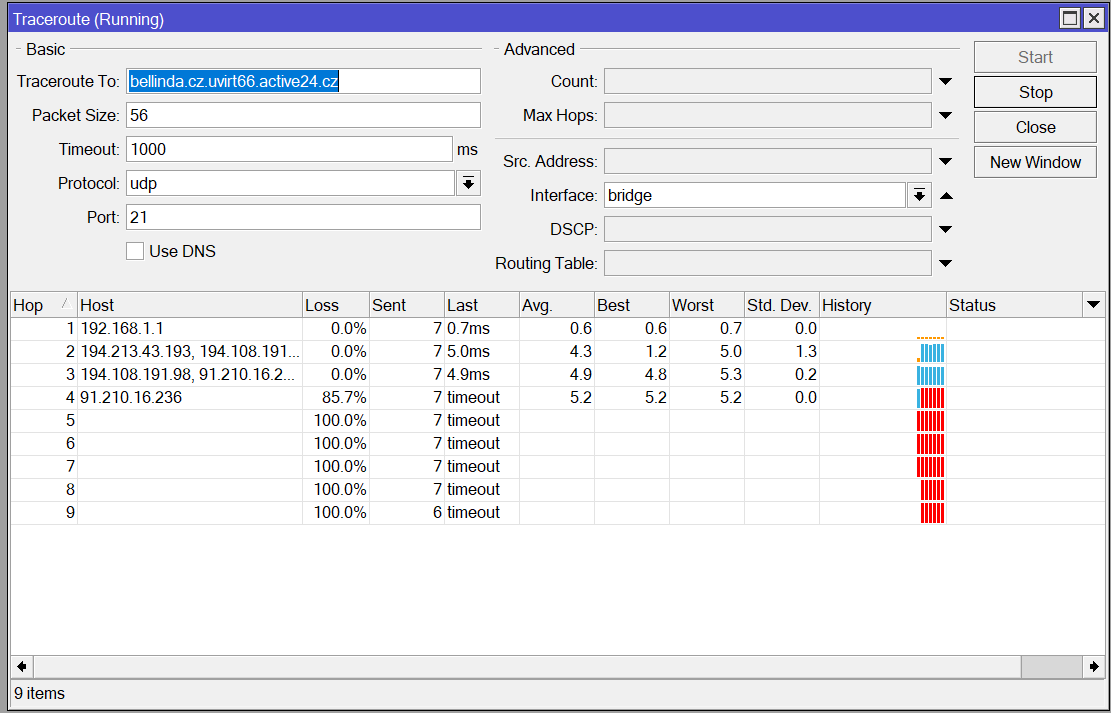
OK, you did UDP traceroute, which is not really representative for your case (any firewall may let TCP 21 = FTP through, but not UDP 21 which doesn’t map to anything).
But even if it is representative, it’s some host on active24 network edge which seems to drop connection, the last node which replied (91.210.16.236) maps to DNS name nix1-xe.active24.cz. I don’t see how a proxy, run on your router, could change this (assuming that your router does SRC NAT all other devices beyond your router will see same src-address both if using proxy or if using “straight” NAT-ed connection.
So no, I still don’t see how using a proxy changes what you see.
And you still didn’t detail where the problem begins if you try to use FTP directly, without using any kind of proxy.
There may be a bit of misunderstanding here. It’s well known that FTP is an awfully outdated protocol and without offering encryption it’s also very unsafe (passwords being transmitted in plain text). As such it’s very sensible from any security expert to work towards banning its use.
Now, the problem is this: if FTP server owner doesn’t do anything about it, then the connection will end up as unencrypted FTP over the internet (on the network topology that’s everything between “OurGateway” and “ACTIVE 24 FTP”) regardless of what you try to do on your side. If your security team forces you to use some proxy (e.g. web proxy on MT), residing on your side of internet cloud, then realistically you dodn’t improve security of your FTP access a bit. It’s really up to active24 to offer a more secure means to access storage (e.g. SFTP), proxy on your side won’t help.
It is possible that your security team is not concerned about plain text passwords passing internet, they might only be concerned about complexity of firewall setup when FTP is involved (FTP uses multiple TCP connections, one is for control plane between client and server port 21, others are open on demand for some operations, e.g. actual file transfer … and these are between random ports on both sides, possibly open from the server side … to overcome this firewalls need to analyze traffic through control plane, even changing it to reflect IP and ports on FW itself … which is a bit troublesome). In this case using a proxy on firewall itself (if security team agrees it’s OK to use it) or on internet side of firewall would help.