Thats just HTTP , im rfering to HTTPS and suing it directly, no rules needed.
Yes, but you do not need to go to the users browsers setup.
You cannot transparently cache HTTPS only HTTP therefore it MUST be set on clients brower settings.
Ok after months of sending mails to support i still haven’t had an answer on this bug and it STILL exists!
Changed only slightly in output message.
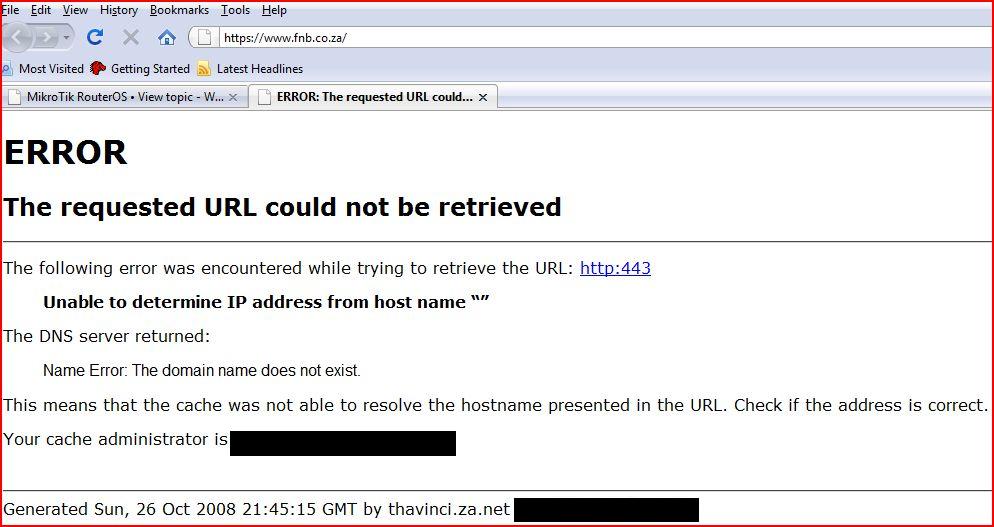
I still don’t know why you are trying to cache HTTPS sites? It’s not going to work.
I am NOT trying to cache HTTPS.
Please understand in a enterprise environment it is often practice to simply deny all internet traffic by disabling NAT and forcing users to use a proxy via say Active Directory Policy.
Now the result of this bug would be that Users will not be able to access the banking sites unless the Nating is enabled and the proxy bypassed for HTTPS.
This is NOT a desirable option in a large organization as you loose control.
If you look at ISA or squid this is possible and is a need infact…
Here are my findings;
HTTPS via the Mikrotik transparent proxy does NOT work (OK we knew that).
HTTPS via the Mikrotik web browser configured proxy BUT with a parent proxy configured in the web proxy does NOT work (dsl-cache.saix.net).
HTTPS via the Mikrotik web browser configured proxy BUT with NO parent proxy configured in the web proxy DOES work.
I logged into a few banking sites and the connections tab in the Mikrotik proxy clearly showed my PC hitting those sites.
I’m using 3.11 x86
Perhaps we should compare settings?
Ok there we hit the nail on the head! So-to-speak.
The option i have is configured proxy with parent proxy.
Reason being have a squid upstream proxy that we use for logging traffic analysis etc… Just more powerful.
In fact i think FTP doesn’t work via this configuration either… Haven’t Confirmed lately…
Thanks For Input.
This is still broken and i can confirm that FTP also doesn’t work!
This has been a long outstanding one!
did you open a ticket and send a supout ?
Twice, once on own once with other issues i had at the time…
My evaluation of 3.17 for use with hotspot actually shows, that HTTPS works for me, with transparent proxy and caching, but NO upstream proxy used until now. Will try that later.
However, I have problems using FTP, too. But that might be considered a “feuture” of hotspot-module 
I just ran into same problem with proxying HTTPS to a parent proxy.
I’m on an enterprise network where all direct outgoing traffic is blocked and BlueCoat proxies are used for all HTTP, HTTPS and FTP traffic.
I’m now trying to solve a capacity problem by using Mikrotik RB1000 proxies to offload a WAN link from web traffic and route the traffic between the Mikrotik proxy and the parent bluecoat proxy over a seperate link.
HTTP and FTP seems to work fine, however HTTPS doesn’t work. I get the same type of error that others have reported from my parent proxy.
I think I just found the problem. When a client browser requests for instance:
The initial HTTPS request to the Mikrotik proxy the Proxy CONNECT string looks like this:
CONNECT www.handelsbanken.se:443 HTTP/1.1
Host: www.handelsbanken.se
However, when the Mikrotik sends out it’s request to the parent proxy it looks like this:
CONNECT http://www.handelsbanken.se:443 HTTP/1.1
Host: www.handelsbanken.se
So the Mikrotik seems to prepend the CONNECT string with “http://” which I assume is not correct when it’s a https page we have requested. Correct behaviour should be to simple pass the CONNECT string untouched to the parent proxy.
This is tested running RouterOS 3.20 on an RB1000.
PS: Like others I’m not trying to achieve any caching of HTTPS traffic, I only need it working for simple forwarding of traffic. Without that working the proxy is unfortunately worthless to me in this type of setups.
Just wanted to let you know that I’ve verified that the problem IS what I described above.
I just tried telneting directly to our parent proxy and tried to send CONNECT cmds with both syntaxes and using http:// in front of the URL the way the
Mikrotik does do fail.
Working:
mathias@mathias-laptop:~$ telnet www-proxy.xxxxx.se 8080
Trying 153.xx.xxx.xx…
Connected to www-proxy.xxxxx.se.
Escape character is ‘^]’.
CONNECT www.handelsbanken.se:443 HTTP/1.1
User-Agent: Mozilla/5.0 (X11; U; Linux i686; en-US; rv:1.9.0.5) Gecko/2008121622 Ubuntu/8.10 (intrepid) Firefox/3.0.5
Proxy-Connection: keep-alive
Host: www.handelsbanken.se
HTTP/1.1 200 Connection established
NOT Working (the Mikrotik way):
mathias@mathias-laptop:~$ telnet www-proxy.xxxxx.se 8080
Trying 153.xx.xxx.xx…
Connected to www-proxy.xxxxx.se .
Escape character is ‘^]’.
CONNECT http://www.handelsbanken.se:443 HTTP/1.1
User-Agent: Mozilla/5.0 (X11; U; Linux i686; en-US; rv:1.9.0.5) Gecko/2008121622 Ubuntu/8.10 (intrepid) Firefox/3.0.5
Proxy-Connection: keep-alive
Host: www.handelsbanken.se
HTTP/1.1 400 Bad Request
Cache-Control: no-cache
Pragma: no-cache
Content-Type: text/html; charset=utf-8
Proxy-Connection: close
Connection: close
I’ve mailed a bugreport regarding this to support and are hoping for a quick response.
In the meantime I found that proxying FTP accually didn’t work with a parent proxy! The Mikrotik proxy happily accepts FTP requests but they are sent out directly, ignoring the defined parent proxy.
As a workaround for the HTTPS problem I used a proxy.pac file to have browsers send https:// requests directly to the parent-proxy and everything else to the Mikrotik proxy. It’s not a solution I can put in production, but atleast it let’s me continue with some realworld tesing without completely blocking HTTPS for the testusers.
BTW: How large CF memory would you recommend to use on a normal office with about 100 users and a 8/1 Mbps ADSL internet connection? If I had to choose between a 8GB 266X fast memory or a 16GB 133X (bigger but slower memory), what would go for?
Not having much luck with the support yet 
The FTP problem is simply acknowledged as works-as-designed and not a bug. They claim that the parent-proxy feature is only supposed to forward HTTP to the parent, not other protocols, but obviously it IS trying to forward HTTPS as well, so I can’t understand why it shouldn’t forward FTP as well.
The HTTPS bug was first declined as “works-as-it-should-according-to-RFC2616” but I’m still trying to convince them it’s not.
According to the following two documents it should work as I have described at least:
http://tools.ietf.org/html/rfc2817
http://tools.ietf.org/html/draft-luotonen-ssl-tunneling-03
Starting to miss my open-source based firewalls where I could just go into the code and fix the damn bugs myself. An open-sourced community edition of RouterOS would have been great so people could contribute with patches for such trivial problems like this.
Much better answers from the support today
The FTP problem is at least accepted as a feature request, and the HTTPS problem will most likely be fixed in next release (3.21).
Thanks support!
HTTPS problem now fixed in this beta package of 3.21:
http://mikrotik.com/download/temp/netinstall-3.21-ppc.zip
http://mikrotik.com/download/temp/routeros-powerpc-3.21.npk
Thanks a lot Mikrotik!
Horray!!!
Finally HTTPS Bug fixed in v3.22!!! Now Just only waiting for the ftp side of things…
Actually not entirely fixed, i have noticed that there have been a few https sites that wont work through a mikrotik proxy but do through ISA and squid.
Will update with more detail when i can…