ax045Y
April 29, 2012, 12:03pm
1
hii,http://forum.mikrotik.com/t/api-in-visual-basic-6-working-fine/46922/1
whats command to enable ppp user?http://wiki.mikrotik.com/wiki/API_command_notes /ppp/secret/enable "
why the api said its not correct command?
You need to do this at two steps.
print the “secret” entry you want enabled. To target a specific entry, use query words.
From the print, extract the “.id” of the entry you want enabled, and put it in place of the “0”.
BTW, it’s “numbers”, not “number”.
ax045Y
April 29, 2012, 7:16pm
3
boen_robot:
You need to do this at two steps.
print the “secret” entry you want enabled. To target a specific entry, use query words.
From the print, extract the “.id” of the entry you want enabled, and put it in place of the “0”.
BTW, it’s “numbers”, not “number”.
did u mean like this,
then i put
is thats what you want?
Yes, but with the star too, so
/ppp/secret/enable
=numbers=*1
ax045Y
April 29, 2012, 8:47pm
5
boen_robot:
Yes, but with the star too, so
/ppp/secret/enable
=numbers=*1
i was try it too,
/ppp/secret/enable
=name=user1
but still disable..
=numbers=user1
?
Are you sure the contents of the text box is interpreted properly? Each line should be treated as a different word. The original code didn’t do that - the “one line” text field was treated as a single word. If you just changed the “one line” text field to a “multiple line” text field, that wouldn’t change the fact all contents will be interpreted as a single word.
ax045Y
April 29, 2012, 9:17pm
7
boen_robot:
=numbers=user1
?
Are you sure the contents of the text box is interpreted properly? Each line should be treated as a different word. The original code didn’t do that - the “one line” text field was treated as a single word. If you just changed the “one line” text field to a “multiple line” text field, that wouldn’t change the fact all contents will be interpreted as a single word.
oohh,
SendCommand ("/ppp/secret/enable") & vbNewLine & ("=numbers=*1")
and try
SendCommand ("/ppp/secret/enable")
SendCommand ("=numbers=*1")
but still not work.
This VB6 API example ‘is as is’.
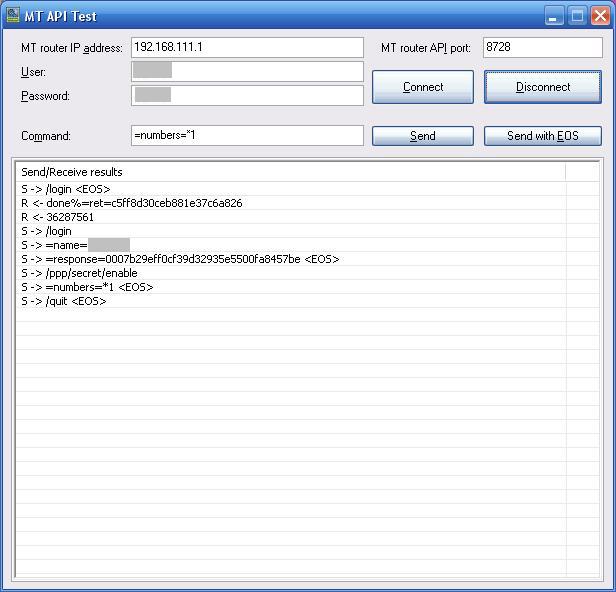
/ppp/secret/enable -> send this without EOS
=numbers=*1 -> send this with EOS
It works for me.
HTH,
You could alternatively modify the app to never send empty words, and send words one by one, including empty words.
That way, in the end, you’d do it like
Type
/ppp/secret/enable
Hit Send.
Type
=numbers=*1
Hit Send.
Hit Send (without typing anything).
ax045Y
April 30, 2012, 2:39pm
10
ditonet:
This VB6 API example ‘is as is’.
/ppp/secret/enable -> send this without EOS
=numbers=*1 -> send this with EOS
It works for me.
HTH,
where i must download this program?
boen_robot:
You could alternatively modify the app to never send empty words, and send words one by one, including empty words.
That way, in the end, you’d do it like
Type
/ppp/secret/enable
Hit Send.
Type
=numbers=*1
Hit Send.
Hit Send (without typing anything).
hmm..