What difference is there between TP-link and mikrotik router

Hi,

I don’t know if this is the right forum section or not.
I have TP link router, which 300Mbps Wireless N USB ADSL2+ Modem Router- Model No. TD-W8968, with
Firmware version:0.6.0 0.11 v0005.0 Build 120802 Rel.68426n
Hardware version:TD-W8968 v1 00000000

However, I am quite confused about TP-link and mikrotik router.

I am in Yemen, thus, TP-link works well with me, however, I don’t know any idea about mikrotik router.
Could you please enlighten me?

Thanks in advance.

What idea about mikrotik you would like to read here?

MikroTik routers use RouterOS as their software, which is the key.

RouterOS allows you to do much more things than what a TP-Link router allows you to do (e.g. limit speeds for each device, set up usernames and passwords via Hotspot and/or PPPoE, accept multiple IPs from your ISP, and redistribute them to other routers, etc. etc. etc.). Furthermore, even the cheapest MikroTik routers can handle much larger amounts of traffic than most (if not all) TP-Link routers.

If you’re only using your TP-Link router for your home, where you and your family use it for your devices, then that’s enough. You don’t need anything more. However, try to hook 50+ devices on it, and you’ll see how everyone will complain that their connection drops randomly.

Thank you very much indeed for your quite excellent information.
However, I would like you to kindly answer my enquirers:

I have always been seeing many wireless network connections are shown in my Laptop's wireless network connection when running my laptop. I don't know where these wireless networks are broadcasting from, and I don't know if there are near to me or not. But when I try to connect to either, I find myself be connected to either without asking entering a PW OR a Security key. However, However, when the connection got wirelessly established, I was asked 'addition log on information may be required'. Although there was an internet access shown, this login page was shown me(screen shot below) when I tried opening a webpage.

Thus, my questions are:

First: if I wish to setup such a service,(LET ANY PERSON CONNECT TO MY WIRELESS ROUTER WITHOUT ASKING ABOUT A PW OR A KEY SECURITY. HOWEVER, HE WILL THEN BE ASKED TO ENTER A LOGIN NAME AND A PW WHEN TRYING OPENING A WEBPAGE. My wireless routeru[/u] can only be set up like being secured with PW or not. However, when the user got the PW, then he can be connected to a wireless and then gets a internet access without addition information required)? Do you mean I can got that service to use MikroTik routers which will let me set up usernames and passwords via Hotspot and/or PPPoE'?

In other words, can setup I let my my Internet subscribing Line offers Internet access to customers who need a enter-name and password provided by me, who created this connection. (Screen shot below)


I was told that 'According to the webpage I have provided above, I need to provide an authentication to access the internet, it's a new hotspot solution powered by Mikro Tik, it enables easy user authentication and accounting in public or private, wired or wireless networks.
his HotSpot technology allows Internet providers to offer Internet access to customers. so if you want to connect to internet, you need a enter-name and password provided by the Internet Provider who created this connection.


Thus, I have thought of the above screen shot as though I will need two devices 'hotspot gateway' which will be connected to a router(TP--Linke or MikroTik). And a router such as TP-Link or MikroTik to which Hotspot will be connect via a LAN port of either router. Then, via Hotspot Gateway I will do that service.
I now only have a Router/Modem powered by TP-Link, and the DSL line is directly plugged to Router. However, This Router device only provides a private, wired or wireless networks.

Second: But there is another question should be raising, which is how long my devices should be away from the RouterOS device to be able receive the usernames and passwords provided by RouterOS powered by MikroTik?

Third: Can MikroTik routers be working well in my home country 'Yemen' well and with my ISP, which is Supper_YemenNet Subscriber Service'?

Fouth: Are there any difficult settings to be done before getting MikroTik routers working well?

Finally: As you think I've been really using my TP-Link router for my home, where I and my family use it for our devices. But in fact, the wireless routers are working very badly specifically in the buildings made of clay. In other words, in the clay buildings, signals strength sent by a router are far too much poorer to be received by those devices are in the next door. I think this RouterOS service will solve the problem forever.

With respect to my final question I was told
"If you want to get strong signal for computers\mobiles which are far form the router, you can use bridge several routers together to extend the wireless signal around your office\building. I noticed that you're using TP-LINK, so hope the following guide can help you to connect routers together via bridge mode.

http://www.tp-link.com/lb/article/?faqid=74\

A router with good performance can also be helpful.
Regarding to detailed instruction about Mikrotik hotspot gateway, I'd like to share this link with you for reference:

Hotspot Gateway

http://www.mikrotik.com/testdocs/ros/2.9/ip/hotspot.php


Regarding my final question I say: This(bridge several routers) would have been a very good idea, if it had succeeded.

If I want to setup 'bridge several routers', I will need physical devices, such as 'wired cables, and so on), or all what I need is just two TP-Link(routers), and then setup the routers via their IP addresses(192.168.1.1)? If I won't need any physical things, then how can I will connect two routers each other? I am now using TP-Link in my own room, however, all other relatives must come to my room in order to get excellent strength signals of the Wireless Router Radio. If I need to let them access a Wireless Router Radio with excellent strength signals while staying in their rooms, then I should put the other router in that room at which they stay. Thus, how can I setup bridge two routers', no plugging between the two routers will be needed?

Moreover, I will only need one ADSL line, which will be plugged to the ADSL port of a router of them?

First of all, this is mikrotik user forum. Probably you will not find anyone willing to tell you what to do with your tplinks. But we can try to help you with mikrotik devices (routerboards) and their software (routerOS).

Everything what you want can be achieved with all mikrotik devices having at least level4 license. So all “home” routers with wifi AP are suitable.

There is no mikrotik device that you can use as ADSL modem. You would need to still use separate ADSL modem (preferably in bridge mode) and connect it between your router and phone line.

To your questions:

  1. No need of more devices for running hotspot features. It is ebedded in RouterOS and can be switch on. So it is enough to have one router and activate hotspot on the router that acts as gateway simultaneously. If you will need to connect more APs to cover wide area, the same hotspot from the gateway can be used - so no need to make aditional hotspots for other APs.

  2. It depends on many things. What AP and antenna you use, how it is set, where it is placed, how looks environment around, how are set your client devices, and mainly what are their trassmitting possibilities.

  3. Router work everywhere the same. Your modem will convert from phone line to ethernet. So there will be no problem with whatever router with ethernet wan connection.

  4. Yes. Mainly for unskilled users without any general knowledge of networks. Moving from tp-link “home” grade devices to mikrotik devices is a big shock. But after you learn something, you will be surprised by wide range of possibilities you got and you did not even think about before.

  5. It is the topic like point nr. 1 and 2. Just imagine that mobile devices (phones, notebooks) have power management. When they see strong signal from AP they think they are close and reducing the transmitt power. If you will set AP power too high (e.g 1000mW - and with higher gain antenna its effectively much more dbi), the mobiles will see strong signal even they are far away, but their poor 50mW amplifiers with tinny small antennas will not be able to deliver the signal and usable level to the antenna of your AP. Remember, wifi is not one way communication so you have to take care about both sides.

Generally, it is good to buy some cheap mikrotik device for trying it. If you can afford it, buy something like RB951Ui-2HnD, RB951G-2HnD or even RB2011UiAS-2HnD-IN that you can use at your home and play a bit with it.

Or at least visit the demo pages to see how web-based configuration looks like:http://www.mikrotik.com/software.html#

But note, there is much better configuration tool then webfig: Winbox.

If you will be deploying other devices, it is always better to connect them by cable instead using wifi. Of course, you can build WDS connection between to connect additional APs in a star or line topology but it will always reduce effective usable throughput.

Thanks a lot,
I think MikroTik RouterOS is the operating system of MikroTik RouterBOARD hardware.

First: Thus, Is that hotspot gateway device shown in the screen shot I have posted ‘MikroTik RouterBOARD hardware.’? If no, then I can understand MikroTik RouterBOARD hardware is not a standalone device.

Second: I really know that my DSL(Digital Subscriber Line) is plugged to my TP-Link router. This is all. Can my DSL be plugged to MikroTik RouterBOARD hardware as well?

Third: I don’t use ADSL, I use DSL(Digital Subscriber Line).
Thus, I don’t want a Mikrotik device that I can use as ADSL modem. As this happens with all routers. Even TP-Link router is not used as ADSL modem. I didn’t use a separate ADSL modem at all with my TP-Link router. All what I have used is a TP-Link Router, DSL, and HP Laptop. I directly connect ADSL Line to a telephone wall socket or receptacle :
I use the ADSL cable included with the Router to connect it to a telephone wall socket or receptacle. Plug one end of the cable into the Line port (RJ11 receptacle) on the rear panel of the Router and insert the other end into the RJ11 wall socket. If you are using a low pass filter device, follow the instructions included with the device or given to you by your service provider. The ADSL connection represents the WAN interface, the connection to the Internet. It is the physical link to the service provider’s network backbone and ultimately to the Internet.. Will this is what I need with Mikrotik device?


However, as I said before 'MY TP-Link wireless TP-Link router can only be set up like being secured with a PW or not. However, when the user got the PW, then he can be connected to a wireless and then he gets an internet access without addition information required) However, I need to LET ANY PERSON CONNECT TO MY WIRELESS ROUTER WITHOUT ASKING ABOUT A PW OR A KEY SECURITY. HOWEVER, HE WILL THEN BE ASKED TO ENTER A LOGIN NAME AND A PW WHEN TRYING OPENING A WEBPAGE.(please see my first screen shot above)
You will understand me If see this ‘I have always been seeing many wireless network connections are shown in my Laptop’s wireless network connection when running my laptop. I don’t know where these wireless networks are broadcasting from, and I don’t know if there are near to me or not. But when I try to connect to either, I find myself be connected to either without asking entering a PW OR a Security key., However, when the connection got wirelessly established, I was asked ‘addition log on information may be required’. Although there was an internet access shown, this login page was shown me(screen shot posted before) when I tried opening a webpage.’

Finally: I’ve been really using my router powered by TP-Link for my home, where my family and I use it for our devices. But in fact, the wireless routers powered by TP-link are working very badly, specifically in the buildings made of clay. In other words, in the clay buildings, signals strength sent by a wireless router are far too poor to be received by those devices in the next door. I think this RouterOS service powered by mikrotik will solve the problem forever. Since RouterOS allows me to offer Internet access to customers by setting up usernames and passwords via Hotspot and/or PPPoE. If any customres far away from my wireless router, they want to connect to internet, then they need a enter-name and password provided by the Internet Provider who created this connection(I).

Hi again.

Please, do not quote if you reply to just above article. Use quoting only if you reply to older article or to more articles at once.

  1. Yes, it corresponds to your picture.

2+3) DSL (regardless it is ADSL or VDSL or whatever version of these DSL types), is phone line. You need a modem if you want to convert from DSL to Ethernet. Mikrotik does not produce any hardware that could act as DSL modem. But: You can switch your tp-link from routing mode to bridging mode so it will start to work just as transparent modem. If it supports such mode. Consult your user manual or product webpage. You use ADSL modem built into your router. Not only tp-link provides routers with built-in adsl modems. There are many other producers that sells adsl modem equipped routers. But not Mikrotik. Mikrotik sells only ethernet (or optical, or wireless equipped) routers. You cannot connect your RJ11 phone line into any Mikrotik router directly.

I do not understand why you repeat again everything about secured and unsecured but with hotspot managed connections. Both options are possible (and their combination) with Mikrotik.

Again: Connection quality is the question of both sides hardware and the environment much more then question of used software on one of the sides. Using high power Mikrotik device you would probably reach better connections, especially when more than few client devices will be connected at the same moment (compared to the same situation with tplink). But without trying it in your environment none will be able to tell you how it will really be.

Thanks a lot,
First: you mean that MikroTik does neither include the Line port (RJ11 receptacle) on the rear panel of the Router, nor ADSL cable?
If so, then how I will connect MikroTik to a telephone wall socket???
If there were Illustration steps of How to connect/install MikroTik router into my network would be very useful?

Second: If my TP-Link router had supported turning to bridging mode, then could I benefit from it as a transparent modem? In other words, how will I be benefiting from TP-Link router as a transparent modem as long as there is no way(ports in Mikrotik router) to plug transparent modem to Mikrotik router?.

Third: as long as there are no ports at all on rear or front panel of Mikrotik router, then how can I connect it with transparent modem, which is TP-Link?

Fourth: If my TP-Link router had not supported turning to bridging mode, then I which kind of Modem would I need to bring?

Finally: Even DC power adapter port isn’t on Mikrotik router, then how will it be plugged in to a main power supply?

I do not understand why you repeat again everything about secured and unsecured but with hotspot managed connections. Both options are possible (and their combination) with Mikrotik.

First:

Could you please understand me, I know that Mikrotik supports both secured and unsecured . However, if you have a look again at my very first screen shot, you will be seeing I managed to connect to ‘shahidnet’ which was unsecured. However, then when I tried to open a website, I was asked ‘addition log on information may be required’, although the Shadhidnet’ was not secured, there was an internet access shown under ‘Shahidnet’. With my TP-link router, a client who having the PW can be connected to my wireless TP-Link router rescured without asking about ‘addition log on information may be required’.


Again: Connection quality is the question of both sides hardware and the environment much more then question of used software on one of the sides. Using high power Mikrotik device you would probably reach better connections, especially when more than few client devices will be connected at the same moment (compared to the same situation with tplink). But without trying it in your environment none will be able to tell you how it will really be.

**First :**Then, if there are clients are far away from my Mirotik router, how can they receive good signals broadcasting from Mikrotik.?

Second: There are no internal antennas for Mikrotik router? Then, how wireless devices(mobile, computes) got connected wirelessly to Mikrotik router?

Finally: I’ve been really using my router powered by TP-Link for my home, where my family and I use it for our devices. But in fact, the wireless routers powered by TP-link are working very badly, specifically in the buildings made of clay. In other words, in the clay buildings, signals strength sent by a wireless router are far too poor to be received by those devices in the next door or much longer. I think this RouterOS, which is the operating system of MikroTik RouterBOARD hardware, powered by mikrotik will solve the problem forever.

Throw them in the bin.

Could you please be a little more patient with me since I am really novice, don’t know anything at all about MikroTik, and willing to know more and more? Thus, I am respectfully requesting you to answer my questions posted previously.

In short : Use Your TP link - to Connect Wireless- Bridge it. Have a Routeros Device as a Gateway - dont use Wireless to “random Devices” - And you have a rock solid net :smiley:

acooperator,

seems that you like to write much more than read and think about what you read.

  1. I already told you this twice and also samsung172 confirmed that.
    1b) Here are the answers to FAQ: http://wiki.mikrotik.com/wiki/MikroTik_RouterOS_Frequently_Asked_Questions_-_FAQ
    Here is the manual to everything you would like to setup: http://wiki.mikrotik.com/wiki/Manual:TOC

So please, read it. Then try to make your own setup. If you fail (and everyone fails for the very first time - I also did and who does not agree is still keeping to fail :slight_smile:), go step back, study again and try again. When you are absolutely sure you did everything right but it does not work, use google and search the answer to your question. If none had similiar problem that can ispire you, only then ask particular question on this forum.

  1. Yes to first question.

2b), 3) What device do you observe finding it without any ports or even without power inlet? I have never seen such device.

  1. You need to consult your service provider which transparent modem converts his DSL to ethernet.

  2. The same like 2b) and 3).

  3. Yeah, you managed to connect to ‘shahidnet’ , so what? I do not see any question. So why do you still repeat this part??

Anyway, I do not recommend to you to keep your AP without WPA2 protection - as whatever device can (and will) connect. Even it will not pass thru your hotspot as it will not know user name and password, but it will eat your time and transmitt in your wireless spectrum so it will reduce the time and link quality for other intentionally connected devices.

  1. Using good directional antenna.

8 ) Some of Mkrotik routers has wifi integrated. Some of them has also internal antennas integrated, others have small external antennas integrated and others have connectors so you can connect your own antenna that fits to your needs. There are devices without wifi integrated but with possibility to add wifi card.

  1. Clay itself will probably not make huge attenuation if the walls are not too thick. The thing what blocks wifi singnal is water. If the clay is wet, then it can block wifi signal effectively. More power transmitting devices (both sides!!) can help a bit trhu first or second wall, but not generally. better to reorient antennas and place them on better place where no obstacles occur. Or to deploy more APs if you cannot do that.

And again: it is not so much question of software! Software cannot boost the signal if you are not able to physically deliver it from point A to point B.

Thanks a lot, I appreciate your kind replies. I hope this will be final questions:

Could you please understand me, I know that Mikrotik supports both secured and unsecured?
‘Shadhident’ is not mine, I have always been seeing many wireless networks are shown in my Wireless Laptop when running my laptop. I don’t know where these wireless networks are broadcasting from, and I don’t know if there are near to me or not. But when I try to connect to either, I find myself be connected to either without asking entering a PW OR a Security key.
(If you have a look again at my very first screen shot, you will be seeing I managed to connect to ‘shahidnet’ which was unsecured. However, then when I tried to open a website, I was asked ‘addition log on information may be required’,(Screen shot below) although I was connected to the Shadhidnet’ not secured, there was an internet access shown under ‘Shahidnet’. With my my wireless network created under TP-link router, a client who having the PW can be connected to my wireless TP-Link router secured without asking about ‘addition log on information may be required’. when he trying to open a website
Thus, my question is: I want to do a wireless network such what I have said( I need to LET ANY PERSON CONNECT TO MY WIRELESS ROUTER WITHOUT ASKING ABOUT A PW OR A KEY SECURITY. HOWEVER, HE WILL THEN BE ASKED TO ENTER A LOGIN NAME AND A PW WHEN TRYING OPENING A WEBPAGE.(please see my screen shot below)


  1. You need to consult your service provider which transparent modem converts his DSL to ethernet.

I know that Ethernet is just computer networking technologies for local area (LAN) and larger networks. So if I have used your device Mikro Tik, how I will let all wireless devices to be connected via my Mikro Tik??? If you have seen my screen shot below, you will see Mikrotik is used, and provides both Wireless interface, and Ethernet interface, and there are wired network and wireless clients are connect to Mikro Tik?


  1. Using good directional antenna

Is is broadcasting very well? Since my fundamental problem with TP-Link is that signals’ strength are far too poor to be received by those devices far away from my wireless TP-link router.


Clay itself will probably not make huge attenuation if the walls are not too thick. The thing what blocks wifi singnal is water. If the clay is wet, then it can block wifi signal effectively. More power transmitting devices (both sides!!) can help a bit trhu first or second wall, but not generally. better to reorient antennas and place them on better place where no obstacles occur. Or to deploy more APs if you cannot do that.

Then, With respect to ‘poor signals’ strength, Mikrotik routers are working with the same way Wireless TP-link router works?

I was told that If I want to get strong signal for computers\mobiles which are far form the router, I can use bridge several routers together to extend the wireless signal around your office\building. I noticed that you’re using TP-LINK, so hope the following guide can help you to connect routers together via bridge mode.’

First: if you don’t mind replying to me, do you think this will work with Mikrotik routers?

Second: If I want to setup ‘bridge several routers’, will each router need to be connected to a telephone wall socket with to the ADSL cable included???


No need of more devices for running hotspot features. It is embedded in RouterOS and can be switch on. So it is enough to have one router and activate hotspot on the router that acts as gateway simultaneously. If you will need to connect more APs to cover wide area, the same hotspot from the gateway can be used - so no need to make aditional hotspots for other APs.

What do you mean with ‘APs’? Is it ‘APPs’, which is ‘Application’?

Second: I need one Mikro Tik router? Then what you mean with 'and activate hotspot on the router that acts as gateway simultaneously"? You mean active hotspot on the same Mikro tik router?

@acooperator

All of your questions (including those last ones) were already answered, but apparently, you’re too unaware of the terminology to understand the answers, so instead of repeating the same answers, I’m going to give you a quick round of the terms. Please don’t skim over them, but read it all, even if you think you already know some of it.

First off, realize that every single device may be multiple things at once. This is a VERY important thing to keep in mind.

APs - Abbreviation for “Access Points”. An access point is a Wi-Fi device you can connect to (as your screenshot shows). Your TP-Link router is actually 3 devices in one - a router, an Access Point, and another thing called “Switch” (but for now, ignore that term; It’s not important for your questions…).

Any MikroTik router that has Wi-Fi is also both a router and an Access Point.

Ethernet - That’s the technical term for what you’d call a “wired” network, i.e. one with cables. Like, this kind of cable. Your TP-Link router, as well as almost every router (TP-Link, MikroTik or others) has at least one, as does your laptop.

Modem - Basically, that’s any device that connects to a phone line (I mean, that’s not the technical definition, but for our purposes…). If your TP-Link router has a port in which you can plug a phone line cable, then it’s also a modem. If not, your internet provider must have given you a separate device with such a port, which also has an Ethernet port, which would then connect to your TP-Link router. That separate device is called “ADSL splitter”, as seen in one of your earlier pictures.

MikroTik routers are not modems. If you have an ADSL splitter, you’d simply move the Ethernet cable from your TP-Link into the MikroTik router. If you don’t have an ADSL splitter currently, you’d need to get one in addition to the MikroTik router.

Hotspot - That’s the term for when you’re connected to the internet either via Ethernet or via Wi-Fi, but are required to enter a username and password from a web page before you can actually use the internet. In other words, exactly the thing you want to do in the end - that’s hotspot. You can do it with any MikroTik router, as this is just a setting in RouterOS, which as we’ve already said is the software that all MikroTik routers use.

The difficult part is making sure people can use MikroTik as an Access Point, i.e. connect to it via Wi-Fi. They must first do that before they can be shown the hotspot page.

Antenna - That’s the thing that actually carries Wi-Fi signals. It’s NOT the same thing as your Wi-Fi adapter. The Wi-Fi adapter is a thing which processes Wi-Fi signals (or orders signals to be sent), whereas an antenna is plugged into a Wi-Fi adapter in order to actually catch signals to be processed (or send signals that the adapter orders it to). Some access points have antennas that can be changed, as opposed to them being “glued” to the router.

There are different kinds of antennas. Some more powerful, some less. Some are “directional” (meaning they send strong signals in a particular direction), others are “dome” antennas (meaning they send a weaker signal in all directions). Some have an optional cable that you can attach between the Wi-Fi adapter and them, others must be directly plugged into the Wi-Fi adapter.

Some MikroTik routers allow you to change the antenna, while others don’t. If you do get a router that does allow you to change the antenna, you’ll need to separately get a good antenna. The antenna and Wi-Fi adapter need to be powerful enough to go through enough walls or better yet - you should position the antenna so that it’s directly visible to the devices that will connect to it (i.e. with no walls in between).

Bridge - A bridge is a device that connects two or more devices in a single local network (it’s similar to that other term “switch” from the start, but with a twist that’s not important for our purposes now…). By definition, you don’t need an ADSL or any other internet connection at all on such a device.

Instead, one of the ends of the bridge is a device that’s connected to the internet OR is another bridge that is then connected to the device with the internet. In other words, you can chain a bridge after a bridge, until the internet is reached. The actual “client” devices, such as your laptop, would connect to their nearest Wi-Fi bridge (which, yes, is also an Access Point), which would in turn forward the signal to another bridge, to another bridge, and so on up until your MikroTik router, and then if the hotspot is passed, up your modem’s ADSL line.
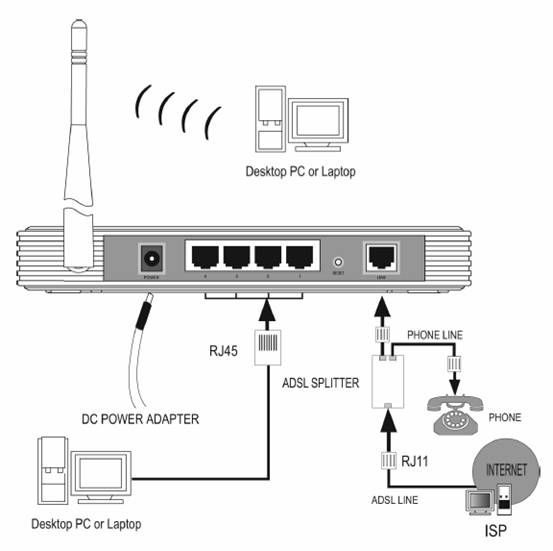
Thanks a lot, I would like you to kindly address these questions for me?

as far as I know that bridge is not a separate physical device, however, two wireless routers connected wirelessly.


“If you want to get strong signal for computers\mobiles which are far form the router, you can use bridge several routers together to extend the wireless signal around your office\building. I noticed that you’re using TP-LINK, so hope the following guide can help you to connect routers together via bridge mode.”

Thus, my questions are:

If I want to setup ‘bridge several routers’:(TP-Link and MikroTik, or TP-Link and TP-link):

First: I will need physical devices, such as 'wired cables, and so on), or all what I need is just two TP-Link (routers), and then setup the routers via their IP addresses(192.168.1.1)?

Second: If I won’t need any physical things, then how can I will connect two routers each other?

Third: I am now using TP-Link in my own room, however, all other relatives must come to my room in order to get excellent strength signals of the Wireless Router Radio. If I need to let them access a Wireless Router Radio with excellent strength signals while staying in their rooms, then I should put the other router in that room at which they stay.

Fourth: Each router will be plugged to a main power supply, and connected to a phone line via ADSL cable?

Finally: No physical connecting between the two routers will be needed?

A “bridge” is an abstract concept. A bridge could use cables, Wi-Fi, or a mixture of both.

So with that in mind,

First: I will need physical devices, such as 'wired cables, and so on), or all what I need is just two TP-Link (routers), and then setup the routers via their IP addresses(192.168.1.1)?

You’d need one physical device to first receive the internet (let’s call it “A”), and then if you want to make the Wi-Fi signal reach further, you’d need at least one more physical device (let’s call it “B”) to act as a bridge, which would connect to that first one. You could also have additional physical devices (“C”) that connect to a previous bridge (“B”; thus forming the chain C, B, A), and you can extend it as much as you need to, depending on how many physical devices you can afford, and how far you want the signal to reach.

Second: If I won’t need any physical things, then how can I will connect two routers each other?

You MAY connect bridges with a cable between them, but you don’t have to.

To connect them via Wi-Fi, you’d need a setting called “WDS Bridge”. With it, “B” (in the above example) would search the air for “A” in the same way your laptop normally does, and connect to it, while at the same time it emits a signal for others to see. “C” should be able to see the signal from “B”, and connect to it in the same fashion, and so on. “C” doesn’t need to see “A” on the air - just “B”.

Most TP-Link routers support this feature, and all MikroTik routers (that have Wi-Fi) support it, as it’s a software setting, really.

Third: I am now using TP-Link in my own room, however, all other relatives must come to my room in order to get excellent strength signals of the Wireless Router Radio. If I need to let them access a Wireless Router Radio with excellent strength signals while staying in their rooms, then I should put the other router in that room at which they stay.

That, or get a more powerful antenna (if you router allows you to replace it), yes.

Fourth: Each router will be plugged to a main power supply,

Well… to some sort of power supply, certainly, yes. I mean, those devices kind of need electricity.

and connected to a phone line via ADSL cable?

No.

Did you bother to read what I said in my previous post about the “bridge” thing?

Finally: No physical connecting between the two routers will be needed?

If both routers support WDS bridge, you won’t need a cable between them, yes.

Watch out. ADSL splitter is not modem. It is not possible to run a wire from splitter to mikrotik router without placing a modem in between. Otherwise it will not do anything.

OK, I’ll admit that I haven’t used an ADSL splitter (I’ve had to deal with routers that are also modems, but not phone/Ethernet splitters), so you may be right, but… Really?

You’re saying an ADSL splitter’s Ethernet port doesn’t have Ethernet signal on it? That there’s such a thing as a modem that has Ethernet ports on both sides, but transforms Ethernet signals of two different and incompatible kinds?!?

I’ve honestly never heard of that before.

Splitter is just low-pass filter that separates two (or more) frequency ranges from one line to two lines and effectively enables to connect analog phone together with adsl modem to one analog phone line. http://en.wikipedia.org/wiki/DSL_filter
Modem is device that converts (MOdulates and DEModulates) signals from one type of signal to another type of signal. In our case it is conversion from DSL analog signal to ethernet. http://en.wikipedia.org/wiki/DSL_modem

Combined home “adsl routers” can incorporate all the devices into one case: ADSL splitter, ADSL modem and Router. Please, note that if we call now something by the word “router”, it normally means not pure router that just routes the packets, but also has many other fuctions - access point, firewall, vpn concentrator, DNS, DHCP and other fuctions that normally do not have any relation to routing itself.

Just to be clear: No router of mikrotik is able to work directly with phone line. If you want to use Mikrotik router with ADSL (or cable TV or satellite internet), you need a modem. If you want to use the line also for phone calls, you need a splitter connected before the modem to connect the phone simultanously with the modem. If the modem has a plug named “phone” it has a built-in splitter so you do not need separate box. If it has only “line in” and no “phone” connector, you need to use a splitter.

@jarda
Ooooohhhh…

OK, seeing the picture on the Wikipedia page more closely, the “ADSL splitter” is not splitting between phone and Ethernet, it’s splitting between phone and ADSL. That makes sense now. Indeed, as I thought, Ethernet only carries Ethernet signals… but we’re not dealing with Ethernet when talking about a splitter.

@acooperator
So yeah, you’d certainly need a separate physical device - an ADSL modem - to first “get the internet”, and then give it to the MikroTik router via an Ethernet cable.

While some modems are also Access Points (i.e. they allow wireless connections to them), it’s not advisable that you do that, because the hotspot is done on the MikroTik router. If you let the modem be an Access Point, people would be able to bypass your hotspot.