stupid question, but i want to know.
i tried it on my running WLAN but all devices weren’t able to connect anymore as they didn’t “find“ it.
i’ve seen people mention that you can easily scan the environment for any (hidden) WLAN so there is no real benefit in terms of “obscurity”.
so what is this feature used for? if you cannot connect to it because your devices cannot detect it, then its simply dead anyway so why not just disable it?
i thought that this was a feature to add all your devices to an SSID, then hide it amongst many others your hosting. f.e. i have IOT and guest wlan and i first thought that you can simply “hide“ it from their lists of available WLANs. that way my guests wouldn’t have a bunch of ssids listed but only the guest.
It just keeps it from showing in the selection list of the clients. Most clients still let you type in the SSID manually, so when it is hidden you can just type it in to connect to it.
I hide SSIDs sometimes. I think it’s a handy feature for networks intended for non user devices. It reduces clutter. There are too many SSIDs in many places already.
Hidden SSIDs are a nightmare. They’re a relic from the days when there were only a handful of access points within a 10-kilometer radius.
They make the chaos even worse, especially in crowded areas.
A hidden SSID means the access point stops broadcasting it, but all clients start broadcasting it themselves as they scan through the networks in their lists.
If the clients are broadcasting it, then why does it remain hidden in the network selection lists?
I think I am misunderstanding what you are pointing out as a problem.
As far as I know there is no practical effect to hiding it besides keeping it out of scan lists. If the clients behave differently connected to a hidden SSID vs a non-hidden SSID I’ve never noticed it in all the years I’ve used one, but I’m happy to learn if I’ve missed something. TIA
It may reduce the clutter in a selection list, but it will not reduce the traffic on the radio network. “does not broadcast the SSID” does not mean the AP does not broadcast, it still sends the AP broadcast but without the SSID field filled. That is also how a client can recognize it is in range and connect the network again (the MAC address is still broadcast).
Yes, obviously it must still broadcast for the network to function. I was just trying to figure out what the “nightmare” was that Ca6ko referred to. The network actually functioning seems like a good thing to me.
Well, the “Hide SSID” function is generally considered quite useless, but undoubtedly there are self-appointed experts on the internet that tell you to always use that option, and when MikroTik would not provide it they would be constantly pestered with questions about it.
It is like the advice to block ICMP that a misguided guy has been yelling around for ages. That causes all kinds of trouble. Fortunately MikroTik allows ICMP in the default firewall, but for sure that causes negative reviews. But at least the network works as it should.
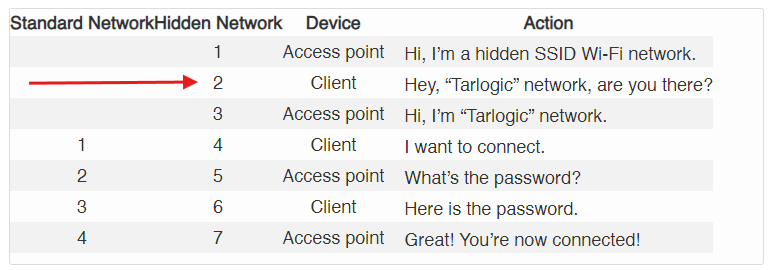
With non-hidden SSID, you have the AP broadcasting the management beacon with the SSID name. The clients only passively listen. If the clients have no stored profile for those SSID, the clients stay silent, and send nothing.
With hidden SSID, all the clients in range that have stored WiFi profiles with the "hidden SSID" flag, will actively try to send the response from #2 of the table, even for the unrelated SSIDs that the AP doesn't know about. You suddenly have many devices chatting unnecessarily, and wasting battery!
Also, all the clients effectively broadcast to the world their list of private SSID names. If I am a bad guy at a coffee shop and setup a fake AP with hidden SSID, I can sniff the private SSID names from other people's devices. My rogue fake AP can then even pretend to be your secret SSID (the fake #3, Hi I am "your secret private home network") and then try to derive your credentials from the authentication attempts.
Thanks for the details. I’ll have to try and understand this better to see if it’s actually a problem. It certainly hasn’t been in my experience, but I only used hidden SSIDs for devices that are stationary like cameras or sensors. I don’t use hidden SSIDs for people devices like phones and computers. That doesn’t make sense to me, I want them to find and connect easily.
I think it’s much more likely that interference from neighboring APs is a problem than the potential traffic caused by a handful of extra connection packets, but since I’ve never noticed this before or seen any consequences of that client behavior maybe I just am not triggering such a problem with my particular usage.
In any case, I appreciate the explanation and it will give me something fun to investigate on my own network for a bit.
Not really.
The network (and SSID) are there, and - once you have connected to it - the device will (should) keep it in memory (with the actual SSID name).
I.e. the client, once a hidden SSID is present, will check if that hidden SSID is among the (several) ones it has already connected to in the past (point 2 in the right column in the gi ven example).
A typical (though not really-really usable/useful in the real world) is to go around (let's say for the sake of the example in an internet cafè) and broadcast a hidden SSID network.
Devices within the coverage of your "fake" AP might try to connect to it, thus revealing the name of the hidden SSID(s) they have been connected to in the past.
Optionally sending forged deauth messages will help creating havoc in the connections and force clients to try and re-connect.
That probably is some other similar setting in the client. When you tell the client not to try to connect all the time and the AP not to broadcast the SSID, the end result is that they won’t find eachother anymore.
(there probably also is some setting to connect only when at the known location, which you can defeat by configuring not to keep location info)