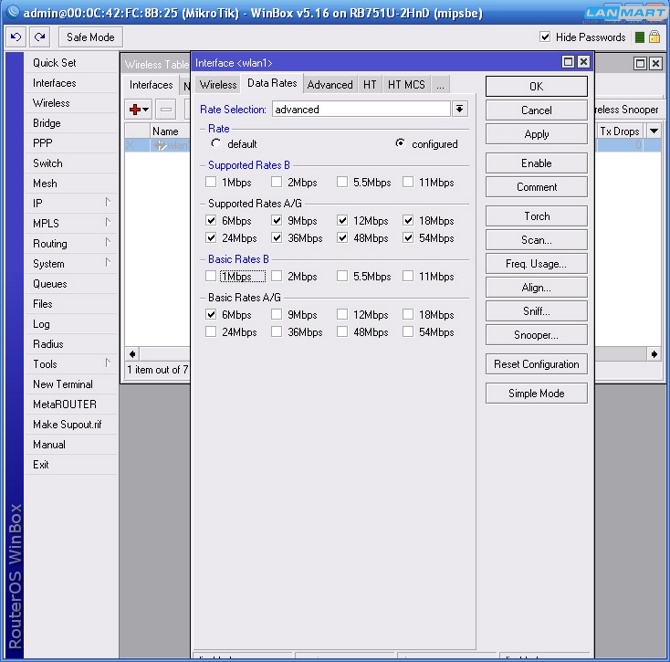
Hi
This is maybe 802.11 general question, not Mikrotik. I have Mikrotik RB751G and Dell laptop with Intel a/b/g wireless
card and windows 7. When MT works in b/g/n mode in MT log file “wlan1: data from unknown device 00:1C:… , sent deauth”
error and Windows not connected:( When set MT in b/g mode it is OK!
This is OS (Windows) error when RadioType:N not try to connect in G mode,
specific hardware (this model WiFi card) error,
or G in b/g/n mode not same G that is on b/g mode?
Or I made bad config at all:)?
My friend told that he connects g client to b/g/n router (not RouterOS)…
Where my mistake? May I connect a/b/g device to MT in b/g/n mode?
b / g / n should allow any device to connect using any of those protocols. What radio are you using in the RB and what are the settings when you type /interface wireless print
Problem solved… I have custom (configured) Data Rates… When I switch to default all is OK… But strange when RouterOS in b/g mode a/b/g clients connected successful and when in b/g/n not connects with same custom Data Rates setup?!
Problem was with a/b/g clients (first post) in RouterOS b/g/n mode… With custom Data Rates connects only if RouterOS in b/g mode… For me it is strange because there i same Date Rates… In default data rates all is OK (connects in b/g and b/g/n mode)…
ok, here is printout of new board:
[admin@MikroTik] /ip firewall connection tracking> print
enabled: yes
tcp-syn-sent-timeout: 5s
tcp-syn-received-timeout: 5s
tcp-established-timeout: 1d
tcp-fin-wait-timeout: 10s
tcp-close-wait-timeout: 10s
tcp-last-ack-timeout: 10s
tcp-time-wait-timeout: 10s
tcp-close-timeout: 10s
udp-timeout: 10s
udp-stream-timeout: 3m
icmp-timeout: 10s
generic-timeout: 10m
tcp-syncookie: no
max-entries: 26624
total-entries: 1only time-out values regarding UDP are 3m (180s) and 10s checking working router i am connected to myself i see connections only with maching timeout values
/ip firewall connection print where protocol=“udp”
802.11a is 5GHz band; 802.11b and 802.11g are 2.4GHz band. ‘n’ is a protocol that can be used in either band. So you can have a/n (802.11n at 5GHz) and b/g/n (802.11n at 2.4GHz), but mixing ‘a’ and ‘b/g’ is impossible because the radio does not operate at multiple frequencies.