I know dot1x is missing from SMIPS Mikrotik devices. However, are there any other missing features? Having the routing package is a hard requirement for me, so I need to know in advance.
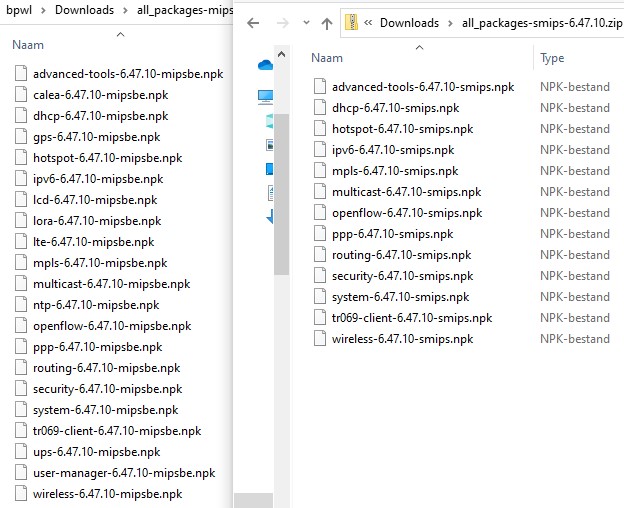
You can download “all packages” from the download site and open the zip file.
There are 13 packages in SMIPS, 21 in MIPSBE.
Question is also how many can you add after the “Main Package”, probably not all of them.
.
.
Weird, because there’s no explicit dot1x package, so it had to included in some other one. I suppose I’ll have to buy a router with SMIPS and see.
My hint: do not buy SMIPS device.
The features do not are packages:
do not exist 1 packet for files, 1 paket for address, 1 packet for user, 1 packet for snmp, 1 packet for sntp, etc…
I don't know what this means, you might have gotten your Italian->English translation wrong.
there’s no explicit snmp, sntp, smb, radius, tftp packages
understand now?
That doesn't tell me what features SMIPS is missing.
SMIPS do not have:
free internal file space
WinBox dll support
disks & partitions
dot1x
ptp
smb
vm
LTE,
any form of USB, is just for power-on the device
NTP,
user-manager
(PoE, LCD, LORA, GPS, calea, UPS)
Looks like I don’t need any of the things on that list for what I’m doing, so I’m going to try it and see.
For be more specific:
ptp is not Point-to-Point-something but is the Precision Time Protocol 802.1as
Is used for syncronize master clock of the devices on LAN,
if the local clock differ too much from master clock, the ethernet link degrade.
Interesting, so how bad of a performance degredation can I expect?
At most half, but not on the whole network, only on that link.
If anything goes worse, the link breaks and is negotiated in half duplex.
It cannot go down further in quality, because at that point there would be something broken, instead of a misalignment problem…
Is this a real issue with SMIPS or something that can just happen in theory?
Can happen? No, is HAPPEN! on other cheaper non-mikrotik router or switch (tenda, edimax, etc.).
Actually no one report about that problem because I do not use on my clients network that device…
If the ethernet go to max 80Mbp/s than full 100M no one notice if have max 50Mbp/s from Internet…
My network could have a lot of SMIPS devices with OSPF in PtP mode, so each link will have at most 2 MAC addresses.
I do not think can be a problem until OSPF table size is not excessive to fit in RAM (32M total)
and the CPU begins to struggle to manage everything (1 core, 650MHz)
Maybe I should upgrade to a hAP which has 64MB RAM and is MIPSBE so I can get all the good features, or should I get a hAP Lite just for testing?
hAP ac² have 4 CORE at 716MHz and 128MB of RAM
If it just for testing, buy the inexpensive hAP mini, has 3 port instead of 4, but for a test is real inexpensive
My test network already has MIPS 880MHz 2-core and ARM 716MHz so I just want to see how much slower a SMIPS/MIPSBE device is.
any form of USB, is just for power-on the device
but can be used as Powerline (ethernet over powerline).
I do agree, if you can afford better (like hAP ac Lite), don’t buy SMIPS, or maybe stick to an older ROS version.
I do run it on 6.44.5 and 6.45.6 … and it works great as my VPN and VPN-TURN server, I have even the web proxy server enabled, which gives faster response in VPN over satellite connections. (tcp session reuse)
It’s also a very cheap way to have multiple AP’s in house, or for your ESP32/Raspberry Pi/Arduino experiments. (I use it in repeater mode at Coderdojo workshops)