I have a hAPax3 acting solely as an AP (connected to an RB5009).
Everything is working well – no complaints.
The wifi connection to the computer I’m posting this from (Beelink mini PC) is connected using 802.11ax at rx/tx of 576/681 Mbps.
Nonetheless, I’m wondering if I can get a slightly zippier experience.
I see the hAP is using about 400MB of RAM and I’m wondering if anyone know how to figure out what exactly is using the memory:
[admin@212hAP-Ax3] /system/resource> print
                   uptime: 1w5d7h54m27s
                  version: 7.17.2 (stable)
               build-time: 2025-02-06 09:10:24
         factory-software: 7.4.1
              free-memory: 637.0MiB
             total-memory: 1024.0MiB
                      cpu: ARM64
                cpu-count: 4
            cpu-frequency: 864MHz
                 cpu-load: 2%
           free-hdd-space: 92.7MiB
          total-hdd-space: 128.0MiB
  write-sect-since-reboot: 1417732
         write-sect-total: 65341359
               bad-blocks: 0.2%
        architecture-name: arm64
               board-name: hAP ax^3
                 platform: MikroTik
Wifi connections are:
[admin@212hAP-Ax3] /interface/wifi/registration-table> print
Flags: A - AUTHORIZED
Columns: INTERFACE, SSID, MAC-ADDRESS, UPTIME, LAST-ACTIVITY, SIGNAL, AUTH-TYPE, BAND
#   INTERFACE  SSID                MAC-ADDRESS        UPTIME       LAST-ACTIVITY  SIGNAL  AUTH-TYPE    BAND
;;; 49TCLRokuTV - Thomas
0 A wifi1      Upstairs5g-0F0493   0C:62:xxxxx  2d22h53m47s  9s             -49     wpa2-psk     5ghz-ac
;;; Screek Human Sensor 2A 16 LR
1 A 2point4    2point4             EC:DA:xxxxx  8h6m39s      0ms            -58     wpa2-psk     2ghz-g
;;; Beelink 212 DR
2 A wifi1      Upstairs5g-0Fxxxx   70:D8:xxxxx  2h24m50s     0ms            -60     wpa2-psk     5ghz-ax
;;; Susan iPhone
3 A wifi1      Upstairs5g-0Fxxxx   60:57:xxxxx  45m27s       0ms            -51     ft-wpa2-psk  5ghz-ax
;;; JRS Iphone
4 A wifi1      Upstairs5g-0Fxxxx   7C:4B:xxxxx  45m15s       3s             -68     ft-wpa2-psk  5ghz-ax
5 A wifi2      Upstairs-2G-0xxxx  10:6Fxxxxx  3m13s        3m9s70ms       -71     wpa2-psk     2ghz-g
ether1 (WAN) connection looks like this:
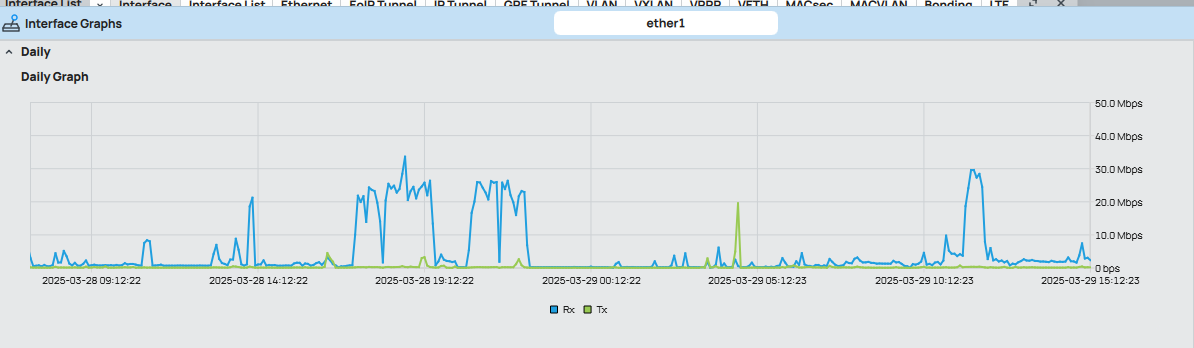
And, of course, here is the config. I seem to have lots of firewall rules, but I think I don’t need any given that this is just an AP, correct?
I also question whether I need to allow remote requests for /ip DNS given that the RB5009 is the DHCP server and the DNS provided to DHCP clients is that of the RB5009 (upstream)?
# 2025-03-29 15:33:26 by RouterOS 7.17.2
# software id = 5NRD-V1QF
#
# model = C53UiG+5HPaxD2HPaxD
# serial number = HDG0
/interface bridge
add admin-mac=48:A9:8A:0F:04:8F auto-mac=no comment=defconf name=bridge \
    port-cost-mode=short
/interface ethernet
set [ find default-name=ether1 ] comment="To RB5009" poe-out=off
set [ find default-name=ether3 ] comment=TV
set [ find default-name=ether4 ] comment=TV
set [ find default-name=ether5 ] comment=OffBridge
/interface wifi
set [ find default-name=wifi1 ] channel.band=5ghz-ax .skip-dfs-channels=\
    disabled .width=20/40/80mhz configuration.antenna-gain=0 .country=Russia \
    .mode=ap .ssid=Upstairs5g-0F0493 .tx-power=24 disabled=no \
    security.authentication-types=wpa2-psk .disable-pmkid=yes .ft=yes \
    .ft-over-ds=yes .management-protection=disabled
set [ find default-name=wifi2 ] channel.band=2ghz-g .skip-dfs-channels=\
    disabled .width=20mhz configuration.country="United States" .mode=ap \
    .ssid=Upstairs-2G-0F0494 disabled=no security.authentication-types=\
    wpa2-psk .disable-pmkid=yes .ft=yes .ft-over-ds=yes \
    .management-protection=disabled
add configuration.mode=ap .ssid=2point4 disabled=no mac-address=\
    4A:A9:8A:0F:04:93 master-interface=wifi2 mtu=1500 name=2point4 \
    security.authentication-types=wpa2-psk .disable-pmkid=yes .ft=yes \
    .ft-over-ds=yes .management-protection=disabled
add configuration.mode=ap .ssid=blueberries disabled=no mac-address=\
    4A:A9:8A:0F:04:96 master-interface=wifi1 name=blueberries \
    security.authentication-types=wpa2-psk .disable-pmkid=yes \
    .management-protection=disabled
/interface list
add comment=defconf name=WAN
add comment=defconf name=LAN
add include=all name=TRUSTED
/ip pool
add comment=offbridge-dhcp-server name=offbridge-dhcp-server ranges=\
    192.168.55.100-192.168.55.200
/queue type
add fq-codel-interval=60ms fq-codel-limit=800 kind=fq-codel name=fq
/system logging action
set 3 remote=192.168.0.13 syslog-severity=emergency
/interface bridge port
add bridge=bridge comment=defconf interface=ether2 internal-path-cost=10 \
    path-cost=10
add bridge=bridge comment=defconf interface=ether3 internal-path-cost=10 \
    path-cost=10
add bridge=bridge comment=defconf interface=ether4 internal-path-cost=10 \
    path-cost=10
add bridge=bridge comment=defconf interface=wifi2 internal-path-cost=10 \
    path-cost=10
add bridge=bridge interface=ether1 internal-path-cost=10 path-cost=10
add bridge=bridge interface=2point4 internal-path-cost=10 path-cost=10
add bridge=bridge interface=wifi1
add bridge=bridge interface=blueberries
/ip firewall connection tracking
set udp-timeout=10s
/ip neighbor discovery-settings
set discover-interface-list=TRUSTED
/ipv6 settings
set max-neighbor-entries=15360
/interface bridge vlan
add bridge=bridge disabled=yes vlan-ids=100
/interface list member
add comment=defconf interface=bridge list=LAN
add comment=defconf interface=ether1 list=WAN
add interface=bridge list=TRUSTED
add interface=ether1 list=TRUSTED
add interface=*6 list=TRUSTED
add interface=wifi2 list=TRUSTED
add comment=OffBridge interface=ether5 list=LAN
/interface ovpn-server server
add mac-address=FE:20:83:39:29:80 name=ovpn-server1

/interface wifi access-list
# Long list removed

/ip address
add address=192.168.2.5/24 comment=defconf interface=bridge network=\
    192.168.2.0
add address=192.168.55.1/24 comment=OffBridge interface=ether5 network=\
    192.168.55.0
/ip cloud
set ddns-enabled=yes
/ip dhcp-server
add address-pool=offbridge-dhcp-server comment=offbridge-dhcp-server \
    interface=ether5 name=offbridge-dhcp-server
/ip dhcp-server network
add address=192.168.55.0/24 dns-server=1.1.1.1 gateway=192.168.55.1 netmask=\
    24
/ip dns
set allow-remote-requests=yes cache-max-ttl=4w cache-size=32768KiB \
    query-server-timeout=5s servers=1.1.1.1,8.8.8.8,9.9.9.9,8.8.4.4
/ip dns static
add address=192.168.2.5 comment=defconf name=hapax3.212.local type=A
/ip firewall filter
add action=accept chain=input comment=\
    "defconf: accept established,related,untracked" connection-state=\
    established,related,untracked
add action=drop chain=input comment="defconf: drop invalid" connection-state=\
    invalid
add action=accept chain=input comment="defconf: accept ICMP" protocol=icmp
add action=accept chain=input comment="allow 67 68 to 10.0.0.1" dst-address=\
    10.0.0.1 dst-port=67,68 log-prefix="allow 67 68  to 10.0.0.1" protocol=\
    udp
add action=drop chain=input comment="drop all to 10.0.0.1" dst-address=\
    10.0.0.1 in-interface=!lo log=yes log-prefix="drop all to 10.0.0.1"
add action=accept chain=input
add action=drop chain=forward comment="drop all 10.0.0.0/24 to not-WAN" \
    disabled=yes log=yes log-prefix=drop-all-10-0-0-0-24-to-not-WAN \
    out-interface-list=!WAN src-address=10.0.0.0/24
add action=drop chain=forward comment="drop guest to 192.168.0.0/16" \
    dst-address=192.168.0.0/16 dst-port=!53,68,68 log=yes log-prefix=\
    drop-guest-to-192-168-0-0-16 protocol=udp src-address-list="Guest WiFi"
add action=accept chain=forward
add action=accept chain=input disabled=yes
add action=accept chain=input comment=\
    "defconf: accept to local loopback (for CAPsMAN)" disabled=yes \
    dst-address=127.0.0.1
add action=drop chain=input comment="defconf: drop all not coming from LAN" \
    disabled=yes in-interface-list=!LAN
add action=accept chain=forward disabled=yes in-interface-list=LAN log=yes
add action=accept chain=forward comment="defconf: accept out ipsec policy" \
    disabled=yes ipsec-policy=out,ipsec
add action=fasttrack-connection chain=forward comment="defconf: fasttrack" \
    connection-state=established,related disabled=yes hw-offload=yes
add action=accept chain=forward comment=\
    "defconf: accept established,related, untracked" connection-state=\
    established,related,untracked disabled=yes
add action=drop chain=forward comment="defconf: drop invalid" \
    connection-state=invalid disabled=yes
add action=drop chain=forward comment=\
    "defconf: drop all from WAN not DSTNATed" connection-nat-state=!dstnat \
    connection-state=new disabled=yes in-interface-list=WAN
/ip firewall nat
add action=masquerade chain=srcnat comment="defconf: masquerade" \
    ipsec-policy=out,none out-interface-list=WAN
/ip hotspot profile
set [ find default=yes ] html-directory=hotspot
/ip ipsec profile
set [ find default=yes ] dpd-interval=2m dpd-maximum-failures=5
/ip kid-control
add fri=0s-1d mon=0s-1d name=Monitor sat=0s-1d sun=0s-1d thu=0s-1d tue=0s-1d \
    wed=0s-1d
/ip route
add disabled=no distance=1 dst-address=0.0.0.0/0 gateway=192.168.2.2 \
    pref-src="" routing-table=main scope=30 suppress-hw-offload=no \
    target-scope=10
/ip service
set www-ssl disabled=no
/snmp
set enabled=yes trap-version=2
/system clock
set time-zone-name=America/New_York
/system identity
set name=212hAP-Ax3
/system logging
add disabled=yes topics=wireless
add action=*4 prefix="XXXXXC MikroTik" topics=hotspot
add action=*4 prefix="XXXXXC MikroTik" topics=\
    !debug,!packet,!snmp
add topics=account
add action=remote prefix="192.168.2.5 " topics=info
add disabled=yes topics=dhcp
add action=*6 topics=debug,packet,wireless,dns,netwatch,dhcp
/system note
set show-at-login=no
/system ntp client
set enabled=yes
/system ntp client servers
add address=192.168.2.2
add address=3.pool.ntp.org
add address=0.north-america.pool.ntp.org

/tool graphing interface
add interface=wifi2
add
add interface=bridge
add interface=ether1
add interface=ether2
add interface=ether3
add interface=ether4
add interface=ether5
add interface=*6
/tool graphing queue
add
/tool graphing resource
add
/tool mac-server
set allowed-interface-list=none
/tool mac-server mac-winbox
set allowed-interface-list=TRUSTED
/tool netwatch
add disabled=no down-script=Netwatch host=1.1.1.1 http-codes="" interval=1m \
    name=Netwatch-1.1.1.1 test-script="" type=simple up-script=Netwatch
/tool romon
set enabled=yes
/tool sniffer
set file-limit=10000KiB filter-interface=ether3,ether4 memory-limit=1000KiB
/user group
add name=HA policy="reboot,read,write,policy,test,api,!local,!telnet,!ssh,!ftp\
    ,!winbox,!password,!web,!sniff,!sensitive,!romon,!rest-api"