I’ve had my Groove/Metal mode set as “station wds” for sometime now.
The unit worked great until I tried to connect to a OnSpot Wifi AP.
I can go to wireless>wlan1>mode and change to station.
From time to time the mode changes back to “station wds”.
How can I force the default to be “station” instead of “station wds”?
Thanks!
If mode=station keeps changing to mode=station-wds then it is being changed on Quickset, /interface/wireless or by a script. A WDS link is still possible if mode=station and mode-wds is not =disabled.
Is there anyplace in “Quick Set” where I can change the mode back to “station”?
I can’t seem to find it.
Alternatively, is there a command I can issue in the terminal that will make “mode=station” the default?
Thanks,
Sam
Have you tried simply reconfiguring from scratch, using Quickset “CPE” mode? CPE = Station
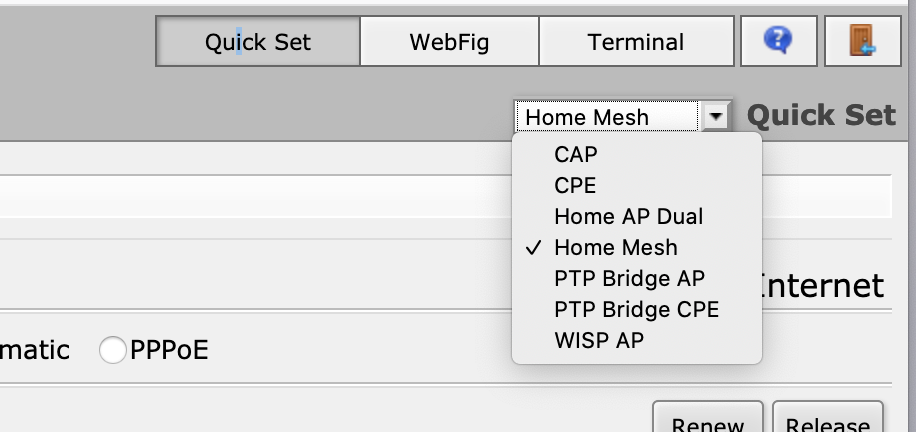
In Quickset it is the very top drop down box, you want “CPE”, but I highly recommend NOT using Quickset as it has a bad habit of breaking things. Just Don’t! I only provided it as one of the places this change could be made…
Issue this command in terminal:
/interface wireless set wlan1 mode=station
If wish we look at your config issue:
/export hide-sensitive file=myconfig
This will create myconfig.rsc in files that you can download and edit with your favorite txt editor.
If you omit hide-sensitive, you will have a good configuration for your use.
Hi 2frogs,
Thanks for the assistance.
Here is what I can find that I belive is relevant in the file myconfig.rsc
/interface wireless
set [ find default-name=wlan1 ] band=5ghz-a/n/ac disabled=no frequency=5745
installation=outdoor nv2-preshared-key=bluegate073 nv2-security=enabled
ssid=“onSpot5G 7” wireless-protocol=nv2-nstreme-802.11
/interface list
add comment=defconf name=WAN
add comment=defconf name=LAN
/interface wireless security-profiles
set [ find default=yes ] authentication-types=wpa-psk,wpa2-psk group-ciphers=
tkip,aes-ccm mode=dynamic-keys supplicant-identity=MikroTik
unicast-ciphers=tkip,aes-ccm wpa-pre-shared-key=onspotwifi
wpa2-pre-shared-key=onspotwifi
I don’t see anything that defines the mode.
Sam
Default values are not shown. The default value for mode is “station”.
https://wiki.mikrotik.com/wiki/Manual:Interface/Wireless
mode (station | station-wds | ap-bridge | bridge | alignment-only | nstreme-dual-slave | wds-slave | station-pseudobridge | station-pseudobridge-clone | station-bridge; Default: station)
If you want to see ALL values add “verbose” to the export. (The hide-sensitive will hide the paswwords)
/export hide-sensitive verbose file=myconfig
Thanks bpwl,
Here is the export.. it is pretty verbose.
I do see station mode now in the text.
Would you suggest any changes?
Thanks!
may/19/2020 16:18:38 by RouterOS 6.46.6
software id = 8A6N-91GP
model = Metal G-52SHPacn
serial number = A80F0A3B773E
/interface ethernet
set [ find default-name=ether1 ] advertise=
10M-half,10M-full,100M-half,100M-full,1000M-half,1000M-full arp=enabled
arp-timeout=auto auto-negotiation=yes bandwidth=unlimited/unlimited
disabled=no full-duplex=yes l2mtu=1600 loop-protect=default
loop-protect-disable-time=5m loop-protect-send-interval=5s mac-address=
74:4D:28:8E:42:29 mtu=1500 name=ether1 orig-mac-address=74:4D:28:8E:42:29
rx-flow-control=off speed=1Gbps tx-flow-control=off
/interface list
set [ find name=all ] comment="contains all interfaces" exclude="" include=""
name=all
set [ find name=none ] comment="contains no interfaces" exclude="" include=""
name=none
set [ find name=dynamic ] comment="contains dynamic interfaces" exclude=""
include="" name=dynamic
add comment=defconf exclude="" include="" name=WAN
add comment=defconf exclude="" include="" name=LAN
/interface lte apn
set [ find default=yes ] add-default-route=yes apn=internet
default-route-distance=2 name=default use-peer-dns=yes
/interface wireless security-profiles
set [ find default=yes ] authentication-types=wpa-psk,wpa2-psk disable-pmkid=
no eap-methods=passthrough group-ciphers=tkip,aes-ccm group-key-update=5m
interim-update=0s management-protection=disabled mode=dynamic-keys
mschapv2-username="" name=default radius-called-format=mac:ssid
radius-eap-accounting=no radius-mac-accounting=no
radius-mac-authentication=no radius-mac-caching=disabled
radius-mac-format=XX:XX:XX:XX:XX:XX radius-mac-mode=as-username
static-algo-0=none static-algo-1=none static-algo-2=none static-algo-3=
none static-sta-private-algo=none static-transmit-key=key-0
supplicant-identity=MikroTik tls-certificate=none tls-mode=
no-certificates unicast-ciphers=tkip,aes-ccm
add authentication-types=wpa2-psk disable-pmkid=no eap-methods=passthrough
group-ciphers=aes-ccm group-key-update=5m interim-update=0s
management-protection=allowed mode=dynamic-keys mschapv2-username=""
name="Pelican WiFi" radius-called-format=mac:ssid radius-eap-accounting=
no radius-mac-accounting=no radius-mac-authentication=no
radius-mac-caching=disabled radius-mac-format=XX:XX:XX:XX:XX:XX
radius-mac-mode=as-username static-algo-0=none static-algo-1=none
static-algo-2=none static-algo-3=none static-sta-private-algo=none
static-transmit-key=key-0 supplicant-identity=MikroTik tls-certificate=
none tls-mode=no-certificates unicast-ciphers=aes-ccm
add authentication-types=wpa-psk,wpa2-psk disable-pmkid=no eap-methods=
passthrough group-ciphers=aes-ccm group-key-update=5m interim-update=0s
management-protection=allowed mode=dynamic-keys mschapv2-username=""
name="YHM Node 2" radius-called-format=mac:ssid radius-eap-accounting=no
radius-mac-accounting=no radius-mac-authentication=no radius-mac-caching=
disabled radius-mac-format=XX:XX:XX:XX:XX:XX radius-mac-mode=as-username
static-algo-0=none static-algo-1=none static-algo-2=none static-algo-3=
none static-sta-private-algo=none static-transmit-key=key-0
supplicant-identity=MikroTik tls-certificate=none tls-mode=
no-certificates unicast-ciphers=aes-ccm
add authentication-types=wpa-psk,wpa2-psk disable-pmkid=no eap-methods=
passthrough group-ciphers=aes-ccm group-key-update=5m interim-update=0s
management-protection=allowed mode=dynamic-keys mschapv2-username=""
name="onSpot 7" radius-called-format=mac:ssid radius-eap-accounting=no
radius-mac-accounting=no radius-mac-authentication=no radius-mac-caching=
disabled radius-mac-format=XX:XX:XX:XX:XX:XX radius-mac-mode=as-username
static-algo-0=none static-algo-1=none static-algo-2=none static-algo-3=
none static-sta-private-algo=none static-transmit-key=key-0
supplicant-identity=MikroTik tls-certificate=none tls-mode=
no-certificates unicast-ciphers=aes-ccm
/interface wireless
set [ find default-name=wlan1 ] adaptive-noise-immunity=none allow-sharedkey=
no ampdu-priorities=0 amsdu-limit=8192 amsdu-threshold=8192 antenna-gain=
6 area="" arp=enabled arp-timeout=auto band=5ghz-a/n/ac basic-rates-a/g=
6Mbps basic-rates-b=1Mbps bridge-mode=enabled channel-width=20mhz
compression=no country="united states3" default-ap-tx-limit=0
default-authentication=yes default-client-tx-limit=0 default-forwarding=
yes disable-running-check=no disabled=no disconnect-timeout=3s distance=
dynamic frame-lifetime=0 frequency=5745 frequency-mode=regulatory-domain
frequency-offset=0 guard-interval=any hide-ssid=no ht-basic-mcs=
mcs-0,mcs-1,mcs-2,mcs-3,mcs-4,mcs-5,mcs-6,mcs-7 ht-supported-mcs="mcs-0,mc
s-1,mcs-2,mcs-3,mcs-4,mcs-5,mcs-6,mcs-7,mcs-8,mcs-9,mcs-10,mcs-11,mcs-12,m
cs-13,mcs-14,mcs-15,mcs-16,mcs-17,mcs-18,mcs-19,mcs-20,mcs-21,mcs-22,mcs-2
3" hw-fragmentation-threshold=disabled hw-protection-mode=none
hw-protection-threshold=0 hw-retries=7 installation=outdoor
interworking-profile=disabled keepalive-frames=enabled l2mtu=1600
mac-address=74:4D:28:8E:42:2A max-station-count=2007 mode=station mtu=
1500 multicast-buffering=enabled multicast-helper=default name=wlan1
nv2-cell-radius=30 nv2-downlink-ratio=50 nv2-mode=dynamic-downlink
nv2-qos=default nv2-queue-count=2 nv2-security=enabled nv2-sync-secret=""
on-fail-retry-time=100ms preamble-mode=both radio-name=744D288E422A
rate-selection=advanced rate-set=default rx-chains=0 scan-list=default
secondary-channel="" security-profile=default skip-dfs-channels=disabled
ssid="onSpot5G 7" station-bridge-clone-mac=00:00:00:00:00:00
station-roaming=enabled supported-rates-a/g=
6Mbps,9Mbps,12Mbps,18Mbps,24Mbps,36Mbps,48Mbps,54Mbps supported-rates-b=
1Mbps,2Mbps,5.5Mbps,11Mbps tdma-period-size=2 tx-chains=0 tx-power-mode=
default update-stats-interval=disabled vht-basic-mcs=mcs0-7
vht-supported-mcs=mcs0-9,mcs0-9,mcs0-9 vlan-id=1 vlan-mode=no-tag
wds-cost-range=50-150 wds-default-bridge=none wds-default-cost=100
wds-ignore-ssid=no wds-mode=disabled wireless-protocol=nv2-nstreme-802.11
wmm-support=disabled wps-mode=push-button
/interface wireless manual-tx-power-table
set wlan1 manual-tx-powers="1Mbps:17,2Mbps:17,5.5Mbps:17,11Mbps:17,6Mbps:17,9M
bps:17,12Mbps:17,18Mbps:17,24Mbps:17,36Mbps:17,48Mbps:17,54Mbps:17,HT20-0:
17,HT20-1:17,HT20-2:17,HT20-3:17,HT20-4:17,HT20-5:17,HT20-6:17,HT20-7:17,H
T40-0:17,HT40-1:17,HT40-2:17,HT40-3:17,HT40-4:17,HT40-5:17,HT40-6:17,HT40-
7:17"
/interface wireless nstreme
set wlan1 disable-csma=no enable-nstreme=no enable-polling=yes framer-limit=
3200 framer-policy=none
/ip dhcp-client option
set clientid_duid code=61 name=clientid_duid value="0xff$(CLIENT_DUID)"
set clientid code=61 name=clientid value="0x01$(CLIENT_MAC)"
set hostname code=12 name=hostname value="$(HOSTNAME)"
/ip hotspot profile
set [ find default=yes ] dns-name="" hotspot-address=0.0.0.0 html-directory=
flash/hotspot html-directory-override="" http-cookie-lifetime=3d
http-proxy=0.0.0.0:0 login-by=cookie,http-chap name=default rate-limit=""
smtp-server=0.0.0.0 split-user-domain=no use-radius=no
/ip hotspot user profile
set [ find default=yes ] add-mac-cookie=yes address-list="" idle-timeout=none
!insert-queue-before keepalive-timeout=2m mac-cookie-timeout=3d name=
default !parent-queue !queue-type shared-users=1 status-autorefresh=1m
transparent-proxy=no
/ip ipsec mode-config
set [ find default=yes ] name=request-only responder=no
/ip ipsec policy group
set [ find default=yes ] name=default
/ip ipsec profile
set [ find default=yes ] dh-group=modp2048,modp1024 dpd-interval=2m
dpd-maximum-failures=5 enc-algorithm=aes-128,3des hash-algorithm=sha1
lifetime=1d name=default nat-traversal=yes proposal-check=obey
/ip ipsec proposal
set [ find default=yes ] auth-algorithms=sha1 disabled=no enc-algorithms=
aes-256-cbc,aes-192-cbc,aes-128-cbc lifetime=30m name=default pfs-group=
modp1024
/ip pool
add name=dhcp ranges=192.168.88.10-192.168.88.254
/ip dhcp-server
add address-pool=dhcp authoritative=yes disabled=no interface=ether1
lease-script="" lease-time=10m name=defconf use-radius=no
/ppp profile
set *0 address-list="" !bridge !bridge-horizon !bridge-path-cost
!bridge-port-priority change-tcp-mss=yes !dns-server !idle-timeout
!incoming-filter !insert-queue-before !interface-list !local-address
name=default on-down="" on-up="" only-one=default !outgoing-filter
!parent-queue !queue-type !rate-limit !remote-address !session-timeout
use-compression=default use-encryption=default use-mpls=default use-upnp=
default !wins-server
set *FFFFFFFE address-list="" !bridge !bridge-horizon !bridge-path-cost
!bridge-port-priority change-tcp-mss=yes !dns-server !idle-timeout
!incoming-filter !insert-queue-before !interface-list !local-address
name=default-encryption on-down="" on-up="" only-one=default
!outgoing-filter !parent-queue !queue-type !rate-limit !remote-address
!session-timeout use-compression=default use-encryption=yes use-mpls=
default use-upnp=default !wins-server
/queue type
set 0 kind=pfifo name=default pfifo-limit=50
set 1 kind=pfifo name=ethernet-default pfifo-limit=50
set 2 kind=sfq name=wireless-default sfq-allot=1514 sfq-perturb=5
set 3 kind=red name=synchronous-default red-avg-packet=1000 red-burst=20
red-limit=60 red-max-threshold=50 red-min-threshold=10
set 4 kind=sfq name=hotspot-default sfq-allot=1514 sfq-perturb=5
set 5 kind=pcq name=pcq-upload-default pcq-burst-rate=0 pcq-burst-threshold=0
pcq-burst-time=10s pcq-classifier=src-address pcq-dst-address-mask=32
pcq-dst-address6-mask=128 pcq-limit=50KiB pcq-rate=0
pcq-src-address-mask=32 pcq-src-address6-mask=128 pcq-total-limit=2000KiB
set 6 kind=pcq name=pcq-download-default pcq-burst-rate=0
pcq-burst-threshold=0 pcq-burst-time=10s pcq-classifier=dst-address
pcq-dst-address-mask=32 pcq-dst-address6-mask=128 pcq-limit=50KiB
pcq-rate=0 pcq-src-address-mask=32 pcq-src-address6-mask=128
pcq-total-limit=2000KiB
set 7 kind=none name=only-hardware-queue
set 8 kind=mq-pfifo mq-pfifo-limit=50 name=multi-queue-ethernet-default
set 9 kind=pfifo name=default-small pfifo-limit=10
/queue interface
set ether1 queue=only-hardware-queue
set wlan1 queue=wireless-default
/routing bgp instance
set default as=65530 client-to-client-reflection=yes !cluster-id
!confederation disabled=no ignore-as-path-len=no name=default out-filter=
"" redistribute-connected=no redistribute-ospf=no redistribute-other-bgp=
no redistribute-rip=no redistribute-static=no router-id=0.0.0.0
routing-table=""
/routing ospf instance
set [ find default=yes ] disabled=no distribute-default=never !domain-id
!domain-tag in-filter=ospf-in metric-bgp=auto metric-connected=20
metric-default=1 metric-other-ospf=auto metric-rip=20 metric-static=20
!mpls-te-area !mpls-te-router-id name=default out-filter=ospf-out
redistribute-bgp=no redistribute-connected=no redistribute-other-ospf=no
redistribute-rip=no redistribute-static=no router-id=0.0.0.0
!routing-table !use-dn
/routing ospf area
set [ find default=yes ] area-id=0.0.0.0 disabled=no instance=default name=
backbone type=default
/snmp community
set [ find default=yes ] addresses=::/0 authentication-protocol=MD5 disabled=
no encryption-protocol=DES name=public read-access=yes security=none
write-access=no
/system logging action
set 0 memory-lines=1000 memory-stop-on-full=no name=memory target=memory
set 1 disk-file-count=2 disk-file-name=flash/log disk-lines-per-file=1000
disk-stop-on-full=no name=disk target=disk
set 2 name=echo remember=yes target=echo
set 3 bsd-syslog=no name=remote remote=0.0.0.0 remote-port=514 src-address=
0.0.0.0 syslog-facility=daemon syslog-severity=auto syslog-time-format=
bsd-syslog target=remote
/user group
set read name=read policy="local,telnet,ssh,reboot,read,test,winbox,password,w
eb,sniff,sensitive,api,romon,tikapp,!ftp,!write,!policy,!dude" skin=
default
set write name=write policy="local,telnet,ssh,reboot,read,write,test,winbox,pa
ssword,web,sniff,sensitive,api,romon,tikapp,!ftp,!policy,!dude" skin=
default
set full name=full policy="local,telnet,ssh,ftp,reboot,read,write,policy,test,
winbox,password,web,sniff,sensitive,api,romon,dude,tikapp" skin=default
/caps-man aaa
set called-format=mac:ssid interim-update=disabled mac-caching=disabled
mac-format=XX:XX:XX:XX:XX:XX mac-mode=as-username
/caps-man manager
set ca-certificate=none certificate=none enabled=no package-path=""
require-peer-certificate=no upgrade-policy=none
/caps-man manager interface
set [ find default=yes ] disabled=no forbid=no interface=all
/certificate settings
set crl-download=yes crl-store=ram crl-use=yes
/interface bridge settings
set allow-fast-path=yes use-ip-firewall=no use-ip-firewall-for-pppoe=no
use-ip-firewall-for-vlan=no
/ip firewall connection tracking
set enabled=auto generic-timeout=10m icmp-timeout=10s loose-tcp-tracking=yes
tcp-close-timeout=10s tcp-close-wait-timeout=10s tcp-established-timeout=
1d tcp-fin-wait-timeout=10s tcp-last-ack-timeout=10s
tcp-max-retrans-timeout=5m tcp-syn-received-timeout=5s
tcp-syn-sent-timeout=5s tcp-time-wait-timeout=10s tcp-unacked-timeout=5m
udp-stream-timeout=3m udp-timeout=10s
/ip neighbor discovery-settings
set discover-interface-list=LAN
/ip settings
set accept-redirects=no accept-source-route=no allow-fast-path=yes
arp-timeout=30s icmp-rate-limit=10 icmp-rate-mask=0x1818 ip-forward=yes
max-neighbor-entries=8192 route-cache=yes rp-filter=no secure-redirects=
yes send-redirects=yes tcp-syncookies=no
/interface detect-internet
set detect-interface-list=all internet-interface-list=none
lan-interface-list=none wan-interface-list=none
/interface l2tp-server server
set allow-fast-path=no authentication=pap,chap,mschap1,mschap2
caller-id-type=ip-address default-profile=default-encryption enabled=no
keepalive-timeout=30 max-mru=1450 max-mtu=1450 max-sessions=unlimited
mrru=disabled one-session-per-host=no use-ipsec=no
/interface list member
add comment=defconf disabled=no interface=ether1 list=LAN
add comment=defconf disabled=no interface=wlan1 list=WAN
add disabled=no list=LAN
/interface ovpn-server server
set auth=sha1,md5 cipher=blowfish128,aes128 default-profile=default enabled=
no keepalive-timeout=60 mac-address=FE:0C:8D:BD:61:75 max-mtu=1500 mode=
ip netmask=24 port=1194 require-client-certificate=no
/interface pptp-server server
set authentication=mschap1,mschap2 default-profile=default-encryption
enabled=no keepalive-timeout=30 max-mru=1450 max-mtu=1450 mrru=disabled
/interface sstp-server server
set authentication=pap,chap,mschap1,mschap2 certificate=none default-profile=
default enabled=no force-aes=no keepalive-timeout=60 max-mru=1500
max-mtu=1500 mrru=disabled pfs=no port=443 tls-version=any
verify-client-certificate=no
/interface wireless align
set active-mode=yes audio-max=-20 audio-min=-100 audio-monitor=
00:00:00:00:00:00 filter-mac=00:00:00:00:00:00 frame-size=300
frames-per-second=25 receive-all=no ssid-all=no
/interface wireless cap
set bridge=none caps-man-addresses="" caps-man-certificate-common-names=""
caps-man-names="" certificate=none discovery-interfaces="" enabled=no
interfaces="" lock-to-caps-man=no static-virtual=no
/interface wireless sniffer
set channel-time=200ms file-limit=10 file-name="" memory-limit=10
multiple-channels=no only-headers=no receive-errors=no streaming-enabled=
no streaming-max-rate=0 streaming-server=0.0.0.0
/interface wireless snooper
set channel-time=200ms multiple-channels=yes receive-errors=no
/ip accounting
set account-local-traffic=no enabled=no threshold=256
/ip accounting web-access
set accessible-via-web=no address=0.0.0.0/0
/ip address
add address=192.168.88.1/24 comment=defconf disabled=no interface=ether1
network=192.168.88.0
/ip cloud
set ddns-enabled=no ddns-update-interval=none update-time=yes
/ip cloud advanced
set use-local-address=no
/ip dhcp-client
add add-default-route=yes comment=defconf default-route-distance=1
dhcp-options=hostname,clientid disabled=no interface=wlan1 use-peer-dns=
yes use-peer-ntp=yes
/ip dhcp-server config
set accounting=yes interim-update=0s store-leases-disk=5m
/ip dhcp-server network
add address=192.168.88.0/24 caps-manager="" comment=defconf dhcp-option=""
dns-server="" gateway=192.168.88.1 ntp-server="" wins-server=""
/ip dns
set allow-remote-requests=yes cache-max-ttl=1w cache-size=4096KiB
max-concurrent-queries=100 max-concurrent-tcp-sessions=20
max-udp-packet-size=4096 query-server-timeout=2s query-total-timeout=10s
servers=8.8.8.8,8.8.4.4,4.4.4.4
/ip dns static
add address=192.168.88.1 comment=defconf disabled=no name=router.lan regexp=
"" ttl=1d
/ip firewall filter
add action=accept chain=input comment=
"defconf: accept established,related,untracked" connection-state=
established,related,untracked
add action=drop chain=input comment="defconf: drop invalid" connection-state=
invalid
add action=accept chain=input comment="defconf: accept ICMP" protocol=icmp
add action=accept chain=input comment=
"defconf: accept to local loopback (for CAPsMAN)" dst-address=127.0.0.1
add action=drop chain=input comment="defconf: drop all not coming from LAN"
in-interface-list=!LAN
add action=accept chain=forward comment="defconf: accept in ipsec policy"
ipsec-policy=in,ipsec
add action=accept chain=forward comment="defconf: accept out ipsec policy"
ipsec-policy=out,ipsec
add action=fasttrack-connection chain=forward comment="defconf: fasttrack"
connection-state=established,related
add action=accept chain=forward comment=
"defconf: accept established,related, untracked" connection-state=
established,related,untracked
add action=drop chain=forward comment="defconf: drop invalid"
connection-state=invalid
add action=drop chain=forward comment=
"defconf: drop all from WAN not DSTNATed" connection-nat-state=!dstnat
connection-state=new in-interface-list=WAN
/ip firewall nat
add action=masquerade chain=srcnat comment="defconf: masquerade"
ipsec-policy=out,none out-interface-list=WAN !to-addresses !to-ports
/ip firewall service-port
set ftp disabled=no ports=21
set tftp disabled=no ports=69
set irc disabled=no ports=6667
set h323 disabled=no
set sip disabled=no ports=5060,5061 sip-direct-media=yes sip-timeout=1h
set pptp disabled=no
set udplite disabled=no
set dccp disabled=no
set sctp disabled=no
/ip hotspot service-port
set ftp disabled=no ports=21
/ip hotspot user
set [ find default=yes ] comment="counters and limits for trial users"
disabled=no name=default-trial
/ip ipsec policy
set 0 disabled=no dst-address=::/0 group=default proposal=default protocol=
all src-address=::/0 template=yes
/ip ipsec settings
set accounting=yes interim-update=0s xauth-use-radius=no
/ip proxy
set always-from-cache=no anonymous=no cache-administrator=webmaster
cache-hit-dscp=4 cache-on-disk=no cache-path=web-proxy enabled=no
max-cache-object-size=2048KiB max-cache-size=unlimited
max-client-connections=600 max-fresh-time=3d max-server-connections=600
parent-proxy=:: parent-proxy-port=0 port=8080 serialize-connections=no
src-address=::
/ip service
set telnet address="" disabled=no port=23
set ftp address="" disabled=no port=21
set www address="" disabled=no port=80
set ssh address="" disabled=no port=22
set www-ssl address="" certificate=none disabled=yes port=443
set api address="" disabled=no port=8728
set winbox address="" disabled=no port=8291
set api-ssl address="" certificate=none disabled=no port=8729
/ip smb
set allow-guests=yes comment=MikrotikSMB domain=MSHOME enabled=no interfaces=
all
/ip smb shares
set [ find default=yes ] comment="default share" directory=/flash/pub
disabled=no max-sessions=10 name=pub
/ip smb users
set [ find default=yes ] disabled=no name=guest read-only=yes
/ip socks
set connection-idle-timeout=2m enabled=no max-connections=200 port=1080
/ip ssh
set allow-none-crypto=no always-allow-password-login=no forwarding-enabled=no
host-key-size=2048 strong-crypto=no
/ip tftp settings
set max-block-size=4096
/ip traffic-flow
set active-flow-timeout=30m cache-entries=16k enabled=no
inactive-flow-timeout=15s interfaces=all
/ip traffic-flow ipfix
set bytes=yes dst-address=yes dst-address-mask=yes dst-mac-address=yes
dst-port=yes first-forwarded=yes gateway=yes icmp-code=yes icmp-type=yes
igmp-type=yes in-interface=yes ip-header-length=yes ip-total-length=yes
ipv6-flow-label=yes is-multicast=yes last-forwarded=yes nat-dst-address=
yes nat-dst-port=yes nat-src-address=yes nat-src-port=yes out-interface=
yes packets=yes protocol=yes src-address=yes src-address-mask=yes
src-mac-address=yes src-port=yes tcp-ack-num=yes tcp-flags=yes
tcp-seq-num=yes tcp-window-size=yes tos=yes ttl=yes udp-length=yes
/ip upnp
set allow-disable-external-interface=no enabled=no show-dummy-rule=yes
/mpls
set dynamic-label-range=16-1048575 propagate-ttl=yes
/mpls interface
set [ find default=yes ] disabled=no interface=all mpls-mtu=1508
/mpls ldp
set distribute-for-default-route=no enabled=no hop-limit=255 loop-detect=no
lsr-id=0.0.0.0 path-vector-limit=255 transport-address=0.0.0.0
use-explicit-null=no
/port firmware
set directory=firmware ignore-directip-modem=no
/ppp aaa
set accounting=yes interim-update=0s use-circuit-id-in-nas-port-id=no
use-radius=no
/radius incoming
set accept=no port=3799
/routing bfd interface
set [ find default=yes ] disabled=no interface=all interval=0.2s min-rx=0.2s
multiplier=5
/routing mme
set bidirectional-timeout=2 gateway-class=none gateway-keepalive=1m
gateway-selection=no-gateway origination-interval=5s preferred-gateway=
0.0.0.0 timeout=1m ttl=50
/routing rip
set distribute-default=never garbage-timer=2m metric-bgp=1 metric-connected=1
metric-default=1 metric-ospf=1 metric-static=1 redistribute-bgp=no
redistribute-connected=no redistribute-ospf=no redistribute-static=no
routing-table=main timeout-timer=3m update-timer=30s
/snmp
set contact="" enabled=no engine-id="" location="" trap-community=public
trap-generators=temp-exception trap-target="" trap-version=1
/system clock
set time-zone-autodetect=yes time-zone-name=America/New_York
/system clock manual
set dst-delta=+00:00 dst-end="jan/01/1970 00:00:00" dst-start=
"jan/01/1970 00:00:00" time-zone=+00:00
/system identity
set name="MikroTik Metal"
/system leds
set 0 disabled=no interface=ether1 leds=user-led type=interface-activity
set 1 disabled=no interface=wlan1 leds=led1,led2,led3,led4,led5 type=
wireless-signal-strength
/system leds settings
set all-leds-off=never
/system logging
set 0 action=memory disabled=no prefix="" topics=info
set 1 action=memory disabled=no prefix="" topics=error
set 2 action=memory disabled=no prefix="" topics=warning
set 3 action=echo disabled=no prefix="" topics=critical
/system note
set note="" show-at-login=yes
/system ntp client
set enabled=no primary-ntp=0.0.0.0 secondary-ntp=0.0.0.0 server-dns-names=""
/system resource irq
set 0 cpu=auto
set 1 cpu=auto
set 2 cpu=auto
/system routerboard settings
set auto-upgrade=no boot-device=nand-if-fail-then-ethernet boot-protocol=
bootp force-backup-booter=no protected-routerboot=disabled
reformat-hold-button=20s reformat-hold-button-max=10m silent-boot=no
/system upgrade mirror
set check-interval=1d enabled=no primary-server=0.0.0.0 secondary-server=
0.0.0.0 user=""
/system watchdog
set auto-send-supout=no automatic-supout=yes ping-start-after-boot=5m
ping-timeout=1m watch-address=none watchdog-timer=yes
/tool bandwidth-server
set allocate-udp-ports-from=2000 authenticate=yes enabled=yes max-sessions=
100
/tool e-mail
set address=0.0.0.0 from=<> port=25 start-tls=no user=""
/tool graphing
set page-refresh=300 store-every=5min
/tool mac-server
set allowed-interface-list=LAN
/tool mac-server mac-winbox
set allowed-interface-list=LAN
/tool mac-server ping
set enabled=yes
/tool romon
set enabled=no id=00:00:00:00:00:00
/tool romon port
set [ find default=yes ] cost=100 disabled=no forbid=no interface=all
/tool sms
set allowed-number="" auto-erase=no channel=0 port=none receive-enabled=no
/tool sniffer
set file-limit=1000KiB file-name="" filter-cpu="" filter-direction=any
filter-interface="" filter-ip-address="" filter-ip-protocol=""
filter-ipv6-address="" filter-mac-address="" filter-mac-protocol=""
filter-operator-between-entries=or filter-port="" filter-size=""
filter-stream=no memory-limit=100KiB memory-scroll=yes only-headers=no
streaming-enabled=no streaming-server=0.0.0.0
/tool traffic-generator
set latency-distribution-max=100us measure-out-of-order=yes
stats-samples-to-keep=100 test-id=0
/user aaa
set accounting=yes default-group=read exclude-groups="" interim-update=0s
use-radius=no
As you can see the verbose output in complete but very long. Difficult to find what matters and what is not used. Good for deep dives in the configuration, but not readable as it is too long.
Suggesting changes? It would not be wise. I don’t even know what your setup constraints are, what you want to achieve (requirements), and how it behaves in this current setup.
With mode=station and NV2 , I assume that you want to connect one client to that OnSpot wifi network that is transmitting in NV2.On the other hand I see also 802.11 authorization settings. You mentioned mode=station-wds , probably when you have multiple stations directly connected to the Groove/Metal. NV2 also indicates the other AP is a Mikrotik. So also mode=station-bridge could replace station-wds. All guesswork, not good for suggestions.
I believe there is a bug in routerOS that causes a Mikrotik Client device to recognize a Ubiquiti AP as a routerboard . It will do this when trying to connect to an OnSpot wifi system. When it does it will change the Wireless Mode to “Station WDS”. I reported this issue to Mikrotik Support (Ticket#2019082422001819) in August of 2019 and again in January 2020. They last responded that “the bug fix is still work in progress. We’ve risen the bug priority.”
When you try to connect to an OnSpot Wifi AP you will see your Quick Set status oscillating between “Searching for Network” and “Connected to ess” just like you have put in a bad password. If you leave the connection up and go to Wireless-Wifi Interfaces you will find the Wireless Mode set to “Station-WDS”. If you change this to Station or Station-Pseudobridge and click “Apply” the connection will be complete and you will get an IP from the AP.
If you do a MAC address vendor lookup on the AP’s MAC you will find that it is a Ubiquiti device not a routerboard.
In the routerOS Changelog for 6.47(testing) I’ve found this entry “*) quickset - use “station-wds” mode when connecting to AP with RouterOS flag;” which I think is trying to address the problem even though the statement sounds otherwise. I have set up a Nanostation LocoM5 as an AP Bridge with WDS selected in the Wireless tab to use for testing since I don’t have any Onspot wifi systems in my area. I am running a Groove 52ac as a CPE/router with v6.47beta 60 installed. If I use Winbox to connect to the Nanostation the connection is completed and I get an IP. When I check the Wireless Mode on the Groove it will be set to Station-Pseudobridge. If I use Webfig to connect to the Nanostation the connection fails and the Wireless Mode is set to Station WDS. At this point the problem may be half addressed in v6.47 although not be preventing the incorrect identification of Ubiquiti as a Mikrotik.
Thanks so much for this post.
It’s been popping back to station wds from time to time and driving me crazy.
My scenario is exactly as you describe.
I plan to contact OnSpot as well to let them know.
They have some info on setting up with Mikrotik Grooves.
Cheers,
Sam
I believe OnSpot knows but it appears it is routerOS causing the problem not AirOS
I found this behavior when connecting to an OnSpotWiFi AP; after turning on wireless debug I found that the issue was related to authentication via the 4-way handshake required by Station WDS mode.
debug: 04:18:D6:9A:C5:BF@wlan1: lost connection, received deauth: 4-way handshake timeout (15)
I tried to capture the handshake, but the sniffer mode only begins capture after authentication is achieved.
Changing mode back to Station allows proper connection in my case.