Why can I access other network ONLY when DHCP lease is online?

This is a weird one, but I bet someone here knows RouterOS well enough to help me debug this. I’ll try to provide a lot of detail, but happy to add more as needed.

I have a Mikrotik router rb5009. It is using the standard network 192.168.88.1 for its address and its network. It has the SFP+ port and in this port is a small embedded device that presents a management web UI on 192.168.1.1. So I want to add rules in order to see it. I do the following actions in the Mikrotik router.

/ip address add address=192.168.1.2/24 interface=sfp-sfpplus1 comment="access SFP stick"

Now on the router itself, this will load the page with this tool, I can see some HTML come back:
/tool/fetch url="``http://192.168.1.1/admin/login.asp``" mode=http output=user

But it does not work when I try to access with my laptop which is on the other network with IP 192.168.88.229

So I add a srcnat masquerade like this:

/ip firewall nat add chain=srcnat src-address=192.168.88.0/24 dst-address=192.168.1.0/24 to-addresses=192.168.1.1 out-interface=sfp-sfpplus1 action=masquerade comment="to access ONU stick UI"

The above rule allows me to see the stick UI on my laptop so it appears to be working now. I can see the web UI in my browser, yay!

BUT: Now I want to work on shifting my outgoing WAN connection over to come through the SFP stick. I have an Internet connection through vlan1 attached to interface ether1 that is in the interface list "WAN" that is online the entire time I do the above. However, I need to take down this connection because I want to eventually have the connection come through the stick device, but I need to be able to see the stick device web UI the entire time.

So, when I run this /ip dhcp-client disable [find interface=vlan1] then I lose the ability to access the web UI from my laptop. In summary, when the above DHCP connection is “down”:

  • Using fetch on the router to the 192.168.1.1 address is still able to show me HTML.
  • The web UI doesn’t load on my laptop anymore. Using curl -4 -v --noproxy '*' ``http://192.168.1.1/admin/login.asp just hangs.
  • The laptop CAN get ICMP ping replies back.

I tried to do some basic debugging with AI tools that try to implicate “fasttrack” and stuff, but they’re all incorrect and eventually try to blame the client configuration. But my Mac can still access the router OS, so I feel like this has to be a router issue.

One more data point is that when I run /tool/torch interface=bridge ip-protocol=tcp port=80 in the “DHCP up” scenario I see packets flowing to 192.168.1.1 from my laptop. In the “dhcp down” scenario I do not see them.

These are the diagnostic commands when the DHCP/Internet connection is online, which I think is quote a standard default config.

/ip firewall filter print
Flags: X - disabled, I - invalid; D - dynamic
0  D ;;; special dummy rule to show fasttrack counters
chain=forward action=passthrough
1    ;;; defconf: accept established,related,untracked
chain=input action=accept connection-state=established,related,untracked
2    ;;; defconf: drop invalid
chain=input action=drop connection-state=invalid
3    ;;; defconf: accept ICMP
chain=input action=accept protocol=icmp
4    ;;; defconf: accept to local loopback (for CAPsMAN)
chain=input action=accept src-address=127.0.0.1 dst-address=127.0.0.1 in-interface=lo
5    ;;; defconf: drop all not coming from LAN
chain=input action=drop in-interface-list=!LAN
6    ;;; defconf: accept in ipsec policy
chain=forward action=accept ipsec-policy=in,ipsec
7    ;;; defconf: accept out ipsec policy
chain=forward action=accept ipsec-policy=out,ipsec
8    ;;; defconf: fasttrack
chain=forward action=fasttrack-connection connection-state=established,related
9    ;;; defconf: accept established,related, untracked
chain=forward action=accept connection-state=established,related,untracked
10    ;;; defconf: drop invalid
chain=forward action=drop connection-state=invalid
11    ;;; defconf: drop all from WAN not DSTNATed
chain=forward action=drop connection-nat-state=!dstnat in-interface-list=WAN

/ip firewall nat print
Flags: X - disabled, I - invalid; D - dynamic
0    ;;; defconf: masquerade
chain=srcnat action=masquerade out-interface-list=WAN ipsec-policy=out,none
1    chain=dstnat action=dst-nat to-addresses=192.168.88.2 to-ports=32400 protocol=tcp in-interface-list=WAN dst-port=32400 log=yes log-prefix=""
2    ;;; to access ONU stick UI
chain=srcnat action=masquerade to-addresses=192.168.1.1 src-address=192.168.88.0/24 dst-address=192.168.1.0/24 out-interface=sfp-sfpplus1

/ip firewall nat print stats
Columns: CHAIN, ACTION, BYTES, PACKETS

CHAIN   ACTION        BYTES  PACKETS

;;; defconf: masquerade
0 srcnat  masquerade  296 218    1 402
1 dstnat  dst-nat           0        0
;;; to access ONU stick UI
2 srcnat  masquerade      256        4

/ip firewall address-list print
(no output)

/interface list member print
Columns: LIST, INTERFACE

LIST  INTERFACE

;;; defconf
0 LAN   bridge
;;; defconf
1 WAN   vlan1

/interface/bridge/port/print
Flags: I - INACTIVE; H - HW-OFFLOAD
Columns: INTERFACE, BRIDGE, HW, HORIZON, TRUSTED, FAST-LEAVE, BPDU-GUARD, EDGE, POINT-TO-POINT, PVID, FRAME-TYPES

INTERFACE  BRIDGE  HW   HORIZON  TRUSTED  FAST-LEAVE  BPDU-GUARD  EDGE  POINT-TO-POINT  PVID  FRAME-TYPES

;;; defconf
0  H ether2     bridge  yes  none     no       no          no          auto  auto               1  admit-all
;;; defconf
1  H ether3     bridge  yes  none     no       no          no          auto  auto               1  admit-all
;;; defconf
2 IH ether4     bridge  yes  none     no       no          no          auto  auto               1  admit-all
;;; defconf
3 IH ether5     bridge  yes  none     no       no          no          auto  auto               1  admit-all
;;; defconf
4 IH ether6     bridge  yes  none     no       no          no          auto  auto               1  admit-all
;;; defconf
5 IH ether7     bridge  yes  none     no       no          no          auto  auto               1  admit-all
;;; defconf
6 IH ether8     bridge  yes  none     no       no          no          auto  auto               1  admit-all

Using a vlan1 is a very bad idea.
Pretty much use any vlan > 1

Why have a vlan on ether1 at all.
Is your configuration changed so ether1 is part of the bridge?
But it is still the wan?
The default config is probably better in most cases.

Ah, the infamous vlan1 ...

Rules 1 and 2 apply.

Hi, it is not actually VLAN 1, the ID is 201 as required by my ISP. What you are seeing is just a label.

Well, then it falls under Rule #12. :wink:

Post your FULL configuration, instructions here:

Post your configuration export as instructed by @jaclaz.

Usually, for the purpose, when you are using an almost untouched defconf firewall, you should add sfp-sfpplus1 to the interface list WAN instead. And you won't need to add the extra masquerade rule (BTW the rule has unnecessary parameters set, such as to-addresses (which also has a wrong value), that does nothing).

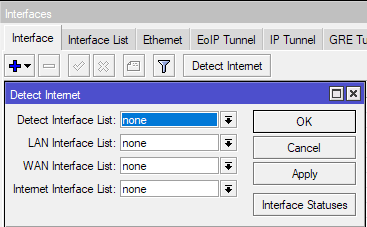
Also check whether Detect Internet is enabled, if yes, turn it off (by setting all lists to none)

Disabling DHCP client on one interface causing unwanted outcomes on another interface might be some side effects of Detect Internet.

I have already posted the configuration but I think my post is stuck in some moderation queue. Thanks.

Great points all around. Good to see I can export my entire configuration.

I consider this configuration “working” when I can be on a laptop on the LAN (in this case it has IP 192.168.88.229, but that doesn’t really matter) and am able to communicate with the device at 192.168.1.1. Here, communicate with means I can load up http://192.168.1.1 in my browser or telnet to it.

I have posted the configuration that DOES work below. But this ONLY WORKS if I have an active DHCP lease from my ISP on the ether1 interface. If I either disconnect the ethernet cable (to lose the lease), or run /ip dhcp-client disable [find interface="ether1"] then I can no longer access the 192.168.1.1 address from my laptop. As I sed before, /fetch on the Mikrotik WILL work.

So there is no real difference in the configuration dump in this state of disconnecting ether1 or not having the lease. In the scenario where I disable it, then obviously disabled=yesis set on the dhcp-client for interface=ether1.

# software id = INYK-3DP2
#
# model = RB5009UG+S+
# serial number = HK70ASNRRST
/interface bridge
add admin-mac=04:F4:1C:9D:3A:77 auto-mac=no comment=defconf name=bridge
/interface ethernet
set [ find default-name=sfp-sfpplus1 ] auto-negotiation=no rx-flow-control=\
    auto sfp-ignore-rx-los=yes speed=2.5G-baseX tx-flow-control=auto
/interface bonding
add lacp-rate=1sec mode=802.3ad name=bond-epyc slaves=ether2,ether3 \
    transmit-hash-policy=layer-3-and-4
/interface list
add comment=defconf name=WAN
add comment=defconf name=LAN
/ip pool
add name=default-dhcp ranges=192.168.88.10-192.168.88.254
/ip dhcp-server
add address-pool=default-dhcp interface=bridge name=defconf
/disk settings
set auto-media-interface=bridge auto-media-sharing=yes auto-smb-sharing=yes
/interface bridge port
add bridge=bridge comment=defconf interface=ether4
add bridge=bridge comment=defconf interface=ether5
add bridge=bridge comment=defconf interface=ether6
add bridge=bridge comment=defconf interface=ether7
add bridge=bridge comment=defconf interface=ether8
add bridge=bridge interface=bond-epyc
/ip neighbor discovery-settings
set discover-interface-list=LAN
/interface list member
add comment=defconf interface=bridge list=LAN
add interface=ether1 list=WAN
/ip address
add address=192.168.88.1/24 comment=defconf interface=bridge network=\
    192.168.88.0
add address=192.168.1.2/24 interface=sfp-sfpplus1 network=192.168.1.0
/ip dhcp-client
add comment=defconf interface=ether1
/ip dhcp-server network
add address=192.168.88.0/24 comment=defconf dns-server=192.168.88.3 gateway=\
    192.168.88.1
/ip dns
set allow-remote-requests=yes servers=192.168.88.3
/ip dns static
add address=192.168.88.1 comment=defconf name=router.lan type=A
/ip firewall filter
add action=accept chain=input comment=\
    "defconf: accept established,related,untracked" connection-state=\
    established,related,untracked
add action=drop chain=input comment="defconf: drop invalid" connection-state=\
    invalid
add action=accept chain=input comment="defconf: accept ICMP" protocol=icmp
add action=accept chain=input comment=\
    "defconf: accept to local loopback (for CAPsMAN)" dst-address=127.0.0.1 \
    in-interface=lo src-address=127.0.0.1
add action=drop chain=input comment="defconf: drop all not coming from LAN" \
    in-interface-list=!LAN
add action=accept chain=forward comment="defconf: accept in ipsec policy" \
    ipsec-policy=in,ipsec
add action=accept chain=forward comment="defconf: accept out ipsec policy" \
    ipsec-policy=out,ipsec
add action=fasttrack-connection chain=forward comment="defconf: fasttrack" \
    connection-state=established,related
add action=accept chain=forward comment=\
    "defconf: accept established,related, untracked" connection-state=\
    established,related,untracked
add action=drop chain=forward comment="defconf: drop invalid" \
    connection-state=invalid
add action=drop chain=forward comment=\
    "defconf: drop all from WAN not DSTNATed" connection-nat-state=!dstnat \
    in-interface-list=WAN
/ip firewall nat
add action=masquerade chain=srcnat comment="defconf: masquerade" \
    ipsec-policy=out,none out-interface-list=WAN
add action=dst-nat chain=dstnat dst-port=32400 in-interface-list=WAN log=yes \
    protocol=tcp to-addresses=192.168.88.2 to-ports=32400
add action=masquerade chain=srcnat comment="to access ONU stick UI" \
    dst-address=192.168.1.0/24 out-interface=sfp-sfpplus1
/ipv6 firewall address-list
add address=::/128 comment="defconf: unspecified address" list=bad_ipv6
add address=::1/128 comment="defconf: lo" list=bad_ipv6
add address=fec0::/10 comment="defconf: site-local" list=bad_ipv6
add address=::ffff:0.0.0.0/96 comment="defconf: ipv4-mapped" list=bad_ipv6
add address=::/96 comment="defconf: ipv4 compat" list=bad_ipv6
add address=100::/64 comment="defconf: discard only " list=bad_ipv6
add address=2001:db8::/32 comment="defconf: documentation" list=bad_ipv6
add address=2001:10::/28 comment="defconf: ORCHID" list=bad_ipv6
add address=3ffe::/16 comment="defconf: 6bone" list=bad_ipv6
/ipv6 firewall filter
add action=accept chain=input comment=\
    "defconf: accept established,related,untracked" connection-state=\
    established,related,untracked
add action=drop chain=input comment="defconf: drop invalid" connection-state=\
    invalid
add action=accept chain=input comment="defconf: accept ICMPv6" protocol=\
    icmpv6
add action=accept chain=input comment="defconf: accept UDP traceroute" \
    dst-port=33434-33534 protocol=udp
add action=accept chain=input comment=\
    "defconf: accept DHCPv6-Client prefix delegation." dst-port=546 protocol=\
    udp src-address=fe80::/10
add action=accept chain=input comment="defconf: accept IKE" dst-port=500,4500 \
    protocol=udp
add action=accept chain=input comment="defconf: accept ipsec AH" protocol=\
    ipsec-ah
add action=accept chain=input comment="defconf: accept ipsec ESP" protocol=\
    ipsec-esp
add action=accept chain=input comment=\
    "defconf: accept all that matches ipsec policy" ipsec-policy=in,ipsec
add action=drop chain=input comment=\
    "defconf: drop everything else not coming from LAN" in-interface-list=\
    !LAN
add action=fasttrack-connection chain=forward comment="defconf: fasttrack6" \
    connection-state=established,related
add action=accept chain=forward comment=\
    "defconf: accept established,related,untracked" connection-state=\
    established,related,untracked
add action=drop chain=forward comment="defconf: drop invalid" \
    connection-state=invalid
add action=drop chain=forward comment=\
    "defconf: drop packets with bad src ipv6" src-address-list=bad_ipv6
add action=drop chain=forward comment=\
    "defconf: drop packets with bad dst ipv6" dst-address-list=bad_ipv6
add action=drop chain=forward comment="defconf: rfc4890 drop hop-limit=1" \
    hop-limit=equal:1 protocol=icmpv6
add action=accept chain=forward comment="defconf: accept ICMPv6" protocol=\
    icmpv6
add action=accept chain=forward comment="defconf: accept HIP" protocol=139
add action=accept chain=forward comment="defconf: accept IKE" dst-port=\
    500,4500 protocol=udp
add action=accept chain=forward comment="defconf: accept ipsec AH" protocol=\
    ipsec-ah
add action=accept chain=forward comment="defconf: accept ipsec ESP" protocol=\
    ipsec-esp
add action=accept chain=forward comment=\
    "defconf: accept all that matches ipsec policy" ipsec-policy=in,ipsec
add action=drop chain=forward comment=\
    "defconf: drop everything else not coming from LAN" in-interface-list=\
    !LAN
/system clock
set time-zone-name=America/Los_Angeles
/tool mac-server
set allowed-interface-list=LAN
/tool mac-server mac-winbox
set allowed-interface-list=LAN

With these two settings:

You are essentially telling:

  1. bridge is LAN
  2. ether1 is WAN
  3. sfp-sfpplus1 is NEITHER of the above

Since the default Mikrotik firewall uses these categorizations in some rules, it may affect the behaviour of the device, but it would anyway be a good idea to give to sfp-plus1 an explicit identity, since the 192.168.1.0/24 is a different subnet from the one you have on the bridge (and through the Mikrotik DHCP server the devices connnected to bridge) 192.168.88.0, to reach it the packets need to be routed, so it would make sense to make it WAN.

And this nat rule:

as CGGXANNX stated would be unneeded because "absorbed" by the main:

Now, the DHCP from ISP assigning or not a lease to ether1 should not change anything, but evidently it does.

What is changed can be routes.

Post the output of:

/ip route print 

with your current configuration twice, once when the ISP DHCP has assigned a lease to ether1 and once with ether1 disconnected (and no DHCP lease) or with the DHCP client disabled.

2 Likes