Can you help me with any clues on the 5g configuration?
I was dealing with a very poor wifi performance on 5G (I don’t even care for 2.4 since it’s only used in my house for IoT stuff). After some experimentation, I finally managed to find good settings that deliver a good signal coverage, download/upload speed (almost the same I get via cable).
The problem now is related to stability. Connections work fine, but I noticed every time I’m in a meeting via Teams - for instance - suddenly connection drop, and I need to wait up to 10s, and it starts to communicate again. Then I decided to troubleshoot and ping both the DNS and Mikrotik. When the connection drops, I start losing packages between my computer and the router, making me believe the issue is Wifi instead of the internet.
Have any of you folks faced such an issue before and have any advice or idea?
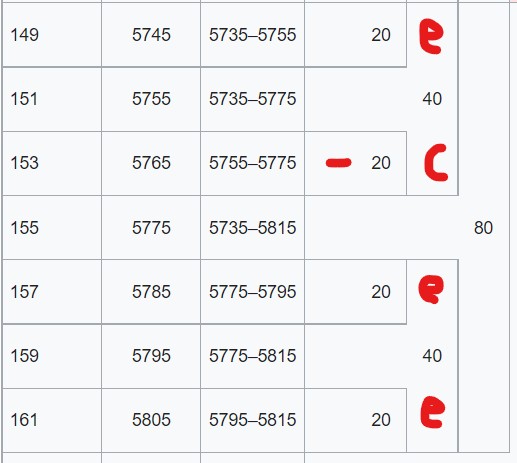
XXXX stands for Ceee, eCee, eeCe or eeeC , this is a 80 MHz wide channel. MT uses the mid frequency of the C channel (other brands use the mid-freq of the wide channel, not MT)
With width XXXX the C channel position is not known in that wide channel, it can be any of the 4 possible positions.
The freq of channel 40 is 5200, 44 is 5240, 54 should not be used as it falls between the 20 MHz increments.
40/XXXX and 44/XXXX greatly overlap https://goughlui.com/2018/06/04/note-choosing-5ghz-wi-fi-channels-for-802-11ac-in-au/
add action=reject allow-signal-out-of-range=10s
Not sure if it acted here, but here one says that the once weak signal will be still considered as weak for 10sec, even if it is already strong (out-of-range) again, so it will be rejected.
Add “/system logging topics=wireless” to see what happens.
I believe my export have some garbage. I tried to implement CAPsMAN here and move forward without it. These frequencies in the export are related to the CAPsMAN.
Do you believe these inactive CAPsMAN configuration play any role impacting my Wifi connection?
I have removed all CAPsMAN settings, here is the export:
# feb/10/2022 13:48:32 by RouterOS 7.1.1
# software id = XLZG-LBM0
#
# model = RouterBOARD 962UiGS-5HacT2HnT
# serial number = 8A77087C856C
/interface bridge
add admin-mac=CC:2D:E0:C4:F4:AD auto-mac=no comment=defconf name=bridge
/interface wireless
set [ find default-name=wlan1 ] band=2ghz-g/n channel-width=20/40mhz-XX country=brazil disabled=no distance=\
    indoors frequency=auto installation=indoor mode=ap-bridge ssid=AB-HOME2G wireless-protocol=802.11
set [ find default-name=wlan2 ] band=5ghz-n/ac channel-width=20/40/80mhz-eCee country=no_country_set disabled=no \
    frequency=5765 frequency-mode=manual-txpower mode=ap-bridge ssid=AB-HOME5G-TOP wireless-protocol=802.11 \
    wps-mode=disabled
/interface pppoe-client
add add-default-route=yes disabled=no interface=ether1 name=pppoe-vivo use-peer-dns=yes user=cliente@cliente
/interface list
add comment=defconf name=WAN
add comment=defconf name=LAN
/interface lte apn
set [ find default=yes ] ip-type=ipv4
/interface wireless security-profiles
set [ find default=yes ] authentication-types=wpa-psk,wpa2-psk eap-methods="" mode=dynamic-keys \
    supplicant-identity=MikroTik
/ip pool
add name=dhcp ranges=10.25.10.100-10.25.10.254
/ip dhcp-server
add address-pool=dhcp interface=bridge name=defconf
/caps-man manager
set ca-certificate=auto certificate=auto enabled=yes
/caps-man manager interface
set [ find default=yes ] forbid=yes
add disabled=no interface=bridge
/interface bridge port
add bridge=bridge comment=defconf ingress-filtering=no interface=ether2
add bridge=bridge comment=defconf ingress-filtering=no interface=ether3
add bridge=bridge comment=defconf ingress-filtering=no interface=ether4
add bridge=bridge comment=defconf ingress-filtering=no interface=ether5
add bridge=bridge comment=defconf ingress-filtering=no interface=sfp1
add bridge=bridge comment=defconf ingress-filtering=no interface=wlan1
add bridge=bridge comment=defconf ingress-filtering=no interface=wlan2
/ip neighbor discovery-settings
set discover-interface-list=LAN
/ip settings
set max-neighbor-entries=8192
/ipv6 settings
set disable-ipv6=yes max-neighbor-entries=8192
/interface detect-internet
set internet-interface-list=WAN lan-interface-list=LAN wan-interface-list=WAN
/interface list member
add comment=defconf interface=bridge list=LAN
add comment=defconf interface=ether1 list=WAN
add interface=pppoe-vivo list=WAN
/interface wireless cap
set bridge=bridge caps-man-addresses=127.0.0.1 discovery-interfaces=bridge interfaces=wlan1,wlan2
/ip address
add address=10.25.10.1/24 comment=defconf interface=bridge network=10.25.10.0
/ip dhcp-client
add comment=defconf disabled=yes interface=ether1
/ip dhcp-server lease
add address=10.25.10.30 client-id=SuiteLuz2 mac-address=D8:F1:5B:C9:78:CC server=defconf
add address=10.25.10.20 comment="Home Automation Server" mac-address=DC:A6:32:6B:6C:09 server=defconf
add address=10.25.10.33 mac-address=A0:20:A6:11:94:88 server=defconf
add address=10.25.10.31 mac-address=D8:F1:5B:C8:DA:DE server=defconf
add address=10.25.10.34 mac-address=A0:20:A6:03:D5:E7 server=defconf
add address=10.25.10.35 mac-address=60:01:94:E3:B5:81 server=defconf
add address=10.25.10.37 mac-address=CC:50:E3:E8:9E:D7 server=defconf
add address=10.25.10.38 mac-address=50:02:91:57:06:A3 server=defconf
add address=10.25.10.36 mac-address=50:02:91:5C:E0:FB server=defconf
add address=10.25.10.39 mac-address=CC:50:E3:E8:A1:87 server=defconf
add address=10.25.10.3 client-id=1:d0:3:df:6b:8:be mac-address=D0:03:DF:6B:08:BE server=defconf
add address=10.25.10.101 client-id=1:b8:c6:aa:7a:c1:23 comment=\
    "Start IP reservation for other devices (TVs, TV Box, Console, etc.)" mac-address=B8:C6:AA:7A:C1:23 server=\
    defconf
add address=10.25.10.40 mac-address=D8:F1:5B:E0:76:9A server=defconf
add address=10.25.10.29 comment="Start IP reservation for Tasmota Devices" mac-address=F4:CF:A2:16:73:CA server=\
    defconf
add address=10.25.10.41 mac-address=60:01:94:FB:F6:6C server=defconf
add address=10.25.10.50 mac-address=84:CC:A8:9C:26:5E server=defconf
add address=10.25.10.2 client-id=1:2c:c8:1b:c3:16:7e mac-address=2C:C8:1B:C3:16:7E server=defconf
/ip dhcp-server network
add address=10.25.10.0/24 comment=defconf dns-server=8.8.8.8,8.8.4.4 gateway=10.25.10.1 netmask=24
/ip dns
set allow-remote-requests=yes
/ip dns static
add address=10.25.10.1 comment=defconf name=router.lan
/ip firewall filter
add action=accept chain=input comment="defconf: accept established,related,untracked" connection-state=\
    established,related,untracked
add action=drop chain=input comment="defconf: drop invalid" connection-state=invalid
add action=accept chain=input comment="defconf: accept ICMP" protocol=icmp
add action=drop chain=input comment="defconf: drop all not coming from LAN" in-interface-list=!LAN
add action=accept chain=forward comment="defconf: accept in ipsec policy" ipsec-policy=in,ipsec
add action=accept chain=forward comment="defconf: accept out ipsec policy" ipsec-policy=out,ipsec
add action=fasttrack-connection chain=forward comment="defconf: fasttrack" connection-state=established,related \
    hw-offload=yes
add action=accept chain=forward comment="defconf: accept established,related, untracked" connection-state=\
    established,related,untracked
add action=drop chain=forward comment="defconf: drop invalid" connection-state=invalid
add action=drop chain=forward comment="defconf: drop all from WAN not DSTNATed" connection-nat-state=!dstnat \
    connection-state=new in-interface-list=WAN
/ip firewall nat
add action=masquerade chain=srcnat comment="defconf: masquerade" ipsec-policy=out,none out-interface-list=WAN
/ip upnp
set enabled=yes
/ip upnp interfaces
add interface=bridge type=internal
add interface=pppoe-vivo type=external
/system clock
set time-zone-name=America/Sao_Paulo
/system identity
set name="MikroTik Router"
/system logging
add
add topics=wireless
/system routerboard settings
set auto-upgrade=yes
/tool graphing interface
add
/tool graphing resource
add
/tool mac-server
set allowed-interface-list=LAN
/tool mac-server mac-winbox
set allowed-interface-list=LAN
OK, will look again for possible “obvious” values in the config.
This is not fully predictable as the wifi RF environment plays a major, and it is difficult to account for all MT different devices and RouterOS versions.
-“RouterOS 7.1.1” is a potential problem. Many reports on this forum of people having to go back to 6.49.2
-“set [ find default-name=wlan2 ] band=5ghz-n/ac channel-width=20/40/80mhz-eCee country=no_country_set disabled=no
frequency=5765 frequency-mode=manual-txpower mode=ap-bridge ssid=AB-HOME5G-TOP wireless-protocol=802.11
wps-mode=disabled”
—> 80 MHz is wide, but correctly set for “no-country”=FCC=US, country must be filled in, manual-txpower ???, SSID with non standard characters “-”
-“/caps-man manager set ca-certificate=auto certificate=auto enabled=yes” - could be disbled
" /interface detect-internet set internet-interface-list=WAN lan-interface-list=LAN wan-interface-list=WAN" - prefer not to detect but set manually, what is done correctly already
/interface list member
add comment=defconf interface=bridge list=LAN
add comment=defconf interface=ether1 list=WAN
add interface=pppoe-vivo list=WAN
“/interface wireless cap set bridge=bridge caps-man-addresses=127.0.0.1 discovery-interfaces=bridge interfaces=wlan1,wlan2” - cleanup ?
I’ll try these fixes.
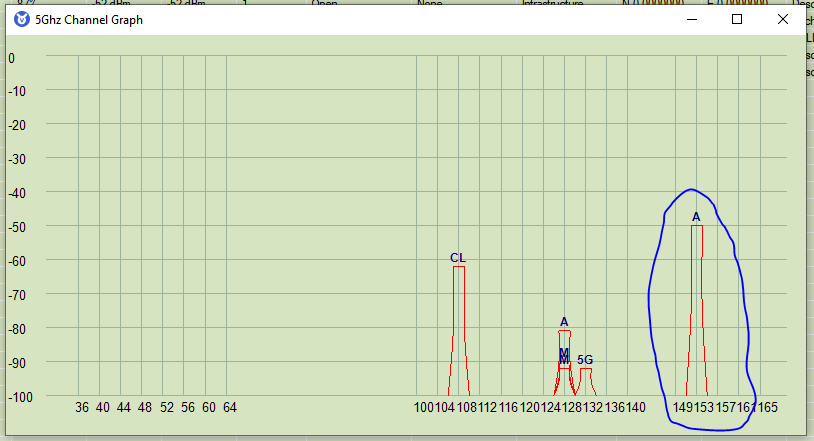
The frequency was set according to the scan I did here. There’s no other network under the same channel.
Maybe there is something related to the firmware version. It’s been annoying have so many disconnects all day.