WiFi and VLANs

I am trying to setup a 951G-2HnD to achieve the following:

Native VLAN 1(public) in all ports but ether2;
Ether1 → VLAN 1 (native) and VLAN 100 tagged (802.1Q);
Port 2 → native VLAN 100 (PVID 100);
The “Public” SSID set on wlan1 WiFi interface;
The “Private” SSID set on a virtual wlan2 WiFi interface;
The management IP address must be set on VLAN 100, the private VLAN;
On ether2 (native VLAN 100) there is a server that I can communicate with via physical connection I have on ether1.

Questions:
Why I can’t ping the IP address set on wlan2 interface but I can ping the server connected to it?
Why wlan2 (via WiFi) does not provide access to the server I have ether2?

The relevant part of my configuration is as follows.

Many thanks for you help!

# software id = MEBG-IZS9
# model = 951G-2HnD
/interface bridge
add name=bridge1 vlan-filtering=yes
/interface wireless security-profiles
set [ find default=yes ] supplicant-identity=MikroTik
add authentication-types=wpa2-psk mode=dynamic-keys name=Public supplicant-identity="" wpa2-pre-shared-key=<secret>
add authentication-types=wpa2-psk mode=dynamic-keys name=Private supplicant-identity="" wpa2-pre-shared-key=<secret>
/interface wireless
set [ find default-name=wlan1 ] country=portugal disabled=no mode=ap-bridge security-profile=Public ssid=Public wireless-protocol=802.11
add disabled=no keepalive-frames=disabled mac-address=D6:CA:6D:BA:C5:37 master-interface=wlan1 multicast-buffering=disabled name=wlan2 security-profile=Private \
    ssid=Private vlan-id=100 vlan-mode=use-tag wds-cost-range=0 wds-default-cost=0 wps-mode=disabled
/tool user-manager customer
set admin access=own-routers,own-users,own-profiles,own-limits,config-payment-gw
/interface bridge port
add bridge=bridge1 interface=ether1
add bridge=bridge1 interface=ether2 pvid=100
add bridge=bridge1 interface=ether3
add bridge=bridge1 interface=ether4
add bridge=bridge1 interface=ether5
add bridge=bridge1 interface=wlan1
add bridge=bridge1 interface=wlan2 pvid=100
/interface bridge vlan
add bridge=bridge1 tagged=ether1,ether3,ether4,ether5 untagged=ether2 vlan-ids=100
/ip address
add address=10.0.20.254/24 interface=wlan2 network=10.0.20.0
Tricky to only show part of config if you don’t know yourself where the error might be.

Where is IP setting for device itself ? I do see an IP address being assigned to wlan2 bit nothing else ?
You should not assign an address to a port being slave of bridge.
Remove interface from bridge or assign address to bridge.

You may want to check this excellent tutorial on ROS and VLAN:
http://forum.mikrotik.com/t/using-routeros-to-vlan-your-network/126489/1

After your read and digest that one, please provide full export so we have the complete story.

Done. Still doesn’t work.
Now with the complete configuration.


# jan/01/2002 04:32:26 by RouterOS 6.49.13
# software id = MEBG-IZS9
#
# model = 951G-2HnD
# serial number = <edit>
/interface bridge
add name=bridge1 vlan-filtering=yes
/interface wireless security-profiles
set [ find default=yes ] supplicant-identity=MikroTik
add authentication-types=wpa2-psk mode=dynamic-keys name=Public supplicant-identity="" wpa2-pre-shared-key=123Public
add authentication-types=wpa2-psk mode=dynamic-keys name=Private supplicant-identity="" wpa2-pre-shared-key=123Private
/interface wireless
set [ find default-name=wlan1 ] country=portugal disabled=no mode=ap-bridge security-profile=Public ssid=Public \
    wireless-protocol=802.11
add disabled=no keepalive-frames=disabled mac-address=D6:CA:6D:BA:C5:37 master-interface=wlan1 multicast-buffering=\
    disabled name=wlan2 security-profile=Private ssid=Private vlan-id=100 wds-cost-range=0 wds-default-cost=0 wps-mode=\
    disabled
/tool user-manager customer
set admin access=own-routers,own-users,own-profiles,own-limits,config-payment-gw
/interface bridge port
add bridge=bridge1 interface=ether1
add bridge=bridge1 interface=ether2 pvid=100
add bridge=bridge1 interface=ether3
add bridge=bridge1 interface=ether4
add bridge=bridge1 interface=ether5
/interface bridge vlan
add bridge=bridge1 tagged=ether1,ether3,ether4,ether5 untagged=ether2 vlan-ids=100
/ip address
add address=10.0.20.254/24 interface=wlan2 network=10.0.20.0
add address=10.0.10.254/24 interface=bridge1 network=10.0.10.0
/system gps
set set-system-time=yes
/system lcd
set contrast=0 enabled=no port=parallel type=24x4
/system lcd page
set time disabled=yes display-time=5s
set resources disabled=yes display-time=5s
set uptime disabled=yes display-time=5s
set packets disabled=yes display-time=5s
set bits disabled=yes display-time=5s
set version disabled=yes display-time=5s
set identity disabled=yes display-time=5s
set bridge1 disabled=yes display-time=5s
set wlan2 disabled=yes display-time=5s
set wlan1 disabled=yes display-time=5s
set ether1 disabled=yes display-time=5s
set ether2 disabled=yes display-time=5s
set ether3 disabled=yes display-time=5s
set ether4 disabled=yes display-time=5s
set ether5 disabled=yes display-time=5s
/tool user-manager database
set db-path=user-manager
# jan/01/2002 04:32:26 by RouterOS 6.49.13
# software id = MEBG-IZS9
#
# model = 951G-2HnD
# serial number = 418402594B03
/interface bridge
add name=bridge1 vlan-filtering=yes
/interface wireless security-profiles
set [ find default=yes ] supplicant-identity=MikroTik
add authentication-types=wpa2-psk mode=dynamic-keys name=Public supplicant-identity="" wpa2-pre-shared-key=123Public
add authentication-types=wpa2-psk mode=dynamic-keys name=Private supplicant-identity="" wpa2-pre-shared-key=123Private
/interface wireless
set [ find default-name=wlan1 ] country=portugal disabled=no mode=ap-bridge security-profile=Public ssid=Public \
    wireless-protocol=802.11
add disabled=no keepalive-frames=disabled mac-address=D6:CA:6D:BA:C5:37 master-interface=wlan1 multicast-buffering=\
    disabled name=wlan2 security-profile=Private ssid=Private vlan-id=100 wds-cost-range=0 wds-default-cost=0 wps-mode=\
    disabled
/tool user-manager customer
set admin access=own-routers,own-users,own-profiles,own-limits,config-payment-gw
/interface bridge port
add bridge=bridge1 interface=ether1
add bridge=bridge1 interface=ether2 pvid=100
add bridge=bridge1 interface=ether3
add bridge=bridge1 interface=ether4
add bridge=bridge1 interface=ether5
/interface bridge vlan
add bridge=bridge1 tagged=ether1,ether3,ether4,ether5 untagged=ether2 vlan-ids=100
/ip address
add address=10.0.20.254/24 interface=wlan2 network=10.0.20.0
/system gps
set set-system-time=yes
/system lcd
set contrast=0 enabled=no port=parallel type=24x4
/system lcd page
set time disabled=yes display-time=5s
set resources disabled=yes display-time=5s
set uptime disabled=yes display-time=5s
set packets disabled=yes display-time=5s
set bits disabled=yes display-time=5s
set version disabled=yes display-time=5s
set identity disabled=yes display-time=5s
set bridge1 disabled=yes display-time=5s
set wlan2 disabled=yes display-time=5s
set wlan1 disabled=yes display-time=5s
set ether1 disabled=yes display-time=5s
set ether2 disabled=yes display-time=5s
set ether3 disabled=yes display-time=5s
set ether4 disabled=yes display-time=5s
set ether5 disabled=yes display-time=5s
/tool user-manager database
set db-path=user-manager

Question:
your device itself, is supposed to be accessible through which means ?
Standard vlanid=1 ?
Then it should have at least an IP address for that VLAN. It doesn’t now.

PS it is recommended if you go the VLAN-way, not to use vlanid=1 anymore. Some devices (non-Mikrotik) are not so happy if that id is being used with vlan-tags.

PS re-read the tutorial again since clearly you missed some parts.

When we configure:

/interface bridge
add name=bridge1 vlan-filtering=yes

The routerboard will automatically create VLAN 1 where the bridge is part of. And this makes a lot of sense. Now, if we add all ports (etherx) to this bridge, I think they should work like a standard switch and better, the chipset would do their job on hardware switching acceleration. Most of the switches on the market will have VLAN 1 as the default VLAN for all ports. Here, the PVID should be used to define if a port will receive tagged or untagged traffic comming from a trunk port and also define how incoming packets should be tagged if so.

As you can see in my configuration, all ether ports are members of bridge1. All of them are set to PVID 1 (VLAN 1) but ether2 that is assigned PVID 100. Everything works like I want as, from a device on VLAN 100 I can ping the server connected on ether2.

The problem is that I want the “Public” SSID to access VLAN 1 (and it is ok) and have the “Private” SSID access devices on VLAN 100. As I don’t want the “public” network to have access to the Mikrotik management, then I want the only IP address set on the Mikrotik to be part of VLAN 100.

I have already tried to set the IP address on ether2 and it does not work and would be a bad practice; I have tried to assign it to the wlan2 interface in my configuration and it does not work it does not matter if this interface is or not in the bridge1; finally, I have created a VLAN 100 and assigned to the bridge 1, does not work either.

Because Mikrotik is very flexible, it is also very complex. I think I am making some kind of mistake due to the way I think on networks. Please notice that I work with networks for over 30 years, being very, very specialized in other makes like Cisco, Huawei, Alcatel, 3Com, Nortel, etc.

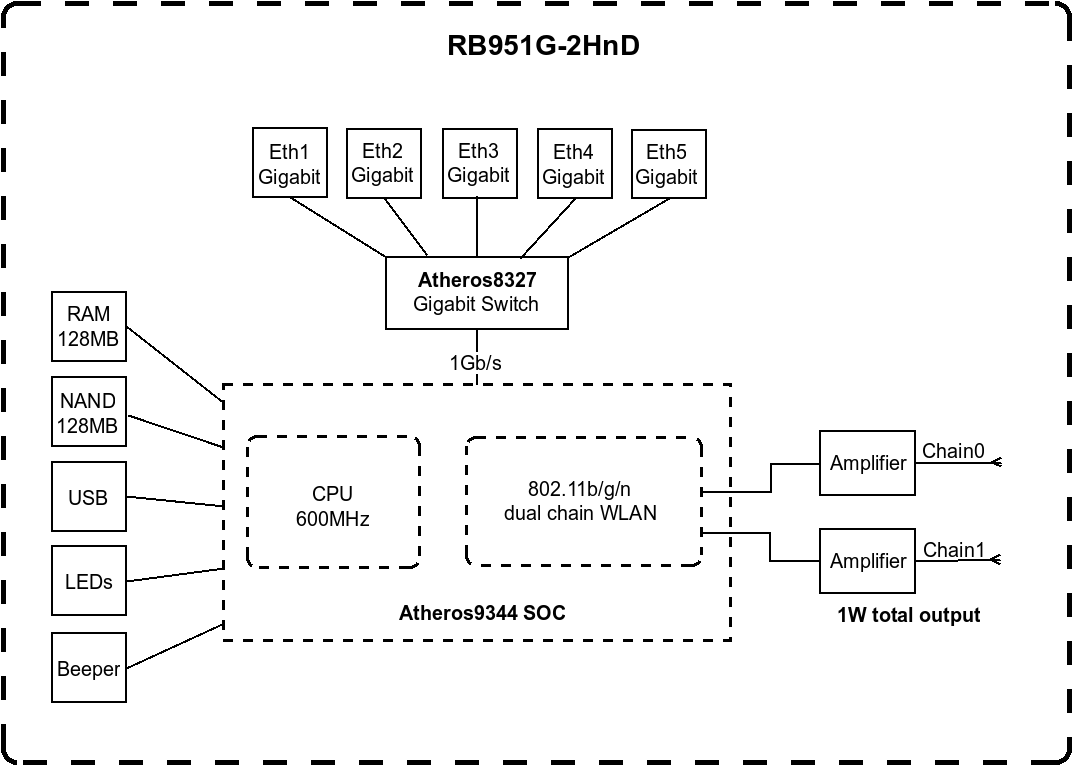
Please look at this Mikrotik block diagram at https://i.mt.lv/cdn/product_files/RB951G-150611115818_150618.png

As the WiFi controller is not part of the switch chipset, I “think” (please notice, I “think”) the WiFi interfaces should be part of the bridge so they can communicate with each other.

Solved!

For those having the same problem, I recommend watching this excellent tutorial that helped me to get there:

https://www.youtube.com/watch?v=4Z32oOPqCqc