Hello,
I have 2 AP Joined to the Capsman with dynamic vlan assignment.
I can see if there are no client connected to the SSID (MARS 5G) the interface will be detected as Inactive or disable port on the bridge and when there are client try connect to this SSID the client is not able.
It’s working normally when the client connect to 2.4G SSID (MARS) because this SSID always enable due i have many IoT devices always connected to this SSID.
So, how we can make the SSID always not on inactive state so the client always can connect anytime.
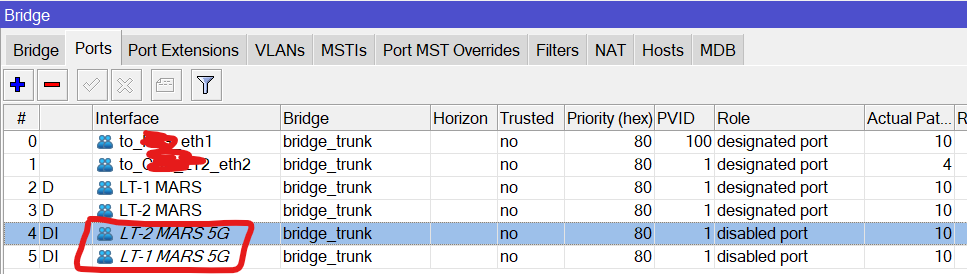
That doesn’t make sense, do you see SSID when no clients connected ? I highly doubt that you can make port active if there is no clients connected.
Start by posting your configuration here.
Try to set “disable-running-check=yes” on wifi interfaces.
Reasoning: when no wifi station is connected to AP, then interface becomes “not running”. And this signals to bridge that port is disconnected. When first station connects to AP, interface transitions to “running”, which in turn is signalled to bridge to transition port to connected. Then xSTP does it magic and turns port into “designated port” which finally allows it to forward frames. Much like when UTP cable is connected to one of RJ45 ports.
But this transition can take a few seconds (RSTP) or few tens of seconds (legacy STP), which can be too long for wireless client … which is waiting to get DHCP handshake done or whatever. So client freaks out and disconnects.
If you set “disable-running-check=yes”, then wireless interface will always be set as “running” and bridge port would never transition to “disabled port”.
Never had problem like that, sorry @OP for disinformation. You learn something everyday.
What I find curious here … why is that setting not available in Winbox GUI ?
Only via CLI, it seems (just checked on 3 AC3s still running on legacy wifi).
hi.. yes that fix my issue