Thank you for your reply.
The network setup is the following:
- Chateau running main LTE+ETH+WIFI and as CapsMan master device
- hAP ac² (which I previously mistakenly named Hex) used as CapsMan slave to extend WiFi + as ETH switch. Connected to Chateau with ETH cable.
- “guest-wifi” is not allowed to “my-wifi”, but the other way around is enabled
- The 5GHz WiFi networks are disabled as I wasn’t using them anyways. 2.4GHz works much better in my case
When testing I’m closer to the Chateau than hAP ac² but it doesn’t probably matter as it’s one network in the end.
The settings export From Chateau looks as pasted below. Unfortunately I don’t know how to connect to CapsMan slave to export the settings as under CapsMan ssh nor WebFig are no longer available. Also comment about the DNS - 192.168.1.2 is not a typo as I’m testing separate pinhole DNS + I’ve checked that it has no impact on my issue.
[admin@MikroTik] > /export hide-sensitive
# ... by RouterOS 7.1beta5
# software id = ...
#
# model = RBD53G-5HacD2HnD
# serial number = ...

/interface bridge
add admin-mac=... auto-mac=no comment=defconf name=bridge
add name=bridge-guest
/interface wireless
set [ find default-name=wlan1 ] band=2ghz-b/g/n channel-width=20/40mhz-XX country=my-country disabled=no distance=indoors frequency=auto installation=indoor mode=ap-bridge ssid=\
    my-wifi wireless-protocol=802.11
set [ find default-name=wlan2 ] band=5ghz-a/n/ac channel-width=20/40/80mhz-XXXX country=my-country distance=indoors frequency=auto installation=indoor mode=ap-bridge ssid=\
    my-wifi-5GHz wireless-protocol=802.11
/interface lte
set [ find ] allow-roaming=no name=lte1
/caps-man configuration
add country=my-country datapath.bridge=bridge name=Config security.authentication-types=wpa2-psk .encryption=aes-ccm ssid=my-wifi
add country=my-country datapath.bridge=bridge-guest name=Config-guest security.authentication-types=wpa2-psk .encryption=aes-ccm ssid=guest-wifi
/interface list
add comment=defconf name=WAN
add comment=defconf name=LAN
/interface wireless security-profiles
set [ find default=yes ] authentication-types=wpa-psk,wpa2-psk mode=dynamic-keys supplicant-identity=MikroTik
add authentication-types=wpa2-psk mode=dynamic-keys name=profile-guest supplicant-identity=MikroTik
/interface wireless
add mac-address=... master-interface=wlan2 name=wlan3-guest-5GHz security-profile=profile-guest ssid=guest-wifi
add disabled=no mac-address=... master-interface=wlan1 name=wlan4-guest-2.4GHz security-profile=profile-guest ssid=guest-wifi
/ip pool
add name=dhcp ranges=192.168.1.10-192.168.1.254
add name=dhcp-guest ranges=10.10.10.2-10.10.10.254
/ip dhcp-server
add address-pool=dhcp disabled=no interface=bridge name=local
add address-pool=dhcp-guest disabled=no interface=bridge-guest name=dhcp-guest
/caps-man manager
set enabled=yes
/caps-man manager interface
set [ find default=yes ] forbid=yes
add disabled=no interface=bridge
add disabled=no interface=bridge-guest
add interface=ether1
/caps-man provisioning
add action=create-dynamic-enabled master-configuration=Config
/interface bridge filter
# wlan3-guest-5GHz not ready
# in/out-bridge-port matcher not possible when interface (wlan3-guest-5GHz) is not slave
add action=drop chain=forward in-interface=wlan3-guest-5GHz
# wlan3-guest-5GHz not ready
# in/out-bridge-port matcher not possible when interface (wlan3-guest-5GHz) is not slave
add action=drop chain=forward out-interface=wlan3-guest-5GHz
add action=drop chain=forward in-interface=wlan4-guest-2.4GHz
add action=drop chain=forward out-interface=wlan4-guest-2.4GHz
/interface bridge port
add bridge=bridge comment=defconf interface=ether1
add bridge=bridge comment=defconf interface=ether2
add bridge=bridge comment=defconf interface=ether3
add bridge=bridge comment=defconf interface=ether4
add bridge=bridge comment=defconf interface=ether5
add bridge=bridge comment=defconf interface=wlan1
add bridge=bridge comment=defconf interface=wlan2
add bridge=bridge-guest interface=wlan3-guest-5GHz
add bridge=bridge-guest interface=wlan4-guest-2.4GHz
/ip neighbor discovery-settings
set discover-interface-list=LAN
/interface list member
add comment=defconf interface=bridge list=LAN
add comment=defconf interface=lte1 list=WAN
/interface lte settings
set external-antenna=both
/interface wireless cap
set bridge=bridge interfaces=wlan1
/ip address
add address=192.168.1.1/24 comment=defconf interface=bridge network=192.168.1.0
add address=10.10.10.1/24 interface=bridge-guest network=10.10.10.0
/ip dhcp-server lease
add address=192.168.1.3 client-id=... mac-address=... server=local
add address=192.168.1.4 client-id=... mac-address=...
add address=192.168.1.2 client-id=... mac-address=... server=local
/ip dhcp-server network
add address=10.10.10.0/24 dns-server=8.8.8.8,9.9.9.9 gateway=10.10.10.1
add address=192.168.1.0/24 comment=defconf dns-server=192.168.1.2,192.168.1.1 gateway=192.168.1.1 netmask=24
/ip dns
set allow-remote-requests=yes servers=192.168.1.2
/ip dns static
add address=192.168.1.1 comment=defconf name=router.lan
/ip firewall address-list
add address=192.168.1.0/24 list=local
/ip firewall filter
add action=accept chain=input comment="defconf: accept established,related,untracked" connection-state=established,related,untracked
add action=drop chain=input comment="defconf: drop invalid" connection-state=invalid
add action=accept chain=input comment="defconf: accept ICMP" protocol=icmp
add action=accept chain=input comment="defconf: accept to local loopback (for CAPsMAN)" dst-address=127.0.0.1
add action=drop chain=input comment="defconf: drop all not coming from LAN" in-interface-list=!LAN
add action=accept chain=forward comment="defconf: accept in ipsec policy" ipsec-policy=in,ipsec
add action=accept chain=forward comment="defconf: accept out ipsec policy" ipsec-policy=out,ipsec
add action=fasttrack-connection chain=forward comment="defconf: fasttrack" connection-state=established,related hw-offload=yes
add action=accept chain=forward comment="defconf: accept established,related, untracked" connection-state=established,related,untracked
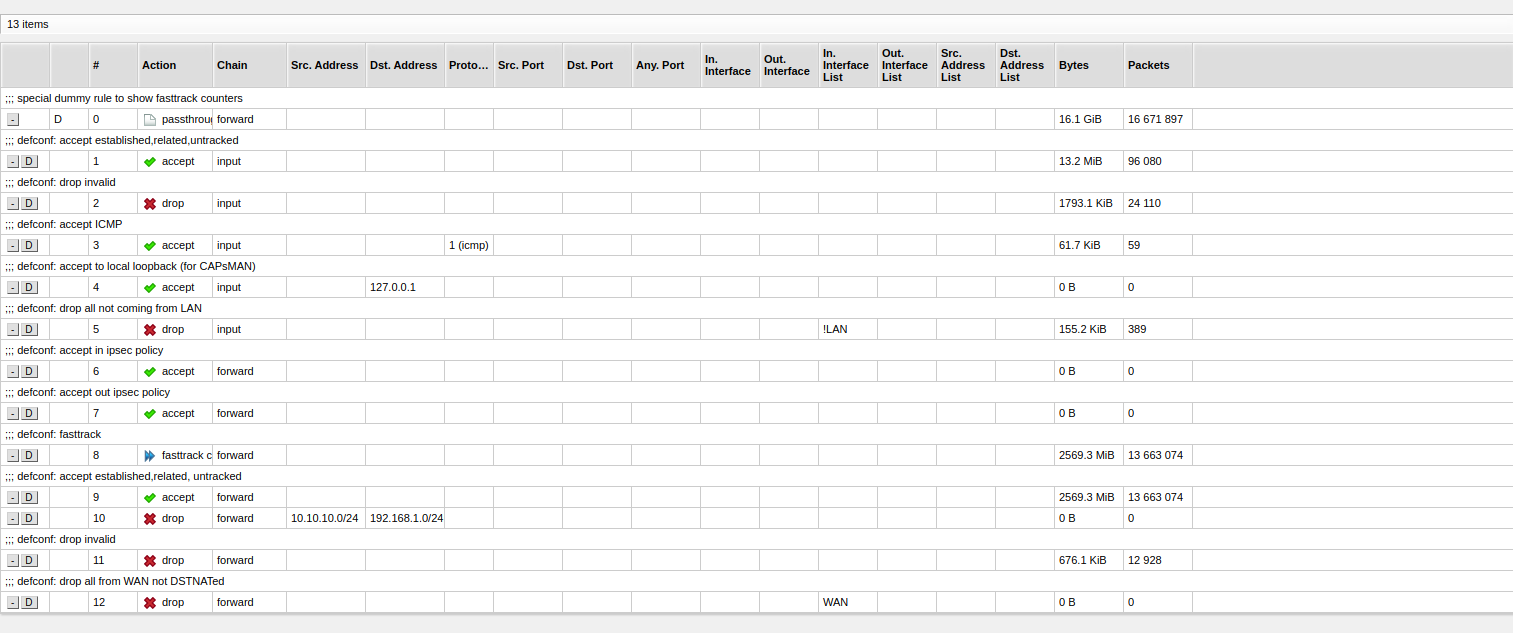
add action=drop chain=forward dst-address=192.168.1.0/24 src-address=10.10.10.0/24
add action=drop chain=forward comment="defconf: drop invalid" connection-state=invalid
add action=drop chain=forward comment="defconf: drop all from WAN not DSTNATed" connection-nat-state=!dstnat connection-state=new in-interface-list=WAN
/ip firewall nat
add action=masquerade chain=srcnat comment="defconf: masquerade" ipsec-policy=out,none out-interface-list=WAN
add action=masquerade chain=srcnat out-interface=bridge-guest src-address=10.10.10.0/24
/ip ipsec policy
add dst-address=0.0.0.0/0 src-address=0.0.0.0/0 template=yes
/ipv6 firewall address-list
add address=::/128 comment="defconf: unspecified address" list=bad_ipv6
add address=::1/128 comment="defconf: lo" list=bad_ipv6
add address=fec0::/10 comment="defconf: site-local" list=bad_ipv6
add address=::ffff:0.0.0.0/96 comment="defconf: ipv4-mapped" list=bad_ipv6
add address=::/96 comment="defconf: ipv4 compat" list=bad_ipv6
add address=100::/64 comment="defconf: discard only " list=bad_ipv6
add address=2001:db8::/32 comment="defconf: documentation" list=bad_ipv6
add address=2001:10::/28 comment="defconf: ORCHID" list=bad_ipv6
add address=3ffe::/16 comment="defconf: 6bone" list=bad_ipv6
/ipv6 firewall filter
add action=accept chain=input comment="defconf: accept established,related,untracked" connection-state=established,related,untracked
add action=drop chain=input comment="defconf: drop invalid" connection-state=invalid
add action=accept chain=input comment="defconf: accept ICMPv6" protocol=icmpv6
add action=accept chain=input comment="defconf: accept UDP traceroute" port=33434-33534 protocol=udp
add action=accept chain=input comment="defconf: accept DHCPv6-Client prefix delegation." dst-port=546 protocol=udp src-address=fe80::/10
add action=accept chain=input comment="defconf: accept IKE" dst-port=500,4500 protocol=udp
add action=accept chain=input comment="defconf: accept ipsec AH" protocol=ipsec-ah
add action=accept chain=input comment="defconf: accept ipsec ESP" protocol=ipsec-esp
add action=accept chain=input comment="defconf: accept all that matches ipsec policy" ipsec-policy=in,ipsec
add action=drop chain=input comment="defconf: drop everything else not coming from LAN" in-interface-list=!LAN
add action=accept chain=forward comment="defconf: accept established,related,untracked" connection-state=established,related,untracked
add action=drop chain=forward comment="defconf: drop invalid" connection-state=invalid
add action=drop chain=forward comment="defconf: drop packets with bad src ipv6" src-address-list=bad_ipv6
add action=drop chain=forward comment="defconf: drop packets with bad dst ipv6" dst-address-list=bad_ipv6
add action=drop chain=forward comment="defconf: rfc4890 drop hop-limit=1" hop-limit=equal:1 protocol=icmpv6
add action=accept chain=forward comment="defconf: accept ICMPv6" protocol=icmpv6
add action=accept chain=forward comment="defconf: accept HIP" protocol=139
add action=accept chain=forward comment="defconf: accept IKE" dst-port=500,4500 protocol=udp
add action=accept chain=forward comment="defconf: accept ipsec AH" protocol=ipsec-ah
add action=accept chain=forward comment="defconf: accept ipsec ESP" protocol=ipsec-esp
add action=accept chain=forward comment="defconf: accept all that matches ipsec policy" ipsec-policy=in,ipsec
add action=drop chain=forward comment="defconf: drop everything else not coming from LAN" in-interface-list=!LAN
/system clock
set time-zone-name=Europe/City
/system routerboard settings
set cpu-frequency=auto
/system routerboard mode-button
set enabled=yes on-event=dark-mode
/system script
add comment=defconf dont-require-permissions=no name=dark-mode owner=*sys policy=ftp,reboot,read,write,policy,test,password,sniff,sensitive,romon source="\r\
    \n   :if ([system leds settings get all-leds-off] = \"never\") do={\r\
    \n     /system leds settings set all-leds-off=immediate \r\
    \n   } else={\r\
    \n     /system leds settings set all-leds-off=never \r\
    \n   }\r\
    \n "
/tool graphing interface
add
/tool mac-server
set allowed-interface-list=LAN
/tool mac-server mac-winbox
set allowed-interface-list=LAN


 ) , select “WISP AP , mode BRIDGE” , then adjust further classical way, never go back to QuickSet.