Wifi - wifi-qcom - slow wifi and Tx/Rx

He,
I have hap ax3 and wifi-qcom.
My old tablet have simetimes terrible slow wifi. I'm looking for the reason

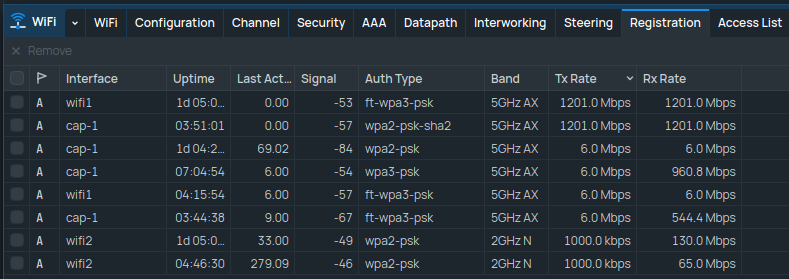
Why are Tx and Rx set so low 1000 kbps.

a few moments later
image

Can I set a minimum speed? When I had wireless I had this option

P.s
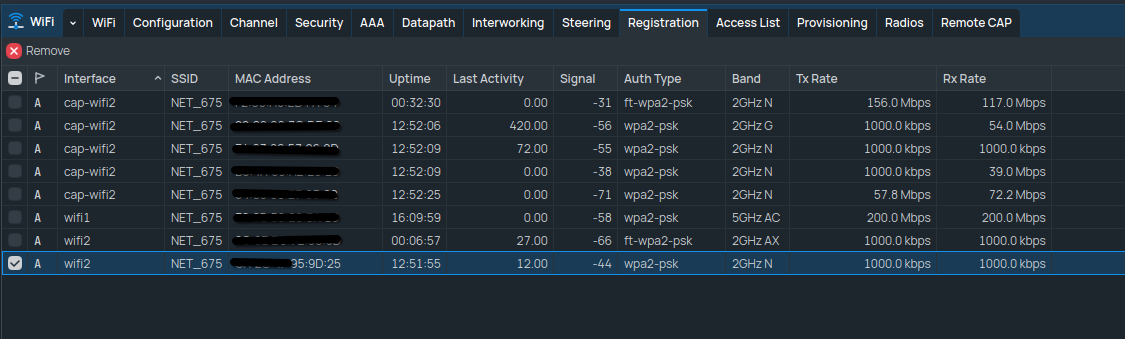
How is it possible that I have Band 2GHz AX set but I see a connected one device in Band 2GHz G?

My config
anynameyoulike.rsc (11.8 KB)

Stuff does idle down if nothing is playing, try adding the device to your access list and rejecting it from 2g for a moment to test!

You can see my stuff idles to 6mbps etc....

1mbit is the base rate of 802.11b. Please support this request: [Feature Request] Option to disable 802.11b in wifi drivers

It's your device which decides what speed it wants to use.
If your AP is able to provide it, that's what will be used.

@3RRR, Why are you setting the channels with all possible limitations?

And what @ToTheFull wrote - the 1000 bkps is a minimum Tx/RX value.

You can monitor it in the terminal:

interface wifi registration-table print stats proplist=tx-rate,rx-rate interval=1 without-paging where mac-address=...

Thanks for the reply.
@ToTheFull
My old laptop won't connect to the 5G network.

@holvoetn Can I disable this speed on provider?

@pmastal
Where can I change these settings?
Unfortunately, I don't know how to do this. I'm using Wifi-qcom.

On old wireless this was possible but those drivers were developed in-house so there was a lot more control.
With wifi-qcom drivers (vendor drivers with some in-house adjustments) this is not possible anymore.

AX means everything from 802.11b/g/n/ax

If your laptop only wants to use G, that's what it will get.
PS must be a REALLY old laptop then ?

@holvoetn my laptop use N.
G is one of the smart devices. I was surprised that it was possible to connect.
Thanks for the information why it works

@3RRR ,

You don't use VLANs, thus the config is simpler.

  1. Clean your wifi configuration.
  2. Set the Security for your needs and roaming
    /interface wifi security name=<sec_name> ...
  3. The channel config
    /interface wifi channel add disabled=no name=<channels_name> skip-dfs-channels=10min-cac
  4. for roaming
    /interface wifi steering add disabled=no name=<stearing_name> rrm=yes wnm=yes
  5. Manager for wifi interfaces
    5a. for the device where CAPsMAN is
    /interface/wifi/set wifi1,wifi2 configuration.manager=capsman-or-local
    5b. for the CAP
    /interface/wifi/set wifi1,wifi2 configuration.manager=capsman
  6. wifi config
    /interface wifi configuration add channel=<channels_name> country= disabled=no name=<cfg_name> security=<sec_name> ssid=<sid_name> steering=<stearing_name>```
  7. Don't forget to provision the CAP, and on the CAP enable the CAP setting :slight_smile:

If you want to see what channels / band are used per wifi interface on the CAPsMAN device:
/interface wifi monitor <wifi_name> without-paging once
If you use Tab after monitor you get all wifi interface names

My configuration is very similar to what you sent.
I don't quite see how this is supposed to solve my problem, but I'll try.

Wat does your config look like?

/export file=anynameyoulke

Remove serial and any other private info, post as Preformatted ext by using the </> button.

I sent the configuration in the first post.

Did you do reconfiguration, or are you still using the initial one?