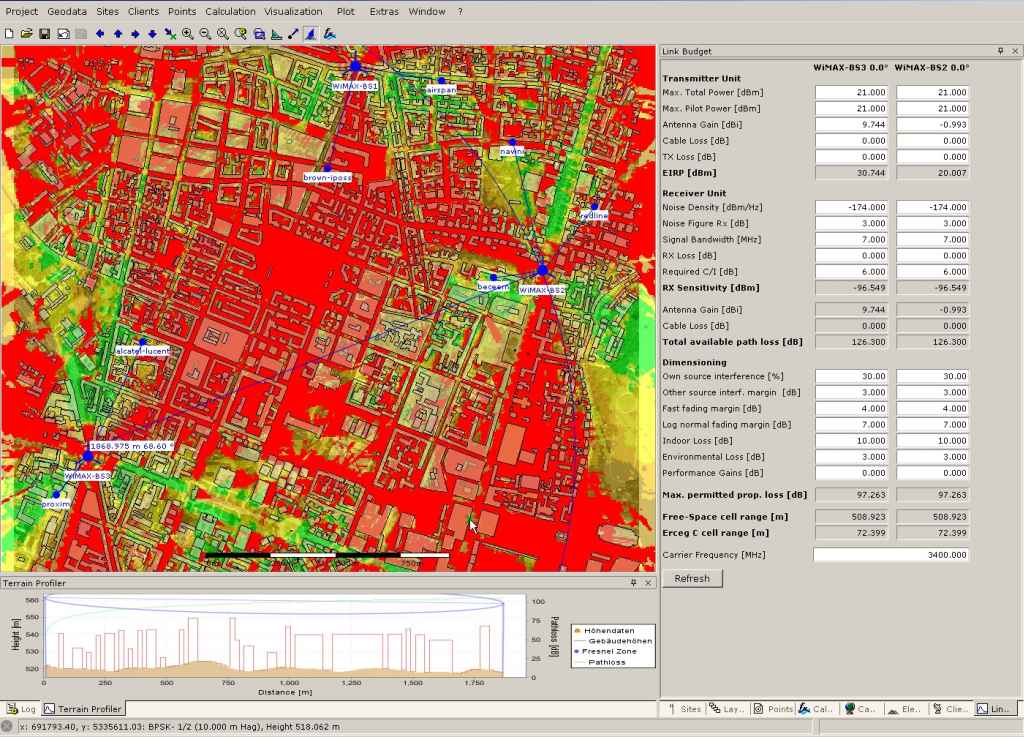
WiMAP-4G is a free radio network planning software for planning wireless technologies in a frequency range from 2 to 6 GHz. This includes for example WLAN, (F)BWA, Pre-WiMAX and WiMAX.
WiMAP-4G supports field strength, power level, SNR (signal-to-noise ratio), modulation level, best server, interference and link-budget calculations for Point-to-Point and Point-to-Multipoint connections. To get best possible results frequency specific attenuation, elevation and building data, transmission power and interference of other radio stations are taken to account. Furthermore the tool supplies already free SRTM-elevation data for the calculation of the radio field propagation and OpenStreetMap-Data for geographical orientation
Initial testing shows it works, but would have liked to see the community edition run in some sort of demo professional mode for a while so that a higher resolution was able to be evaluated, even if for a limited period of time. Community mode restricts the accuracy to 50m squares right from the start. From the test sites I created I can already see that the coverage data calculated is over-optimistic. By a long way. To be fair, I have not yet added building height data.
Also, once the DTEM elevation data and size of area required for your coverage square has been decided upon and downloaded, I could not find any way to increase this size or to change the centre of that square of data. E.g. I chose the default values and found the data set was too small. I was not able to increase the size of that square and so had to create a whole new project. I had to do this about 3 or 4 times before I got the right settings I wanted in the end. I.e. centre point and square size. An annoying “feature”.
Looks like it’s all written in java, so it runs slow on my XP machine and sometimes crashes when clicking on buttons with the whole program window stating “not responding”, so the program process has to be killed to get out of the program. But I guess that’s java and WIndows for you!
the result of prpagation depends on the propagation model that you configure. So there are a lot models that are recommended by different organisations or working-groups. Erceg (A-C based on urban, rural and suburban areas), ITU-T and Free-Space (based on frequrency and LOS or NLOS ) are few of the famous models. So select the right one (based on your calculation areas) and you will get realistic results.
Its right that the tools gets the free elevation data online (SRTM). Its not correct that you can’t increas the area easily. Delete the existing *asc elevation file (menu point elevation model) and load a bigger one - so you keep your configured sites and get a bigger calculation area. To get the new *asc elevation file you can do that with wimap-4g (configure ne calculation area and download this) or use your own data or old already downloaded areas…
Yes, its written in Java. Slow? Ok, that is a subjective discussion. Do you have all latest Java Updates?
I know, I have been using professional propagation calculation tools for a very long time for frequencies from Medium Wave to Microwave, for land and sea path! But no matter what model I use on this program, the prediction is over optimistic for this location here. But I believe this is because the ground clutter data is missing and the accuracy is limited to 50m. Total height difference here is only about 20-30m at the most (not including building heights, which is very variable with a few very tall buildings and a lot of small buildings), except for one small place on the island where there is a very large sudden change in elevation. I have been doing the predictions on one of our access points located in a relatively flat area, except for a slowly rising 30m rise to the north at a distance of about 500m away. Yet all the predictions appear to not even “see” this hill to the north and claim we can cover the terrain beyond this hill for many kilometers with no problems. As the top of the hill is higher than our antenna, we know for a fact it does not and it blocks the signal. Which is why we are installing a new system to the north.
Delete the existing *asc elevation file (menu point elevation model) and load a bigger one - so you keep your configured sites and get a bigger calculation area. To get the new *asc elevation file you can do that with wimap-4g (configure ne calculation area and download this) or use your own data or old already downloaded areas…
I will give this a try, but still not easy in my book. Appears to me to be a “kludge” to get around the fact it is not automatic. I should just be able to define a new square dimension and it should automatically download and cache the data. But hey! It’s free. I could always complain and demand my money back?
Yes, its written in Java. Slow? Ok, that is a subjective discussion. Do you have all latest Java Updates?
Yes, and each time the “stupid” java update does another update, it just adds another copy of the program to my hard drive in a new folder, each time becoming larger and slower. An ‘update’, should update not just add yet another completely new folder and a completely new version. I have now had to operate a regime where every time it claims there is an update, I uninstall it and download the most recent. I then only have one java. But this is not a Java bashing subject. I was just commenting that it crashes and is slow. That’s java for you. Maybe I am prejudiced.
WiMAP-4G v3 is under constant development. We proudly present our release Version 3.1 with additional features to optimise planning work-flows. Updates, changes and added features:
Automated antenna adjustment
with aligned direction settings - and aligned tilt settings
Offers import functionalities for existing project data from non WiMAP-4G sources
Support of NSMA formatted antenna pattern (ADF - Antenna Data File format e.g. Andrew CommScope)
New Technologies available: TETRA and Generic OFDM, e.g. for DVB-T planning
Better usability of terrain profiler
Faster performance due to improved calculation algorithms
Professional Edition offers to support larger projects (areas up to 200km x 200km)
Performance of Open Street Map integration improved
Check out the Community Edition by downloading it for free. Additionally you can request a free 30-days trial Professional Edition license to test the full feature set. Once the trial period expires the Community Edition features can still be access again with the free Community Edition license. The Professional Edition offers you higher flexibility, more comfort and additional features to improve your productivity and work-flow. You might find additional information including a pricing plan at our web-page http://www.wimap-4g.com.