Hi, I have here a reproducible error:
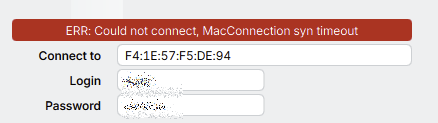
I have in my system 2 NICs, a Onboard 1G-NIC and a PCI-E 10G-NIC:

The 1G-NIC is only used for WoL, becuase my mainboard does not support WoL via PCI-E.
The Switch at which the 1G NIC is connected, pings (Netwatch) the 10G-IP and disables the 1G-Port if the 10G-IP answers. This, because Windows gets totally confused with 2 NICs in the same LAN.
Problem, Winbox throws the above error, the moment the 1G-NIC becomes disconnected (Netwatch disables the 1G-interface). It will work again when I manually disable the 1G-NIC.
I would think this is a bug, becuase WInbox should always use the remaining NIC and not somehow use the disconnected 1G-NIC.