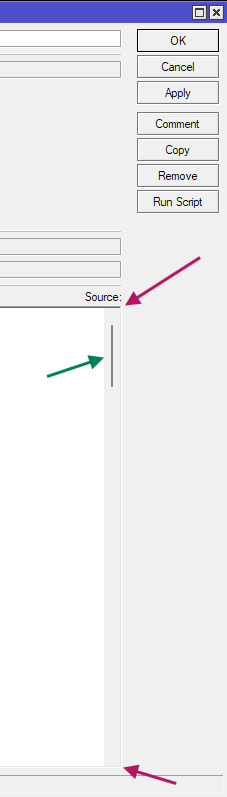
Yes, this is a really dumb issue that is specific to WinBox 4. Under WinBox 3, or any normal desktop GUI program that use common UI controls, the script text box is a control that is top-right-bottom-left anchored (purple arrows)
which means the 4 sides of the edit control keep fixed distances to the 4 sides of the parent window (parent form), when you expand or shrink the parent window, then to keep the distance to the right and bottom sides the same, the edit control will also grow and shrink accordingly. The edit control delimits the visible area of the text content, and because it knows about the number of lines of text it contains, it can properly calculate and display the scroll bar (green arrow) and scroll itself when you move the cursor to an area that it currently doesn't display. When you scroll the green scroll bar, the other edit boxes for the other fields (like Name, Owner, Run Count or Last Time Started) above the editor stay at their place and are visible. This is how normal programs should behave.
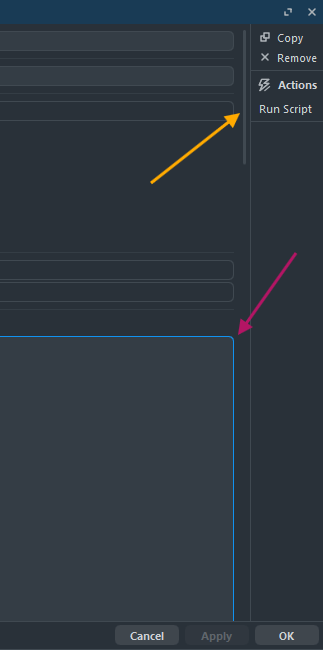
In WinBox 4 makes the bizarre decision to have the edit box control that contains the script to always grow as big as the text content that it contains. The control grows and shrinks with its content and only has top-right-left anchors, not bottom.
It's the parent control of the edit control (the parent control is the one that also contains the other textboxes and labels for the other fields), that is limited in size and has 4-side anchoring. This parent control, when it cannot fully show its child controls (among them is the script editor textbox), will display a scrollbar, pointed at by the yellow arrow in this screenshot.
This scrollbar scrolls the content of the parent container control. Which means when you scroll, you also move the other edit boxes (like Name, Owner, Run Count or Last Time Started) in or out of the visible area, and can see the huge, expanded size of the script editor textbox.
The problem is that because the editor control is always as big as needed to show all its text content, it can never see a situation where the edit cursor moves out of the area that it displays. To this editor control, it is always able to show everything needed. That the user doesn't see all the text is not its fault but is due to the parent container control clipping the visible area. The editor control never has the need to scroll anything.
The parent control being a generic container control has no notion of edit cursor or where the edit cursor is currently located. It's logical that it's unable to automatically scroll the edit cursor into view.
I somewhat understand why they have the scrollable parent container, with its children not bottom-limited. That's because WinBox 4 since the first beta has the ability to put every fields (that are spread accross all the tabs) into a single page, as a long list of edit controls that requires vertical scrolling. When there are too many items stacked vertically that exceed the parent's form height, it's no longer possible to have 4-side anchoring for any child items.
In short: this is due to the dumb choice MikroTik picked for the layout for the form's controls. You should raise a support ticket for this or post a complain in the WinBox 4.1 release thread, so that they, maybe, limit the height of a multi-line text edit control, or at least turn on 4-side anchoring for them if the control is the last control of the container.