Some kind of doing MikroTik's job for them...
It looks like they don't want to keep their own (very short) list of known issues up to date, so here is the long list of them. Hope, this list will be used while working on bug fixes.
Some of these issues were discovered by myself, some were taken from the topic.
Note, that here are only functional issues and bugs, it's not about bad interface layout and colors.
I will try to keep this post up to date. If you find some bug that is not listed, feel free to post, I'll add it to the list.
Changelog:
Updated on 17 Jun 2025 after beta24 release
Updated paragraph 5 in "Self-discovered and from the topic" list
Updated paragraph 5 in "From MT posts" list (issue fixed).
Updated on 10 Jul 2025 after beta26 release
Updated paragraph 4 in "Self-discovered and from the topic" list (clarification).
Updated paragraph 6 in "Self-discovered and from the topic" list (issue is probably fixed).
Updated paragraph 7 in "Self-discovered and from the topic" list (clarification).
Updated paragraph 10 in "Self-discovered and from the topic" list (issue is fixed).
Updated paragraph 11 in "Self-discovered and from the topic" list (issue is fixed).
Updated paragraph 16 in "Self-discovered and from the topic" list (issue is "fixed").
Updated paragraph 18 in "Self-discovered and from the topic" list (issue is not fully fixed, added clarification).
Updated paragraph 17 in "Self-discovered and from the topic" list (issue is fixed).
Updated paragraph 22 in "Self-discovered and from the topic" list (issue is fixed).
Updated on 30 Jul 2025 after beta29 release
Updated paragraph 4 in "Self-discovered and from the topic" list (issue is fixed).
Updated paragraph 5 in "Self-discovered and from the topic" list (issue still exists, but not relevant anymore).
Updated paragraph 7 in "Self-discovered and from the topic" list (added one more clarification).
Updated paragraph 8 in "Self-discovered and from the topic" list (issue is fixed).
Updated paragraph 13 in "Self-discovered and from the topic" list (clarification).
Updated paragraph 15 in "Self-discovered and from the topic" list (issue is fixed).
Updated paragraph 18 in "Self-discovered and from the topic" list (issue is fixed).
Updated paragraph 24 in "Self-discovered and from the topic" list (issue is fixed).
Added paragraph 26 in "Self-discovered and from the topic" list (new issue).
Updated on 06 Aug 2025
Added paragraphs 27, 28 in "Self-discovered and from the topic" list (new issues).
Updated on 03 Oct 2025
Updated paragraph 19 in "Self-discovered and from the topic" list (issue is fixed).
Updated paragraphs 1 and 7 in "From MT posts" list (issue is fixed).
Updated on 02 Nov 2025
Added paragraphs 29-31 in "Self-discovered and from the topic" list (newly discovered issues)
Updated on 06 Nov 2025 after beta39 release
Updated paragraph 2 in "Self-discovered and from the topic" list (issue is fixed).
Updated paragraph 14 in "Self-discovered and from the topic" list (issue is fixed).
Added paragraph 32 in "Self-discovered and from the topic" list (newly discovered issue).
Updated on 10 Nov 2025
Added paragraph 33 in "Self-discovered and from the topic" list (newly discovered issue).
Added paragraph 34 in "Self-discovered and from the topic" list (newly discovered issue).
Updated on 14 Nov 2025 after beta41 release
Updated paragraph 30 in "Self-discovered and from the topic" list (issue was not completely fixed, added clarification).
Updated paragraph 32 in "Self-discovered and from the topic" list (added a note regarding buttons).
Updated paragraph 33 in "Self-discovered and from the topic" list (issue is fixed).
Updated paragraph 34 in "Self-discovered and from the topic" list (issue is fixed).
Updated on 15 Nov 2025
Added paragraph 35 in "Self-discovered and from the topic" list (newly discovered issue).
Updated on 20 Nov 2025
Added paragraph 36 in "Self-discovered and from the topic" list (newly discovered issue).
Updated on 21 Nov 2025 after beta42 release
Updated paragraph 13 in "Self-discovered and from the topic" list (issue is fixed).
Updated paragraph 31 in "Self-discovered and from the topic" list (issue is only partially fixed).
Updated paragraph 36 in "Self-discovered and from the topic" list (issue is fixed, but it still looks bad, added a note).
Updated on 24 Nov 2025
Added paragraph 37 in "Self-discovered and from the topic" list (newly discovered issue).
Self-discovered and from the topic:
- Tons of Some scaling issues.
The majority of issues with scaling were fixed in beta39. There are still some issues, details here: 📣 WinBox 4 is here 📣 - #2924 by teslasystems
- [Fixed in beta39] Default internal window position is in the top-left corner instead of being in the main window center.
- Password field on the login page is not automatically activated when you choose some item from a saved list.
- [Fixed in beta29] Log autoscroll is very slow. It works with 1 - 2 seconds delay after a message actually appears in the list. In beta14 there was no delay.
[UPD 10 Jul 2025]: This happens, if the memory buffer is not full. If it's full, there is no delay.
- If you scroll up, autoscrolling is supposed to be paused, but in fact it still scrolls in some cases. As an example, if the same message appears under different buffers (memory and disk), it automatically scrolls 1 line down. [beta24]: Now, autoscroll pause doesn't work at all. If some new message arrives, it scrolls 1 line down. If 2 new messages arrive, it scrolls 2 lines down, etc. Not a beta24 regression. Autoscroll pause just doesn't work if a buffer is full.
[UPD 30 Jul 2025]: After adding 'Freeze' functionality in beta29 probably not relevant anymore.
- [Not 100% sure, but seems it's fixed in beta26] Delay (about 0.5 seconds) when switching between tabs when there are more than 2-3 items in a table. WinBox 3 works flawlessly with that, so it’s not about “too much items”.
- App is unresponsive overall. Even interface window may open with a delay.
[UPD 10 Jul 2025]: This delay is relevant to ethernet and sfp interfaces, others don't have this delay.
[UPD 30 Jul 2025]: When you have more than 3-4 opened internal windows, then zooming for example performs very slowly, it takes about 1-2 seconds to repaint with new zoom. Looks like bad unoptimized implementation of paining/scaling in the app.
- [Fixed in beta29] Telnet window doesn’t keep last values (protocol, IP, user) after connecting. WinBox 3 keeps them.
- File dragging from WinBox to desktop doesn't work.
- [Fixed in beta26] Can't drag empty (zero-size) file into WinBox. Shows error (FAILED reading local file: Unknown error) and creates empty *.tmp file on the router. No such issue in WinBox 3.
- [Fixed in beta26] Column header shifts to the left when you press mouse button down on the header edge without dragging.
- [Fixed in beta26] No filtering by port in ip/firewall/connections (will probably be fixed by splitting IP/Port in upcoming RouterOS releases).
- [Fixed in beta42] Bottom-most grid line in a table is not always drawn.
To reproduce this: first scroll to the very bottom of any table window, then scroll up and down many times and you'll see that the very bottom grid line sometimes drawn, sometimes not.
- [Fixed in beta39] When reducing internal window width to the minimum, the buttons may be painted outside of a window. Need to limit minimum window width so, that all buttons will fit inside.
- [Fixed in beta29] ComboBox does not collapse after second click when it wasn’t focused on first click.
- [Fixed removed in beta26] Artifacts on graph’s time labels. They may be drawn one above another, creating a total mess. This happens on scales >130%.
Time labels were just removed in beta26. Interesting solution
- [Fixed in beta26] No secondary sorting.
- [Fixed in beta29] Bug with ability to choose inactive RoMON Neighbors by keyboard on login page, causes error and crash.
MikroTik's changelog states it's fixed, but in fact it's not. I can open this list with mouse, navigate to inactive RoMON with arrow keys on keyboard, press 'Enter' and it will cause app crash.
- [Fixed in beta33] ‘OK’ and ‘Apply’ buttons are always committing the data, even if there were no any changes.
- In ‘Opened windows’ list window names are duplicated very often (like Log->Log, System->RouterBOARD->RouterBOARD, etc.)
- If you click on the left main menu item with subitems and don’t’ choose anything, but click on some free space in main window, next time you hover on some menu item, it will be opened without any click.
- [Fixed in beta26] Clipped % sign on the status bar, if CPU usage is 100 %.
- Huge RAM usage even with small amount of opened windows.
- [Fixed in beta29] No ‘New window’ button in tools like Ping, Torch, etc.
- Can’t ping by DNS name in Ping and Traceroute tools. Would be nice to have this functionality in all other places, like Telnet tool for example.
- [beta29 issue] Newly added 'freeze/pause' functionality doesn't work good. When you click this button in the Log window for example, it freezes the whole app for some period of time, that seems to be dependent on records count. And when the app unfreezes, there is a strange "blink" of the table. This freeze is about 1-2 seconds with ~1500 records and about 5 seconds with ~11K records. Dependence or rows count speaks of bad implementation. Such feature shouldn't depend on rows count at all.
- IP->Firewall->Connections can take about 5 seconds to open.
- Can't open new WinBox instance by middle-click on current app instance in taskbar (Windows)
- If you want to filter interfaces in the interface list by their type, using 'Filter' button and 'is' matcher, the dropdown list is shown empty. May be there are other places with same problem.
Screenshot with example in this post: 📣 WinBox 4 is here 📣 - #2818 by infabo - If you select multiple items in some ordered table and then start to drag them with mouse, but don't actually move them and release the mouse button, their order erroneously changes.
[beta41 update]: not fixed as it should be! Now the order is not changed, but the log shows, that the rules are still moved and repainting mess still occurs.
GIF with example here: 📣 WinBox 4 is here 📣 - #2989 by teslasystems - When you drag items in some ordered table, there is a rendering issue - when items order changes, new text and other elements are painted on a previous image buffer, after that everything redraws again.
As of beta42, there are some improvements - there is no drawing on a previous image buffer, but if there are multiple items dragged, redrawing doesn't happen "in one shot". First item is drawn first, other items are drawn next. Bad painting mechanism that causes performance degradation.
This issue is directly related to issue #7 and plays significant role in bad app performance because of many unneeded redraws.
Example with GIF in the beginning of this post: 📣 WinBox 4 is here 📣 - #3069 by teslasystems - Can't rename an existing workspace. Shows "can't change name" error. OK and Apply buttons are deactivated, though they shouldn't be, when action is unsuccessful!!!
- [Fixed in beta41] When you open some internal window for the first time (i. e. it was never opened before in a current workspace) and try to resize it by dragging its left or top edge, the window width/height will increase on the opposite side of the window, while the left/top edge doesn't move and remains at the original position.
- [Fixed in beta41] When you open some multitab window for the first time in a current workspace and try to change global scale, it resizes correctly first. But when you switch to another tab and try to change scale again, its width, let's say, "switches to another level". Looks like each tab has its own internal initial value of window width, and scaling triggers the window to set this internal value. If you resize the window manually before changing global scale, the bug disappears.
Example here: 📣 WinBox 4 is here 📣 - #2958 by teslasystems
-
The app doesn't keep its original window size, if it was closed with maximized window state. Instead, it keeps its width and height that it had in maximized state.
-
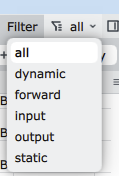
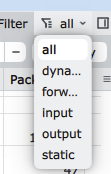
[Fixed in beta42, but it's not OK, read below] In some cases, dropdown menu width is not correct, so the items don't fit.
To reproduce: Open IP->Firewall, click 'all' filter. All items will be fully visible.
Then increase global zoom (Ctrl + '+') and decrease it (Ctrl + '-'). Click 'all' filter once again. You'll see, items no longer fit.
If you close and reopen Firewall window, items will become fully visible again.
As of beta42, items do fit, but now it's too wide and looks awful. Make dropdown width equal to the widest item!
-
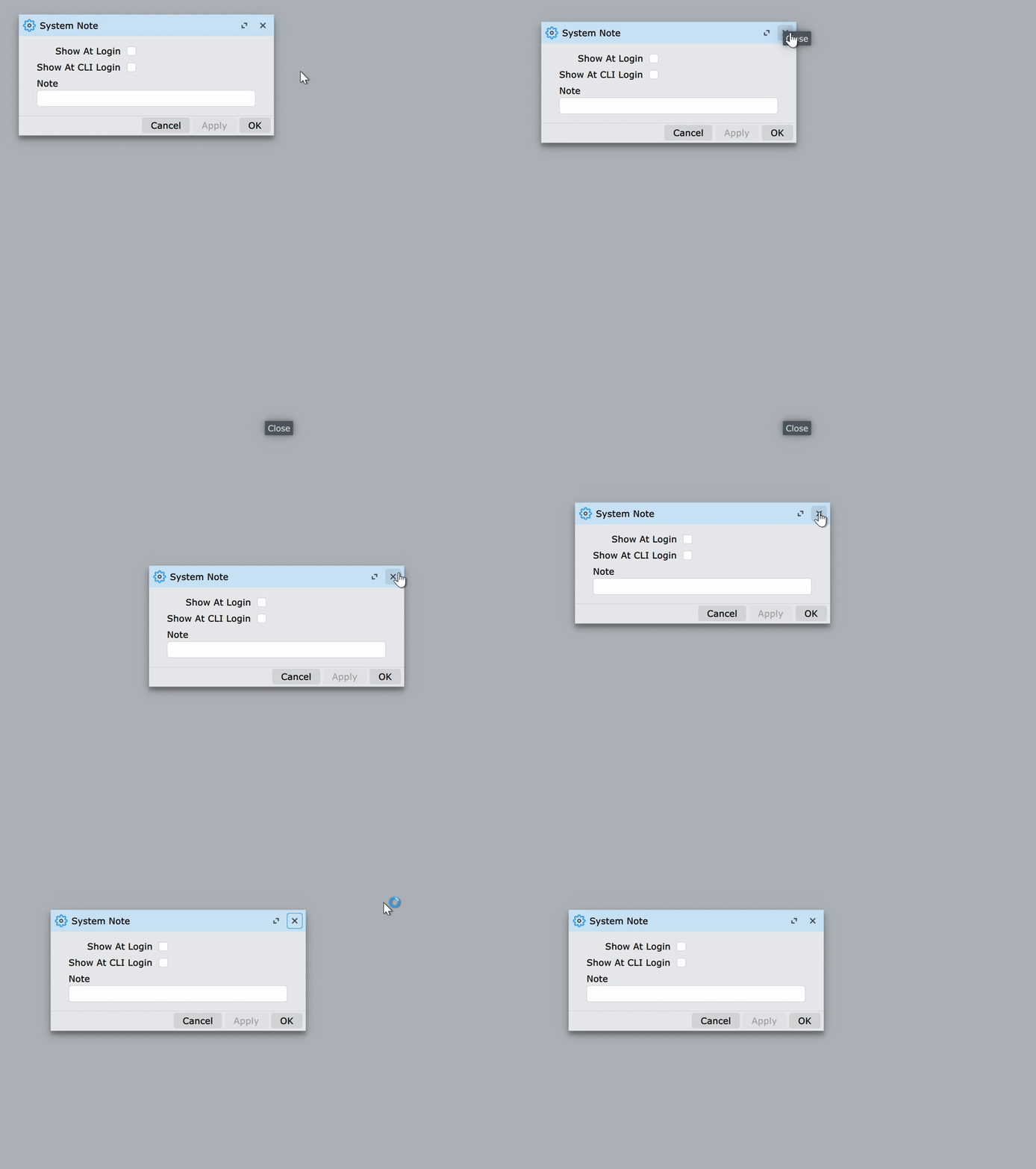
If you try to drag any internal window using some of its title button ('Close' for example), a popup for this button appears and remains on screen until you stop dragging. Normally, you shouldn't be able to drag a window using its button!