Agree 100%: what used to be a simple switching action with very minimal mouse movement, is now a real trek to another part of the screen. Preview of the window is simply not needed: the full description/path of the window was enough to identify it.
Hi guys,
So is there any hope for a Linux AppImage ?
Its great that there’s now a linux version, but it would be nice to have a single file that includes all of the dependencies, and that could be made portable easily (with the creation of the .config and .home along the program file).
For instance, right now on a clean Arch, it requests “libxcb-icccm.so.4” to start with…
Thanks !
On Arch you can use the AUR package: https://aur.archlinux.org/packages/winbox
Thanks infabo, yeah ok but i have other machines, some on other distros. Afaik, only AppImages (that include all dependencies) can be put on a usb stick on work right away anywhere, with its settings being loaded properly from with the same folder…
You can find Winbox in many package respositories in many distros. There are snaps, flatpak, etc. available - packaged by community.
When the copy-paste file option will be available, which is a basic and necessary function, its absence prevents us from using WinBox 4.x ???

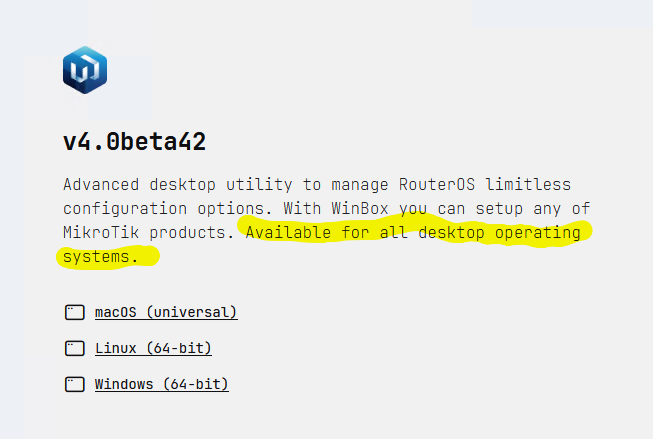
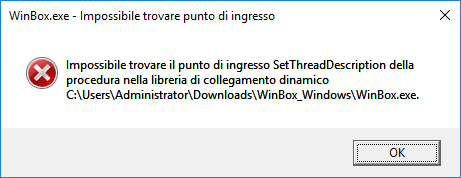
There's no point in developing a beta version on an operating system that will no longer be supported in a year.
At this rate, the beta version will be stable in a few years, and usable when it truly resembles WinBox and ceases to be a toy for "trendy" graphics developers.
The real WinBox is still usable on Server 2016, so I don't see the problem.
Indeed, but if a decent description on the website of system requirements had been listed then I wouldnt have wasted time finding that out….
Was that so tough? Just download the .zip, extract the .exe and run it is already “wasting time to find out”?
Imagine that it would have been a .NET executable and you first had to find and install the corresponding .NET runtime, or if it had been Java and you had to install a Java runtime…
It may still be possible to use the program when that OS (I do not have experience with it) has a capability to run virtual machines with a more modern OS inside it.
Bump for this. In classic WinBox it’s displayed as Dec/06/2025 which whilst non-standard is unambiguous. However, without controls to define the date format (or it picking up OS default), then this is ambiguous. Now I assume one could argue that because it’s not USA format (MM/DD/YYYY) then it should be universally understandable.
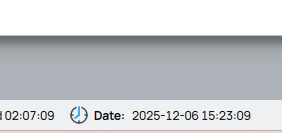
Good point @robmaltsystems. IMO it should follow the system locale, I'm sure Qt has some function to format date based on OS language/location. I may be in the US, but this month-first formatting is dumb. But ISO date is a bit too dorky for UI.
I've complained about the status bar before, but it actually the Icons and Labels make the status longer than necessary... So it ends up wrapping and looking terrible on two lines, especially with the "wasted" labels like "Date:" when it is pretty obvious. I wish there was some "Icons Only In Status Bar" options.
Also, at expense of length, perhaps timezone be useful thing to show? i.e. so the admin quickly know the timezone (and thus why time might not be same as system & what auto-timezone came up with). Overall some more options to status bar be good.
This thread really does need to die and breakout into individual topics  I think that it’s been mentioned before but as searching a topic for “drag” produced a lot of hits, I’ll post it again.
Is there any plan for drag & drop to work from the File List Window into File Explorer on Windows? Failing that can it please remember the last download folder? It’s a right pain to keep having to browse to a backup folder - it defaults every time to folder containing WinBox.exe which isn’t helpful.
And/Or @normis updating the top-post with items MikroTik is tracking.
No, no. It should directly use date format, specified in OS settings. Sometimes, actual date format, that was set by the user, differs from default date format for specific location/language.
Allow me to partially disagree, that format is a good one.
That is (almost[1]) the standard ISO 8601 date/time format (which BTW is how you should write dates as file names to have them easily sortable).
Still allowing the user to choose the date format should be allowed in some settings.
[1] the trailing Z is missing if UTC or - as Amm0 noted - without timezone it could be ambiguous.
Sure. Just inexact language since OS defaults follow the locale, but you're right there are more direct controls. Point being is something in Qt could format this based on platform-specific operation.
Well, it's not a Z UTC time shown in WinBox for a connected router. It is the local time of RouterOS based on /system/clock setting. i.e. if you change your timezone in RouterOS, you'll see router's time updated in WinBox.
And to be clear, I think it should be RouterOS time so any proposed formatting changes should not try to convert status bar clock to local time – only just format the clock based on "OS's date settings"
Sure, but without something showing the timezone (like Z if UTC or - say - +01:00) It can be ambiguous.
Think of Winbox used remotely (with Wireguard or similar) to access a router in another time zone, user might be confused by a date/time in the lower right of the Winbox Windows and - wrongly - believe that that Is local time.
Of course not for large timezone differences, but 1 or 2 hours difference could accidentally create issues.
I’m running WinBox for Linux, but can’t test for windows or mac.
I’m running into an issue when everytime I use winbox 4 to upload a container file. It breaks my internet streaming service! Samsung TV Plus on my tv.
Anyone getting disconnected from streaming service when uploading files with winbox 4?
If I upload with sftp it’s fine.
Thanks