If I understand correctly then <own>workspace corresponds to a device-specific default workspace (own per device).
Yes, with a name derived from the name you used to connect the device (either hostname, IP address, or MAC address).
Unfortunately the option to share workspaces between similar devices (available in winbox3) is gone…
Well, KDE is QT based, and doesn’t have any problems like this. Either is something with your system, or Mikrotik reinvented the wheel, and forgot to add something to the dialog. Probably the second option.
Try to invoke a file selector on your system, e.g. go to files and select upload.
What do you get? A usable file selector?
Not on Winbox4. Never did. What I’m saying is that this isn’t a QT problem - this is a Mikrotik problem.
When using KDE (QT based) the file selectors are ok. It’s an important distinction, because we can direct the complains to where it belongs. And it isn’t with QT.
No @pe1chl is right, the file picker on Linux is pretty "minimal". And it's the same on KDE (SteamOS's ArchLinux) and GNOME (Ubuntu Desktop).
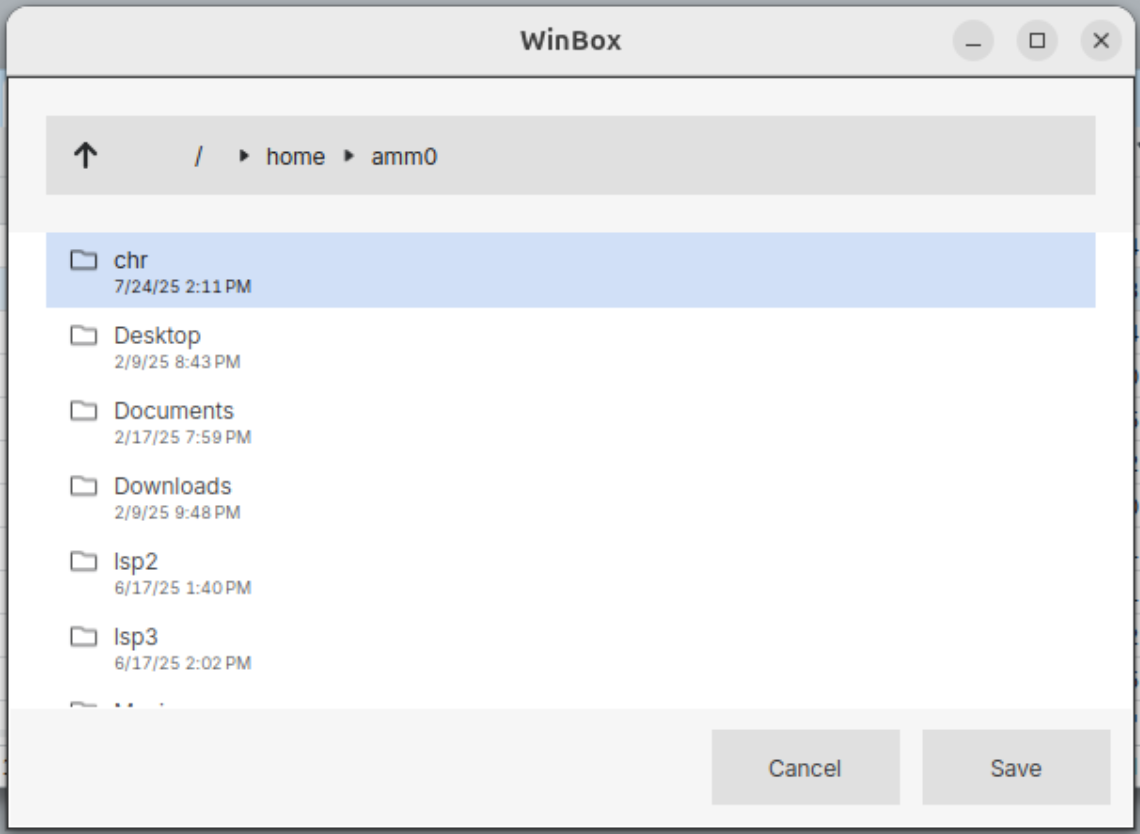
And AFAIK, all comes from Qt library, and their SDK suggests:
On Windows and macOS, this static function uses the native file dialog and not a QFileDialog.
...so @pe1chl and Linux user get the "QFileDialog" look-and-feel above.
On Mac, you get a navigator on right, so while "Macintosh HD" being default is odd. You can click the right thing on right to @phascogale's point.
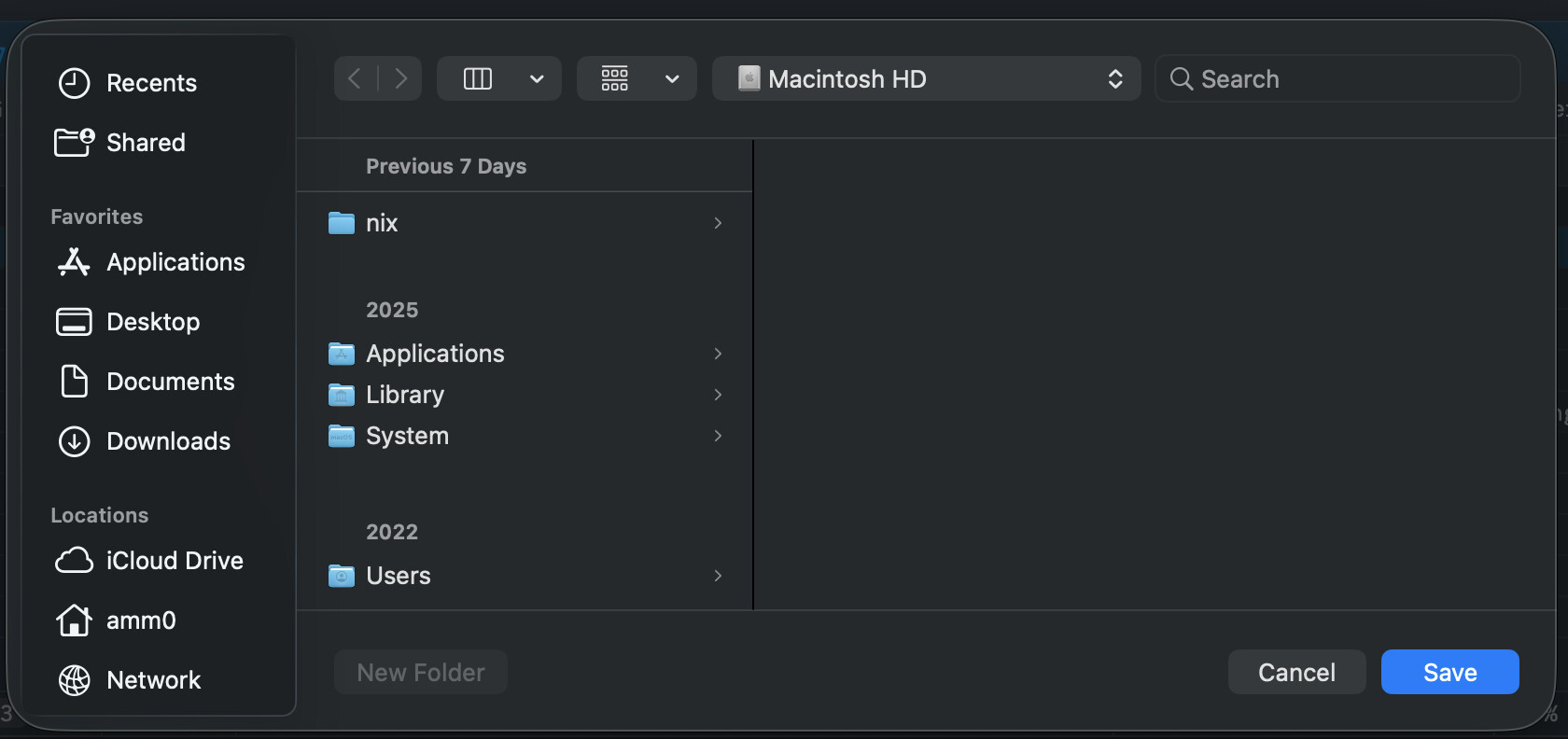
So it's more MikroTik expecting the cross-platform library to "do the right thing", and it doesn't. So MikroTik would have "re-invent" the file dialog for Linux to fix that. For Mac, it seems some QFileDialog call needs to use QDir::homeDir() instead as starting path (since default is empty string).
UPDATE:
So MikroTik would have "re-invent" the file dialog for Linux to fix that.
I checked on QGIS, which a Qt-based app, on Ubuntu using GNOME and it shows a rather sane dialog:

So maybe they did re-invent the wheel. A quick gander at QGIS code suggest they call a Qt primitive (although they do a lot to remeber the path).
That WinBox file chooser is 100% custom. I have never seen this layout. I even have a "Filter" - which is empty select box.
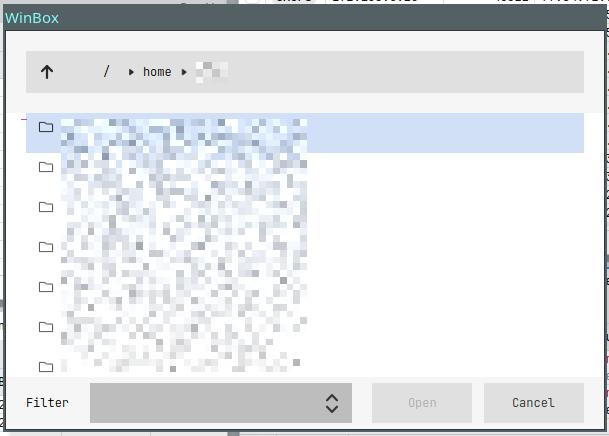
Mikrotik seems to like implementing file/folder dialogs by foot. Like the "Files" window. With the folder/file tree view. Nowhere to be seen anywhere. It is Mikrotik trademark.
The fact that KDE uses QT does not mean that KDE also uses the file selector provided by QT… maybe they also thought “well, this is unusable” and have written their own application-specific file selector. Like everyone seems to do on Linux.
applications on my system use my system defined file chooser. Exception are Java apps. But GTK and QT usually.
Look, there is a hook to use the native file system manager - several QT applications (not KDE applications: just QT ones) do this on Linux.
By the way: several GTK applications do the same.
That Winbox sorry excuse for file manager has nothing to do with using QT or not.
Also, just tested it with Mint 22.3/Cinnamon and OpenSuse Leap 16.0/KDE. The box look EXACTLY the same. This is Mikrotik doing. They could choose to open the system default file manager - and didn’t.
To bring in some documentation here: QFileDialog Class | Qt Widgets | Qt 6.x
Search for "platform-native" and you will find:
By default, a platform-native file dialog is used if the platform has one. In that case, the widgets that would otherwise be used to construct the dialog are not instantiated, so related accessors such as layout() and itemDelegate() return null. Also, not all platforms show file dialogs with a title bar, so be aware that the caption text might not be visible to the user. You can set the DontUseNativeDialog option or set the AA_DontUseNativeDialogs application attribute to ensure that the widget-based implementation is used instead of the native dialog.
So it does use a native dialog when available. For Windows and Mac this is probably obvious.
For Linux this is kind of different. It may depend on what libraries and frameworks are installed (GTK+, ...) and what desktop environment is used (Gnome, KDE, ...). Depending on that you will see a different file dialog.
Well, at least that's the theoretical part. It's still possible that things behave different here. Mikrotik could have set DontUseNativeDialog - for what ever reason. Or Qt behaves different when linked statically, making it unable to load other system libraries? No idea...
Any Linux user around who is presented a different file dialog?
The file dialog shown first in that document is familiar to me. It also appears when I ask Firefox to save a file. But I don’t think Firefox is a QT application, so maybe that dialog still is some “native” one?
I am using Xfce, not KDE or Gnome, but of course I have lots of KDE and Gnome libraries installed for applications that are from that environment.
From screenshoot in QFileDialog documentation - https://doc.qt.io/qt-6/qfiledialog.html#details that is its default GUI layout design (same as @Amm0 posted above for QGIS), for Linux MT created some custom designed dialog or heavy customized QFileDialog (if is even possible to be customized like that).
Ok, I hope they throw that work away and just give is the standard dialog. At least I can sort by modification time, and I am able to read the names more easily…
I can bet they created custom dialog just to match WinBox UI design style because they didn’t find the way how to skin/customize QT provided QFileDialog to look like other WinBox dialogs.
Design over functionality? I thought it was "design follows function".
I was orginally thinking "this what Qt must do", but I think they do have DIY file dialog now... And, found QGIS (also uses Qt) uses KDE-like dialog on KDE, and GNOME-like dialog on GNOME
And the Qt forums may have the clue:
https://forum.qt.io/post/808839
So my guess... They are using some staticly linked Qt libraries, not the system ones. So to avoid needing to play trick to find/install the needed library from OS (or statically link for all WM variants or, god forbid, use a package), they add their own file dialog on linux. And this because the Qt in OS path might vary, or Qt might not be installed, or, Qt version has some bug that then breaks WinBox, etc. etc.
Unforentently, we may be back to packaging to fix the file dialog on Linux.
As I understand from these QT forum posts (by manipulating LD_LIBRARY_PATH env. var.), QFileDialog should dynamically detect and load WM native file dialog library and failover to its QT implementation (unless is forced with DontUseNativeDialog), native libraries are not needed to be statically linked for all WMs.
If they are conerned regarding native dialog compatibility with staticaly linked QFileDialog which loads native one (when native library is updated and QT library needs compatibility update), they could set DontUseNativeDialog and that QT provided dialog will be always loaded and will look much better than this custom impemented. But maybe they decided to not use this QT provided dialog because is not easy to customize it to look like rest WinBox custom dialogs and it will have then non-native dialog that doesn’t fit in Winbox design.
I worked on development for some mobile apps and it was not unusual to hear “This doesn’t look nice“ when I was using some native provided UI components even it is much more functional than “nicer” design.
I know this from my own experience. However, I work for clients, and as you know, the customer is king.
With Mikrotik, I sometimes wonder who is product owner for WinBox team. Please don't get me wrong - this is a tool that needs to be reliable and efficient above all else. Visual details, such as a system-styled file chooser, are not important to me.
I value usability much more, and I am very familiar with my system's file chooser.
And now I leave the file chooser discussion. I won't need or use it anyways. I prefer to transfer files using SCP. 