Did you get an answer to this?
I have exported all connections from WinBox v3.41 (I had a master password there) and imported this file in v4.0… it worked perfectly. I am asked for this master password every time I open WinBox 4.0
Just noticed that I can drag files from folder to WinBox, but can’t drag them from WinBox to folder. Also, if a file has zero size, it shows an error. OS Windows.
It sounds like your Lenovo is set up as a Hackintosh. Are you aware that there’s a native macOS build for Winbox 4? It might be worthwhile for you to eschew trying the VM route when you can run the native version, without any of the headaches of virtualization. That said, if the VMs are largely there for work vs. personal isolation, I’d make sure that you’ve configured your VM with any GPU acceleration you can. Qt, like other modern GUI frameworks, takes advantage of a GPU to accelerate its rendering, and falling back to software rendering is going to hurt no matter what OS you’re using.
WRT the new need for GPU acceleration, it seems like the target era for acceleration is DirectX 11 support (based on other screenshots in the forum). That came out in 2009, which means that any machine, even with an onboard GPU, has had support for the feature set needed for over a decade. It is indeed a new requirement above and beyond the legacy Winbox codebase, but it’s really not a tall ask. Folks have every right to be grumpy about the new requirements, but it’s unfair to be mad that there’s a much more supportable code base than its predecessors and also be mad that the new codebase comes with new requirements. There’s plenty that still needs love in Winbox 4, but in my opinion, the new app is a huge step in the right direction in multiple dimensions, and while my needs aren’t the same as everyone’s, it’s been more than sufficient for me to maintain my networks.
I kinda robbed this reply to send my thanks to normis and anyone else working on the new Winbox, because I know there’s an awful lot of negative feedback here. Not my place to comment on their feedback, but I know hearing a lot of negative responses can really take the wind out of your sails, so I hope that hearing that there are folks that are thankful for your work helps you continue.
I just installed the Beta 14 and looks good. Few things that I like to see in future versions:
-
A way export current DB of devices registered. I found import but I couldn’t import the .WBX from version 3.41 so I had to input manually my devices. For large deployments it’s not practical
-
A quick search to find by Workspace, Group, Comment or IP Address / Hostname. For multiple devices can be cumbersome to find the device.
-
The Font of all the text is too small!!! Common my eyes are not as use to be (At least give the chance to adjust it at the taste of the user!)
I will find more stuff for sure but this is my first impressions by trying out the new version!
There is a way to crash WinBox 4.0beta14.
In a x86 based system (normal x86, or a x86 CHR), open System/Console, double click the item that should be the local screen console, and it will just crash.
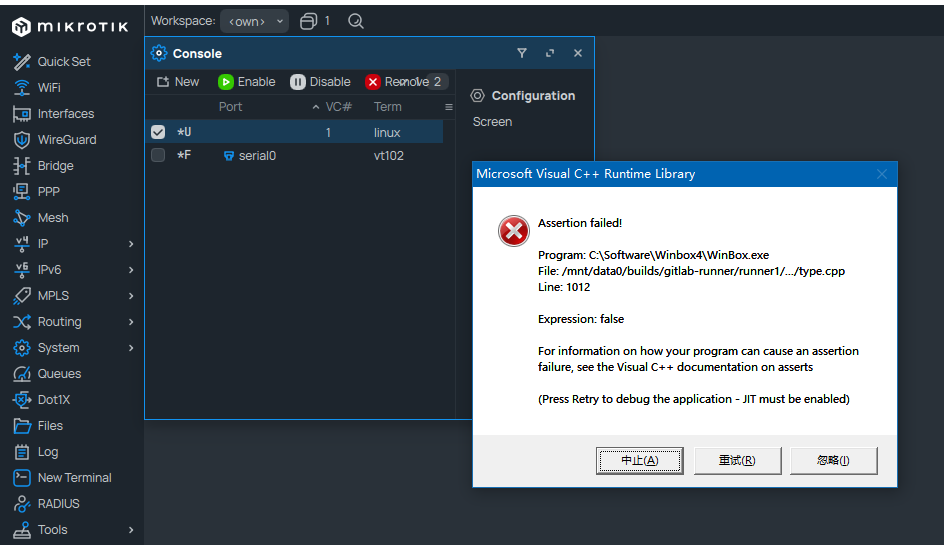
For reference, in Winbox 3, double click that item do nothing at all.
Another bug for beta14.
For some reason the timezone droplist in System/Clock duplicated each item one more time, except for “manual” option which only present once.
This bug seems only present when connected to a RouterOS 7.x device.
When connected to a RouterOS 6.x device there is no duplication problem.
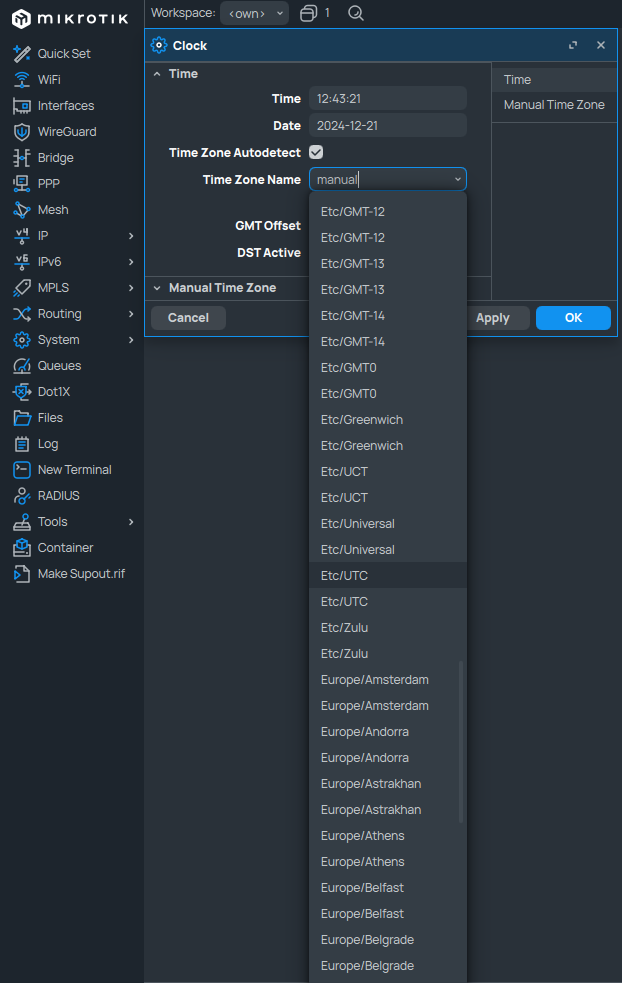
Unfortunately, no change with 4.0beta14 (now against ROS 7.16.2)…
Version 4 is looking nice and awesome, a small missing in the Log windows is that I can’t still find the Freeze button to quick stop logs stream, that’s a requirement!
Also when opening the log window. I always have to scroll completely first to the newest additions. With WinBox 3 it always jumped directly to the newest entry when opening the log window, regardless how the sorting is defined (newest or oldest on top).
Another point of improvement. Workspaces. Make it switchable to auto-save on/off. Sometimes I made changes temporarily in for example columns and do not want this to be saved to the workspace. I would like to click a save button by my self when I think it is needed.
- Please implement “select all” aka Ctrl+A to mark all entries
- Please implement selecting with keyboard => Shift+arrows
- If you carefully selected some entries and by chance you click anywhere outside checkbox area than all selected items get unselected - what an annoying situation.
Please bring back in-line comments, no matter the reason. Do not remove functionality; adding is OK or updating is fine, but removing is just BAD.
Running under MacOS, x86
UPDATE: I see that the option is not under the column selections, but under the hamburger menu on the top right. It would however, still be nice to rearrange the column order.
Yes, please bring back in-line comments, no matter the reason. Do not remove functionality; adding is OK or updating is fine, but removing is just BAD.
Also the drop down of side options was nice. Now I have to add another click to get under other options, e.g. IP → Firewall & IP → DHCP Server
Wherever there is an added click, is another means of lost productivity and hassle.
I just installed the Beta 14 and looks good. But I cant using New Winbox Option, After I click On It then existing winbox will crass, Where I let them the issue
By the way I can’t replay the post the announcements of WinBox 4 Is here any Problem on that ??
why are you using my avatar picture?
Some Time WinBox 4 Take too may times, I feel leggy. I think it’s need more speed
Another problem is drag and drop, I taka my router backup, after that try to drag it my pc can’t. it’s an issue for me
I like you avatar, by the way I just change it. 
Users without “sensitive” and/or “password” permission can reveal CAPsMAN passphrases and PPP secrets in Winbox 4 beta14 (and probably earlier).
In Winbox 3 “Hide Passsword” field can not be disabled if user does not have “sensitive” permission, but in Winbox 4 this setting is “outside” of user session and can be changed by any user that can login into device.
Be aware of that if you are admitting access to your devices for restricted users as you cannot deny access for Winbox 4 specifically! As of now I see this problem appearing with CAPsMAN wireless configuration passphrases and PPP secrets
Is there some limit on the router OS version that is compatible with the new winbox?
I have RB751G-@HnD running 6.42.12 and and new Winbox will not connect to it ?
By mac or IP it is stuck in Authentication.
Maciej
The same is true for newer WinBox3. We improved security, so you need to upgrade RouterOS in any case.