I have asked for that since day one of WB4. I have also filed a feature suggestion (SUP-221057), it was said that it is already on their todo list but very low prio because it is only a cosmetic improvement. Tbh, most of Winbox 4 changelog is cosmetic. But MikroTik may surprise us anytime.
I made a separate shortcut that sets the environment variable before launching WinBox. Things definitely look much better for now.
Shortcut target:
C:\Windows\System32\cmd.exe /c "set QT_QUICK_BACKEND=software&& start "" "C:\Program Files\Winbox\WinBox.exe""
Set Run to Minimized so no console window is shown, and use the WinBox icon via Change Icon…
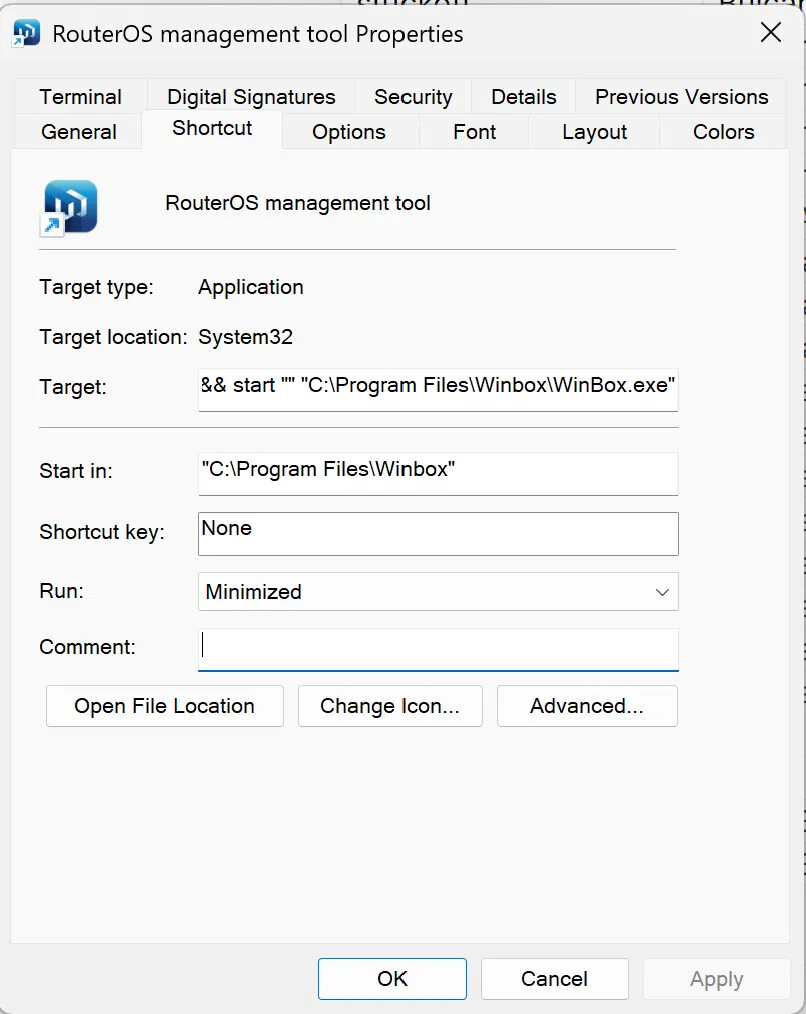
Please test and share your observations.
Thanks everyone for the support!
"Simply" set on environment
MT_QUICK_BACKEND=software
Then search & replace inside winbox exe from "QT_QUICK_BACKEND" to "MT_QUICK_BACKEND" (open file as binary, no UTF-8)
and save it as wb4sw.exe
In my case, there isn't much difference in terms of memory usage...

Unfortunately not everythign works correctly with disabled GPU renderer, so officially software renderer is not supported, you can use it at your own risk.
If that was a reply to me:
Honestly, I don’t see any difference, aside from a tiny (negligible) gain in memory.
I complain often, but in this case, there’s nothing to complain about.


Qt is also short for Quality.
I didn't pay attention to it, but I don't recall noticing it.
In any case, for me, memory usage has changed so little that,
from that perspective, it makes no difference.
I've created 5 .bat files that I can put next to the exe file, I never liked hardcoded paths.
1:
start "" "%~dp0winbox.exe" -platform windows:fontengine=gdi
2:
set QSG_RHI_PREFER_SOFTWARE_RENDERER=1
start "" "%~dp0winbox.exe"
3:
set QSG_RHI_PREFER_SOFTWARE_RENDERER=1
start "" "%~dp0winbox.exe" -platform windows:fontengine=gdi
4:
set QT_QUICK_BACKEND=software
start "" "%~dp0winbox.exe"
5:
set QT_QUICK_BACKEND=software
start "" "%~dp0winbox.exe" -platform windows:fontengine=gdi
They all use different amounts of memory.
If you see the same usage probably the setting didn't work.
i just want to confirm im seeing the exact same huge lag and delay / stuttering on opening up winbox v4 on win11 , setting the QT_Quick_backend = software fully resolves this big delay / stuttering , however there are then rendering issues / no backdrop on some menus.
I will try some of the suggestions in this thread. However, I just wanted to post my confirmation (im on win11 with nvidia rtx4000 quadro gpu).
it's crazy that MikroTik is now forcing us to use Winbox version 4, and these major issues still exist. I really hope they introduce an updated Winbox version 3 compatible with RouterOS 7.25 till MOST of the big Winbox v4 (on windows) bugs are resolved.
Yes, please. Just give me an option to open all "Subwindows" maximized all the time. I'll never get this window in window concept. Oh, and close them again when I pick another menu branch. Just like Webfig.