winbox error : router does not support secure connection, please enable legacy mode if you want to connect anyway.
Winbox - 3.22
RB1100AHx4 - 6.46.4
And see attachment.
Any idea?
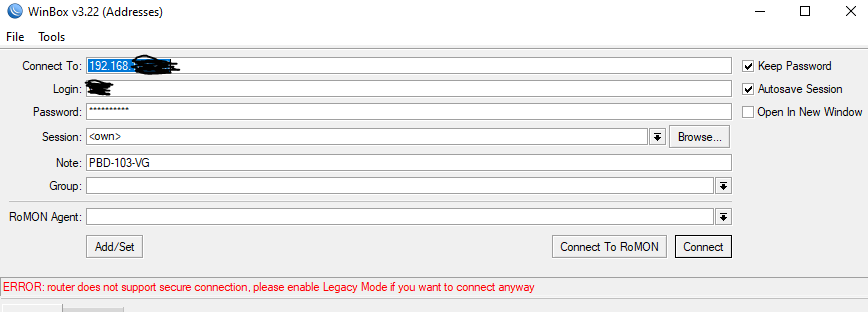
winbox error : router does not support secure connection, please enable legacy mode if you want to connect anyway.
Winbox - 3.22
RB1100AHx4 - 6.46.4
And see attachment.
Any idea?
I had the same problem, the best you go back to the previous version
You need to enable set Tools > Legacy Mode in WinBox
Once you log on, Make sure System > Routerboard Current vs Upgrade Firmware is the same, otherwise click on Upgrade and reboot.
So I wonder if the new secure winbox connection cannot handle NAT.
Was setting up a new router that I pre configured but managed to frogg up the OSPF config on the new one.
GRE connected but I had to NAT my connection to get route back and Winbox did not want to connect with legacy mode on or off.
Used SSH to fix my config and once NAT was off Winbox worked again.
Just a guess but this might be how they solve man in the middle attacks but this creates the issue that I cannot force my router to use legacy mode if all this is true.
Edit: What I mean is that I think new Winbox security cannot handle stuff like NAT that “tamper” with the header of the package. Once again just a guess and I have not tested.
Current Firmware and Upgrade Firmware is the same = 6.46.4
The same problem on RB4011iGS+RM v. 6.46.6 and winbox v. 3.24.
Legacy Mode didn’t work either.
Reboot solved the problem, but temporarily.
I’m facing the same issue on 6.48.1
Before issue occur I added 22k static dns records to setup smth like ad block functionality. Had only 27 mb RAM available after that.
Normally, before import, ~100 mb RAM was available (lovely days) which means that import resulted in permanent loss of 73 mb of ram.
Looks like memory leak. Tried to flush dns cache but operation was failed due to timeout. Several tries after and one finished w\o errors but cache was not cleaned actually.
Reverted everything back thanks to backup.
I face the same issue but Firmware is upgraded Packages=Firmware=v7.2
Any other idea?
I can reach it when I connect to my Network by LAN but not when I’m connected by WLAN.
I can reach the other devices (core router, core switch) upfront the troublemaker in either case.