FYI:
MikroTik support #[SUP-10870]
Richard
Thank you for new Log Window.
** In Log Window, # column align need Left OR Center because # and Time is show very near/close.
** Zoom In and Zoom Out need shortcut key as like: Ctrl +, Ctrl -
Also, when upgrading the firmware, within the “Routerboard dialog box”, the message to reboot your computer to activate firmware is off centered.
Linux + Wine here.
Windows opens with the last used size and position.
tested another machine (Also Lenovo Laptop) with same Win10 Version … same issue 
I have on both laptops german localization …
Richard
The issue with Winbox window position and shuffled windows inside the Winbox itself is caused by the scaling factor in the display settings.
If you set it to 100%, you won’t see any issues. In my case it is set to 125%…
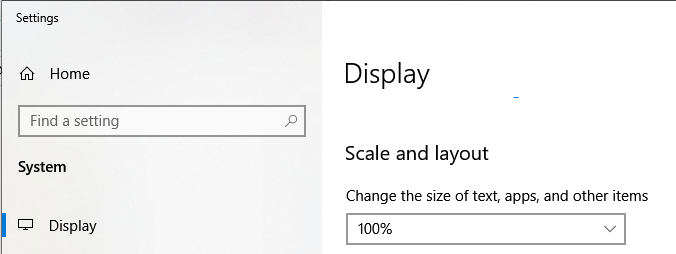
I also confirm that saved opened windows inside Winbox are always reverted to some default sizes after each login. I have scaling set at 100%, 2K display.
OK ... Windows 10 Display scale factor set to 100% and there is no problem.
when i set the scale to 125% or 150% (as i use the notebook) the issue is back 
Richard
Yes, outermost window size is saved with session file, but zoom level is not. Yes, I no longer have to drag the window larger before zooming it, but I still have to zoom it ^3 every time. Please fix this!!
Ironic that recent “lawyer” change that forced user to “acknowledge” contents of system note before allowing him to do anything, is now nullified by making system note entirely unreadable without microscope. User is not even allowed to zoom the system note, he must first close it! :-/
On another note, I do appreciate the expandable log window columns finally. Thank you.
*) added Legacy Mode = means to get access to device which have older version ROS version,is that correct?
I can confirm that when I rescale my display from extra large for my old eyes 200% down to teeny weeny 100% size, the log files do not overlap.
How do I get the log files to appear normal and maintain larger fonts sizes etc… ???
I dont have this problem with other things like notepad++ for example!
All the issues I had with scaling is now gone as far as I know BUT i noticed something before. I run a 2 monitor setup with one 4K (laptop) and the other 1440 (external screen).
If I had the problem where I could not read the logs on either screens dragging the winbox window from one screen to the other and then back again would solve this issue for me.
When you do that Windows re-scales the window according to that screen and it made everything “readable” again on both screens.
I confirm it too
Enable Autosave Session and check the Autosave on Close checkbox is checked.


We have repeated the issue. It happens if Windows window scaling is used together with Winbox zoom. Autosave no longer works. We will try to fix it ASAP.
thx a lot !
I’m still getting this flip-flopping of window sizes when starting winbox64.exe (on Wine under Linux Mint 19):
creating Window Class routeros_null
creating Window Class routeros_connect
DPI=100
EMS=13
ERROR: bad bmp format id=2329
biPlanes=1, biBitCount=1, biCompression=0
ERROR: bad bmp format id=3329
biPlanes=1, biBitCount=1, biCompression=0
creating Window Class routeros_dbl_canvas
 discovery started
then
creating Window Class routeros_dbl_canvas
DPI CHANGED to 120
rescale font 100 to 120
EMS=16
 discovery started
then
creating Window Class routeros_dbl_canvas
 discovery started
etc.
I also get the window pinned to 0,0 regardless.
Connecting to an actual router gives a window sized roughly 460x260 or 440x240 (depending on the above flip-flip).
This is worse than 3.21, which was itself bad. The last version that worked even vaguely properly was 3.20 (on Wine on Mint).
On Windows (7 - 64) it all seems to work properly for me, but I don’t have any funky scaling settings.
Dear MT!
Would you consider changing the first column in the Log window to the running number?
Currently those numbers are from 0 to 999 and when the log is full (all 1000 lines populated) the specific log message will get a new number from the previous log entry with every new entry added. From my perspective the log entry number should start from 0 after a device reboots and should never be changed for a specific log message.
Does it make sense to you or anyone else here?
Thank you!
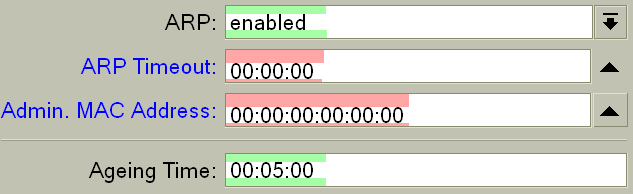
One cosmetic problem, optional fields have wrong vertical centering. With small zoom the text is too much to top, while with big zoom it’s too much to bottom. It happens everywhere for this field type. Other fields (simple edits, dropdowns) have it correct.
I agree that the # column isn’t necessary. The numbers are meaningless if they change which message they are associated with for every event. However, I do really like that I can select, open properties, and copy content from the log window now. Definitely need to keep that.