The problem does not appear if you have a saved session but there is no window open as soon as you login…
But if there is already a window open, as soon as you login, and you press ESC it will exit from winbox… ( i do not mean to open a window when you login and then press ESC, am talking for a window that is already open when you logged in )
I ve tested from different computers to different devices… the behaviour is always the same…
Today I tested on a Windows 10 system and again when I copy the .viw file from the sessions directory from my Linux system to the Windows 10 system it immediately shows the same problem.
Copying the other files (settings.cfg.viw and Addresses.cdb) does not change anything, even with the “new” settings.cfg.viw and the copied .viw file in the sessions directory the problem is reproduced.
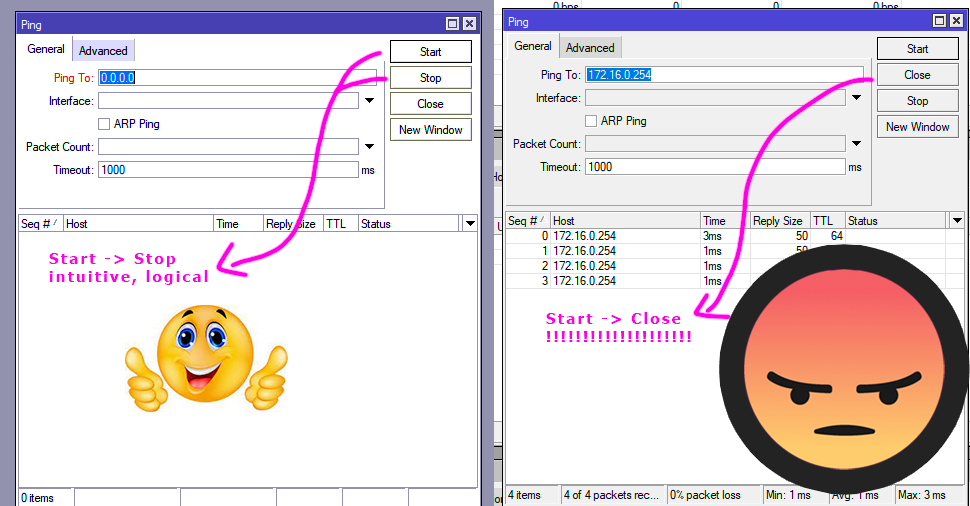
The same guy that moved these buttons around must have inverted “/export hide-sensitive” to “/export show-sensitive”. Hopefully the did not hire an UX-expert - if I were in that position I would take my 5 things and run run run run
I wonder how sources of WinBox are organized that “adding selection window…” touches placement of buttons in totaly separated parts of gui-system and how it is connected to “hide-sensitive” parts?
Looks like I was mistaken, I used 3.29 on my beta firmware to check out my wireguard router and all the items including keys were exposed using hide-sensitive.. SInce I dont have wireguard on a regular firmware hard to test but will take the word of smarter folks than me that it works fine on regular firmware.
My apologies to the gui programmers, but I bet there are a few bottles at work stashed somewhere.
While we are discussing Winbox issues and improvements, it would be great to have the capability to (i) minimise the side bar to just the icons and (ii) expand to the icons + descriptive text, just like these left-hand sidebar examples from the new Chrome-based Windows Edge browser (also just like how it is in Google Cloud Console).
Screen ‘real-estate’ is at a real premium within a Winbox session when one is working with multiple sessions opened side-by-side on a small laptop screen, particularly in the field, or even on a medium-sized desk-top monitor.
Jajajaja, Are you going to propose in Italy that the red light and green light and yellow traffic signals randomly change position too??
Okay just a joke. Yes you are right it will slow people down, to ensure they make the right decision but that does not cut it in the real world which is make things more efficient and faster and logical.
Lets say you are an Italian fisherman whose boat is sinking, the water is rough and the Italian helicopter is approaching to drop you a life raft.
The operator is selecting the drop button but oops its not
a. on the top most menu quickly available for selection as one would expect
b. it is randomly placed in a 3 layer menu selection
c. it is randomly placed within a 10x20 matrix grid of buttons
OH NO, the helicopter dropped the life raft 1000metres away and the poor fisherman sinks below the waves.
But at least rextended the IT Networking guru is content that he got his wish and critical buttons were randomly placed.
For more excerpts from my Book, Why a Canadian MTUNA beats an Italian CCNA CCXI CCRT CTQTTY etc etc etc... Anytime! on sale at any amazon retailer....
Probably the fisherman is rescued from some immigrant boat…
The right answer is always the same: like start/stop on same button…
The technology is already present like Simple Mode / Advanced Mode on Wireless interface…
Somethig is badly wrong with this version, everytime I try to add side widgets such as cpu load, memory load, current time, etc., the app closes itself from taskbar.
Also it happens 10-20% of times when trying to minimize the window to taskbar.
I’ve cleaned %appdata%/roaming/Mikrotik and I’ve also netinstalled my hap ac2 with 7.1rc2, there is a bug in the code I believe.
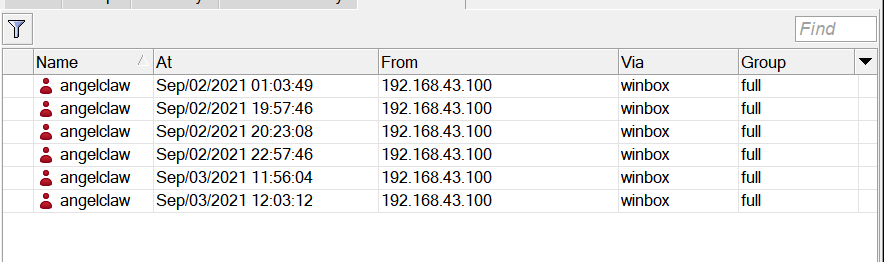
After all these crashes, the router remains with hanged sessions which are impossible to clear without a reboot:
icsterm, is this happening on v7.1rc2 or at least v7? I have already reported this behavior (SUP-58300, Stalled entries in active Winbox session list & wrong session removed from session list on logout) - reproduced and will be fixed. Not only after crashes, after all disconnects.
@nescafe2002
I only upgraded since 7.1rc1, it’s an older bug for sure (I’ve not tested 3.28 nor previous 7.x builds).
Couting my sessions it seems that indeed, disconnecting does not clear active sessions.