thanks but still don’t work so i will guess it is a server side problem
I would be happier if some efforts were also made to update IOS MT application.
It does work if you remove the spaces from the conceptual model rextended provided.
I was able to download 3.34 32-bit without problems.
Majority of the world is on Android, my friend …
not talking about the link to download old version, that work
i’m talking about making the app auto upgrade to last version when you ask for< when I press check for update the “change log” blank and does not do nothing…
Ok, maybe one more time.
upgrade.mikrotik.com is an alias for download.mikrotik.com.
download.mikrotik.com has address 159.148.172.226
download.mikrotik.com has address 159.148.147.204
download.mikrotik.com has IPv6 address 2a02:610:7501:4000::226
download.mikrotik.com has IPv6 address 2a02:610:7501:1000::204
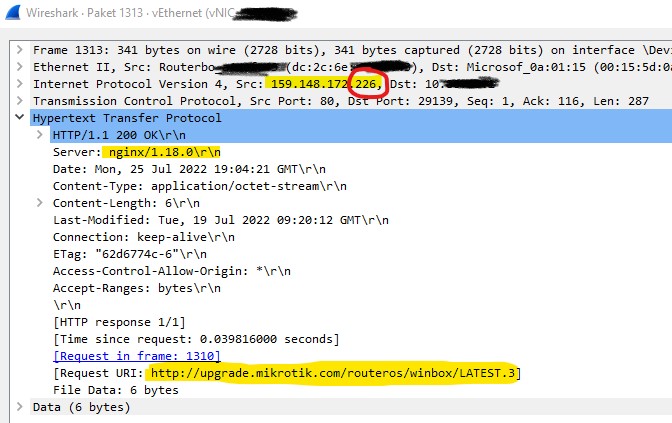
159.148.172.226 and 2a02:610:7501:4000::226 are broken.
159.148.147.204 and 2a02:610:7501:1000::204 work fine.
Either wait for MikroTik to fix the broken server or define those records locally without the currently broken one.
Posts: 777
hah, the bad battery post.
this mentioned and resolved in several places on the forum. please use the search bar before asking questions.
one example (literally what Rextended said): http://forum.mikrotik.com/t/winbox-where-to-download-older-versions/142584/2
I keep a txt file on my laptop with the following so I can remember how to get older versions if I need to…sometimes I come across an ancient device that has not been updated for years and it needs an older version of winbox to connect to it.
change version number in url for what is needed
https://download.mikrotik.com/winbox/3.25/winbox.exereally old versions will be here instead
http://download2.mikrotik.com/routeros/winbox/3.2/winbox.exe
I can confirm it too.
For me it works again.
Must be some change needing time to ripple through.
You just ended up on the working server, that’s all.
.226 and ::226 are still not working.
HTTP replies are different too.
the broken .226 responds with:
HTTP/1.1 200 OK
Server: nginx/1.18.0
and the working .204 responds with:
HTTP/1.1 200 OK
Server: ThirdWorldFileDaemon
Only if its a One Plus according to the minority users in our fam - everyone else is iphone!
We dont need bidets either!!
Was able to update directly from Winbox at home, but cannot update at work???
Read the previous posts, sheesh.
3 days later, .226 server still can’t serve WinBox updates, any fix for this, MikroTik?
Got bugs only view .
How to produce :
- When access mikrotik, using Winbox head to IP>FIREWALL then tab RAW.
- As example I have 72 RAW rules (info bottom left interface 72 items). But the winbox gui when we scroll down only have max around 50% of it. As fo my case show around 35 36 items only.
- Try close the IP>FIREWALL window and try open it again.
- All 72 RAW rules will be shown.
Note : If we close the winbox, the bug will be happen again.
Not important but somehow annoying. The bug itself I think have occurred since Winbox 3.35
Hope dev can look for it. TYVM.
#Last update, after update to v7.7stable, this bug dont happen anymore.
Same bug with rb5009. The bug happened since prev version (3.36 ?) and still exists in 3.37.
Actually u dont need to close and open again, just resize the window, all the rules come back.
I guess it is winbox UI bug.
The bulit-in updater fails…
Read my few replies from above, ffs.
Any chance to fix this http://forum.mikrotik.com/t/winbox-v3-36-released/158461/28 simple issue of not sorted Address List in DHCP static lease drop down option? Reported already many times, thanks
Please in a next release change the format of the files used by winbox (.cdb, .viw) from binary to some human-readable format like JSON or XML.
As a transition mechanism, Winbox would still be able to read binary files but would write them in the new format (new extension). When reading, it reads the new format when available.