10 days later, one server still doesn’t provide upgrades, are we fixing it @MikroTik or taking it off the DNS list?
[quote=CeaIT post_id=948729 time=1659131024 user_id=204171]
Is MFA on the roadmap for WinBox?
Our cybersecurity is requiring MFA on all the network stack for management.
[/quote]
Put your management in a separate VLAN or at least a separate IP range and you can use a VPN as a second factor.
Whatever you do, NEVER open the Winbox port to access from the general internet! That is unsafe even when MFA would be in place. ALWAYS use some VPN or list of allowed source addresses!
[quote=pe1chl post_id=948765 time=1659170484 user_id=80589]
[quote=CeaIT post_id=948729 time=1659131024 user_id=204171]
Is MFA on the roadmap for WinBox?
Our cybersecurity is requiring MFA on all the network stack for management.
[/quote]
Put your management in a separate VLAN or at least a separate IP range and you can use a VPN as a second factor.
Whatever you do, NEVER open the Winbox port to access from the general internet! That is unsafe even when MFA would be in place. ALWAYS use some VPN or list of allowed source addresses!
[/quote]
Agree.
When you’re arriving at Winbox, you already passed the front door.
If you want something fixed, file a bug report, I always say. So I did.
As of now, the .226 server is back in business serving winbox upgrade requests.
Winbox 64 bit, v3.37 (but already v3.35, v3.31) does not list the disks under System/Disks.
There are no disks in the dropdown list for ‘Format Drive’
Happens on ROS 6.46.8 (hEX and hEX PoE) On some routers it works, on others it does not. (Same router type, same WinBox version and same ROS version)
Terminal “disk print” is always OK. Webfig is always OK.
Older Winbox v3.29 is sometimes also OK. (e.g. For ROS 4.47.10), but that is yet another hEX PoE.
Pffff hard to test, as some work others not, is it version or device specific?
Current workaround: don’t trust System/Disks in WinBox, even for v3.37
It works on my Hex, FWIW.
Already tried to clean the Winbox folder on your machine ? Best to copy it aside, in case you still need info from there.
Removed 6.46.8 directory in …\AppData\Roaming\Mikrotik\Winbox
New descriptors downloaded … no change (this is normally common for all my hEX on 6.46.8 , some work some don’t)
Removed that ‘IPaddress’.viw from ..\AppData\Roaming\Mikrotik\Winbox\sessions . No change in behavior
This situation is the reason for my request http://forum.mikrotik.com/t/winbox-v3-37-released/159534/40 above (#40).
When there is some subtle corruption in a winbox file, at least give us the possibility to look at it and maybe fix it without throwing away everything!
FEATURE Request
add possibility to filter mac address in cisco like style aaaa.bbbb.cccc
for now its supports aa:bb:cc:dd:.ee:ff , aa-bb-cc-dd-ee-ff , aabbccddeeff formats
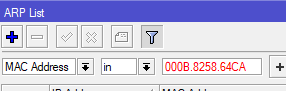
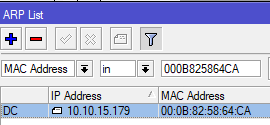
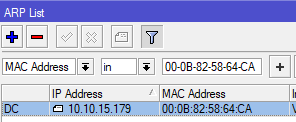
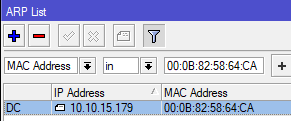
Simple solution for this is just to strip off all that is not [0-9a-fA-F]
I want represent MAC with Rex’s style:
(000000.0.0):0C:42-09:04:FE
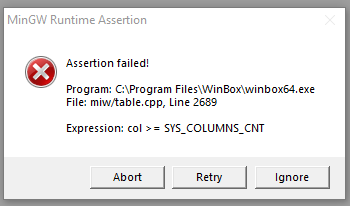
When I open the “IP - Firewall - Filter” window and try to move the “#” column (the one with order of the rules), Winbox throws the following error:
I confirm, but I’m curious why you want move that column, just for find a bug?
The issue has been reported to developers, thank you for the report.
It was an accident  I wanted to move another column - so just a random find.
IP/Kid Control/Devices: why is the traffic shown in bytes? Please make it show in gigabytes or at least megabytes.
Why. It would be hard to handle in external programs if this changes. In Splunk dashboard “MikroTik Device Traffic” that uses Kid Control, I can set the scale that would be useful to see on the graph.
In general it could be a useful feature in winbox to have some selectable output format for fields.
E.g. I would like a date field to be shown in YYYY-MM-DD format, no month names or "optimization" for "today".
Similar to the above request to show bytecounts in larger units.
For the view part in WinBox, It could be Ok that select scale, as long as original data are used behind.
Time format are a big mess in RouterOS/Winbox. It should use a standard format and not different type depending on where you look and if its some hour back or days back,
Kid control is a feature clearly intended for home usage.. whatever your need is to export this data to something like splunk.
The raw data could still be counted / exported in bytes, this topic is about winbox, it’d be easy to convert it to reasonable values and just display it in megabytes/gigabytes in WINBOX.