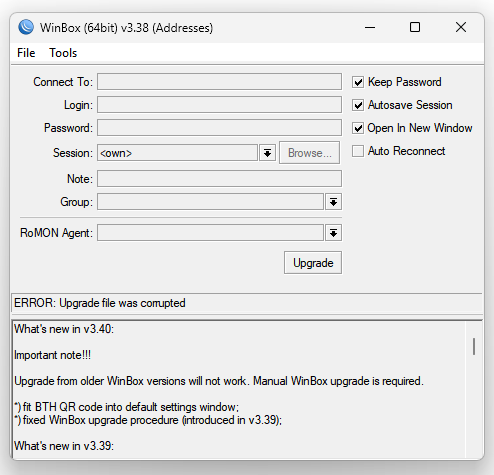
I get “ERROR: Upgrade file was corrupted” when trying to upgrade from v3.38 using the “Update” button. Tried retrying it several times with same result.
So it seems the upgrade problem was introduced earlier than v3.39 … ?
Edit: Ok, I see the news says “Upgrade from older WinBox versions will not work. Manual WinBox upgrade is required”. I will just update it manually, no trouble
Actually I’m also using CrossOver wine fork on Mac (Gcenx build), maybe with official wine it’s different. Wine is supporting Windows API WinVerifyTrust, if this API is used in Winbox to verify PE certificate.
I’m running ROS version 7.12 beta9 in which BTH is active and configured.
Or do you mean this winbox version with BTH is only working with ROS version 7.13 betaxx and above?
It will make people to not become narrow-eyed every time Winbox opens in dark room with dark-themed OS.
Also it probably won’t happen until complete UI component library redesign (basically Winbox rewrite). Real solution is to make your community open-source tool, like what Portainer did to Docker. RouterOS have really good API for that.
While it would be nice to have dark mode (I don’t care though), the question why are certain users nagging about it with every new winbox version is highly relevant. Release threads in this forum (such as this) should be used to report bugs (possibly specific to the particular version). And lack of dark mode is not a bug, it’s a missing feature. Go and harass MT via proper support channels (e.g. sales department).
Every time I execute the new Winbox64.exe on Windows 10, I get the software install warning “The app you’re trying to install isn’t a Microsoft-verified app” from Windows. I have also tried the 32-bit version of v3.40.
I have Windows set to warn when I’m installing an app from somewhere other than the windows store. This makes it harder for accidental installs of spyware to occur. So, I would rather not turn it off.
Note: I did not get this warning with the 32-bit v3.37.
PS: I hate forced dark mode. I work on the edge of a retail sales floor. There is so much light behind my monitor that it is nearly impossible to read most “Dark Mode” interfaces.