From the standpoint of the user, Winbox is a login manager, and everything shown after login comes from the device itself.
anything, literally everything what came from Java is useless piece of shit
I glad to hear winbox is not using this “language”…
+1000
Java? Crossplatform? Really? Well, goodbye good old winbox, this will be a useless piece of bloatware crap .
Oh, I think we just need some tolerance…How about Electorn-based software? Also you need to integrate a lot of telemetry, shitty touchscreen icons, some pictures, a good donate games (i prefer one or two, but who know), Siri and Google Assistant, ChatGPT…
…And subscriptions. “You can configure routing only for 99 Eur/mo.!”
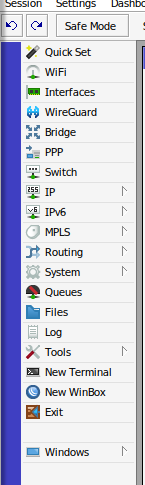
Mikrotik, can you please take care of the following skin bug. MPLS is disabled but still shown.
{
    "Mesh": 0,
    "MPLS": 0,
    "Dot1X": 0,
    "RADIUS": 0,
    "CAPsMAN": 0,
    "Wireless": {
        "W60G Station": 0,
        "Nstreme Dual": 0,
        "Channels": 0,
        "Interworking Profiles": 0
    },
    "PPP": {
        "L2TP Ethernet": 0,
        "PPP Scanner": 0,
        "PPTP Server": 0,
        "SSTP Server": 0,
        "OVPN Server": 0,
        "Import .ovpn": 0,
        "PPPoE Scan": 0,
        "PPPoE Servers": 0,
        "Secrets": 0,
        "Profiles": 0,
        "L2TP Secrets": 0
    },
    "Partition": 0,
    "Make Supout.rif": 0,
    "WinBox": 0,
    "License": 0,
    "Interfaces": {
        "EoIP Tunnel": 0,
        "IP Tunnel": 0,
        "GRE Tunnel": 0,
        "VXLAN": 0,
        "VRRP": 0,
        "VETH": 0,
        "MACsec": 0,
        "Bonding": 0,
        "MACVLAN": 0
    },
    "System": {
        "Auto Upgrade": 0,
        "Disks": 0,
        "Health": 0,
        "License": 0,
        "NTP Client": 0,
        "NTP Server": 0,
        "Packages": 0,
        "Ports": 0,
        "Reset Configuration": 0,
        "Special Login": 0
    },
    "Tools": {
        "BTest Server": 0,
        "Bandwidth Test": 0,
        "Email": 0,
        "RoMON": 0
    }
}
But Winbox menu looks like this:
Two things:
Both Winbox 32-bit and 64-bit versions are available here:
https://www.mikrotik.com/download
Download button on that page has the same URL linked, so clicking there returns to same page. No way to download Winbox.
How does a user identify which version of Winbox is in use? Can’t find that info in Winbox itself or in Wine when executing the .exe file.
Thanks.
Forget the question about the winbox version. I see it in a newly opened Winbox title bar before connecting to a router (when it shows the ROS version). I was on 3.37, downloaded the Oct '23 ver from another site which shows 3.40.
From WinBox menu on download page: https://mt.lv/winbox64 vs https://mt.lv/winbox - how is this same URL?

You cannot see that? Like on screenshot from your post
That’s brave (or…?), running router admin software downloaded from non official site
Got a fresh download from the official site: Winbox64.
anyone have an issue with version 3.40 of winbox and routeros 7 when logging in the session just disconnects? this only started when I upgraded to winbox 3.4
Which version of routeros ?
There have been versions (beta/rc) where this was an issue so best to make at least sure you’re at the latest stable version.
If it would be a generic problem, this place would be swamped with reports which AFAIK is not the case (yet).
I see native WinBox on Linux in my dream when i sleep )))
Which is why IMO effort should be directed at web applications, not native apps. Having written both, I completely appreciate that writing web apps is harder although considering the last one I wrote was 10+ years ago, I would imagine the frameworks have improved massively in that time. A web interface and controller approach would solve many problems and improve sales. Sure, it would introduce some new ones but I’m not in the mood for blockers 
There is already a dedicated topic for controller software: http://forum.mikrotik.com/t/mikrotik-devices-controller/158354/1
It is not. That’s why so many (including the big ones like Microsoft) used to develop Electron “desktop software”. In classic software development it is “hard” to separate user interface development. In web applications you easily throw the UI part to any army of FE developers, just hand over a backend interface API documentation and you’re pretty ready to go.
As I said, it is 10 years since I did any web app development and I still read CodeProject with envy as to how powerful the modern frameworks look these days. I want Mikrotik to thrive. I love the power of RouterOS but I do lose some customers to Unifi for simplicity of their cloud controller.
I’m already subscribed to that topic and the low down is AFAIK, the controller is dead. IMO management and controller are the same thing.
There’s already WebFig … functionality-wise it’s on par with WinBox, so no need to re-invent the wheel.
But there’s a very important difference, which can not be fixed by web app at all: WinBox can connect via MAC. And many users use WinBox because this function was a deciding point (when using it for one reason, one can use it always).
And this difference alone is the key selling point of WinBox (and also key differentiator from other vendors’ management tools, not many support in-band connectivity which doesn’t depend on at least half decently configured IP stack on network gadget).
There’s already WebFig … functionality-wise it’s on par with WinBox, so no need to re-invent the wheel.
There is yes but you can’t access it remotely unless you set-up port forwarding or VPN. Complexity again… also, it’s a per device interface, not a controller for the entire network. I’m not trying to diss it (too much) but defending the existing isn’t too helpful when you’re trying to think outside the existing box.
WinBox can connect via MAC.
I agree that this is occasionally a very useful feature but could a much simpler native application act as an interface between a web app and the device? The only reason why an application running in a browser can’t do the same as WinBox is because the same API isn’t available. This was a generic problem with all web apps which is why Progressive Web Apps came into existence.
Same with Winbox.
And please don’t respond you can open a port directly on your router for Winbox access. That’s, how shall I say … not smart.
It would really help if you stated what are your wishes/requirements from the new web app. Because there are many things that can already be done, but using a few different tools. There’s WebFig if you want to configure one device using Web browser (most home users need this). There’s WinBox if you want to configure one device but have connectivity issues/requirements. There’s RoMoN if you want to configure a fleet of ROS devices which can access each other (but aren’t necessary accessible directly from management station). There’s API which should in principle offer all management possibilities and one can build their own solution. Etc.
And your response to statement by @kko was very vague, but if one keeps it in context with original statement one can assume that you were talking about app which would run in linux (“natively” … web app is not native anywhere, winbox can decently run in wine environment).
Well, normal L6 applications (e.g. web browsers) are not made to play with L2/L3 stuff. And all OSes provide such API (IP stack, ethernet sockets). There are libraries which expose that to application … e.g. npcap, which is installed with windows wireshark and provide wireshark access to L2 of network interfaces. Turning such library into API … IMO that’s insanity (a huge can of worms in shape of security issues etc.). And I don’t see browsers incorporate such library either. So you can simply forget the idea of seeing web app connect via MAC to your ROS device.