Like "The Dude"... this is the best unofficial explanation so far...
All in all, it is the apparent sloppiness.
OT, but just noticed today (tripple):
https://mikrotik.com/product/hap_ax_s
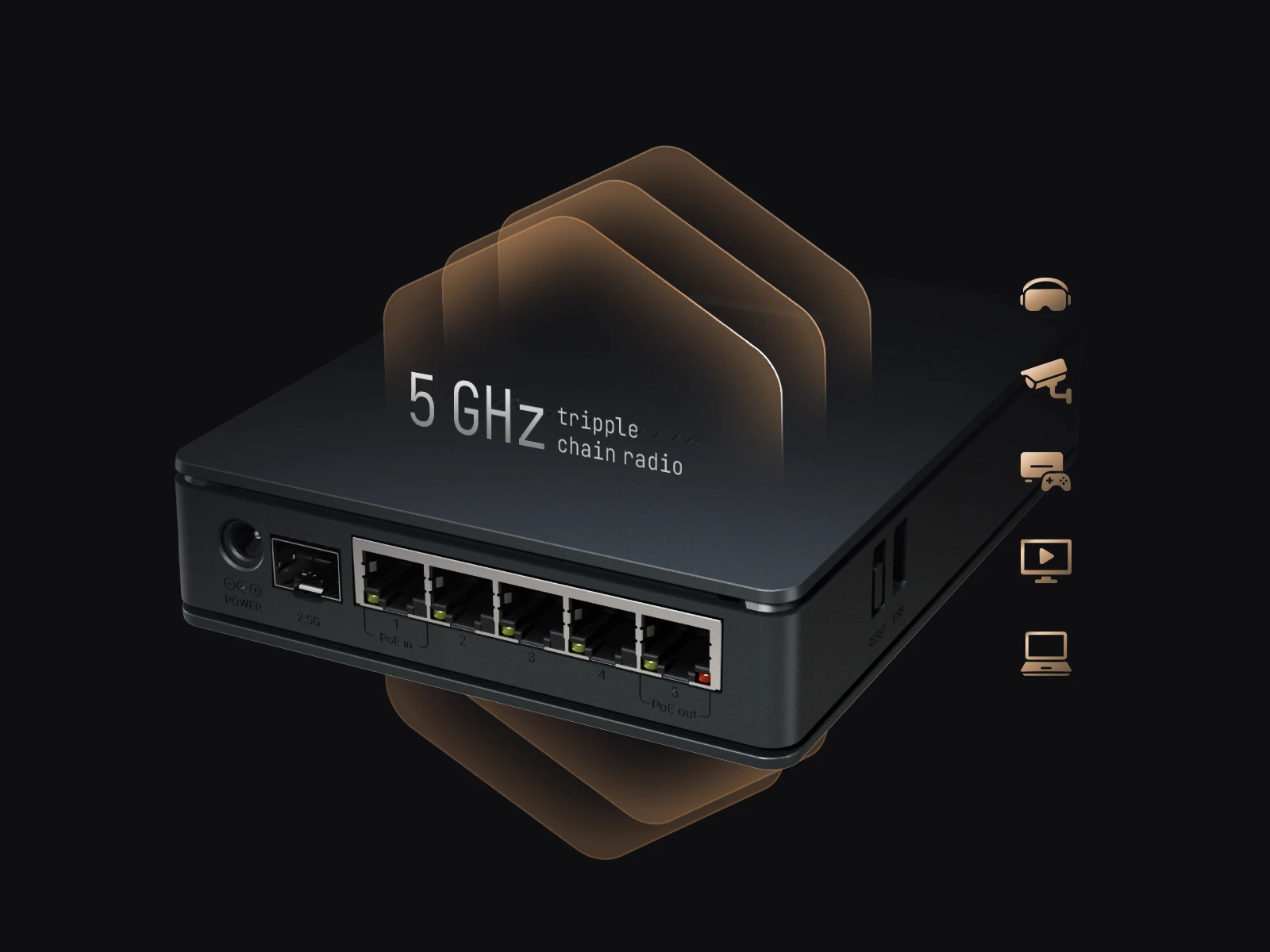
BTW, it isn't a typo on a (quickly typed) help page or forum post, it is an image in the official product page I presume it took some time to put together the image, giving the "right" hue and colours, scaling it, adding the (senseless) icons on the side, etc., then review and approval from the art director and/or product manager, the marketing department, etc. ...
This hap ax s has become quite infamous recently. I am really tempted to buy it just to see if it actually has all the issues other topics are talking about.
Is like WinBox 4, no matter if work correctly, must be nice...
Or the image is made with A.D. ...
Could you tell a bit more about that?
Just use the forum search functionality.
They should've went with "T-t-tripppple chains!"
Remember when I couldn't load a thing?
Buffering forever, drove me insane
Now I'm scrolling fast, my heart takes wing
Triple chains running through my veins
That old AC wireless was so slow
Now I'm flying, baby, watch me go
T-t-tripple, t-t-tripple chains
Can't slow down, take no pains
T-t-tripppple chains, speedy wifi connection
Got the lightning in my hands, total perfection
Download my dreams at the speed of light
T-t-tripppple chains keeping me alive
Yeah, t-t-tripppple chains, I'm alive
Tripple chains, I'm alive
More seriously, but still largely offtopic  , could it be that the "advertised" 900 Mbit are with three chains and all you can have is 500 or maybe 600 with only two chains?
No, but they losing revenue since they have no controller/"dude replacement", and instead worked on "multi-platform" WinBox4 client.
Version 2.
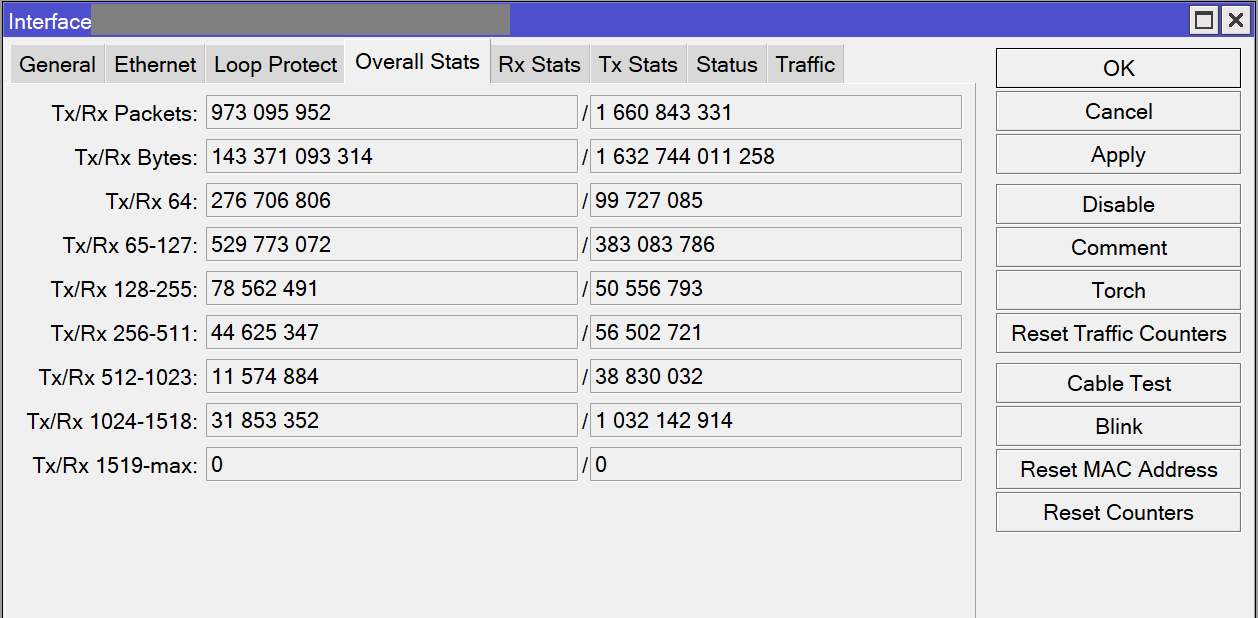
1. Added thousands grouping for 'Stats' tabs either.
There were no grouping at all, so the numbers were hard to read. Affects 'Overall Stats', 'Rx Stats' and 'Tx Stats' tabs, may be also some other places with similar data.
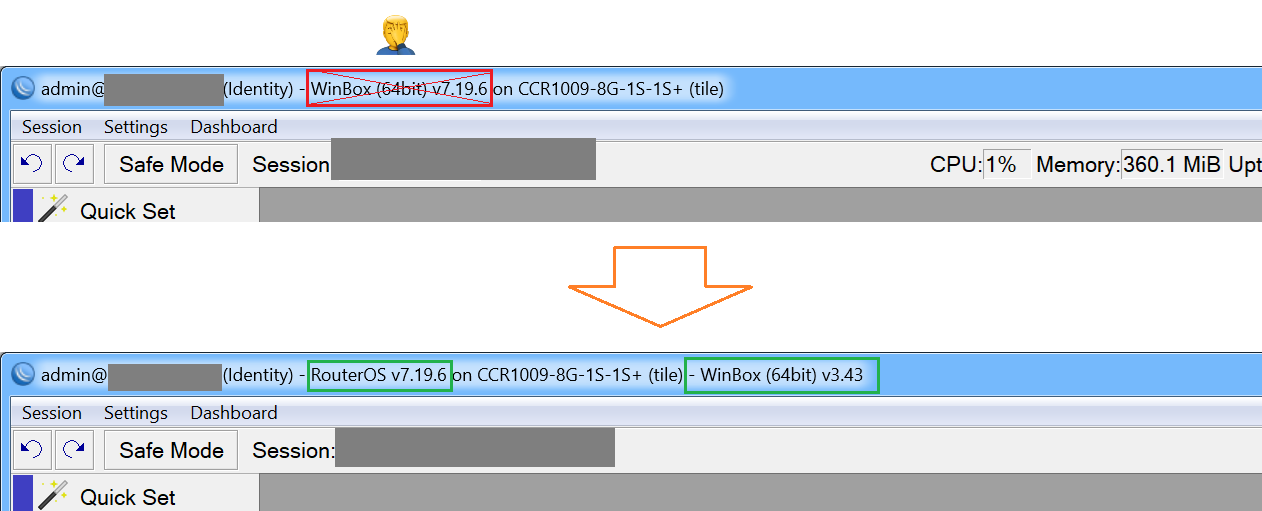
2. Updated main window title.
Replaced "WinBox (64bit) v7.xx" with "RouterOS v7.xx" (Seems, MikroTik doesn't differ RouterOS version from WinBox version...) and added WinBox version at the end. This looks more clear and logical and provides full information about versions. Works with RoMON too.
3. Added ability to change zoom using Ctrl + Mouse wheel.
Download: winbox64_ESR_2.zip (754.5 KB)
For advanced users:
Stats grouping mod
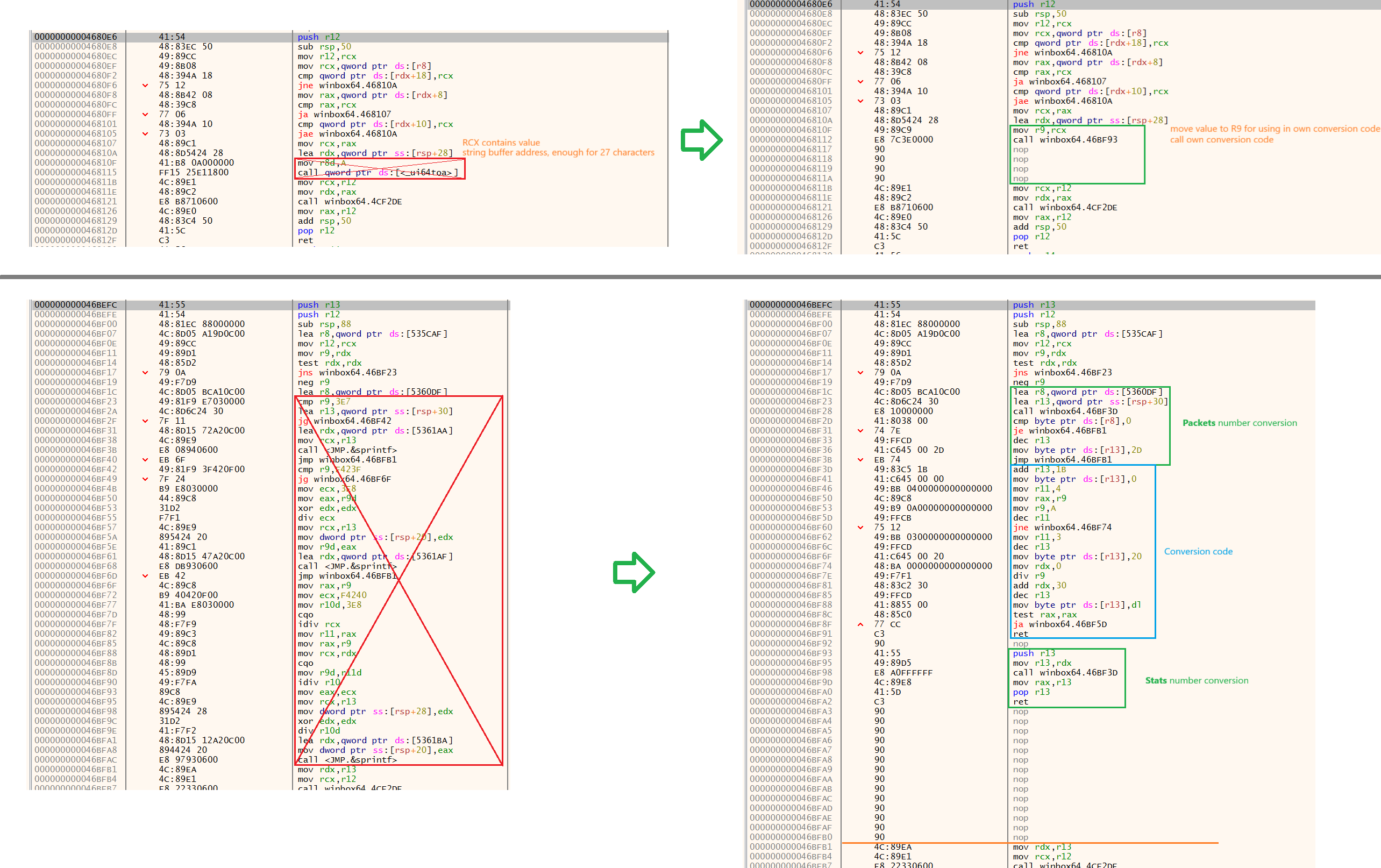
Stats numbers conversion function is located at address 0x4680E6.
For some unknown reason, MikroTik is using _ui64toa function for stats numbers conversion, instead of their own crooked implementation. This function doesn't support any grouping, so we have a mess.
Replaced the call of this function with the call to my own conversion code. Conversion code from version 1 was modified a little bit to make it invokable from different places.
// Packets number conversion start
  lea r13, [rsp+30h]        // Load string buffer (address was taken from the original code)
  call @Convert

// Packets number conversion finish
  cmp byte ptr [r8], 0      // R8 contains sign
  je 0x46BFB1               // No sign, continue to the original code
  dec r13
  mov byte ptr [r13], '-'
  jmp 0x46BFB1              // Continue to the original code

// Conversion code itself
@Convert:
  add r13, 27               // Add offset, because conversion is done from end to start
  mov byte ptr [r13], 0     // Null-character
  mov r11, 4                // Digits counter for grouping (+1 for the first iteration)
  mov rax, r9               // Number is located in R9
  mov r9, 10                // Divider

@ConvCycle:
  dec r11                   // Decrease digits counter for grouping
  jnz @SkipGroup
  mov r11, 3                // If 3 symbols moved to buffer,
  dec r13
  mov byte ptr [r13], $20   // then add 'Space' character
@SkipGroup:
  mov rdx, 0
  div r9                    // Divide by 10, RAX - quotient, RDX - remainder
  add rdx, $30              // Convert to digit character
  dec r13
  mov byte ptr [r13], dl    // Move character to buffer

  test rax, rax             // Check if a number is fully converted
  ja @ConvCycle

  ret                       // Return

// -----
  nop

// Added the code for converting stats numbers in a code cave just after initial conversion code

@StatsConv:
  push r13                  // Save R13 register to stack, because it's used in the routine that calls stats conversion routine
  mov r13, rdx              // Load string buffer address from RDX
  call @Convert
  mov rax, r13              // Load result address to RAX
  pop r13                   // Restore R13
  ret

  nop
  nop
  ...
As you see, conversion code itself is labelled as @Convert: and for packets number conversion everything remains as in version 1, only call and return is added. For stats number conversion there is an additional code added at the end (some free space has left after replacing conversion code in version 1), it's labelled as @StatsConv: and performs some actions to correctly integrate @Convert: function for stats numbers grouping.
In the end, modifications look like this:
Title modification mod
Replacing - WinBox (64bit) v with - RouterOS v is quite simple, this string is located in .rdata section at address 0x538779, so just changed it. It's shorter, so all remaining characters were filled with zeroes.

To add WinBox version at the end, new code was needed.
.rdata section has "WinBox (64bit) v3.43" string at address 0x539BBC, so it can be used for title ending. Only hyphen is required. There is some free space in .rdata section at address 0x539E44, so I've added it in there.

Title making routine is located at address 0x4B46E8. At address 0x4B4A00 it passes the final string to other function that sets it to the window title. So, it's required to inject string modification code before it. I decided to replace the code at address 0x4B49F8 with the call to my title modification code and move 2 replaced instructions into it. Title modification code was placed in a code cave in .text section at address 0x531460.
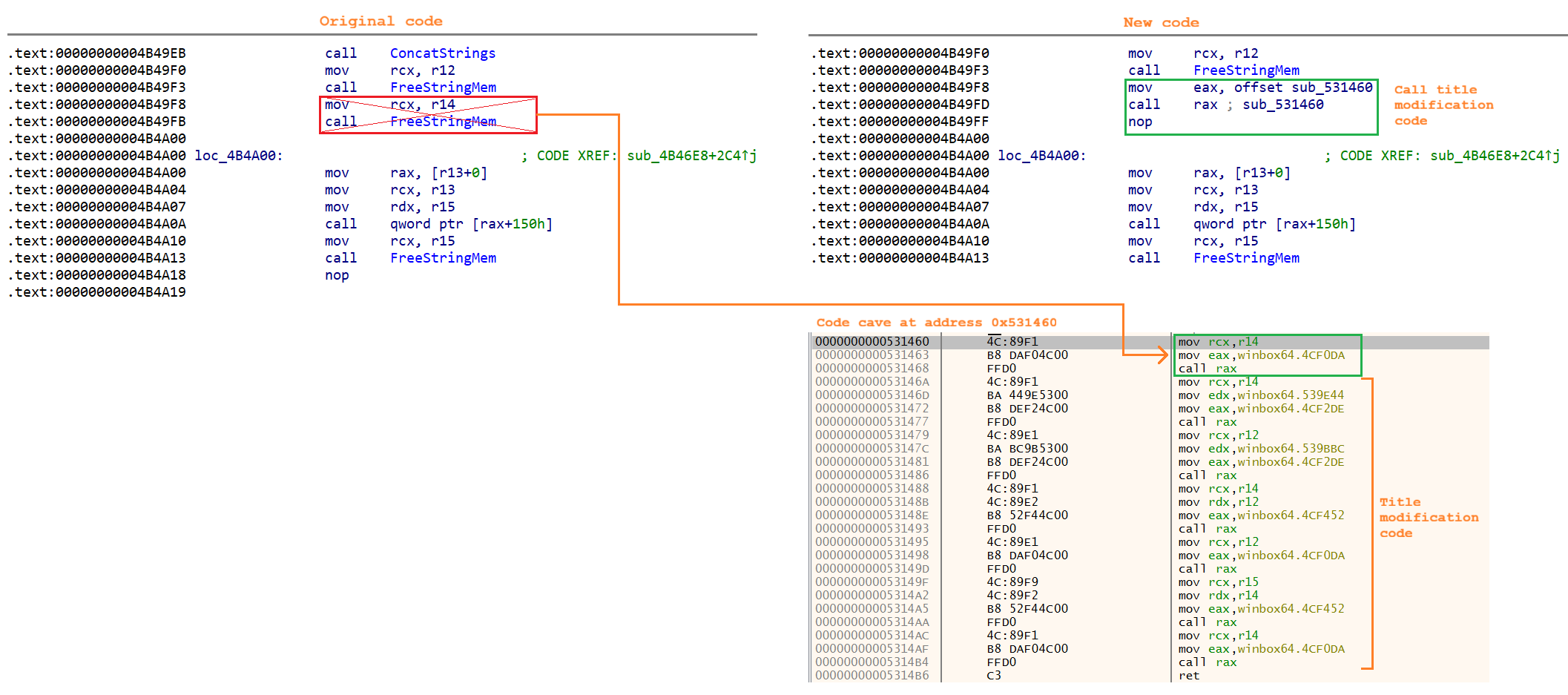
Title modification code:
  mov rcx, r14                      // Part of original replaced code (used indirect call to avoid address offset calculation)
  mov eax, Proc_FreeString_Addr
  call rax

  mov rcx, r14                      // String dst buffer (address in R14 is free)
  mov edx, rdataHyphenAddress       // Address of " - " string in .rdata
  mov eax, Proc_ExtractStoredString_Addr
  call rax

  mov rcx, r12                      // String dst buffer (address in R12 is free)
  mov edx, WB3_String_Addr          // Address of "WinBox (64bit) v3.43" string in .rdata
  mov eax, Proc_ExtractStoredString_Addr
  call rax

  mov rcx, r14                      // R14 - address of " - " string
  mov rdx, r12                      // R12 - address of "WinBox (64bit) v3.43" string
  mov eax, `Proc_ConcatStrings_Addr`
  call rax                          // R14 - address of " - WinBox (64bit) v3.43" string

  mov rcx, r12
  mov eax, Proc_FreeString_Addr     // Free mem of " - " string
  call rax

  mov rcx, r15                      // R15 - address of title string
  mov rdx, r14                      // R14 - address of " - WinBox (64bit) v3.43" string
  mov eax, Proc_ConcatStrings_Addr
  call rax

  mov rcx, r14
  mov eax, Proc_FreeString_Addr     // Free mem of " - WinBox (64bit) v3.43" string
  call rax

// Finally, R15 contains a pointer to the address of the modified title string

  ret
R12 and R14 contain free addresses and can be used to temporarily place new strings. R15 contains a pointer to the address of the title string (original and modified).
Proc_FreeString_Addr is a function at address 0x4CF0DA. It frees a memory allocated to a string, when it's not needed anymore. Accepts a pointer to the address of the string in RCX.
Proc_ExtractStoredString_Addr is a function at address 0x4CF2DE. It extracts a string from .rdata section at specified address. Accepts address for new string placement in RCX and .rdata address of a string in RDX.
Proc_ConcatStrings_Addr is a function at address 0x4CF452. It concatenates two strings. Accepts a pointer to the address of 1st string in RCX and pointer to the address of 2nd string in RDX. Address in RCX will contain a pointer to the address of the new string.
Zoom with 'Ctrl + Mouse wheel' mod
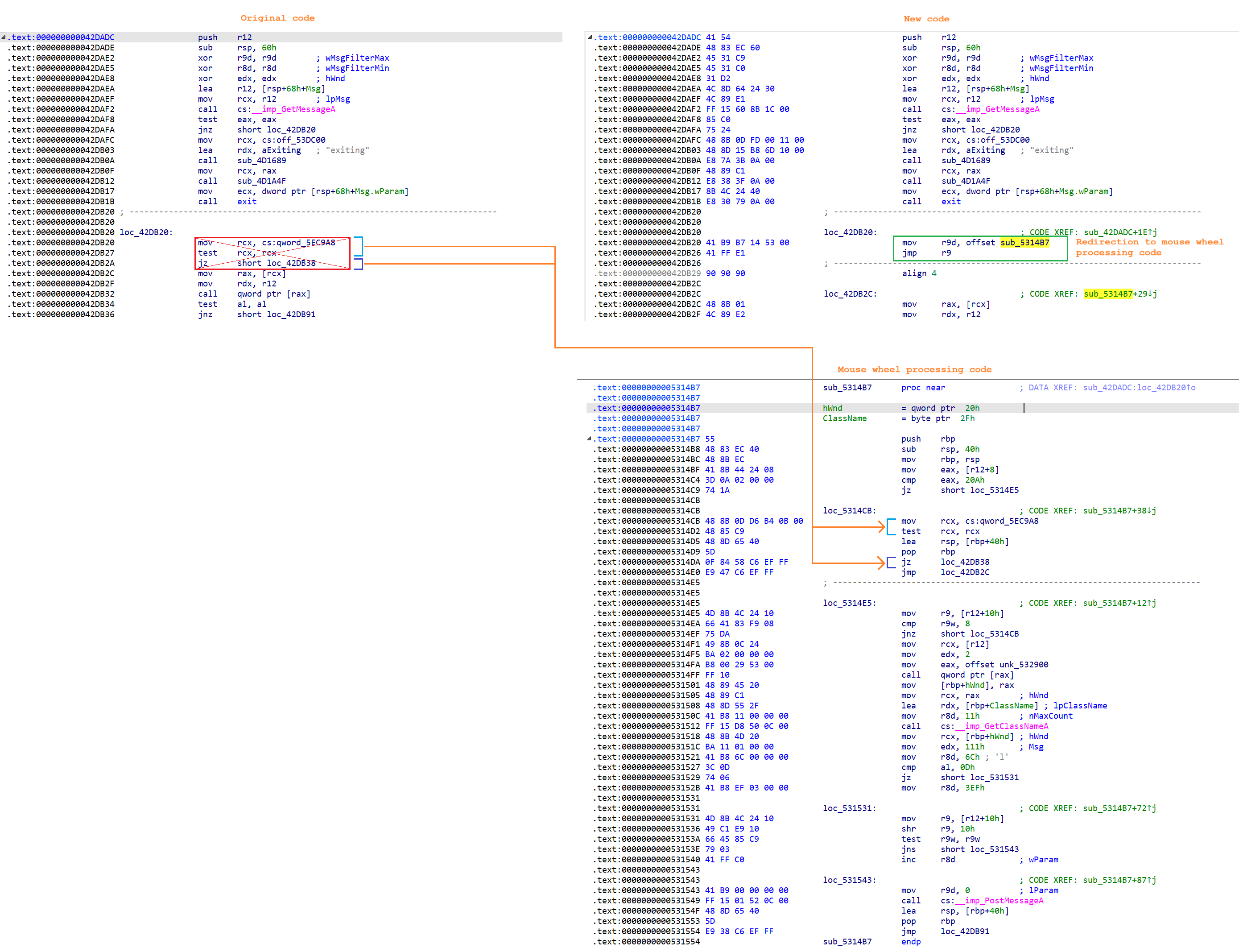
To catch mouse wheel events it's required to read WM_MOUSEWHEEL messages in a main application loop. The loop is located at address 0x4BC7A4. The message is read using WinAPI GetMessage function at address 0x42DAF2, and I've injected a redirection call at address 0x42DB20, it will pass control to my own code, that processes WM_MOUSEWHEEL messages. Replaced instructions are of course moved.
If the needed mouse wheel event is catched, the code needs to change zoom. I've decided to find WM_COMMAND messages that are translated from
Ctrl + '+' and Ctrl + '-' shortcuts. And, for some reason, WinBox registers different accelerator identifiers for 'Connect' and 'Main' windows.
| Window | Zoom In | Zoom Out |
|---|---|---|
| Connect | 0x3EF | 0x3F0 |
| Main | 0x6C | 0x6D |
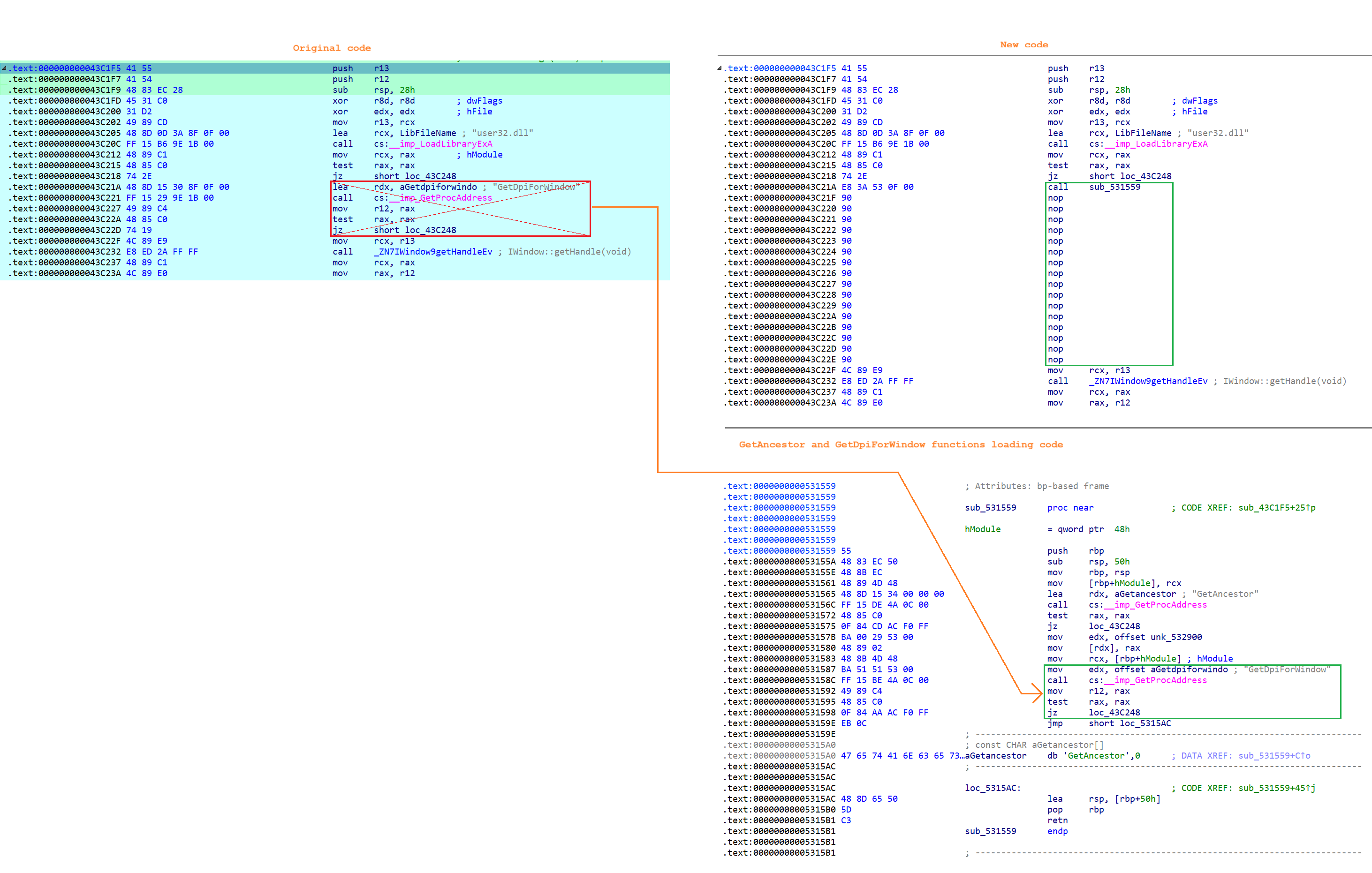
So, after catching a mouse wheel message, it's needed to send a WM_COMMAND message to the app window with appropriate identifier. I'm using PostMessage WinAPI function for that. One note is that a mouse wheel event can be received from any internal window or control, but the message should be sent only to the parent app window, so it's required to get its handle. For this purpose there is a GetAncestor WinAPI function from the user32.dll library. If called with GA_ROOT argument, it will always return main parent window handle from any of the child's handle. The only problem is that this function is not imported by the original WinBox, so it needs to be loaded dynamically. Luckily, there is a place, where the app loads the address of GetDpiForWindow function that is also located in user32.dll library, so it simplifies the mod. I've placed a redirection call at address 0x43C21A. The code, that loads the address of GetDpiForWindow function was also moved to my code. To store the address of GetAncestor function at runtime I'm using a free space in the end of the .data section at address 0x532900. The loading code is placed in a code cave at address 0x531559.
Redirection to the mouse wheel processing code is placed at address 0x42DB20. The mouse wheel processing code is placed in a code cave at address 0x5314B7. First it checks if a Ctrl key was pressed. If not, it executes 3 replaced instructions and returns to the original code as nothing happened. If Ctrl was pressed, it finds the parent window handle and chooses an appropriate accelerator identifier based on wheel direction and parent window type (connect or main window). Connect window has 'routeros_connect' class, main window has 'routeros_main' class. And I'm using GetWindowClassA function to get it from a handle. But for quicker processing I just check the length of a class string returned by the function, there is no need to compare strings themselves, there are only 2 possible options. After that, the code sends a message to change current zoom and returns to the original code. More detailed comments are in the code below.
Mouse wheel processing code itself:
// R12 - MSG struct
  mov eax, [r12 + 8]			// Msg code
  cmp eax, WM_MOUSEWHEEL		// check if equal to WM_MOUSEWHEEL (0x20A)
  je @MouseWheel

// -------------------------- Replaced original code ---------------------------
@OrigCode:
  mov rcx, cs:qword_5EC9A8		// If not, execute part of replaced original code
  test rcx, rcx

  lea rsp, [rbp + $40]			// Return stack (not a part of original code)
  pop rbp

  jz 0x42DB38
  jmp 0x42DB2C					// Jump to original code
// -----------------------------------------------------------------------------

@MouseWheel:
  mov r9, [r12 + 10h]			// wParam, contains the distance (high word) and virtual key (low word)
  cmp r9w, MK_CONTROL			// Check if Ctrl was pressed
  jne @OrigCode					// If not pressed, return to original code

// --------- Get root window class (routeros_main or routeros_connect) ---------
  mov rcx, [r12]				// hWnd
  mov edx, GA_ROOT
  mov eax, DataCave_Addr
  call [rax]
  mov TophWnd, rax				// Keep top parent hWnd
  mov rcx, rax
  lea rdx, ClassName
  mov r8d, 17					// ClassName length
  call GetClassNameA			// GetClassNameA(hWnd, ClassName, 17)

  mov rcx, TophWnd				// Top parent hWnd
  mov edx, WM_COMMAND			// Msg

// ---------------------- Load appropriate accelerator ID ----------------------
  mov r8d, $6C					// 0x6C - zoom in for main window
  cmp al, 13					// Length of 'routeros_main'
  je @ros_main_window			// If 'routeros_main' then keep value as is,
  mov r8d, $3EF					// otherwise load 0x3EF - zoom in for connect window
@ros_main_window:
  mov r9, [r12 + 10h]			// wParam
  shr r9, 10h					// Scroll distance (multiple of WHEEL_DELTA (120))
  test r9w, r9w					// Check only direction, distance doesn't matter, always consider as single scroll
  jns @MouseWheel_PostMessage	// If positive, keep as is and skip to next instruction
  inc r8d						// If negative, then change to zoom out (0x6D for main window, 0x3F0 for connect window)

// -------- Send message and skip original wheel processing code ------
@MouseWheel_PostMessage:
  mov r9d, 0					// lParam = 0
  call PostMessage				// PostMessage(Parent_hWnd, WM_COMMAND, AcceleratorID, 0)

  lea rsp, [rbp + $40]
  pop rbp
  jmp 0x42DB91					// Skip original message processing
Modifications look like this:
Please, if you can, switch admin@xxx with identity, on more windows open is better know the device than the login...
Anything that scrapes a Whinders dependency off into the toilet is a VERY good thing . . .
Yes, I was planning it.
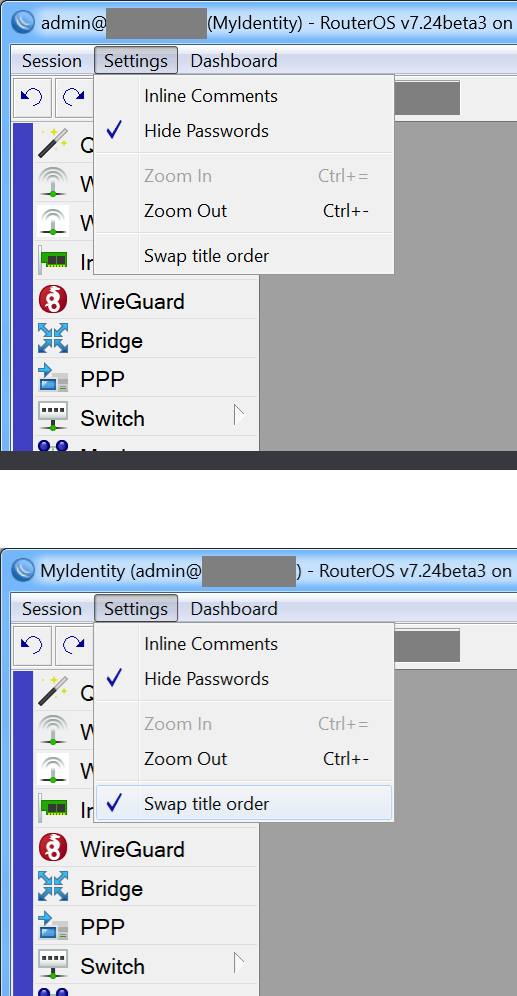
Identity (admin@host) - RouterOS... - would this format be ok?
It would be nice to have it adjusted to the right to easily asses numbers.
This would improve it more than the grouping alone.
Do you know any places with right-justified fields (not table cells)? It would help to figure out how to do this, if it's even supported. I didn't see such examples.
Version 3.
Download: winbox64_ESR_3.zip (755.3 KB)
-
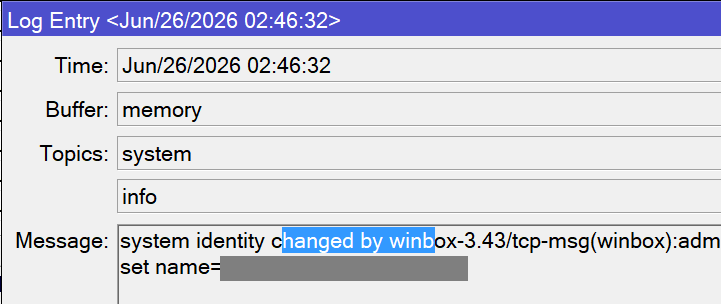
Fixed invisible selection in Message field of 'Log Entry' window. Relevant to RouterOS 7.20+, where this field has become multiline. The only problem is that it selects all text, when the window becomes focused after being unfocused. (may be they've "fixed" this problem by just hiding selection...
 ). Will try to fix it later in a normal way.
-
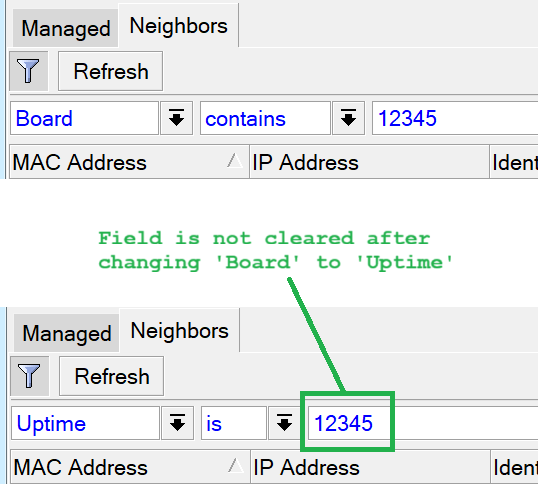
Fixed filter value field was cleared when changing filter parameter.
-
Added ability to change the order of user@host and identity in main window title. The new setting is available under 'Settings' menu in main window. It's saved on app close and stored in
%AppData%\Roaming\MikroTik\WinBox\settings.dat, i. e. in the same place as original WinBox'ssettings.cfg.viwfile. I had no wish to figure out in its format, so added own file. It will be used to store other settings in future releases. The file is saved on app close and only if a setting was modified.
-
Fixed own bug that was causing an exception. It's not critical and unnoticable, because it was occuring only when the app was closed, but anyway, it wasn't good.
For advanced users:
Added new own .text, .rdata and .data sections to executable.
This solves many current and potential future problems:
- Existing code cave at address
0x531460is already not enough to store my own code, new.textsection removes this size limitation and can be increased as needed - Better data organization - can store strings and other constants in new
.rdatasection, no need to store them in the code - Runtime data, like addresses and some values will be stored in new
.datasection - No risk to interfere with anything (like in the issue 4)
Log Entry selection fix
The multiline message field is a standard Windows' "EDIT" class, and it's created with CreateWindowEx WinAPI function. In original, its dwClass parameter is equal to 0x40200044, i. e. it consists of these values: WS_CHILD | WS_VSCROLL | ES_AUTOVSCROLL | ES_MULTILINE. It also adds other values, depending on some conditions, but I wasn't looking into that. The parameter is calculated at address 0x4445E2 while creating the object. I've just added ES_NOHIDESEL value (0x100) and it solved the problem. So, the whole fix is just changing one bit (0x40200044 -> 0x40200144).
Filter field clear fix
There are 2 possible field types in filters - TextEdit and ComboBox. When you add a new filter, it creates both objects and hides one of them, depending on selected filter parameter. For example, if you add a new firewall filter, you see 'Action' parameter by default and a ComboBox field to choose or type a value. If you then select 'Comment' parameter, it hides ComboBox and shows TextField. But in background both object do exist, the app only changes their visibility. So, to keep the typed value, it's required not only to intercept string removal, but also to copy it between TextEdit and ComboBox, when needed.
Everything happens in the function, that is located at address 0x4566C8. It's called, when you change a filter parameter. It clears the field value just before making it visible, i. e., when the field is hidden in background, it keeps the value. Attached original code with some comments. If selected parameter requires a ComboBox, it executes the code at address 0x45675F, if it requires TextField, it executes the code at address 0x45679E. In both cases rbx register is loaded with the address of a method, that clears the value and then executed in call rbx instruction.
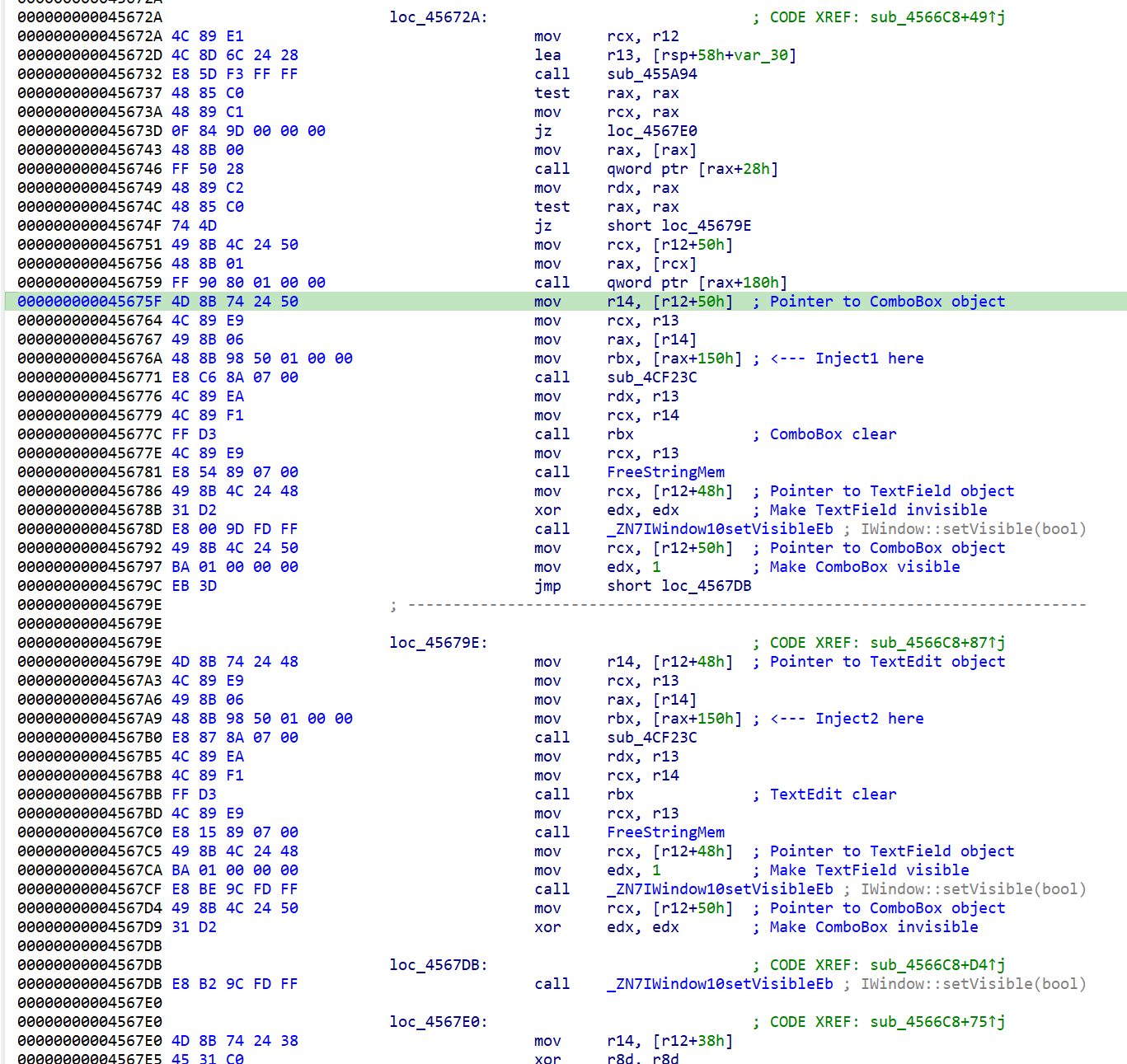
Some info about objects:
TextField object contains a pointer to its string value address at offset [base+60h]
ComboBox consists of the same TextField object and the button. Inside ComboBox, a pointer to TextField object is located at offset [base+48h]
I've modified 2 instructions in the code above (marked as Inject1 and Inject2) so, that rbx is loaded with the addresses of my own code, that handles moving string values between TextField and ComboBox, when needed. Original values emptying code is not executed. Below is the code itself.
// Call ComboBox clear (from Inject1)
// Need to copy value from TextEdit to ComboBox

  mov rcx, [r12+50h]		// Load ComboBox object pointer
  call IWindow::isVisible

  test al, al				// If visible, then skip
  jnz @End

  mov rsi, [r12+48h]    	// Pointer to TextEdit object (source)
  mov rbx, [rsi+60h]		// String address in TextEdit object (source)

  mov rdi, [r12+50h]    	// Pointer to ComboBox object (destination)
  mov rdi, [rdi+48h]		// Pointer to TextEdit object of ComboBox
  lea rcx, [rdi+60h]		// Pointer to string address in TextEdit object of ComboBox (destination)
  cmp [rcx], Zero_Addr		// Check if string was zeroed before replacing
  je @SkipFree1

  call FreeStringMem		// sub_4CF0DA

@SkipFree1:
  mov [rdi+60h], rbx		// Move string address from TextEdit to ComboBox
  mov [rsi+60h], Zero_Addr	// Load zero string address to avoid app crash on objects destroy
  ret

// ---

// Call TextEdit clear (from Inject2)
// Need to copy value from ComboBox to TextEdit

  mov rcx, [r12+48h]		// Load TextEdit object pointer
  call IWindow::isVisible

  test al, al				// If visible, then skip
  jnz @End

  mov rsi, [r12+50h]    	// Pointer to ComboBox object (source)
  mov rsi, [rsi+48h]		// Pointer to TextEdit object of ComboBox
  mov rbx, [rsi+60h]		// String address in TextEdit object of ComboBox (source)

  mov rdi, [r12+48h]		// Pointer to TextEdit object (destination)
  lea rcx, [rdi+60h]		// Pointer to string address in TextEdit object (destination)
  cmp [rcx], Zero_Addr		// Check if string was zeroed before replacing
  je @SkipFree2

  call FreeStringMem		// sub_4CF0DA

@SkipFree2:
  mov [rdi+60h], rbx		// Move string address from ComboBox to TextEdit
  mov [rsi+60h], Zero_Addr	// Load zero string address to avoid app crash on objects destroy
@End:
  ret
Swap title order mod
Main menu for main window is created in sub_4B53CA. Injected redirection to my item adding code at address 0x4B6255.
New item adding code:
  mov eax, Proc_FreeString_Addr			// Replaced original instruction
  call rax

  mov rcx, [r12+50h]
  mov edx, $999
  mov rax, [rcx]
  call qword ptr [rax+28h]				// Add separator (sub_441540)

  mov r14, [r12+50h]
  mov edx, ItemCaption
  mov rcx, r13
  mov rax, [r14]
  mov rsi, [rax+18h]
  mov eax, Proc_ExtractStoredString_Addr
  call rax
  xor r9d, r9d
  mov r8, r13
  mov edx, SwapTitleOrderMenuItemID
  mov rcx, r14
  call rsi								// Add menu item
  mov rcx, r13
  mov eax, Proc_FreeString_Addr
  call rax

  mov rcx, [r12+50h]
  mov edx, SwapTitleOrderMenuItemID		// item ID
  mov r8d, data_TitleOrder_Addr			// Address of checked flag value in .data
  mov r8, [r8]
  and r8, 1
  mov rax, [rcx]
  call qword ptr [rax+38h]				// Set checked state (sub_4415DA)
  ret
Menu click handling for main window is performed in sub_4B41BA. Injected redirection to own item handling code at address 0x4B41F8.
New menu item click handling code:
  cmp dx, SwapTitleOrderMenuItemID - 64h		// DX = Menu item ID - 64h
  je @ProcessSwapTitle							// New menu item clicked

  cmp dx, 0Fh									// Original replaced code
  ja 0x4B42D9
  jmp 0x4B4202									// Some other item clicked, return back

@ProcessSwapTitle:
  xor byte ptr [data_TitleOrder_Addr], 1		// Invert value
  or qword ptr [data_ModifiedFlags_Addr], 1		// Flag as modified

  mov r8b, byte ptr [data_TitleOrder_Addr]		// Load checked state value

  mov rcx, [r12+50h]
  mov edx, SwapTitleOrderMenuItemID             // item ID
  mov rax, [rcx]
  call qword ptr [rax+38h]                      // Set checked state (sub_4415DA)

  mov rcx, r12
  mov eax, MakeTitleString_Addr                 // Update window title (sub_4B46E8)
  call rax

  jmp 0x4B42D9									// default case
To load/save menu item state, wrote 2 functions that read/write its state to settings.dat file.
Current file format:
| Offset (bytes) | Description | Data | Data size (bytes) | Notes |
|---|---|---|---|---|
| 0h | Signature | 0xAA555354 | 4 | |
| 4h | Title order | 0 or 1 | 4 | 0 - standard order; 1 - swapped admin@host and Identity |
The file is read on app initialization in sub_4B8994. Injected redirection to reading function at address 0x4BC758.
Reading code:
  mov eax, GetAppDataDirSub_Addr			// call GetAppDataDir (sub_4AEF59, replaced instruction)
  call rax

  mov rdx, r14								// r14 contains a pointer to the address of AppData path
  mov r8d, rdata_SettingsFileName_Addr

  mov ecx, data_FullSettingsFileName_Addr	// Address in .data to receive full file name
  mov eax, ConcatStringsSub_Addr
  call rax									// call ConcatStringsSub (sub_4B6C4C)

  mov ecx, [data_FullSettingsFileName_Addr]	// Full file name string
  add rcx, 4
  mov edx, GENERIC_READ
  mov r8d, FILE_SHARE_READ
  xor r9, r9
  mov dword ptr [rsp+20h], OPEN_EXISTING
  mov dword ptr [rsp+28h], FILE_ATTRIBUTE_NORMAL
  mov [rsp+30h], 0
  call CreateFileA

  mov FileHandle, rax
  cmp FileHandle, INVALID_HANDLE_VALUE
  je @KeepDefaultValue

@DoRead:
  mov rcx, FileHandle
  lea rdx, Buffer
  mov r8d, 8
  lea r9, BytesCount
  mov [rsp+20h], 0
  call ReadFile

  test eax, eax								// some read error
  jz @CloseAndLeaveDefaultValues

  cmp BytesCount, 8							// check read bytes
  jne @CloseAndLeaveDefaultValues

  mov rax, [Buffer]
  cmp eax, SettingsFileSignature			// Check signature
  jne @CloseAndLeaveDefaultValues

  ror rax, 32								// Swap halves
  mov edx, eax
  and edx, $FFFFFFFE						// Check if 0 or 1, otherwise incorrect value
  test edx, edx
  jnz @CloseAndLeaveDefaultValues

  mov ecx, data_TitleOrder_Addr				// Load the value read from the file into address in .data
  mov byte ptr [rcx], al

@CloseAndLeaveDefaultValues:
  mov rcx, FileHandle
  call CloseHandle (modify address) $C4

@KeepDefaultValue:
  ret
If the file doesn't exist or contains any error, default value is loaded (standard title order).
Writing to the file occurs on app close. Placed redirection to writing code right after return from the main application loop at address 0x42DAFC.
Writing code:
  cmp dword ptr [data_ModifiedFlags_Addr], 0	// Check if some parameter was modified
  jz @End

  mov ecx, [data_FullSettingsFileName_Addr]		// Full file name kept in .data after reading on app initialization
  add rcx, 4

  mov edx, GENERIC_WRITE
  xor r8, r8
  xor r9, r9
  mov dword ptr [rsp+20h], CREATE_ALWAYS
  mov dword ptr [rsp+28h], FILE_ATTRIBUTE_NORMAL
  mov [rsp+30h], 0
  call CreateFileA

  mov FileHandle, rax
  cmp FileHandle, INVALID_HANDLE_VALUE
  je @End

@DoWrite:
  mov dword ptr [Buffer+0], SettingsFileSignature
  mov ecx, [data_TitleOrder_Addr]
  mov dword ptr [Buffer+4], ecx					// Move title order value to buffer

  mov rcx, FileHandle
  lea rdx, Buffer
  mov r8d, 8
  lea r9, BytesCount
  mov [rsp+20h], 0
  call WriteFile

  mov rcx, FileHandle
  call CloseHandle

@End:
  mov ecx, data_FullSettingsFileName_Addr		// Full file name ptr
  call FreeStringMem							// sub_4CF0DA

  mov rcx, off_53DC00							// replaced original instruction
  ret
Exception bug
I've noticed, that the app was throwing an exception at address 0x4D3530 after closing. There is some cleanup happening in this place, and for some reason the cleaning code is reading the address of a code cave (0x531460) and it was looking for zero bytes, that were originally in this place. These zeros act as a condition to complete the cleanup loop. So, I just shifted all my code 8 bytes down and left first 8 zero bytes in a code cave to make cleanup code finish successfully.
Is there a way to fix the bug that changes the Wi-Fi configuration after ROS 7.22 interworking.realms-raw? This makes it very inconvenient to use WinBox 3 on the latest versions of ROS.
I'll take a look into this
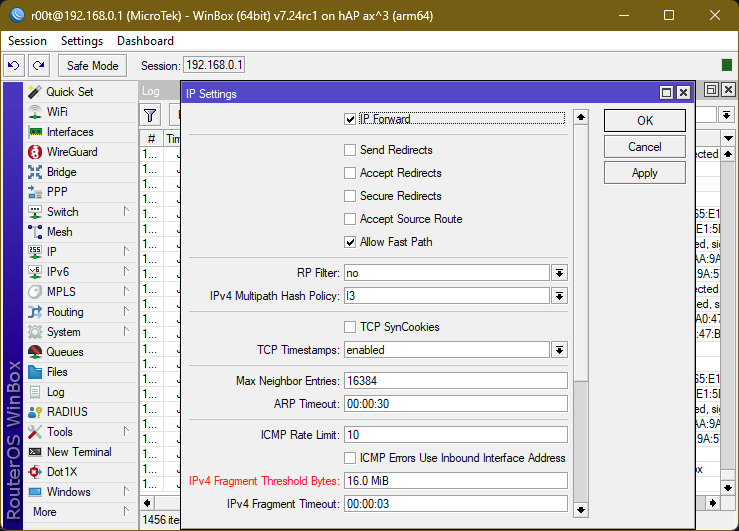
Hi, great job. I like how it works much faster, i.e., it connects instantly compared to the original. I hope you can add a dark theme so I don’t have to deal with the fourth terrible parody of Winbox every time. There's a request to fix the menu in ip->settings, since from some version on, options only change properly through the terminal or the disgusting 4. By the way, on my ReFS-installed Windows (maybe exploit protection), for some reason 3ESR doesn't run, only the original.
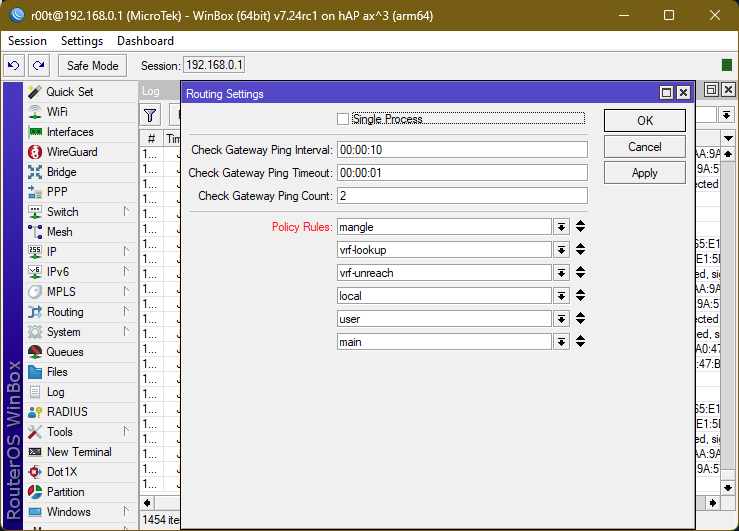
Event Viewer Log:
Faulting application name: winbox64.exe, version: 3.43.102.3, time stamp: 0x00000000
Faulting module name: ntdll.dll, version: 10.0.28000.2179, time stamp: 0x7a0e62fc
Exception code: 0xc0000005
Fault offset: 0x00000000001651d1
Faulting process id: 0xCC4
Faulting application start time: 0x1DD1C4E773092B6
Faulting application path: C:\Users\root\Downloads\winbox64.exe
Faulting module path: C:\WINDOWS\SYSTEM32\ntdll.dll
Report Id: 4ac27d7f-92e4-42bd-9b3d-86800be98502
Faulting package full name:
Faulting package-relative application ID: