Something I have been struggling with for quite some time and I just can not get it right.
I’m sure once I see the solution, it will be something simple but I just don’t see it.
OK, to start, network diagram attached.
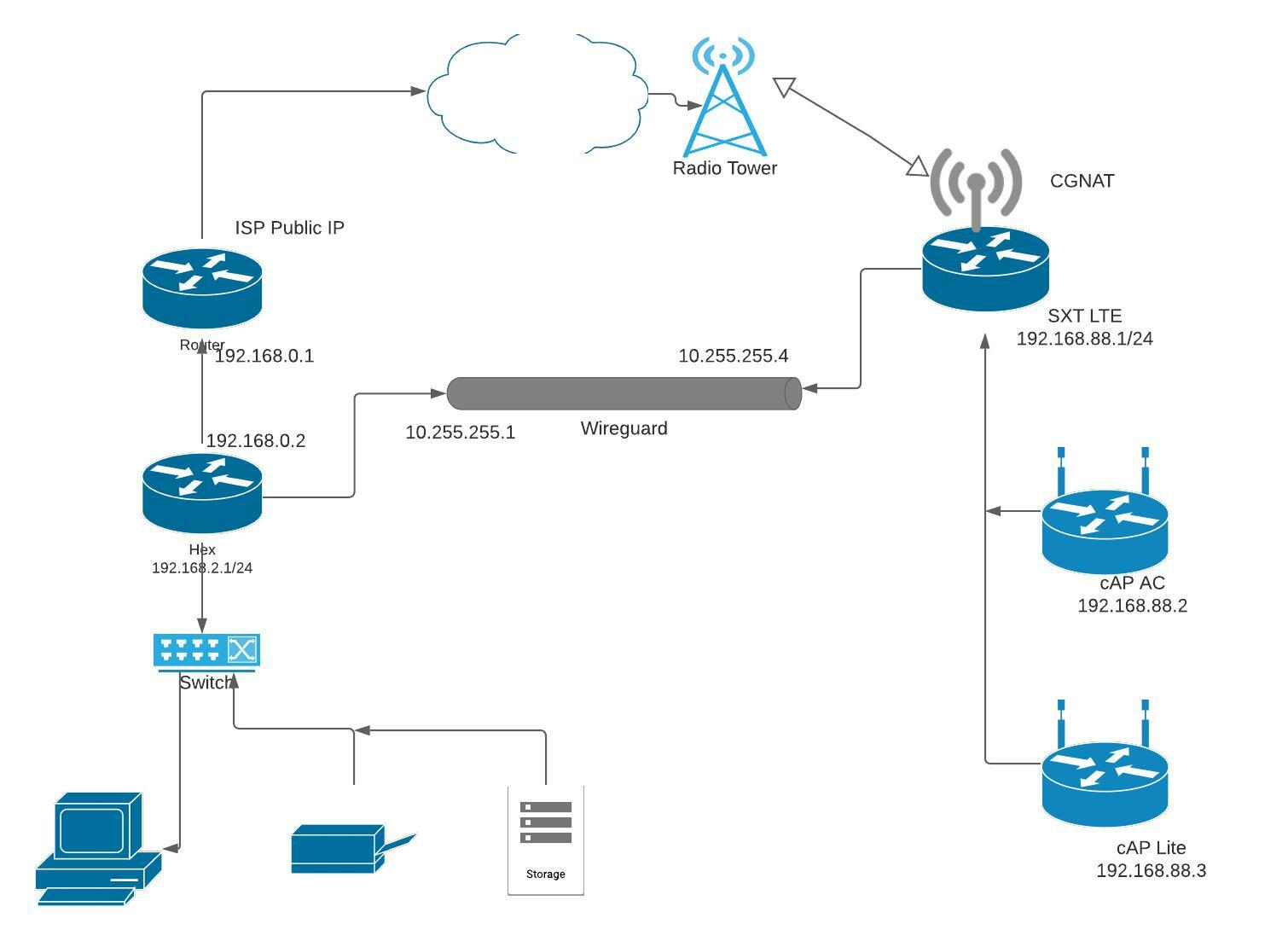
Requirement:
to be able to connect two sites through wireguard, both LAN environments need to be accessible from ‘the other side’.
Home environment:
Hex 7.1.1, sitting behind ISP modem with dynamic IP (though in the past I have NEVER seen it change, I consider it dynamic to be safe), port forwarding for Wireguard from ISP to Hex.
Some remote WG devices like laptop and phone, they can connect without any problem to local LAN (not on diagram).
Remote environment:
SXT LTE, CGNAT, 7.2rc3, CAPSMAN
Serving 2 APs (cAP AC and cAP Lite, both also 7.2rc3)
Wireguard between Hex and SXT works when using WG IP adresses.
The problem starts once I want to access device behind the router or use the normal LAN IP addresses.
When I’m home and want to ping 192.168.88.1 → timeout.
Ping to 192.168.88.2 → timeout
When I am in France and want to access NAS on 192.168.2.15 → timeout.
Ping to 192.168.2.1 ->timeout
But ping / Winbox from 10.255.255.1 or .2 always works. So the tunnel works but I can not get behind the router onto the LAN.
And that’s where I am lost … searched loads of relevant posts and solutions here. The only thing which “should” be there are the allowed addresses in the peer settings and some routing rules, as far as I understood. I think they are correct yet it doesn’t work.
Config files (redacted to hide all public and secret stuff)
HEX
# jan/31/2022 20:38:55 by RouterOS 7.1.1
# software id = BFJX-J8NU
#
# model = RB750Gr3
# serial number = <serial Hex>
/interface bridge
add admin-mac=<mac1> auto-mac=no comment=defconf name=bridge
/interface wireguard
add listen-port=19685 mtu=1450 name=wireguard
/interface list
add comment=defconf name=WAN
add comment=defconf name=LAN
/ip pool
add name=dhcp ranges=192.168.2.100-192.168.2.254
/ip dhcp-server
add address-pool=dhcp interface=bridge name=defconf
/routing table
add fib name=""
/system logging action
set 1 disk-file-count=5 disk-file-name=disk2/log disk-lines-per-file=4096
/ip neighbor discovery-settings
set discover-interface-list=LAN
/ip settings
set tcp-syncookies=yes
/interface list member
add comment=defconf interface=bridge list=LAN
add comment=defconf interface=ether1 list=WAN
add interface=wireguard list=LAN
/interface wireguard peers
add allowed-address=10.255.255.2/32,192.168.90.0/24 comment=\
    "mAP2nD 10.255.255.2" endpoint-address=10.255.255.2 endpoint-port=19685 \
    interface=wireguard persistent-keepalive=25s public-key=\
    "<public peer .2>"
add allowed-address=10.255.255.3/32 comment="Laptop  10.255.255.3" \
    endpoint-address=10.255.255.3 endpoint-port=19685 interface=wireguard \
    persistent-keepalive=25s public-key=\
    "<public peer .3>"
add allowed-address=192.168.88.0/24,10.255.255.4/32,192.168.2.0/24 comment=\
    "SXT 10.255.255.4" endpoint-address=10.255.255.4 endpoint-port=19685 \
    interface=wireguard public-key=\
    "<public peer .4>"
add allowed-address=192.168.91.0/24,10.255.255.5/32 comment=\
    "mAPLite 10.255.255.5" endpoint-address=10.255.255.5 endpoint-port=19685 \
    interface=wireguard persistent-keepalive=25s public-key=\
    "<public peer .5>"
add allowed-address=10.255.255.6/32 comment="Android S20 10.255.255.6" \
    endpoint-address=10.255.255.6 endpoint-port=19685 interface=wireguard \
    public-key="<public peer .6>"
/ip address
add address=192.168.2.1/24 interface=bridge network=192.168.2.0
add address=192.168.0.2/24 interface=ether1 network=192.168.0.0
add address=10.255.255.1/24 interface=wireguard network=10.255.255.0
/ip cloud
set ddns-enabled=yes update-time=no
/ip dhcp-client
add comment=defconf disabled=yes interface=ether1
/ip dhcp-server lease
	<lots of leases>
/ip dhcp-server network
add address=192.168.2.0/24 comment=defconf dns-server=192.168.2.14 gateway=\
    192.168.2.1 netmask=24
/ip dns
set allow-remote-requests=yes servers=192.168.2.14
/ip dns static
add address=192.168.2.1 comment=defconf name=router.lan
/ip firewall address-list
<Blacklist addresses>
<Whitelist addresses>
/ip firewall filter
add action=accept chain=input comment=\
    "defconf: accept established,related,untracked" connection-state=\
    established,related,untracked
add action=drop chain=input comment="defconf: drop invalid" connection-state=\
    invalid
add action=accept chain=input comment="defconf: accept ICMP" protocol=icmp
add action=accept chain=input comment=\
    "defconf: accept to local loopback (for CAPsMAN)" dst-address=127.0.0.1
add action=jump chain=input comment=\
    "Check intruders in \"Dynamic_blacklist\" chain - UDP 19685" dst-port=\
    19685 in-interface-list=WAN jump-target=dynamic_blacklist protocol=\
    udp src-address-list=!Whitelist
add action=accept chain=input comment="allow Wireguard" dst-port=19685 \
    in-interface-list=WAN log=yes log-prefix="Port 19685 - " protocol=udp
add action=accept chain=input comment=\
    "Accept Winbox from everywhere except WAN (therefor also VPN tunnels)" \
    dst-port=8291 in-interface-list=!WAN log=yes log-prefix="Port Winbox - " \
    protocol=tcp
add action=drop chain=input comment=\
    "Drop all else coming from WAN (thus allowing VPN traffic)" \
    in-interface-list=WAN
add action=accept chain=forward dst-address=192.168.88.0/24 src-address=\
    192.168.2.0/24
add action=accept chain=forward dst-address=192.168.2.0/24 src-address=\
    192.168.88.0/24
add action=fasttrack-connection chain=forward comment=Fasttrack \
    connection-state=established,related disabled=yes hw-offload=yes \
    out-interface=!wireguard
add action=accept chain=forward comment=\
    "defconf: accept established,related, untracked" connection-state=\
    established,related,untracked
add action=drop chain=forward comment="defconf: drop invalid" \
    connection-state=invalid
add action=drop chain=forward comment=\
    "defconf: drop all from WAN not DSTNATed" connection-nat-state=!dstnat \
    connection-state=new in-interface-list=WAN
add action=add-src-to-address-list address-list=bl_blacklist \
    address-list-timeout=4w chain=dynamic_blacklist connection-state=new \
    src-address-list=bl_stage2
add action=add-src-to-address-list address-list=bl_stage2 \
    address-list-timeout=10m chain=dynamic_blacklist connection-state=new \
    src-address-list=bl_stage1
add action=add-src-to-address-list address-list=bl_stage1 \
    address-list-timeout=15m chain=dynamic_blacklist connection-state=new \
    in-interface-list=WAN
add action=return chain=dynamic_blacklist comment=\
    "Return to chain that jumped into this one"
/ip firewall nat
add action=masquerade chain=srcnat comment="defconf: masquerade" \
    ipsec-policy=out,none out-interface-list=WAN
/ip firewall raw
add action=drop chain=prerouting log-prefix="" \
    src-address-list=Blacklist
add action=drop chain=prerouting comment="Drop brute forcers" log-prefix=\
    "DYNAMIC BLACKLIST IP" src-address-list=bl_blacklist
/ip firewall service-port
set ftp disabled=yes
set tftp disabled=yes
set irc disabled=yes
set h323 disabled=yes
set sip disabled=yes
set pptp disabled=yes
set udplite disabled=yes
set dccp disabled=yes
set sctp disabled=yes
/ip ipsec policy
set 0 disabled=yes
/ip route
add disabled=no distance=5 dst-address=0.0.0.0/0 gateway=192.168.0.1 \
    pref-src=0.0.0.0 routing-table=main scope=30 suppress-hw-offload=no \
    target-scope=10
add disabled=no distance=1 dst-address=192.168.90.0/24 gateway=10.255.255.2 \
    pref-src=0.0.0.0 routing-table=main scope=30 suppress-hw-offload=no \
    target-scope=10
add disabled=no distance=1 dst-address=192.168.88.0/24 gateway=wireguard \
    pref-src=0.0.0.0 routing-table=main scope=30 suppress-hw-offload=no \
    target-scope=10
/ip service
set api-ssl disabled=yes
/system clock
set time-zone-name=Europe/Brussels
/system identity
set name=MTHex
/system logging
add action=disk topics=warning
add action=disk topics=info
add action=disk topics=error
add action=disk topics=critical
/system note
set show-at-login=no
/system ntp client
set enabled=yes
/system ntp client servers
add address=94.224.67.24
add address=be.pool.ntp.org
/system scheduler
add interval=1m name=CheckPiHoleDNS on-event=\
    "system script run CheckPiHoleDNS;" policy=\
    ftp,reboot,read,write,policy,test,password,sensitive,romon start-date=\
    sep/06/2021 start-time=11:37:38
/system script
add dont-require-permissions=yes name=CheckPiHoleDNS owner=holvoetn policy=\
    ftp,reboot,read,write,policy,test,password,sniff,sensitive,romon source=":\
    local currentDNS [/ip dns get server]\r\
    \n:local piholeDNS \"192.168.2.14\"\r\
    \n:local backupDNS \"208.67.222.222,208.67.220.220\"\r\
    \n:local testDomain \"www.google.com\"\r\
    \n\r\
    \n:if (\$currentDNS = \$piholeDNS) do={\r\
    \n    :do {\r\
    \n       :resolve \$testDomain server \$piholeDNS\r\
    \n    } on-error={\r\
    \n        /ip dns set servers=\$backupDNS\r\
    \n        /ip dhcp-server network set 0 dns-server=\$backupDNS\r\
    \n        :log error \"Pi-hole isn't working, using OpenDNS instead\"\r\
    \n        /tool e-mail send to=\"<mymail>\" subject=\"Mikrotik \
    DNS\" body=\"Default DNS set, PiHole DOWN\"\r\
    \n    }\r\
    \n} else={\r\
    \n    :do {\r\
    \n        :resolve \$testDomain server \$piholeDNS\r\
    \n        /ip dns set servers=\$piholeDNS\r\
    \n        /ip dhcp-server network set 0 dns-server=\$piholeDNS\r\
    \n        :log info \"Pi-hole is working again,\"\r\
    \n        /tool e-mail send to=\"<mymail>\" subject=\"Mikrotik \
    DNS \" body=\"PiHole operational again.\"\r\
    \n    } on-error={}\r\
    \n}\r\
    \n"
/tool mac-server
set allowed-interface-list=LAN
/tool mac-server mac-winbox
set allowed-interface-list=LAN
/tool romon
set enabled=yes
Routes from Hex
Flags: D - DYNAMIC; A - ACTIVE; c, s, y - COPY
Columns: DST-ADDRESS, GATEWAY, DISTANCE
#     DST-ADDRESS      GATEWAY       DISTANCE
0  As 0.0.0.0/0        192.168.0.1          5
  DAc 10.255.255.0/24  wireguard            0
  DAc 192.168.0.0/24   ether1               0
  DAc 192.168.2.0/24   bridge               0
1  As 192.168.88.0/24  wireguard            1
2  As 192.168.90.0/24  wireguard          1
SXT
# jan/31/2022 20:29:02 by RouterOS 7.2rc3
# software id = WZHT-RPE1
#
# model = RBSXTR
# serial number = <serial SXT>
/caps-man channel
add band=2ghz-g/n control-channel-width=20mhz extension-channel=disabled \
    frequency=2412,2437,2462 name=2.4
add band=5ghz-a/n/ac control-channel-width=20mhz extension-channel=disabled \
    name=5
/caps-man datapath
add local-forwarding=yes name=2.4
add local-forwarding=yes name=5
/interface bridge
add admin-mac=<mac1> auto-mac=no comment=defconf fast-forward=no \
    name=bridge
/interface lte
set [ find ] allow-roaming=yes band="" name=lte1 network-mode=3g,lte
/interface ethernet
set [ find default-name=ether1 ] arp=proxy-arp
/interface wireguard
add listen-port=19685 mtu=1450 name=wireguard
/interface vlan
add interface=bridge name=Guest vlan-id=10
/caps-man datapath
add bridge=bridge local-forwarding=no name=Guest vlan-id=10 vlan-mode=use-tag
/caps-man rates
add basic=12Mbps name=2.4 supported=12Mbps,18Mbps,24Mbps,36Mbps,48Mbps,54Mbps
add basic=24Mbps name=5 supported=24Mbps,36Mbps,48Mbps,54Mbps
/caps-man security
add authentication-types=wpa2-psk name=Guest
add authentication-types=wpa2-psk encryption="" name=MikroTik
/caps-man configuration
add channel=2.4 country=france datapath=2.4 distance=indoors hide-ssid=no \
    hw-retries=4 installation=indoor name=config2.4 rates=2.4 security=\
    MikroTik ssid=MikroTik2.4
add channel=5 country=france datapath=5 distance=indoors hide-ssid=no \
    hw-retries=4 installation=indoor name=config5 rates=5 security=MikroTik \
    ssid=MikroTik5
add channel=2.4 country=france datapath=Guest distance=indoors hide-ssid=no \
    installation=indoor name=Guest rates=2.4 security=Guest ssid=\
    LaFolliaGuest
/interface list
add comment=defconf name=WAN
add comment=defconf name=LAN
/interface lte apn
set [ find default=yes ] apn=free default-route-distance=5 ip-type=ipv4 name=\
    FRFree
add apn=mworld.be default-route-distance=5 ip-type=ipv4 name=BEOrange
/interface wireless security-profiles
set [ find default=yes ] supplicant-identity=MikroTik
/ip pool
add name=dhcp ranges=192.168.88.100-192.168.88.254
add name=Guest ranges=192.168.100.100-192.168.100.149
/ip dhcp-server
add address-pool=dhcp bootp-support=none interface=bridge name=defconf
add address-pool=Guest interface=Guest name=Guest
/queue simple
add max-limit=1M/2M name=Guest target=192.168.100.0/24
/routing table
add fib name=""
/system logging action
add memory-lines=16384 name=support target=memory
/caps-man manager
set enabled=yes
/caps-man manager interface
set [ find default=yes ] forbid=yes
add disabled=no interface=bridge
/caps-man provisioning
add action=create-dynamic-enabled hw-supported-modes=gn master-configuration=\
    config2.4 slave-configurations=Guest
add action=create-dynamic-enabled hw-supported-modes=gn master-configuration=\
    config2.4 radio-mac=08:55:31:B0:BF:EE slave-configurations=Guest
add action=create-dynamic-enabled hw-supported-modes=gn master-configuration=\
    config2.4 radio-mac=2C:C8:1B:1D:10:6C slave-configurations=Guest
add action=create-dynamic-enabled hw-supported-modes=an master-configuration=\
    config5
/interface bridge port
add bridge=bridge comment=defconf ingress-filtering=no interface=ether1
add bridge=bridge comment=defconf ingress-filtering=no interface=ether2
/ip neighbor discovery-settings
set discover-interface-list=LAN
/ip settings
set max-neighbor-entries=8192
/interface list member
add comment=defconf interface=bridge list=LAN
add comment=defconf interface=lte1 list=WAN
add interface=wireguard list=LAN
/interface lte settings
set sim-slot=b
/interface wireguard peers
add allowed-address=192.168.2.0/24,10.255.255.0/24 endpoint-address=\
    <serial Hex>.sn.mynetname.net endpoint-port=19685 interface=wireguard \
    persistent-keepalive=25s public-key=\
    "<public Hex>"
/ip address
add address=192.168.88.1/24 comment=defconf interface=bridge network=\
    192.168.88.0
add address=192.168.100.1/24 interface=Guest network=192.168.100.0
add address=10.255.255.4/24 interface=wireguard network=10.255.255.0
/ip cloud
set ddns-update-interval=5m update-time=no
/ip dhcp-server network
add address=192.168.88.0/24 comment=defconf gateway=192.168.88.1
add address=192.168.100.0/24 gateway=192.168.100.1
/ip dns static
add address=192.168.88.1 comment=defconf name=router.lan
/ip firewall filter
add action=accept chain=input comment=\
    "defconf: accept established,related,untracked" connection-state=\
    established,related,untracked
add action=drop chain=input comment="defconf: drop invalid" connection-state=\
    invalid
add action=accept chain=input comment="defconf: accept ICMP" protocol=icmp
add action=accept chain=input comment=\
    "defconf: accept to local loopback (for CAPsMAN)" dst-address=127.0.0.1
add action=accept chain=input comment=\
    "Accept Winbox from everywhere except WAN (therefor also VPN tunnels)" \
    dst-port=8291 in-interface-list=!WAN protocol=tcp
add action=drop chain=input comment=\
    "Drop all input coming from WAN if it got here" in-interface-list=WAN
add action=accept chain=forward dst-address=192.168.88.0/24 src-address=\
    192.168.2.0/24
add action=accept chain=forward dst-address=192.168.2.0/24 src-address=\
    192.168.88.0/24
add action=fasttrack-connection chain=forward comment=\
    "defconf: fasttrack but not Wireguard" connection-state=\
    established,related disabled=yes hw-offload=yes src-address=\
    !192.168.100.0/24
add action=accept chain=forward comment=\
    "defconf: accept established,related, untracked" connection-state=\
    established,related,untracked
add action=drop chain=forward comment="defconf: drop invalid" \
    connection-state=invalid
add action=drop chain=forward comment=\
    "defconf: drop all from WAN not DSTNATed" connection-nat-state=!dstnat \
    connection-state=new in-interface-list=WAN
/ip firewall nat
add action=masquerade chain=srcnat comment="defconf: masquerade" \
    ipsec-policy=out,none out-interface-list=WAN
add action=masquerade chain=srcnat comment="defconf: masquerade" \
    ipsec-policy=out,none out-interface=wireguard
/ip firewall raw
add action=drop chain=prerouting comment="Drop updates for Windows" content=\
    download.microsoft.com
add action=drop chain=prerouting content=download.windowsupdate.com
add action=drop chain=prerouting content=windowsupdate.com
add action=drop chain=prerouting content=wustat.windows.com
add action=drop chain=prerouting content=ntservicepack.microsoft.com
add action=drop chain=prerouting content=stats.microsoft.com
add action=drop chain=prerouting content=wustat.windows.com
add action=drop chain=prerouting content=windowsupdate.microsoft.com
add action=drop chain=prerouting comment="Drop updates for Apple" content=\
    appldnld.apple.com
add action=drop chain=prerouting content=mesu.apple.com
/ip firewall service-port
set ftp disabled=yes
set tftp disabled=yes
set irc disabled=yes
set h323 disabled=yes
set sip disabled=yes
set pptp disabled=yes
set udplite disabled=yes
set dccp disabled=yes
set sctp disabled=yes
/ip route
add disabled=no distance=1 dst-address=192.168.2.0/24 gateway=wireguard \
    pref-src="" routing-table=main scope=30 suppress-hw-offload=no \
    target-scope=10
/ip service
set telnet disabled=yes
set ftp disabled=yes
set api disabled=yes
set api-ssl disabled=yes
/snmp
set enabled=yes
/system clock
set time-zone-name=Europe/Paris
/system identity
set name=MTSXTLte
/system leds
set 1 type=off
/system logging
add action=support disabled=yes topics=lte
/system ntp client
set enabled=yes
/system ntp client servers
add address=45.87.76.3
add address=185.111.204.220
/system package update
set channel=testing
/tool mac-server
set allowed-interface-list=none
/tool mac-server mac-winbox
set allowed-interface-list=LAN
/tool mac-server ping
set enabled=no
/tool netwatch
add down-script="/interface wireguard peers disable 0\r\
    \n:delay 5\r\
    \n/interface wireguard peers enable 0\r\
    \n" host=10.255.255.1
/tool romon
set enabled=yes
/tool sniffer
set filter-interface=*A only-headers=yes
Routes from SXT
Flags: D - DYNAMIC; A - ACTIVE; c, s, m, y - COPY
Columns: DST-ADDRESS, GATEWAY, DISTANCE
#     DST-ADDRESS       GATEWAY    DISTANCE
  DAm 0.0.0.0/0         lte1              5
  DAc 10.159.45.62/32   lte1              0
  DAc 10.255.255.0/24   wireguard         0
0  As 192.168.2.0/24    wireguard         1
  DAc 192.168.88.0/24   bridge            0
  DAc 192.168.100.0/24  Guest             0
If any info is missing, please let me know.
Also, it you spot some glaring issues/improvement, please let me know but also clarify why. I’m learning a lot from feedback from others.
Thanks in advance for your assistance.
EDIT: just noticed some private/public keys are not included in the export. Must be something related to how the export works (or doesn’t).
Don’t bother about those, the interface works. The problem is not there.
As some Llama here will surely say, it’s only about the routing 

 firewall