Seriously?! Please tell me it’s part of the joke. So now I’ll be the bad guy who pushed you do delete everything, even though in reality I just explained to you (over and over) the one thing that was very wrong, and that you shouldn’t do that if your intention is really to help beginners. Talk about overreaction…
Im done with wireguard, clearly I missed the boat somewhere and until I understand it, wont bother clouding the forums with crap.
Dont want to waste anyone else or my time any further. Its not an over reaction, its a sanity check, not good for my health. 
As far as understanding WG goes, you were already there. Yes, your insistence on avoiding addresses as much as possible (even when it didn’t help anything) wasn’t something I liked, and I think there’s good reason why beginner-oriented tutorials don’t do that. But ok, it wasn’t wrong, just less common. Other than that, I really thought that you understood things. Until you got stubbornly stuck with that one stupid thing, for no good reason, and it wasn’t even directly related to WG, it would be equally wrong with ethernet or any other interface type.
So think it over and if you’re not sure about anything, just ask. I explained so many things to you, some even several times, I can do few more tries.
Today I received a response from MikroTik …. Cryptokey routing is fully supported under RoS 7.x .. everything is combined under /interface/WireGuard …. Which displays the relevant data.
Ok, but the very heart of WireGuard is Cryptokey Routing so what do they mean by that? Indeed Cryptic… 
Proper routing is done using public/ private key lookup.
Addresses are linked to those keys.
That’s how it knows how to route what where.
@larsa
I agree that it’s cryptic … I also believe that RoS fully supports WireGuard but a lot of the stuff like the Tools the Donenfeld provides with WireGuard is encapsulated within RoS otherwise allowed IPs would not work the way that is expressed in the WireGuard docs.
A very simple test for example:
On the TikYou set up WG having interface 172.16.50.1
and have your peer a iPhone access 2 subnets residing in your Tik LAN
Lest say subnet 1: 192.168.99.0 and subnet 2: 10.10.50.0
In subnet 1 you have NAS IP 192.168.99.155 … allowed IP
In subnet 2 you have a Windows PC IP 10.10.50.99 … allowed IP
When WG is activated on the iPhone you should be able to ping 192.168.99.155 and also 10.10.50.99 without having to manually enter either route and only rely on the Tik DAc route 172.168.50.0/24 …. Yes both addresses are reachable …. How can both of these addresses be reachable without a static route entry?
If however you manually enter a static route for 10.10.50.99 ….. can you ping both addresses ? Tell me what happens ….
Good to know.
I have to think in concepts because its clear I know shit when it comes to networking. 
(also not relevant for me unless i consider MT in the context)
For LOCAL OUTBOUND TRAFFIC.
In my twisted way, I think of it this way.
USER (payload) —> Destination address ----> MT device -----> IP routes
IP Routes ---- > gwy=wireguard interface —> STOPPEN —> Wireguard Protocol
Wireguard Protocol ( Wireguard Mini Router = Wireguard Customs office. )
Customs officer attempts to find a match of destination address with Allowed IP in the list Peers starting at Peer1 on the list.
Match found ----> Peer Selection ----> encrypt payload (right public key) ----> add destination address and destination port for that peer —>create transport packet
Transport packet ----> MT Device
IP Routes ----> gwy= ISP gateway IP table=main —> WWW.
++++++++++++++++++++++++++++++++++++++++++
On the INCOMING SIDE,
MT Device ------> Incoming Transport packet ------> Incoming destination address exists on device ------> IP routing
IP Routing ----> Due to destination port on transport packet ------>STOPPEN ----> Wireguard Protocol/Customs Office
WG Protocol -----> decrypt transport into payload from associated peer and then reveal Source IP address
Customs officer confirms that the source IP exists on the peer used to decrypt the payload.
Source IP exists -----> send payload to MT device
MT Device —> Route to correct interface via destination address and firewall rules
So in my twisted way, I dont think of wireguard protocol doing traditional routing but it is doing some steering and marshaling and thus is like a customs booth at an airport.
Thus on the outgoing side, I think of the MT device routing the traffic to wireguard, wireguard ‘customs processing’ is executed, the resulting traffic is returned to the router for onward IP routing.
On the Incoming side, I think of the mT device routing the traffic to wireguard, wireguard ‘customs processing is executed’, the resulting traffic is returned to the for onward IP routing.
Notice, I completely avoided any use of IP address for wireguard interface.
More accurately destination addresses for outbound, source addresses for inbound
AND NOT anything to do with
IP addresses for interfaces.
Well yes (sort of), but I’m afraid you missed the point where they “admit” that the complete wg driver actually is included in ros. fun! Besides, wg peers and the mt routing engine based on the underlying netfilter/nftables are two separate entities.
Concur and that is why I try to understand the implementation as two processes working together.
One other very interesting observation
In Winbox Tools and using the Ping tool if no static route is added for 10.10.50.99 in my test scenario 10.10.50.99 is pingable but as soon as a static route is added 10.10.50.99 becomes host unreachable ….. why?
Yes in the configuration all subnets are isolated from each other.
You have missing information
IPHONE
- faux IP address = ________________________???
-allowed IPs =192.168.99.155 (NAS), 10.10.50.99 (PC)
TIK Wireguard
- allowed IP = _______________?
TIK Router
IP address=172.168.50.1/24 interface=wg-tik network=192.168.50.0
++++++++++++++++++++++++++++++++++++++++++++++++++++++++++++++++++++++++
By the way, If I wanted to test ping like you are doing here is my solution…
IPHONE
- faux IP address = 172.168.50.5/32
-allowed IPs =192.168.99.155 (NAS), 10.10.50.99 (PC)
TIK Wireguard
- allowed IP = 172.168.50.5/32
TIK Router
IP address=nil entry
IP Route
dst-address=172.168.50.5/32 gwy=wg-tik table=main
Firewall Rules
add chain=forward action=accept in-interface=wg-tik dst-address=192.168.99.155/32 src-address=172.168.50.5/32
Since the firewall rule already allows full access, you should be able to also ping the device.
+++++++++++++++++++++++++++++++++++++++++++++++++++++++++++++++++++++++++++++
Read the paper.
It’s explained routing is done using lookup of the keys.
And yes, it is in the kernel hence it is in ROS.
Let me try this. Start with few routers and networks connected using regular ethernet like this:
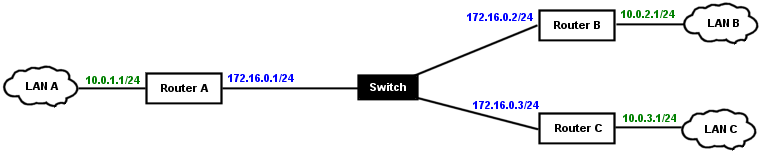
All blue addresses are reachable, because they are in same subnet. And all green ones need gateways like this:
On Router A:
/ip route
add dst-address=10.0.2.0/24 gateway=172.16.0.2
add dst-address=10.0.3.0/24 gateway=172.16.0.3
On Router B:
/ip route
add dst-address=10.0.1.0/24 gateway=172.16.0.1
add dst-address=10.0.3.0/24 gateway=172.16.0.3
On Router C:
/ip route
add dst-address=10.0.1.0/24 gateway=172.16.0.1
add dst-address=10.0.2.0/24 gateway=172.16.0.2
Simple and clear, right? And guess what, you can use exactly the same config with Wireguard and it will work, because it’s still basic networking with same principles. It’s great, isn’t it? It means that WG isn’t some new and completely different thing, it’s very similar to what you (probably) already know.
One difference is that Wireguard has additional config, allowed addresses, and it’s used by this “crypto routing”. It doesn’t affect regular routing, you still need that, this is an extra thing. You can imagine it as additional something (black circles in image) sitting on the “wire” and filtering/routing packets:
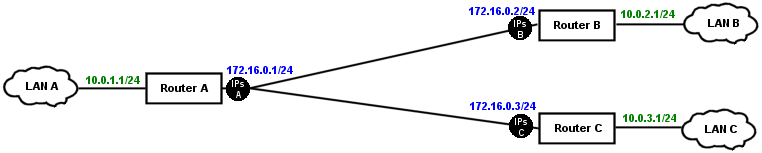
On Router A:
- 172.16.0.2/32, 10.0.2.0/24 allowed for Router B
- 172.16.0.3/32, 10.0.3.0/24 allowed for Router C
On Router B :
- 172.16.0.0/24, 10.0.1.0/24, 10.0.3.0/24 allowed for Router A
On Router C:
- 172.16.0.0/24, 10.0.1.0/24, 10.0.2.0/24 allowed for Router A
(Router B and Router C don’t have direct link between them, traffic goes via Router A)
“x.x.x.x/x allowed for Router X” means two things:
- x.x.x.x/x will be sent to X (if regular routing sends it to WG interface)
- x.x.x.x/x will be accepted when coming from X (if X sends something else not listed as allowed, it will be dropped)
Regular routing and crypto routing are two distinct complementary things (don’t get confused by wg-quick and other high level clients, they automatically add routes for all allowed addresses; RouterOS doesn’t do that). Usually you’ll have them in sync, but you don’t have to (which makes more or less sense depending on exact config). For example:
a) Allowed address 0.0.0.0/0 (= any address) and route to only 10.0.1.0/24 => only 10.0.1.x will be sent to peer.
b) Allowed address 10.0.1.0/24 and route to 0.0.0.0/0 => only 10.0.1.x will be sent to peer.
Difference between the two is that for a) the router won’t even try to send anything else (e.g. 8.8.8.8) via WG interface, because no route points to there. For b) it will try to send it, but it will be blocked by WG. Part of this crypto routing is that peers on same WG interface must have distinct allowed addresses. If you’d add same 10.0.0.0/24 for more than one peer, WG wouldn’t know to which one it should send such packets.
If you want to keep things simple, you can stop here and live happily ever after.
–
If you want to think about it a little more, then knowing all the above, you may ask whether you really need gateway=. Regular routing needs some gateway, but what it really needs is just to find that it’s somewhere on WG interface. It’s actually WG’s crypto routing which decides where (to which peer) to send packets. So you can use a shortcut, gateway= and it will work too.
Now that you got rid of IP address as gateway, you may go further and ask whether you need that IP address at all. And the answer is, not necessarily. If you’re doing e.g. site to site tunnel, you only really care about local and remote LAN subnets, and maybe you don’t want another extra subnet. After all, if you have site to site IPSec tunnel, there isn’t another subnet there either, so why should it be here. And you’re right, you can do without it. But it doesn’t mean that the connecting subnet was completely useless!
If you’re connecting e.g. from 10.0.1.100 (LAN A) to 10.0.2.100 (LAN B) and 10.0.2.100 is down, Router B would like to send icmp “host unreachable” to 10.0.1.100, to let it know that 10.0.2.100 is dead. If you have connecting subnet (172.16.0.0/24), it will use 172.16.0.2 as source. But if you got rid of it without knowing what you’re doing, there’s no address to use and there won’t be any icmp message. So you just lost useful functionality. Was it worth it? But fortunately it can be fixed by adding pref-src to route and router will use that address, e.g. on Router B:
/ip route
add dst-address=10.0.1.0/24 gateway=<wireguard> pref-src=10.0.2.1
add dst-address=10.0.3.0/24 gateway=<wireguard> pref-src=10.0.2.1
Once again, having addresses is safe default config, don’t get rid of them for no good reason. For example, if you have just peers with single addresses and no subnets behind them (phones, etc), safe default is to use standard ethernet-like config where server has IP address on WG interface (172.16.0.1/24) and it tells that all 172.16.0.x clients are to be found on that interface. You can get rid of this address and add route instead (dst-address=172.16.0.0/24 gateway=), but then you’ll have same problem as in previous example, which can be fixed the same way, but it has no advantage whatsoever. Keep it simple, keep the address.
Congratulations, you understand correctly! Just don’t try to “improve” it with some crazy ideas.
Because you’re trying to take torch from @anav and continue his previous adventure. Don’t. If 10.10.50.99 is PC in LAN behind router, then router already has route to it (a dynamic one created by 10.10.50.x/24 address on that interface). If you add another one to 10.10.50.99, you can only break things. iPhone’s WG client automatically creates routes for allowed addresses, so you don’t need to do anything there either. If it wasn’t iPhone but RouterOS device, it wouldn’t happen, and you’d have to add route (dst-address=10.10.50.0/24 gateway=wireguard) on this device.
Excellent explanation, Sob !
This should be in the help page !
@mozerd maybe you should hire a consultant to teach you a thing or two about networking.
Or take a class or something. Before you copy-pasta any more info from github, mm?
I see Mozerd’s mother has entered the thread again. ;-PP (Let it rest Znevna…)
Yup! Said, by you and the crickets.
Yes, after reading that any beginner is 100% ready.