WireGuard: allowed IPs - Unofficial WireGuard Documentation

@Sob … you do understand that @anav is one very smart dude :slight_smile: an ACERBIC Lama 4 sure (sharply or bitingly critical, sarcastic, or ironic in temper, mood, or tone)

Thank YOU I will buy into your explanation now ---- and — very much liked your SUPERB “article” preceding :slight_smile:

Thank you, @sob … I hope now people will stop spreading inaccurate information.

My short interpretation: the first diagram applies to WG mesh as well, the peers logic being hidden in the “switch” black box. Ethernet switch uses ARP table to select destination port, WG interface uses crypto-routing for the same. Ethernet switch learns MAC addresses automatically, WG interface is configured statically. Both magics only apply after packet enters the black box, usual L3 routing has to push packet into it (unlike black holes which suck data all by them selves :wink:)

Good sum up! @Sob, may I suggest you put a copy of your post in “Useful user articles”?

@anav: What will it take for you to like it? Should I add “dedicated to @anav” to it? Or “to @anav with love”? :slight_smile:

@mkx: That’s my idea, to show that it’s not that much different. Slight problem with full mesh is that with NATs everywhere, you won’t usually have it, because WG doesn’t have any built-in support to get through those. As a result, the WG-specific config (allowed addresses) will be slightly different and won’t match exactly the regular IP config (addresses/routes). But if there was full mesh, it would.

@Larsa: I’ll probably do it later, after I polish it a bit, think about if there’s some additional stuff it could have, etc.

Larsa, there is no point in etching it in stone with all the errors I have found, he is waiting to be corrected before publishing! jajajajajajaja

I do have many questions/observations (not related to crypto key routing, that part is rock solid). I keep writing and rewriting a very long post,sigh…

Oh yeah, and feedback from fans. I’ll clear my schedule. :wink:

It can wait until after you go to Poland to help refugees, now that is important work!!!

@sob, yeah I know that WG can do quite a bit more magic than simple ethernet switch. But if you think about it, ethernet switch doesn’t have to be just plain … there are ACLs, etc. And besides, ethernet is a LAN L2 protocol without much of security needed while WG aims to provide secure communication in a very hostile environment so it better provide some good magic … but as we agree, L3 requirements are just the same regardless of underlying technology (ethernet, ATM, infiniband, wireguard, IPsec, SLIP, IPoAC, …), routes are still needed.

Observations

  1. Very good diagram example of a generic network, and I liked the separation using the black WG bubbles. It would have been preferential to have more LANs per router and perhaps a bit more detail for allowed IPs between them but still nice and clean.

  2. You selected a coordinated IP address subnet for your peer wireguard interfaces, which reinforces your notion that an IP address for the wireguard interface is expected and a good thing.

  3. The explanation, or more accurately the purpose of the paragraph starting with "Regular routing and crypto routing are two distinct complementary things… and ending with “.…happily ever after.” was vague and weak. At first I thought you were trying to describe crypto routing and then realized you were just attempting to highlight the different effects on traffic between IP routing and Crypto Routing. This needed a bit more detail and clarity.

  4. Personally I prefer to look at Crypto Processes as its own mini router (or Customs Booth if you will), and thus VERY conceptually (for the new beginner), gets user traffic from IP routing (payload), converts that to encrypted user traffic with RIGHT peer destination information (encrypted transport packet) and then back to IP routing for onward TX, and then the reverse happens at the other end. They work hand in hand to ensure the traffic gets to where it needs to be and thus both Route in their own way, and I view Crypto Routing as Crypto Steering or Marshaling because I get easily confused :wink: when using the word Routing for different processes. But thats just me, it is crypto routing and I have no issues with how it works and what it does.

  5. What the new person, beginner, should focus on is that Crypto Routing runs in the background and has to do mainly with two processes. However, for crypto routing to occur, it is the responsibility of the admin, to first accurately state the Allowed IPs for each peer (key word being peer=remote site). More specifically the admin should, at any local device, consider the Allowed IPs as they relate to the remote end for two distinct populations of addresses, a. the destination addresses at the remote end, for local users heading outbound and entering the tunnel, and b. the source addresses for users at the remote end, heading inbound and will be exiting the tunnel. Now that the Allowed IPs are correctly established by the admin, Crypto Routing can carry out its two integrated processes, and the really core bit uses the admin Allowed IPs to ensure the right peers and right keys are matched to the local traffic entering the tunnel so that the right destination information is added and subsequently at the other again compare peers and allowed IPs to ensure authorized traffic is allowed to exit the tunnel. The other process which occurs is the encryption and decryption (not as exciting). That is enough detail for the new beginner at the start of their journey. I added a bit more detail a few post before which adds the order of events involved (encryption, matching, selection, filtering etc.).

  6. I liked the fact that you included the IP addresses of the other sites wireguard interfaces as part of the Allowed IPs. Did you do this to facilitate PING?
    Or does this automatically ensure then that fragmentation issues are reported??? This question becomes clearer later!

  7. I was disappointed you skipped an important step in your evolutionary process, namely this configuration, that you didnt put and was waiting to see. I am truly hoping I got the gateway IPs correct.
    /ip route (at LANB)
    add dst-address=10.0.1.0/24 gateway=172.16.0.1 table=main
    add dst-address=10.0.3.0/24 gateway=172.16.0.3 table=main

  8. Now you can tie in question 6, with the observation at 7. and my follow-on questions.
    Q1 - If I have stated the IP routes as such, would I still need to include the IP addresses of the interfaces in the Allowed IPs, to PASSIVELY detect and report fragmentation issues???
    Q2 - Are they linked? or is the Allowed IPs inclusion simply to facilitate the more ACTIVE ping test/troubleshooting.

  9. I forget to mention in 6, that I liked how you used the subnet to describe the Allowed IPs for the IP wireguard addresses, such that in all cases only one entry need be made to cover all peers and thus every possible ping direction!

  10. Then we get to the use of IP address for Wireguard, for the simple case, one mobile peer or perhaps 3 or 4, where they all have a faux address where we conveniently ensure their nomenclatures line up such that they can easily be described or captured within a subnet and then we provide an IP address for the Server WG interface that includes them. This shows some flexibility in your thinking on the use of IP address and that you do realize the practical effect that this causes DAC routes for those to be created on the Server device.

  11. What is not clear to me yet, is how you can justify that usage but then not be consistent when the same could potentially be used for a subnet on a different peer, not an iphone - not a faux IP, but an MT device peer subnet. Somehow to you, the IP address on the phone is sufficiently different from a subnet on another MT Device such that you dont want to use an additional IP address line to also include this subnet - and yes one has to ensure there is no overlap or conflict with any other peers. I am still fuzzy on the distinction??

  12. Now we get to - okay we can get away with using wg-interface, but if we do, then we lose something in the translation for Passive communications fragmentation reports etc… Here is where you propose Pref Source. I understand pref source, in that it will change the source IP of the payload to that suggested in this case you picked the LAN gateway 10.0.2.1. However this could be misleading. What if router A had 3 subnets…?? What then?
    In other words, the missing part of the equation here is that whatever pref-source you select IT HAS TO BE on the allowed IP list at the remote site. This wasnt explicitly stated and needs to be. With that wording, the reader can then go back to your example information and confirm YES, I see now that that pref- source is included in the allowed IPs at the other end, and thus will be allowed to exit the tunnel at the other end.

  13. But then I get confused because it appears to me in your example the preferred source is the same as the source initiating the packets so what has been gained ?? Assuming preferred source changes the source of the payload from whatever it is to the preferred source IP. There is some nuance I am missing?? The source is A, and the preferred source is A? what is gained??
    I think I am missing an important point here.

  14. Another point of confusion with pref source, is this only for originating devices, traffic from local subnet heading outbound? What happens for the associated Return Traffic at the Server Side and the IP routes created there??

  15. Lastly we get to the discussion of using wg-interface only with manual IP routes. It works but as you state is missing the Passive communications component and may not suffice for ACTIVE troubleshooting/pinging.

  16. For ACTIVE pinging one can choose any existing Allowed IP for this purpose and if necessary identify an existing subnet at the other end and include this in local Allowed IPs, so that is easily accomplished without too much fuss.

  17. For Passive communications, it seems you are saying the two ways to ensure this is done right but the over riding requirement is that:
    AN IP address for the wireguard interface has to be present, as per your example, and needs to be a coordinated subnet between the peers.
    Then one has two options:
    a. use the correct gwy IP ADDRESS in the IP route OR
    b. use wg-interface name WITH pref source!

  18. In other words any time you deviate from some form of 17 (aka like 15) , the full breadth of possible communications between WG interfaces is not established.

Summary: The above represents what I got out of your post. Sorry I do not have the level of understanding of the others and thus cannot blindly accept stuff if not understanding how and why it functions.

Outstanding issues.

  1. For me to understand Passive Communication (fragmentation or any other magic that happens automatically (passively) with the proper structure).
  2. For you to explain why I cannot use multiple IP addresses for all my local Allowed IPs. :slight_smile:)))) but I can for single IP devices like Iphones.
  3. To explain pref source explaining the purpose, as it looks like the source and source pref are no different in the example AND ALSO in terms of return traffic vice originating traffic, as it appears you only describe originating outbound ??

For example let me propose and addendum to your example. The PLUS lines are added to show what I would normally have done, and
based on your information would do in the future.

IP addresses associated with Wireguard on the devices.
Peer1 - iphone - 192.168.35.2/32
peer2 - laptop - 192.168.35.200/32
++++++++++++++++++++++++++++++++++++++++++++++++++++++++++++++++++++++++++++++++++
peer3 - MT device client - 172.168.77.2/24 ( Subnet 10.10.10.0/24 needs to access server on Local Router subnet D)
peer4 - MT device client 172.168.77.3/24 (Subnent 10.20.10.10.0/24 needs to access server on Local Router subnet E)
Server- Local Router - 172.168.77.4/24

Allowed IPs Local Router
192.168.35.0/24 (handles both incoming peer 1 and peer 2 - using local Router internet and for peer 2, To be able to config the local router - so fw rules have to lineup)
10.10.10.0/24 (handles incoming subnet from peer3)
10.20.10.0/24 (handles incoming subnet from peer4)
+++++++++++++++++++++++++++++++++++++++++++
172.168.77.0/24 (ensures any device can ping any IP wireguard interface )

IP Routes Local Router
dst-address=192.168.35.0/24 gwy=192.168.35.1 table=main
dst-address=10.10.10.0/24 gwy=172.168.77.2 table=main
dst-address=10.20.10.0/24 gwy=172.168.77.3 table=main

IP Routes other peers
[peer3] dst-address=subnetD/24 gwy=172.168.77.4 table=main
[peer4] dst=address=subnetE/24 gwy=172.168.77.4 table=main

OR
Let say I add a second, IP address to the local router wireguard interface…
and this time lets use wg-interface for the gateway,
Server- Local Router - IP1 - 172.168.77.4/24 / IP2 - 192.168.35.1/24

IP Routes
(DAC) dst-address=192.168.35.0/24 gwy=wg-local table=main
dst-address=10.10.10.0/24 gwy=wg-local table=main pref source=??
dst-address=10.20.10.0/24 gwy=wg-local table=main pref-source=??

IP Routes other peers
[peer3] dst-address=subnetD/24 gwy=wg-peer3 table=main pref-source=10.10.10.1 ??
[peer4] dst=address=subnetE/24 gwy=wg-peer4 table=main pref-source=10.20.1.1 ??


What i find strange is that pref source is already the source IP, the source packets from peer 3 are from subnet 10.10.10.0/24, the source packets from peer 4 are already from 10.20.10.0/24 ??

I meant cleaning my schedule as a joke, but … well … :slight_smile:

  1. One LAN or ten LANs, the only difference is that you’ll have one or ten routes and subnets in allowed-address. And it’s simple example focused on routing and WG, everything is allowed to communicate with everything else. If you’d like to limit something, it would be job for firewall, which is yet another independent layer.

  2. Because it is. It’s safe default, it’s same as ethernet, which makes it easy to understand.

  3. I was trying to explain relation between the two. How it’s possible to allow more in one and less in the other (or the other way around), but how it’s actually intersection between the two that matters in the end. And yes, it can probably be improved.

  4. Fine by me. And as you can see, I have it as those separate black circles, which was supposed to suggest that it’s sort of separate.

  5. I think it’s there, right after second image. For each peer you have to define what it can send and receive. And it mustn’t conflict between different peers (this part should probably be mentioned a bit earlier).

  6. It’s simply because they are there, and if they should be able to pass through tunnel, they need to be listed as allowed.

  7. It’s in the first part, the ethernet config (which is also shared when it’s WG).

  8. See 6). The peer has them, you want them to be able to pass through tunnel (doesn’t matter if you actively try to communicate with them, or the communication is initiated by peer), they must be allowed.

  9. If you mean 172.16.0.0/24 on B and C, instead of using only existing addresses (e.g. 172.16.0.1 and 172.16.0.3 on B), you can see it either as lazy shortcut or future proof config. Currently there are only .1, .2 and .3, but if I decide to add .4 for another client that won’t have subnet of its own (e.g. a phone), I won’t have to touch Router B or C and everything will work. Only changes needed will be on Router A and on this new client.

  10. One thing, all addresses are real. If in 9) I mentioned another phone client, it will get 172.16.0.4/24 and it will be real address, the client will really have and use it. And again, it’s the basic networking, that’s how you’d do it with ethernet.

  11. I’m not completely sure if I understand. But I guess it could be related to the past misunderstanding about what’s local and remote. Addresses 172.16.0.x/24 are in local subnet in relation to WG interface. Addresses 10.0.x.x/24 are remote subnets, because they are behind other routers.

It’s true that if you look at it from Router A, then address 172.16.0.2 (owned by Router B) is remote, because it’s on different router. But it’s still in local subnet. Here comes ethernet again. If you have all routers connected using switch, then even though address 172.16.0.2 is on remote router, it’s clearly in local subnet. Same way your PC 192.168.88.10/24 is in same local subnet with your router 192.168.88.1/24. That’s clear, right?

And the only difference with WG is that you don’t have any cables, only virtual links. Physically different, but logically the same thing.

  1. Important thing, this has nothing to do with just WG, it will happen with other interface types too.

Simple version, when router itself wants to send packet somewhere, it needs to select source address to use. Most common case is that it simply takes whatever address is on the interface where it sends the packet. So if you have your typical home router with 192.168.88.1/24 on LAN and 1.2.3.4 on WAN, then when destination is some 192.168.88.x in LAN, it will use 192.168.88.1 as source, and when it’s something else (e.g. when it checks for updates), it will choose 1.2.3.4, because packet is going to internet. It’s logical, right? But if outgoing interface doesn’t have any address, it doesn’t know what to choose and it fails. So there’s another option (which actually has precedence) and it’s pref-src address on route. When router decides to where it should send this packet, it first checks routes (it’s “routing decision” in some diagrams). It finds the best route, and if this route has pref-src, it will use it as source. And that’s it.

It just has to be some address owned by router, so if you have several LAN subnets, pick one address from any of them. Or completely different one, it would work too (but if it should be completely proper config, all other routers should be aware that this address is on this router, so they ideally should have routes to it; so it’s probably better to stick with something they already have route to). Or you can just keep the connecting subnet (172.16.0.x/24 in example) and not worry about pref-src.

Whether WG must allow this address, of course, it’s still the same thing as in 6) and 8), otherwise it couldn’t pass through tunnel.

  1. See 12), I think it’s all explained there.

  2. Pref-src is when router itself sends something. It doesn’t influence forwarded packets from other devices.

  3. As described, don’t do it when it doesn’t give you any advantage. If you’re doing site to site tunnel and you don’t need another subnet at all, then it can make sense to skip addresses on WG interfaces. But if you do need some subnet, e.g. because you have several phones and each gets 172.16.0.x, then replacing address (172.16.0.1/24) on server’s WG interface with route (172.16.0.0/24) doesn’t help with anything, it’s not better in any way, it’s worse, don’t do it.

  4. Yes.

  5. No. It’s two different things, gateway and source address. You can have different combinations:

a1) WG interface with address 172.16.0.x/24, route with gateway=172.16.0.y => 172.16.0.x will be used as source
a2) WG interface with address 172.16.0.x/24, route with gateway= => 172.16.0.x will be used as source
b1) WG interface without address, route with gateway=172.16.0.y => won’t work at all (there won’t be any communication with remote subnet), because regular routing doesn’t know where 172.16.0.y is
b2) WG interface without address, route with gateway= => will need pref-src to fix source address

Difference between gateways is that:

a) gateway= clearly relies on WG’s crypto routing based on allowed addresses
b) gateway=172.16.0.y seems to use the specified gateway address, but it doesn’t really do that, it only finds out that 172.16.0.y should be reachable on (a1 above)

So while b) is correct, if you want to keep ethernet-like config, it in fact can be confusing, because you can’t really choose gateway (remote router) this way. For example, “/ip route add dst-address=10.0.1.0/24 gateway=172.16.0.3” on Router B wouldn’t work as it suggests at the first sight. It says that the subnet (10.0.1.0/24) is behing Router C (172.16.0.3), but if WG’s allowed-address says that it should be sent to Router A, it will win.


As for your outstanding issues, bring them back if you still have some after reading this. And if #2 is that thing, don’t even start with that. If you really (really) don’t understand why it’s completely wrong, I can try once more, but I don’t think I should have to do that, it’s such basic thing that it should be obvious (and again, it doesn’t have to do anything with WG).


And your examples:

  • Allowed addresses are per-peer, you can’t have 192.168.35.0/24 to cover both peer 1 and 2. Each must have only their 192.168.35.x/32
  • Same for 172.168.77.0/24, each peer on main router must have only own 192.168.77.x/32.
  • Peers themselves (remote devices) can have allowed-address=172.168.77.0/24 for peer representing server, it will allow them to reach other peers via main server.
  • Route dst-address=192.168.35.0/24 gwy=192.168.35.1 is nonsense, in first example you don’t have any 192.168.35.1. You could have your address-less dst-address=192.168.35.0/24 gwy=, but it’s better to not do that, as explained above.
  • Other routes are correct (they would also work with gwy=, see 17).
  • Address 192.168.35.1/24 in second example is correct.
  • If peers have 172.168.77.x/24 on their WG interfaces, you don’t need pref-src for routes (see 17).
  • Otherwise it would be pref-src=

Read and answered in order so there may be duplication!

  1. It’s simply because they are there, and if they should be able to pass through tunnel, they need to be listed as allowed.
    You didnt answer the questions here! Its simply because they are there.… is a frivolous answer without any meaning. Yes BUT should they be allowed to pass through the tunnel?
    What uses will be made of them? Does it have to with permitting PING, or to auto report ping fragmentation??

:sunglasses: The peer has them, you want them to be able to pass through tunnel … they must be allowed.
But why? What functionality are you protecting? Since you seem unable to answer this question thus far let me phrase it differently… what will not be possible if you do not include them in allowed IPs.

  1. I’m not completely sure if I understand. But I guess it could be related to the past misunderstanding about what’s local and remote. Addresses 172.16.0.x/24 are in local subnet in relation to WG interface. Addresses 10.0.x.x/24 are remote subnets, because they are behind other routers.

Well I appreciate how you view the coordinated subnet created between WG interfaces as a local subnet (to all wg devices). I also understand that yes from any local device, subnets on other routers are remote subnets. However my question was not that, it was why are you content to include an IPHONE within a local WG interface IP address and despite the iphone being a remote device, but not a subnet on another remote device, an MT device. What is the difference I am missing?? As you state this has nothing to do with WG but something else I am missing!!

Is it not true that as soon as I identify something with an IP address at the local router, that something (be it an IPHONE or a subnet) is now considered local on that router.
Hence IP address= 192.168.50.1/24 interface=wg-local network=192.168.50.0 WHERE 192.168.50.0/24 describes a subnet on a peer, means now for all intensive purposes that the subnet is recognized as a local entity, in terms of routing at least?
Hence - (dac) dst-address=192.168.50.0/24 gwy=wg-local table=main IS CREATED AND PROPERLY UTILIZED BY THE ROUTER???

More work to be done here…


12) Important thing, this has nothing to do with just WG, it will happen with other interface types too.
AHHH, this is really good stuff!! We may spend several weeks here. :-0
However I need to drill down WHERE this pref source is applied. Is it applied in the payload, or is it applied on the transport??
Perhaps that is where i was getting confused, as the payload is from the user, and it seemed to me you were picking the the same source for pref-source.
However if we are talking transport then yes, instead of the outgoing interface router IP, pref-source changes this to the local user subnet IP.

So basically the transport layer has to have some address assigned to it as source and if we use the actual WG gateway IP on the IP route, that is the obvious choice and is readily available.
If we use the gwy=wg-interface-name, then we are forcing the router to decide.
Would it not simply go get the wg interface IP address line to get that info, if one is assigned??
If so, then what we are saying is that if you have no IP address for the WG interface, pref-source is a viable alternative.

  1. As described, don’t do it when it doesn’t give you any advantage. If you’re doing site to site tunnel and you don’t need another subnet at all, then it can make sense to skip addresses on WG interfaces. But if you do need some subnet, e.g. because you have several phones and each gets 172.16.0.x, then replacing address (172.16.0.1/24) on server’s WG interface with route (172.16.0.0/24) doesn’t help with anything, it’s not better in any way, it’s worse, don’t do it.

Even if I do this ???
allowed IPs=172.16.0.2/32, 172.16.0.4/32
dst-address=172.16.0.2/32 gwy=wg-local pref-source=(local subnet)
dst-address=172.16.0.4/32 gwy=wg-local pref-source=(local subnet)

Better??
IP address WG 172.168.0.1/24 interface=wg-local network=172.168.0.0
(dac) dst-address=172.16.0.0./24 gwy=wg-local table=main

  1. No. It’s two different things, gateway and source address. You can have different combinations:

a1) WG interface with address 172.16.0.x/24, route with gateway=172.16.0.y => 172.16.0.x will be used as source
a2) WG interface with address 172.16.0.x/24, route with gateway= => 172.16.0.x will be used as source
b1) WG interface without address, route with gateway=172.16.0.y => won’t work at all (there won’t be any communication with remote subnet), because regular routing doesn’t know where 172.16.0.y is
b2) WG interface without address, route with gateway= => will need pref-src to fix source address

Super, confirms what I did on 15. both will work. VERY CLEAR NOW. ( and yes a gateway IP without a corresponding IP address for WG interface is a no go)

All good… so far

  1. has some niggly points.
  2. is where there is still some friction ( non wg friction :slight_smile: )

6,8) It’s not much different explanation, but it’s really that simple, if those addresses (172.16.0.x) should ever be able to pass through tunnel for any reason, they need to be allowed. If they exist, you may want to ping them, that’s one good reason. If you don’t fiddle with pref-src (which should be seen as advanced config, so not necessary), they will be used as source for router’s communication to remote subnet (e.g. icmp messages), that’s another good reason. It’s enough for me. If you want to break these basic things (I’m not sure why would you want to), then don’t allow them.

  1. I’m still not sure (so keep trying if that’s not it), but it isn’t about the evil thing again, is it? In my example, 172.16.0.0/24 is local subnet for WG. Router B has 172.16.0.2, Router C has 172.16.0.3, they both have other subnets behind them, but that’s irrelevant here. A phone client would get 172.16.0.4, another may get 172.16.0.5, etc. And they would all be in same local subnet (local in logical sense, with virtual links connecting their WG interfaces).

If your 192.168.50.0/24 is equivalent of my 10.0.2.0/24, i.e. it’s behind another router, then no, you can’t put address 192.168.50.1/24 on WG interface. It would tell router that this subnet is on its WG interface, but it isn’t there, it’s somewhere else. That’s the reason why it’s wrong. And the fact that with WG it would sort of work doesn’t save it (if it was ethernet, it wouldn’t work at all).

  1. In this case, payload (packets inside tunnel). Nowhere so far we care about transport (outer encrypted WG packets), it’s another layer that we know it’s there, but it “just works” and that’s all we need to know about it right now.

But yes, the same happens there too, these transport packets also need to choose source address. With simple router it will be whatever is on WAN interface (when peer is somewhere in internet), with dual-WAN router it will be whatever is on the WAN interface that gets used, and if there would be different route to peer (its public address) with pref-src, then that would be used as source.

  1. I think you can see yourself that the second config is better. Imagine that you have not two but hundered peers. One address would still be enough to cover all of them. Your first example would need hundered routes. But it’s not just about number of addresses, routes or whatever, we’ve been there before. You can avoid address and use one route for whole /24, and it will be one address vs one route. But you gain nothing by doing that. Main point is that the address (for local subnet) is safe basic config. If you want to use something else, you should be able to explain why it’s better (not just different). If you can’t, stick with default.

Almost there.
Where we differ is that very space.

By adding the IP address of a subnet from another router (due to basing it on allowed IPs) then I am not sure I have done something evil? What I have done is actually added that subnet to my router, since it now exists on an interface on the Router.

To be consistent how is the iphone any different. Its a remote device with an address, just like the remote MT with a subnet. So I co-opt that address by ensuring its within the existing IP address of my current WG interfaces and I dont see much difference in doing something similar with the subnet address due to my ignorance more than anything else. :wink:

Lets discuss the following example …Where I try to apply newfound wisdom!!!
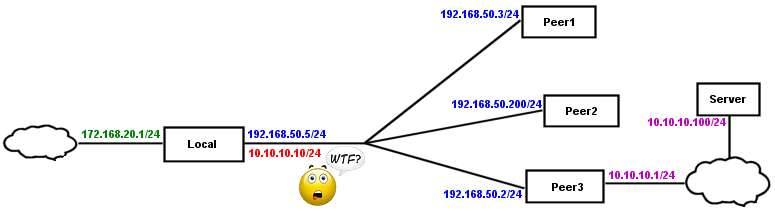
There is a subnet on my local router that peer 3 users (on an MT device) will need to access which has address of 172.168.20.1/24 interface=whatever network=172.168.20.0
The peer 3 users themselves,are on subnet with address of 10.10.10.1/24 interface=whatever network=10.10.10.0

IP addresses for wg, where I try to apply all the good stuff!
peer1 192.168.50.3/32 iphone
peer2 192.168.50.200/32 laptop
peer3 192.168.50.2/24 interface=wg-peer3 network=192.168.50.0 Allowed IPs = 192.168.50.0/24, 172.168.20.0/24
Local 192.168.50.5/24 interface=wg-local network=192.168.50.0 Allowed IPs = 192.168.50.2/32, 192.168.50.200/32, 192.168.50.3/32, 10.10.10.0/24

Peer 3 Routes
dst-address=0.0.0.0/0 gwy=wanIPgateway table=main
dst-address=172.168.20.0/24 gwy=wg-peer3 table=main
dst-address=192.168.50.0/24 gwy=wg-peer3 table=main

Local Routes
dst-address=0.0.0.0/0 gwy=wanIPgateway table=main
dst-address=192.168.50.3/32 gwy=wg-local table=main
dst-address=192.168.50.200/32 gwy=wg-local table=main
dst-address=192.168.50.2/32 gwy=wg-local table=main
dst-address=10.10.10.0/24 gwy=wg-local table=main


Correct ???
+++++++++++++++++++++++++++++++++++++++++++++++++++++++++++++++++++++++++++++++++++

So now lets ‘sweeten the pot’ and add some juice!
The subnet on peer 3 device (DHCP server) assigns leases from 10.10.10.20-254

I elect to add an IP address to the local Router and smartly choose
add address=10.10.10.10/24 interface=wg-local network=10.10.10.0

In this regard there is no potential conflict with a user at the other end for that subnet.
Result:
(dac) dst-address=10.10.10.0/24 gwy=wg-local replaces the similar manual remove above.

Will this work? If not what breaks? Are you having a nervous breakdown?

Are you sure this is the case that there won’t be any ICMP message without setting pref-src? I have to admit I have not tested this myself. But I am thinking of the very similar situation with IPv6 where you can do a traceroute and you don’t necessarily have a global point to point subnet connecting two routers together, just an fe80:: link local subnet. In this case, the router uses another global address that it has to respond to the traceroute, for instance a loopback address.

If MikroTik IPv4 behaves similarly to this process, I would expect it would still send ICMP messages without pref-src set in this situation, but instead that they would come from some randomly selected IP that was the “winner” of some selection process (a dynamic pref-src rather than a static one). But I admit, I have not tested this, and so you could very well be correct. The rest of what you said is quite accurate and I agree with it. I’m just wondering about that one bit.

@anav: Problems with your config:

  • Allowed IPs all together are misleading, but I’m pretty sure you know that it’s 192.168.50.3/32 for peer1, 192.168.50.200/32 for peer2, 192.168.50.2/32 and 10.10.10.0/24 for peer3.
  • Peer3 doesn’t need manual route for 192.168.50.0/24, it will have dynamic one created by its 192.168.50.2/24 address.
  • Same for Local, when it has 192.168.50.5/24 address on its WG interface, it creates dynamic route for 192.168.50.0/24, so manual ones for 192.168.50.x/32 are useless.

Otherwise it’s ok. The first part, I mean. But the following one… why? What is your thought process? What gave you an idea that this could be something good?
wg-evilconfig.png
Subnet 10.10.10.0/24 is behind Peer3, the whole thing, all addresses from .0 to .255, even if you currently don’t use all of them, they simply don’t belong anywhere else.

Correct config is route on Local router (dst-address=10.10.10.0/24 gateway=192.168.50.2/), it’s simple and everything works correctly.

You replaced this route by IP address 10.10.10.10/24 on Local router. How is it better? Yes, if it’s WG (not ethernet), it will work if some device from Local LAN communicates with some device in Peer3’s LAN (e.g. Server 10.10.10.100). But if Local router itself also wants to communicate with Server, it won’t work, because it will choose 10.10.10.10 as source (because it thinks that Server is connected directly to its WG interface) and Server won’t be able to respond, because this address is supposed to be in Peer3’s LAN (both Server’s and Peer3’s routes say it is there).

So you changed perfectly good working config, by which you gained nothing, but you broke something. Why do you think it’s good idea? Because it clearly isn’t.

@mducharme: I’m going to say yes, but just between us, don’t tell @anav, I wouldn’t bet my life on it. I didn’t do much with it before, I did lot of testing now, and assuming that I didn’t make some horrible mistake, it’s as described. If it’s IPv6 and there’s no non-link-local address on WG interface, it chooses another one. IPv4 doesn’t, even logging ICMP in output doesn’t show anything.

Interesting - thanks. It is good to know the behaviour anyway. I wonder if this is something MikroTik specific, or if this same thing occurs on regular Linux with a similar configuration?

I see your point Sob, I hadnt thought of the consequences of the traffic flow in the opposite direction. The traffic may reach the server but the response will never make it back.
Not to worry wont actually config like that just wanted to see why not… what broke etc…

@mducharme: Quick test with Linux and WG has different result, IPv4 works the same as IPv6, if there’s no address on interface, it chooses another one from elsewhere. I expect it’s probably configurable somewhere, but so far I didn’t find any info about it. Edit: there’s a difference between ROS v6 and v7, the former also selects another address (tested with IPIP, because it doesn’t have WG), but v7 doesn’t.

@anav: It may take a while before I believe you. :wink:

Depends if I really want to look at your latest diagram or not…

Interesting - this behaviour then can probably be described as a bug in the network stack of RouterOS v7. It is probably worth reporting.