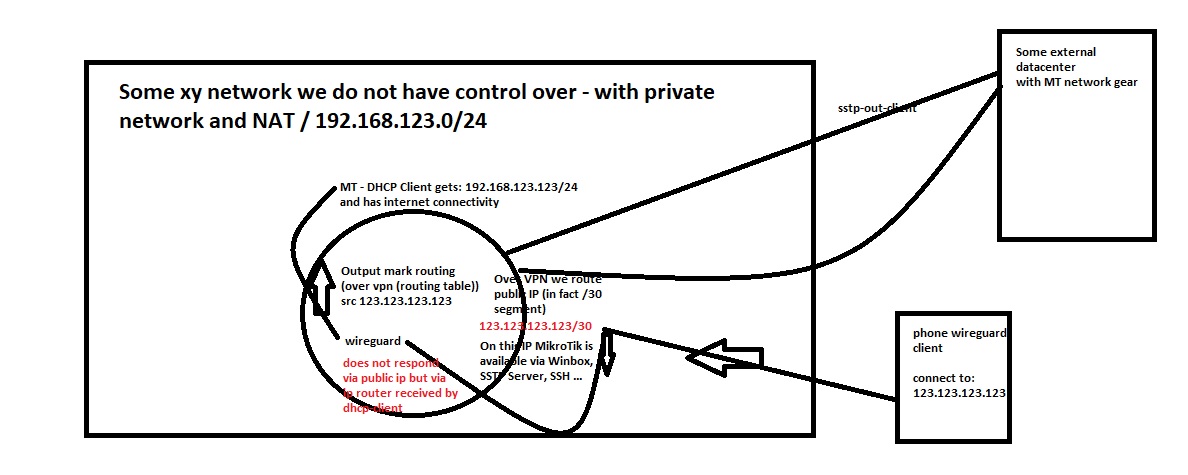
I have a case, that router routes some traffic over VPN (over which I get public IP address) - I want to use this public IP as Wireguard endpoint. The problem is that clients try to connect to IP (I can see packets) but responses from MT Wireguard service are going back by using default routing table.
I have output mangle rule for this public IP and it works as I can connect to MikroTik by using Winbox or ping it - but Wireguard does not want to respond on the same IP/interface where the requests are originating from.
It is a router (A) currently located as guest in a NAT-ed network. It has (private) IP in that network. From here I do a VPN to another router (at our ISP) where I have the option to route public IP to the router (A) - this part works. I can access router (A) via Winbox by using public IP so output mangle rule works. I have setup SSTP VPN on it and it also works without problems. Today I tried to setup Wireguard on it - I am trying to connect to public IP but if I create Output firewall rule (just for logging purposes) I can see that it does not “reply” from the public IP but from the IP that it has in the NAT-ed network that I mentioned at the beginning.
Funny thing is that IP/services “respond” correctly by using public IP (when I try to access it via Winbox) and also SSTP VPN works correctly - only Wireguard has chosen the wrong out interface and wrong source IP to respond.
Everything the same address ?? I hope not.
If you want to mask info (which BTW is NOT needed for internal addresses) at least make it clear there is a difference (which there SHOULD be).
No, there are 3 different (private) subnets, do not worry - I think there is something in mangle missing to force wireguard to send packets back where they originated from…
I also thought it will be simple… But look - this is output filter rule for logging only:
output: in:(unknown 0) out:br-lan, connection-state:new proto UDP, 10.x.y.z:443->PUBLICIPOFMYPHONECLIENT:7736, len 120
Instead of private IP there should be public IP as a source…
Do you think - as there is UDP that I will need a combination of packet mark + routing mark? I already have a “general” output routing mark mangle rule for public IP that this router has but it is not enough …
In fact it is really difficult to “catch” the traffic as it is already in output as you can see in LOG attached above …
Here is full config - there are no firewall rules (and I removed some PPP secrets…) This router is inside an private network and makes SSTP VPN client connection out - via that connection I am “bringing” public IP on it that I can use to connect via Winbox or use SSTP VPN (Server this time) on it…
For example, is the SSTP VPN a connection to the MT device/router? or to the Router in front of the MT and then the VPN connection is fed to the MT as a WAN port with an IP address and gateway??
On the MT device should all users, or single subnet of many, etc use this SSTPVPN for what I assume is internet access???
+++++++++++++++++++++++++++++++++++++++++++++++
If the SSTP VPN is anchored in within the MT device, this assumes port forwarding to the MT device from the in front router and thus also assumes you have an etherport getting wanip on the private LAN of the router in front correct…
Starting to see why a diagram is necessary…without context, no credible answers are possible
This router is a standalone router connected with 1 cable in a private network - like if brought it in your home network and connected it. It received IP address in that network via DHCP client and then it has started SSTP-OUT VPN to my datacenter (ISP) - from there I have routed /30 subnet via (that SSTP VPN) to the router, so now it has also public IP reachable from anywhere.
So at the moment router is reachable worldwide via that public IP.
By using public IP I am now able to connect to the router from anywhere via Winbox (yes, later I will setup firewall rules but let’s ignore this for this example).
By using public IP I am also able to connect to SSTP VPN that I have setup (with PPP secrets… and Let’s encrypt certificate…) on it.
I would like to be able to connect also via Wireguard but Wireguard (I do not know why) does not choose to respond via public IP and routing mark (OverVPN) but as it looks like it is still choosing main routing table and tries to “respond” by using private network we have our router in…
Is it clearer now?
You have an MT router that is NOT connected to the ISP modem.
You have an ISP modem/router in front of it, that may or may not get a public IP.
I suspect it does not otherwise why would you need an SSTP client to go out to the internet vice SSTP server to host.
Furthermore if the ISP MODEM router gave you a reachable public IP you would not need to go through SSTP VPN to provide a public IP to wireguard!
Furthermore if the ISP modem router gave you a reachable public IP ( and you could forward ports on it), you dont need the SSTP VPN to make
your MT device a wireguard endpoint.
Forgetting everything else, its seems what you want to do is emulate a local WAN connection (for wireguard) via your SSTP VPN connection. So the WIreguard is riding within an SSTP VPN tunnel.
Now you can see why a better diagram with better clarity is needed. As stated above, if you have reachable public IP where you are at, and one can port forward to the MT, you dont need this level of complication.
It almost sounds like a teenager is trying to circumvent their family’s internet by paying for an external SSTP VPN service with access to public IPs. Since the router is attached to the home network, it looks like any other device. With SSTP client on the router, the router now can go out the normal internet of the home, establish the VPN tunnel and no one is the wiser.
What I dont understand is if you already have this SSTP VPN connection, WHY Do you need wireguard?
SSTP VPN is also two way street so you should be able to remotely connect to the SSTP VPN server and then to the MT router SSTP client. Also users behind the MT router should be able to use the SSTP VPN to go a different path for internet traffic if so desired.
You really need to fill in some missing pieces here…