Wireguard connection freeze

I set up wireguard for road warriors (both iOS and android devices)
Wireguard interface/peers have a separate /24 subnet, a firewall foward rule allows to reach few machines on LAN.
Configuration to peers is sent via file or via qrcode
Both works for few seconds then LAN machines become unreachable (via ping or https).
No way to bring up connections over tunnel.
No traffic detected on WG interface, peer, firewall rules
Disabling and enabling WG interface/peers has no effect.
I tried persistent keepalive without succes.

Any idea ?

/export would help, remove serial before posting.

These 2 statements contradict each other.
(Except perhaps if the client can connect without going via wireguard)

If second entry is valid, some possible options.

  • Incorrect destination port on clients.
  • Server behind cgnat
  • Incorrect public key on clients, or on server. (common)
  • Incorrect allowed address entries for client peers on server. (common)
    • Likely there should be a single /32 allowed address assigned on the server for each peer.
    • (And this will be the same as the Address entry on the peer)

Another possibility (might match case 1)
Where wireguard server is not default gateway for LAN.
Initially try with SrcNat on wireguard server
Can make clients a subnet of main lan and use Published arp entries on wireguard server.

Why are you guessing Rplant, let the OP show us the configs for both router and road warriors, so we can work from facts..

Here I am :

"server" side :

/interface wireguard
add listen-port=20012 mtu=1420 name=wg2 private-key=theprivatekey
add listen-port=20013 mtu=1420 name=wg3 private-key=theprivatekey
add listen-port=20015 mtu=1420 name=wg5 private-key=theprivatekey

/interface wireguard peers
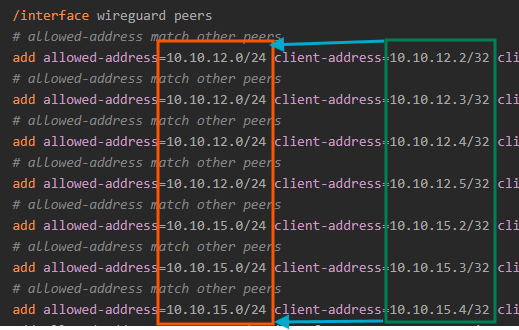
# allowed-address match other peers
add allowed-address=10.10.12.0/24 client-address=10.10.12.2/32 client-allowed-address=0.0.0.0/0 client-endpoint=A.B.C.D interface=wg2 name=A1 persistent-keepalive=20s public-key=thepublickey
# allowed-address match other peers
add allowed-address=10.10.12.0/24 client-address=10.10.12.3/32 client-allowed-address=0.0.0.0/0 client-endpoint=A.B.C.D interface=wg2 name=A2 persistent-keepalive=20s public-key=thepublickey
# allowed-address match other peers
add allowed-address=10.10.12.0/24 client-address=10.10.12.4/32 client-allowed-address=0.0.0.0/0 client-endpoint=A.B.C.D interface=wg2 name=A3 persistent-keepalive=20s public-key=thepublickey
# allowed-address match other peers
add allowed-address=10.10.12.0/24 client-address=10.10.12.5/32 client-allowed-address=0.0.0.0/0 client-endpoint=A.B.C.D interface=wg2 name=A4 persistent-keepalive=20s public-key=thepublickey
# allowed-address match other peers
add allowed-address=10.10.15.0/24 client-address=10.10.15.2/32 client-allowed-address=0.0.0.0/0 client-endpoint=A.B.C.D interface=wg5 name=D1 persistent-keepalive=20s public-key=thepublickey
# allowed-address match other peers
add allowed-address=10.10.15.0/24 client-address=10.10.15.3/32 client-allowed-address=0.0.0.0/0 client-endpoint=A.B.C.D interface=wg5 name=D2 persistent-keepalive=20s public-key=thebublickey
# allowed-address match other peers
add allowed-address=10.10.15.0/24 client-address=10.10.15.4/32 client-allowed-address=0.0.0.0/0 client-endpoint=A.B.C.D interface=wg5 name=D3 persistent-keepalive=20s public-key=thepublickey
add allowed-address=10.10.13.0/24 interface=wg3 name=B1 persistent-keepalive=20s public-key=thepublickey

/ip address
add address=10.10.12.1/24 interface=wg2 network=10.10.12.0
add address=10.10.13.1/24 interface=wg3 network=10.10.13.0
add address=10.10.15.1/24 interface=wg5 network=10.10.15.0

/ip firewall filter
add action=accept chain=input dst-port=20012 in-interface-list=WANs protocol=udp
add action=accept chain=input dst-port=20013 in-interface-list=WANs protocol=udp
add action=accept chain=input dst-port=20015 in-interface-list=WANs protocol=udp
add action=accept chain=forward comment="WG2" dst-address=192.168.1.0/24 src-address=10.10.12.0/24
add action=accept chain=forward comment="WG3" dst-address=192.168.1.0/24 src-address=10.10.13.0/24
add action=accept chain=forward comment="WG5" dst-address=192.168.1.0/24 src-address=10.10.15.0/24

Configuration sent to client : (A1 in this case)

[Interface]                                              
 ListenPort = 51820                                       
 PrivateKey = theprivatekey
 Address = 10.10.12.2/32                                  
 [Peer]                                                   
 PublicKey = thepublickey 
 AllowedIPs = 0.0.0.0/0                                   
 Endpoint = A.B.C.D:20012

Working with winbox, I was not aware of "# allowed-address match other peers" warning until current terminal export....
Is this the problem ?

Routes to 10.10.x.x subnets are of course created dynamically

As said, the WG connection to 192.168.1.0/24 https LAN machines is initially working, then it stops answering in few tens seconds.

It's not only a warning it's even a big fat error. Current versions of RouterOS don't even allow you to save peers with such errors anymore.

You'll need to edit the peers and copy what you set in the green column to the orange column (allowed-address).

I had a longer post with more details:

So basically I'm wrongly allowing the single peer for the whole subnet instead of its own /32 IP address ....
Thank you for explanation on suggested link

Allowed addresses is to identify the other end.

a. source addresses allowed to exit the tunnel at your router end ( and visit LAN or WAN or router )
b. destination addresses (folks on local router are heading too) allowed to enter the tunnel going to the other end

If the addresses are not local, you will need ip routes for them ......
any device, single address, associated with an existing wg interface on the router, is already covered by IP routes.