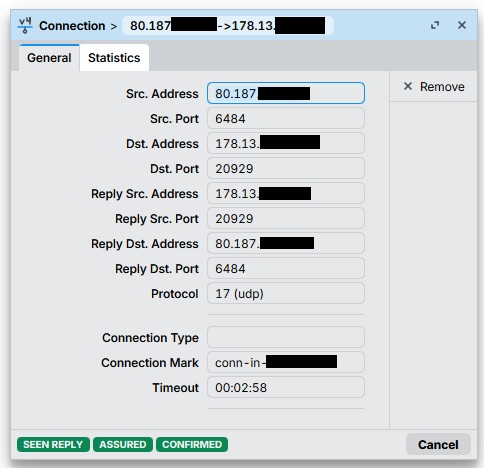
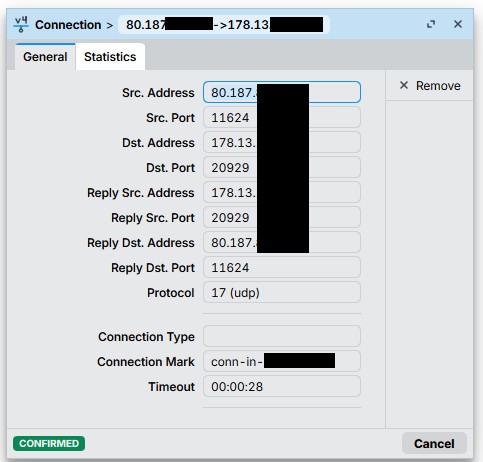
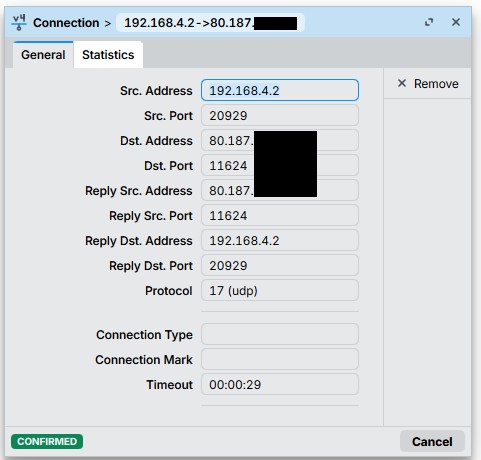
The “src-address” are the public IPs of the router.
But Routing-Marks are still ignored. WireGuard answers through the default-route with the lowest distance in the main routing table. Which breaks, if you connect (initally) not through this interface.
For example, if I connect through WAN3, WG answers through WAN1 (if this is the lowest-distance default route in main table). But Connection-Marks and Routing-Marks are configured. Testd this too: WireGuard - RouterOS - MikroTik Documentation no effect, still breaks.
There are great posts from @lurker888 explaining the reason behind that RouterOS blatantly ignores pref-src. Can this really be a bug? - #58 by lurker888. If you try to mark-routing packets generated by WireGuard based on connection marks, then you need the NAT tricks described in those threads, because otherwise the packets are not associated with the expected connection.
In recent RouterOS versions (>= 7.21), VRF support for the WG transport has been added, which can possibly be a solution if you put your WANs in different VRF, and use one separate WireGuard instance for each of them. Example: Wireguard VRF Issues - #19 by CGGXANNX.
You are correct sir. THe easiest solution is to use wireguard on the lowest distance WAN ( primary wan ). Wireguard, should transfer to the secondary wan if the primary wan is not available etc…
If you wish, in a multi-wan to have your wireguard running on a secondary WAN then you need to ‘trick the system as CGCX noted…
What lurker provided was a work around using either a secondary bridge or other faux interface on the router, which was used as a go-between. In other words he sent the incoming handshake to this interface by dstnat and then sourcnatted the traffic on its way to the wireguard protocol. The effect is that the wireguard protocol chose the optimal local destination (the faux interface) to reply to and route to, and the router unsourcenatted the traffic and undestinatted the traffic such that the handshake reply had the correct destination address ( the originating client on the web ) and was coming from the original destination address as source (wan2).
Ex. Lurker used a faux bridge with two addresses ……
I see no connection between this bridge and the WireGuard-Instance?
And the IP “172.16.10.2” in his SNAT rules. What does this?
But if you tell me this is “by design” so, I can live with it.
I think the “routing rule” solution is much easier and resilient (at least with static-public-IPs) than some bridge and NATing.
But I’d would still like to know why “Mangling” fails but Routing/Rules works? As long as under Routing/Settings Policy “User” is above “Main”. AFAIK Mangling and Rounting/Rules are almost the same? Mangling is a more “sophisticated” way and Rounting/Rules simpler?
The dummy bridge is there to have an interface to attach the dummy IP address 172.16.10.1. As @anav wrote above, instead of that you can also use the existing lo loopback interface and attach an /32 address to that instead of /30.
The need for the dummy address and the SRCNAT rule is explained in one of @lurker888 post in that thread. In short, without that, normal connection tracking will not work if you need routing table other than main, because when WireGuard generates UDP packets to be sent out, the packets initially have no specific source address assigned. WireGuard does not use the address on which it received previous packets as the sender address when it responds. If no special trick is implemented, then the source address is only assigned after routing selection have been made. If your routing selection (for example using mangle rules) relies on connection tracking (which requires mapping of source & destination addresses & ports to existing conntrack entries) then that will not work, because the source address will not match if it's not the IP address associated with the route with the lowest distance in main (WAN1).
If your mangle rule needs things like connection-mark then it will not work without the tricks.
The trick using SRCNAT forces the UDP packets generated by WireGuard to have a specific destination address (the dummy address), which in turn forces it to have a specific source address (because with that /32 or /30 route, only one possible source address is available). That UDP packet can then be associated with an existing conntrack entry. The conntrack entry stores the NAT data and can restore the original real destination IP address. And because it's an existing connection tracking entry, things like connection-mark are preserved and accessible.
I try to think of it visually. Imagine LO is just a big sphere.
Traffic comes in from the internet heading for the wireguard protocol in the router.
We make rules such that the incoming handshake traffic is diverted to the blob/sphere
(such that the original destination address is changed to a blob address, (dstnat))
(we then sourcenat the traffic coming out of the blob, such that the original source IP address of traffic is now blob address and not client address)
The handshake traffic hits the wireguard protocol and is accepted as the keys etc line up.
Now the wireguard protocol chooses the optimal local address to route the traffic back and it can only be the LO address ( not WAN1 or WAN2, which it normally sees ). Thus it gets sent back to the Blob, which unsourcenats the blob address original address to be the client address, which is of course now the new destination address. The router undestinats the traffic uncovering the original destination address which is WAN2, which will the accurate source address for the response.
Through the fairy dust of connection tracking. ———>
Now mangle rules will work and we send traffic from wan2 via the special table useWAN2 or whatever its named and the routing will go out WAN2 vice shorter distance WAN1.
Without this trickery, there was no way for us to force the wireguard protocol to use WAN2, it would always choose WAN1. A previous attempt by Sindy along the same lines also worked but was replaced because it depended upon WAN1 being up. If not no wireguard worked. This LO method, works if WAN1 is available or not available. (just some past history)
I tried the NAT-approach, but failed. There is so much discussion in the thread, I think I have not made all steps or all steps correctly. Is there a list where I can see: step 1 do this, step 2 do that and so on. Binding an /32 to the LO interface is easy, but which IP for DNAT, which for SNAT… Do I have to allow here in firewall filter (forward or input)? I think I will stay with the “routing rules” solution. But I’d like to know why this works?
As learned here, the WG “answer” has no source-IP, so why does the routing rule match correctly against the Soruce-Address? At what point is the correct source-ip applied that the rule can match?
To me, it has still a “buggy taste”. Why does Mangling not work (but the Routing-Mark counter goes up)? Why does it work with Routing Rules? If it works with Routing Rules (Source-Address), why can Mangling not use this Source-Address (which WG souldnt issue at all) too?! At which point in the packet flow are Routing Rules and Mangling consulted? Why does MT describe a solution in this way: WireGuard - RouterOS - MikroTik Documentation (which doesnt work for me too)?
Here is a shorter post with a working configuration based on @lurker888 post:
If you use the /32 address assignment instead of /30 then for both DSTNAT and SRCNAT rules, use that same address in to-addresses.
Of course any filtering is only needed for the input chain.
This is something that I don't understand. Are you sure that it really works with only routing rules? as in: Client from the outside uses WG app and connects to the IP address of WAN2 on your router (which is not the default one in main), and the WG connection works normally with the router answering correctly through WAN2? If that's the case, does that remote client has a public IP address (not behind NAT)?
I can confirm that @lurker888's solution works. I've just dealt with this in a Dual WAN scenario.
It was a !&$@ to make it work because it depends A LOT on the current state of your Dual/Multi WAN setup.
In my case there were two rules I had in mangle at top, to simplify the rest of them
add action=accept chain=prerouting comment="Bypass Mangle for Local/Multicast LAN" dst-address-list=no-mark
add action=accept chain=output comment="Bypass Mangle for Local/Multicast Router" dst-address-list=no-mark
Obviously this was making the wg-wan1/2 marking useless since the packets never reached the mark-routing for those connection marks.
I redid the logic of my rules a little and now everything seems fine
Thank you @lurker888 !