Wireguard in 2nd WAN

Has anyone implemented this?

I’m tired of reading and trying… Everything is fine work on 1 WAN.

if you add 2nd WAN and mark it (I tried statically)
(input rules, with fasttrack exclude and include rule, ipaddress, route list, all presents)

/ip firewall filter
chain=forward action=fasttrack-connection hw-offload=yes connection-state=established,related connection-mark=no-mark log=no log-prefix=""
chain=input action=accept protocol=udp in-interface-list=isp-list dst-port=X log=no log-prefix="" 
chain=input action=accept protocol=tcp in-interface-list=isp-list dst-port=80 log=no log-prefix=""

/ip firewall mangle
chain=prerouting action=mark-connection new-connection-mark=connection_wan2 passthrough=yes connection-mark=no-mark in-interface=wan2 log=no log-prefix=""
chain=output action=mark-routing new-routing-mark=route_wan2 passthrough=no connection-mark=connection_wan2 log=no log-prefix=""

for port WG and 80 to the router via WAN2 absolutely the same rules.
and if go via WAN2 via 80 to the router - everything works, WG - no (both with packet marking and static route)

[TUN] [HM562] Handshake for peer 1 (x:x) not completed after 5 seconds, repeating (let’s try 2)

Packets arrive on port WG, but they do not leave. At that time packets arrive on port 80 and respond as need.

It seems that the gateway IP, not the peer, comes to the WG interface via WAN2, I’m not sure. How to see a log of Wireguard server ?
However, with the same configuration, but on WAN1 - everything works.

so here’s the question, has anyone implemented WG on the 2nd WAN? Could you show your configuration?

Provide full config,
/export file=anynameyouwish ( minus router serial number, any public WANIP information, keys etc.)


updated in some ports numbers, sorry.

There was an issue pre 7.15.3 where the second WAN for wireguard ( secondary wAN) would not work even if one mangled for wireguard.
So Im assuming before looking at the config, that there may other issues at play since you are using 7.15.3.

Can you clarify why there are two Configs for one device?
The simple is the actual router hosting wireguard, what is the purpose of WAN2 config…
Is that simply the device providing LTE termination, and you pass the private IP to the other router as WAN2??

I also tend to think that there is a bug that has survived to the current version.

simple.rsc is the main router, wan2.rsc is wan2 itself.

The purpose of wan2 is to provide an independent separate channel for specific needs. And planing to use 4-6 additional WAN.
Yes, wan.src is just an LTE modem that works as a laboratory device, it forwards ports, it can’t do anything else.
In fact, some WAN devices will be GPoN in bridge mode or router mode.

P.S. So I guess I need to post a bug report?

Nope, your config needs to be fixed first, then we can properly assess if you still have issues. Since others are using 7.15.3 with secondary WAN without issue, its likely the config.

The config is so hosed and confusing…
I dont know where to begin… which means its so nonesensical there is no logical easy mod… a complete rewrite is required.
So many firewall rules not needed as well.

Before I bother, did you realize the ltap is only giving you a WAN2 throughput of like 100Mbps or less??
Only really useful I suppose to config the router, or maybe reach something on the CCR1009 LAN
The other things is no need for IP DHCP on the CCR1009 for WAN2, just set the DHCP lease statically on the LTAP to 192.168.80.10

This is just notional because there is much not known. A network diagram would be very helpful to try to explain what you are attempting to do and what the ports are connected to!!
QUESTION:
Do your LTE connection get a PUBLIC IP ADDRESS? If not wireguard may not be possible. In fact you may have to do it through your PPPOE connection if that gives you a public IP.

# 2024-08-17 16:57:58 by RouterOS 7.15.3
# software id = xx
#
# model = CCR1009-7G-1C-1S+
/bridge 
add bridge=bridge  vlan-filtering=off   {  turn on after config complete }
/interface ethernet
set [ find default-name=combo1 ] name=combo1-isp
set [ find default-name=ether1 ] name=ether1-WAN2
set [ find default-name=ether7 ] name=ether7-OffBridge
/interface pppoe-client
add add-default-route=yes disabled=no interface=combo1-isp name=pppoe-wan1 \
    user=x@x
/interface wireguard
add listen-port=54456 mtu=1420 name=wg-note
/interface vlan
add interface=bridge name=vlan23 vlan-id=23
add interface=bridge name=vlan25 vlan-id=25
add interface=bridge name=vlan231 vlan-id=231
add interface=bridge name=vlan233 vlan-id=233
add comment=X-LAT interface=bridge name=vlan235 vlan-id=235
/interface list
add name=WAN
add name=LAN
add name=TRUSTED
/ip pool
add name=pool_vlan23 ranges=192.168.23.100-192.168.23.199
add name=pool_vlan25 ranges=192.168.25.100-192.168.25.199
add name=pool_vlan231 ranges=192.168.231.100-192.168.231.199
add name=pool_vlan233 ranges=192.168.233.100-192.168.233.199
add name=pool_vlan235 ranges=192.168.235.100-192.168.235.199
/ip dhcp-server
add address-pool=pool_vlan23 interface=vlan23 lease-time=23h59m59s name=\
    dhcp_vlan23
add address-pool=pool_vlan25 interface=vlan25 lease-time=23h59m59s name=\
    dhcp_vlan25
add address-pool=pool_vlan233 disabled=yes interface=vlan233 lease-time=\
    23h59m59s name=dhcp_vlan233
add address-pool=pool_vlan231 interface=vlan231 lease-time=23h59m59s name=\
    dhcp_vlan231
add address-pool=pool_vlan235 interface=vlan235 lease-time=23h59m59s name=\
    dhcp_vlan235
/routing table
add fib name=use-WAN2
/interface list member
add comment="Internet wan1" interface=pppoe-wan1 list=WAN
add interface=ether1-WAN2 list=WAN
add interface=vlan23 list=LAN
add interface=vlan25 list=LAN
add interface=vlan231 list=LAN
add interface=vlan233 list=LAN
add interface=vlan235 list=LAN
add interface=wg-note list=LAN
add interface=ether7-OffBridge  list=LAN
add interface=vlan23 list=TRUSTED
add interface=ether7-OffBridge  list=TRUSTED
add interface=wg-note list=TRUSTED
/interface wireguard peers
add allowed-address=13.13.13.37/32 interface=wg-note name=note \
    public-key="x"
/interface bridge ports
add bridge=bridge  ether port=2  UNKNOWN purpose  
add bridge=bridge  ether port=3  UNKNOWN purpose
add bridge=bridge  ether port=4  UNKNOWN purpose
add bridge=bridge  ether port=5  UNKNOWN purpose
add bridge=bridge  ether port=6  UNKNOWN purpose
add bridge=bridge  ether port=8  UNKNOWN purpose
/interface bridge vlans
add bridge=bridge tagged=bridge ??????????????? vlan-id=23
add bridge=bridge tagged=bridge ??????????????? vlan-id=25
add bridge=bridge tagged=bridge ??????????????? vlan-id=231
add bridge=bridge tagged=bridge ??????????????? vlan-id=233
add bridge=bridge tagged=bridge ??????????????? vlan-id=235
/ip neighbor discovery-settings
set discover-interface-list=TRUSTED
/ip address
add address=192.168.80.10/24  interface=ether1-WAN2   network=192.168.80.0  comment="WAN LTE"
add address=192.168.55.1/30 comment=defconf interface=ether7-OffBridge network=\
    192.168.88.0
add address=192.168.23.1/24 comment=LAN interface=vlan23 network=\
    192.168.23.0
add address=192.168.25.1/24 comment=WiFi interface=vlan25 network=\
    192.168.25.0
add address=192.168.231.124 comment=Guests interface=vlan231 network=\
    192.168.231.0
add address=192.168.233.1/24 comment=Equipment interface=vlan233 network=\
    192.168.233.0
add address=192.168.235.254/24 comment=X interface=vlan235 network=\
    192.168.235.0
add address=13.13.13.1/24 interface=wg-note network=13.13.13.0
/ip dhcp-client
disabled=yes
/ip dhcp-server network
add address=192.168.23.0/24 dns-server=192.168.23.1 gateway=192.168.23.1 \
    ntp-server=192.168.23.1
add address=192.168.25.0/24 dns-server=192.168.25.1gateway=192.168.25.1 \
    ntp-server=192.168.25.1
add address=192.168.231.0/24 dns-server=192.168.231.1 gateway=192.168.231.1 \
     ntp-server=192.168.231.1
add address=192.168.233.0/24 dns-server=192.168.233.1 gateway=192.168.233.1 \
     ntp-server=192.168.233.1
add address=192.168.235.0/24 dns-server=192.168.235.1gateway=192.168.2351 \
     ntp-server=192.168.235.1
/ip dns
set allow-remote-requests=yes use-doh-server=https://1.1.1.1/dns-query \
    verify-doh-cert=ye

/ip firewall address-list
add address=192.168.23.X  list=Authorized    comment="admin device #1"
add address=192.168.23.Y  list=Authorized comment="admin device #2"
add address=13.13.13.37  list=Authorized comment="remote admin wireguard"
add address=192.158.55.2  list=Authorized comment="admin off bridge"

/ip firewall filter
{ default rules to keep }
add action=accept chain=input comment="accept established, related" \
    connection-state=established,related
add action=drop chain=input comment="drop invalid" connection-state=invalid
add action=accept chain=input comment="allow ICMP" in-interface-list=\
    !isp-list protocol=icmp
{  admin rules }
add action=accept chain=input comment="WG handshake" dst-port=54456 protocol=udp
add action=accept chain=input comment="admin access" src-address-list=Authorized
add action=accept chain=input comment="users to services"  in-interface-list=LAN dst-port=53,123 protocol=udp 
add action=accept chain=input comment="users to services"  in-interface-list=LAN dst-port=53 protocol=tcp
add action=drop chain=input comment="drop all else"     { add as last rule }
+++++++++++++++++++++++++++++++
{ default rules to keep }
add action=fasttrack-connection chain=forward  connection-mark=no-mark \
    connection-state=established,related hw-offload=yes
add action=accept chain=forward connection-state=established,related,untracked
add action=drop chain=forward comment="drop invalid" connection-state=invalid
add action=accept  chain=forward comment="internet access"  in-interface-list=LAN out-interface-list=WAN 
add action=accept chain=forward comment="port forwarding"  connection-nat-state=dstnat
add action=accept chain=forward comment="admin access"  src-address-list=Authorized out-interface-list=LAN
++++++++++Add any other subnet to subnet access rules here +++++++++
add action=drop chain=forward comment="drop all else"

/ip firewall mangle
add action=mark-connection chain=input comment="WAN LTE" \
    connection-mark=no-mark in-interface=ether1-WAN2 new-connection-mark=\
    connection_lte passthrough=yes
add action=mark-routing chain=output connection-mark=connection_lte \
    new-routing-mark=use-WAN2 passthrough=no
/ip firewall nat
add action=masquerade chain=srcnat ipsec-policy=out,none out-interface-list=WAN

Why using netmap instead of dstnat ??
Also is the PPOE dynamic??? or fixed??  aka why 82.209.xx.xx

/ip route
add dst-address=0.0.0.0  check-gateway=ping distance=2  gateway=192.168.80.1
add dst-address=0.0.0.0/0  gateway=192.168.80.1  table=use-WAN2

/ip service
set telnet disabled=yes
set ftp disabled=yes
set www disabled=yes
set ssh address=192.168.23.0/24
set api disabled=yes
set winbox address=192.168.23.0/24,192.168.55.0/30,13.13.13.0/24
set api-ssl disabled=yes

/tool mac-server
set allowed-interface-list=NONE
/tool mac-server mac-winbox
set allowed-interface-list=TRUSTED

I think there is no error in this lab configuration, except for the WAN2 line and Wireguard.

And I think you don’t need my configuration, this is a basic initial standard configuration, it works and there are no questions about it.

There is only a question about Wireguard on WAN2.
As I wrote earlier, LtAP is only for lab research. If I manage to run Wireguard on this, then I plan to transfer the settings to a working router with GPON PPPoE.

Of course, the LTE connection has a static public address.
And the thing is that I have already tried to run Wireguard on WAN2 with PPPoE, it also does not work.
Therefore, it was decided to create a separate lab and practice on it, since it is impossible to do this on a working system.

I just need to know if Wireguard works on WAN2 for anyone? 2nd question, I would like to see a working configuration for Wireguard on WAN2, only routing.
Total configuration doesn’t matter, I’m only looking for the settings for Wireguard via WAN2, everything else doesn’t affect Wireguard via WAN2.

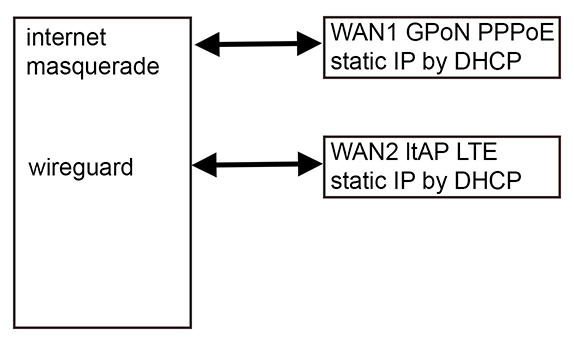
Well, the diagram couldn’t be simpler, I’m attaching it.

Thank you for wasting your time.
scheme.jpg

Here, I highlighted only what is relevant to the topic.
The goal is the same - to get access to the router via Wireguard via WAN2

/interface ethernet
set [ find default-name=ether1 ] name=ether1-WAN2

/interface wireguard
add listen-port=54456 mtu=1420 name=wg-note

/interface vlan
add comment="WAN 4G" interface=ether1-lan name=isp-wan2 vlan-id=8

/routing table
add disabled=no fib name=route_wan2

/interface list member
add interface=isp-wan2 list=isp-list

/interface wireguard peers
add allowed-address=13.13.13.37/32 interface=wg-note name=note \
    public-key="x"

/ip address
add address=13.13.13.254/24 interface=wg-note network=13.13.13.0

/ip dhcp-client
add add-default-route=no interface=isp-wan2 use-peer-dns=no use-peer-ntp=no

/ip firewall filter
add action=accept chain=input comment="WG note" dst-port=54456 \
    in-interface-list=isp-list protocol=udp
add action=accept chain=input comment="WG note mgmnt" in-interface=\
    wg-note
add action=accept chain=forward comment="mngmnt all net" in-interface=isp-wan2

/ip firewall mangle
add action=mark-connection chain=prerouting comment="WAN LTE" \
    connection-mark=no-mark in-interface=isp-wan2 new-connection-mark=\
    connection_lte passthrough=yes
add action=mark-routing chain=output connection-mark=connection_lte \
    new-routing-mark=route_wan2 passthrough=no

/ip firewall nat
add action=masquerade chain=srcnat ipsec-policy=out,none out-interface-list=\
    isp-list

Basically, the ROS implementation has a bug where Wireguard’s initial handshake always gets sent back through the default gateway instead of the interface the traffic came from which makes the connection fail due to a protocol error. And since the handshake isn’t tracked, you can’t use mangle to manage it either.

The only way to work around the bug is by using policy routing:

http://forum.mikrotik.com/t/wireguard-multi-wan-policy-routing/174145/1

Mangle as per normal for wan2 (traffic coming to wan2 leaves wan2)

  • input chain-mark connections
  • output chain mark route

Apply rule.
/ip firewall nat
chain=dstnat dst-address-type=local in-interface=WAN2 protocol=udp dst-port=wg-port action=dst-nat to-addresses=ip.of.wan.1

Does that fix the initial handshake issue?

Yes, in that the response goes back from WAN2 not WAN1.

Great, perfect with an alternative workaround! Any thoughts on the pros and cons compared to policy routing?

Well this fix assumes one is still mangling to ensure traffic coming into wan2 goes out WAN2 and using a special route table for the WAN2.

If you are talking using Routing Rules, if the situation permits it, and it works, then that is another approach which uses same table and same route as above.

Do you mean… like
add action=lookup-only-in-table dst-address=fixed-static-public-IP-of-WAN2 table=use-WAN2

/ip route
add address=0.0.0.0/0 gateway=wan2-gatewayIP table=use-WAN2

Yeah, that was the solution I was thinking of but I had NAT in mind and just didn’t have the energy to figure out a good variation like the one you just showed.

Wasnt me, I have the nergy but not the smarts… you can thank Sindy for that one.

I tried it first, cause I prefer static rules instead marks. But handshake did not work.
Tried different combinations in the routing rule to route the handshake packets back.

THIS IS BRILLIANT!!!

I am very grateful for your time and help.

Special thanks for Sindy !

P.S. Can you explain how this rule works?
So the packets from WA2 are sent to WAN1, where they are picked up by Wireguard and then back the same way?

I wonder if Mikrotik plans to fix this bug so that such tasks don’t have to be done by trickery!

Mikrotik has had a few supout reports on this matter and is hopefully working on a fix.

The problem we are facing is that the response to the handshake leaves WAN2 and then ends up bleeding out WAN1. Therefore the originating device gets a response from an unknown destination address and is rejected.

Therefore we tell the router that all traffic coming from ether2 (wan2) is destinatted to WAN1 for that port.

Thus when WAN1 is chosen (incorrectly) to reply to that traffic ( before leaving the door so to speak ) the router sees the dstnat rules and “un-destination nats” the traffic out through WAN2.

Yeah, the first WireGuard handshake is like a secret handshake between two routers (Peer A and Peer B) that want to communicate securely. Peer A sends a “hello” (handshake initiation packet) to Peer B which responds with a “hello back” (handshake response packet).

But because there’s a bug in ROS, Peer B sends the “hello back” from a different address than the one it received the first “hello” from, which confuses Peer A. Peer A thinks it’s suddenly talking to someone else or that something fishy is going on so it just ignores the response and the handshake fails. It’s a built-in security measure in WireGuard to make sure both peers are actually who they say they are.

To make it work, you have to use some workarounds to ensure that the “hello back” is sent back using the same address it came from using inbound routing policies or dst-nat.