Hi to all, first time posting here.
Apologies if I am not using the correct terminology, I am not network specialist.
I am trying to connect Linux-1 and Linux-2 hosts subnets using 2 Mikrotik routers MT-1 and MT-2. For the moment I am testing in Eve Ng with the following network diagram:
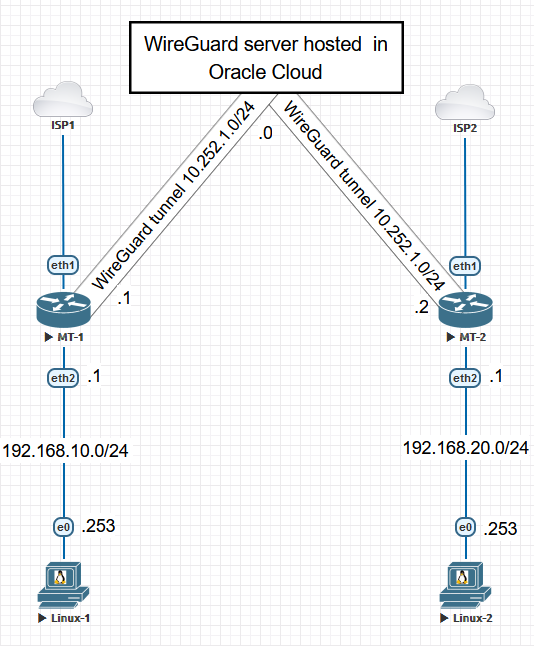
The idea is to create a transparent link between 192.168.10.0/24 and 192.168.20.0/24 subnets
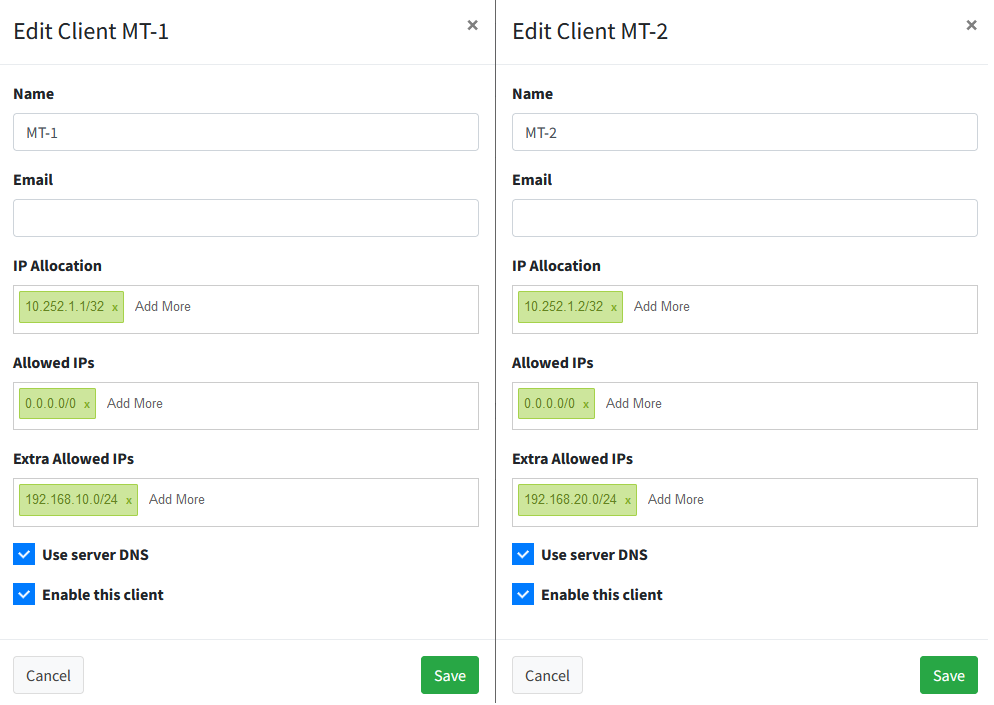
Wireguard server is running on Oracle Cloud as a Docker container using wiregard-ui → https://hub.docker.com/r/ngoduykhanh/wireguard-ui
Server config:
[Interface]
ListenPort = 51820
PrivateKey = serverPrivateKey

[Peer]
PublicKey = MT-1_PublicKey
PresharedKey = MT-1_PresharedKey
AllowedIPs = 10.252.1.1/32

[Peer]
PublicKey = MT-2_PublicKey
PresharedKey = MT-2_PresharedKey
AllowedIPs = 10.252.1.2/32
Server routes:
Kernel IP routing table
Destination     Gateway         Genmask         Flags Metric Ref    Use Iface
default         colajet.local   0.0.0.0         UG    0      0        0 eth0
10.252.1.0      *               255.255.255.0   U     0      0        0 wg0
172.22.0.0      *               255.255.0.0     U     0      0        0 eth0
Server Post-Up script (set on wireguard-ui):
iptables -A FORWARD -i wg0 -j ACCEPT; iptables -t nat -A POSTROUTING -o eth0 -j MASQUERADE
Server Post-Down script (set on wireguard-ui):
iptables -D FORWARD -i wg0 -j ACCEPT; iptables -t nat -D POSTROUTING -o eth0 -j MASQUERADE
MT-1 config:
/interface bridge
add name=bridge1
/interface ethernet
set [ find default-name=ether3 ] disabled=yes
set [ find default-name=ether4 ] disabled=yes
/interface wireguard
add listen-port=51820 mtu=1420 name=wireguard1
/interface wireless security-profiles
set [ find default=yes ] supplicant-identity=MikroTik
/ip pool
add name=dhcp_pool0 ranges=192.168.10.2-192.168.10.254
/ip dhcp-server
add address-pool=dhcp_pool0 interface=bridge1 name=dhcp1
/port
set 0 name=serial0
/routing table
add disabled=no fib name=use-wg
/interface bridge port
add bridge=bridge1 interface=ether2
add bridge=bridge1 interface=ether3
add bridge=bridge1 interface=ether4
/interface wireguard peers
add allowed-address=0.0.0.0/0 endpoint-address=xxx.yyy.com endpoint-port=51820 interface=wireguard1 \
    persistent-keepalive=15s public-key=serverPublicKey
/ip address
add address=10.252.1.1/24 interface=wireguard1 network=10.252.1.0
add address=192.168.10.1/24 interface=bridge1 network=192.168.10.0
/ip dhcp-client
add interface=ether1
/ip dhcp-server network
add address=192.168.10.0/24 gateway=192.168.10.1
/ip dns
set servers=1.1.1.1
/ip firewall address-list
add address=192.168.10.0/24 list=thru-wg
add address=192.168.0.0/16 list=private-networks
add address=172.16.0.0/12 list=private-networks
add address=10.0.0.0/8 list=private-networks
/ip firewall mangle
add action=change-mss chain=forward new-mss=clamp-to-pmtu passthrough=yes protocol=tcp tcp-flags=syn
add action=mark-routing chain=prerouting dst-address-list=!private-networks new-routing-mark=use-wg \
    passthrough=no src-address-list=thru-wg
/ip firewall nat
add action=masquerade chain=srcnat comment="NAT internet" out-interface=ether1
add action=masquerade chain=srcnat comment="NAT wireguard" out-interface=wireguard1
/ip route
add disabled=no distance=1 dst-address=0.0.0.0/0 gateway=wireguard1 pref-src="" routing-table=use-wg scope=30 \
    suppress-hw-offload=no target-scope=10
/system identity
set name=MT-1
/system note
set show-at-login=no
MT-2 config:
/interface bridge
add name=bridge1
/interface ethernet
set [ find default-name=ether3 ] disabled=yes
set [ find default-name=ether4 ] disabled=yes
/interface wireguard
add listen-port=51820 mtu=1420 name=wireguard1
/interface wireless security-profiles
set [ find default=yes ] supplicant-identity=MikroTik
/ip pool
add name=dhcp_pool0 ranges=192.168.20.2-192.168.20.254
/ip dhcp-server
add address-pool=dhcp_pool0 interface=bridge1 name=dhcp1
/port
set 0 name=serial0
/routing table
add disabled=no fib name=use-wg
/interface bridge port
add bridge=bridge1 interface=ether2
add bridge=bridge1 interface=ether3
add bridge=bridge1 interface=ether4
/interface wireguard peers
add allowed-address=0.0.0.0/0 endpoint-address=xxx.yyy.com endpoint-port=51820 interface=wireguard1 \
    persistent-keepalive=15s public-key=serverPublicKey
/ip address
add address=10.252.1.2/24 interface=wireguard1 network=10.252.1.0
add address=192.168.20.1/24 interface=bridge1 network=192.168.20.0
/ip dhcp-client
add interface=ether1
/ip dhcp-server network
add address=192.168.20.0/24 gateway=192.168.20.1
/ip dns
set servers=1.1.1.1
/ip firewall address-list
add address=192.168.20.0/24 list=thru-wg
add address=192.168.0.0/16 list=private-networks
add address=172.16.0.0/12 list=private-networks
add address=10.0.0.0/8 list=private-networks
/ip firewall mangle
add action=change-mss chain=forward new-mss=clamp-to-pmtu passthrough=yes protocol=tcp tcp-flags=syn
add action=mark-routing chain=prerouting dst-address-list=!private-networks new-routing-mark=use-wg \
    passthrough=no src-address-list=thru-wg
/ip firewall nat
add action=masquerade chain=srcnat comment="NAT internet" out-interface=ether1
add action=masquerade chain=srcnat comment="NAT wireguard" out-interface=wireguard1
/ip route
add disabled=no distance=1 dst-address=0.0.0.0/0 gateway=wireguard1 pref-src="" routing-table=use-wg scope=30 \
    suppress-hw-offload=no target-scope=10
/system identity
set name=MT-2
/system note
set show-at-login=no
What I have tried:
- Adding route to server for reaching 192.168.10.0/24 via 10.252.1.1, and 192.168.20.0/24 via 10.252.2.1
- Adding route to MT-1 for reaching MT-2 subnet (192.168.20.0/24) via 10.252.1.2
- Adding route to MT-2 for reaching MT-1 subnet (192.168.10.0/24) via 10.252.1.1
Facts:
- Server can ping wireguard interface IP of both MT-1 and MT-2
- MT-1 can ping server wireguard interface IP, as well as MT-2 wireguard interface IP, but cannot ping Linux-2 computer
- MT-2 can ping server wireguard interface IP, as well as MT-1 wireguard interface IP, but cannot ping Linux-1 computer
- Linux-1 computer can ping MT-2 wireguard interface IP, but cannot ping neither wireguard server interface IP, nor Linux-2 computer
- Linux-2 computer can ping MT-1 wireguard interface IP, but cannot ping neither wireguard server interface IP, nor Linux-1 computer
- Botn Linux-1 and Linux-2 computers have internet access through wireguard (whatsmyip on botn computers shows the public ip of the server)
Any idea why Linux1 and Linux-2 cannot ping each other?
Many thanks in advance.