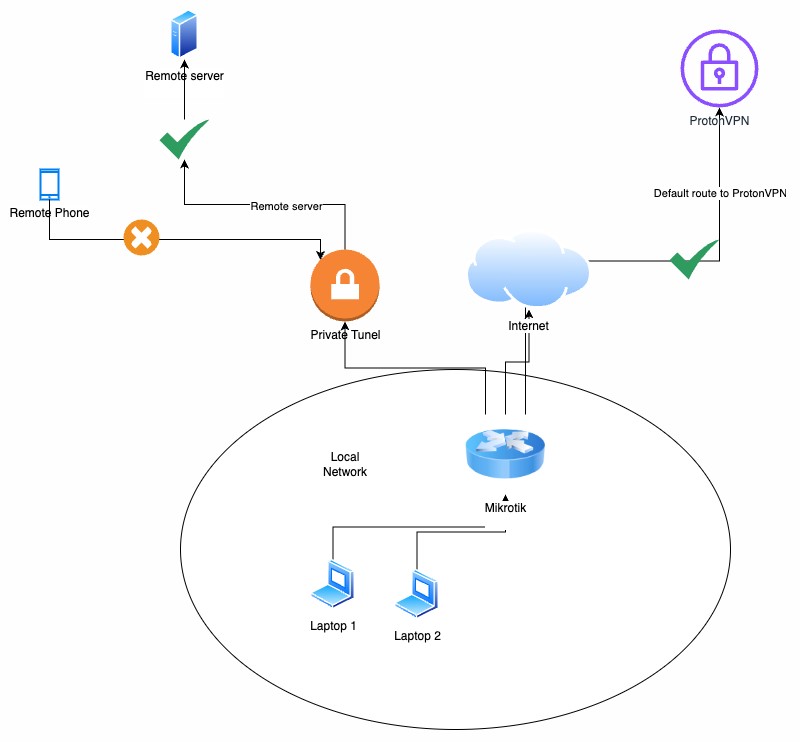
I’m experiencing an issue where my mobile devices can’t connect to my Wireguard VPN when my router’s default route goes through ProtonVPN. Everything works fine with remote servers, but mobile clients just won’t connect. Let me explain my setup in detail:
Current setup:
Router: Mikrotik hAP ax2
Main VPN: ProtonVPN (all outgoing traffic)
Secondary VPN: Wireguard (remote server access + mobile clients)
Situation:
My setup works perfectly with:
Wireguard tunnel operational for my remote servers
All outgoing traffic through ProtonVPN
Pings work both ways between remote servers and local machines
When connecting to a remote server, Wireguard shows my ISP box IP (not ProtonVPN IP) as peer address, confirming that the routing setup on Mikrotik works as intended
I created exceptions for certain traffic that should not go through ProtonVPN:
Traffic to Mikrotik servers (DynDNS) → OK
Wireguard UDP traffic → Partially OK
Configuration implemented:
“no_vpn” routing table
Modified fasttrack rule to exclude “no_vpn” table
Mangle rules to mark:
Traffic to Mikrotik servers
Wireguard UDP traffic
Issue:
Remote server connection via Wireguard: OK
Mobile client connection via Wireguard: NOT OK
Wireguard logs show transmitted bytes but no handshake
Test performed:
If default route → ISP BOX: Everything works
If default route → ProtonVPN: Mobile clients can’t connect
Question:
Could there be a specific interaction between ProtonVPN and Wireguard for mobile clients? I suspect restrictions on mobile operators’ side but without certainty.
First a diagram as I have no idea what you mean about remote servers… Right now I am assuming you have cloud servers behind a CHR.
Second
With a full config nothing really useful can be provided, I prefer not to guess.
/export file=anynameyouwish (minus router serial number, any public WANIP information, keys etc. )
There are two issues - one is the same regardless the VPN types and the other one is specific to Wireguard.
Mobile clients connect from “random” public addresses, so the only route that can handle any of them is the default one. Given that the default route in the default routing table (called main) goes via the ProtonVPN tunnel, you need to add additional routing table whose default route goes via the regular WAN, and you need to make the router use that routing table for the return Wireguard handshake and transport traffic towards the mobile clients. Since you want only part of the own traffic of the router to use that table, you have to use mangle rules to assign the routing table name.
The issue specific to Wireguard is that the Wireguard stack does not “respond” to incoming packets in the sense that it would send the response from the same address to which the request has arrived; instead, it uses the routing table main to determine the route first and assigns the local source address based on that, which is the normal behavior for packets it sends from its own initiative. So the usual way of assigning a connection mark when handling the incoming request and translate the connection mark into a routing mark when handling an outgoing response cannot be used. Nor is it possible to use just mangle to assign the routing mark and then a src-nat rule to change the address, as that would creat two colliding tracked connections.
So you need to use a dst-nat rule that matches on the WAN IP of the router and changes it to the one assigned to the NordVPN tunnel, because that’s the address that will be chosen as source for the Wireguard response packets routed using the default route in table main, and a mark-routing rule in mangle that matches on the source UDP port (the listen-port of the Wireguard “server”) that will make sure that these will be routed using the dedicated routing table.
@sindy I must admit that I’m not sure I fully understood all the technical aspects of the proposed solution.
Let me clarify my current Wireguard traffic configuration:
I have set up a rule in the “output” chain that forces outgoing traffic from my private Wireguard tunnel to go through my Internet box rather than through ProtonVPN.
I can confirm the effectiveness of this rule through two observations:
Without the rule:
Ping to my remote server ~100 ms
The IP address visible as “peer” on my remote server is ProtonVPN’s
With the rule active:
Ping returns to ~8ms
The IP address visible as “peer” is indeed my Internet box’s IP
Is this the issue you were referring to in your explanation? Or did I misinterpret your response?
Thanks for the config and continual understanding of the requirements both very helpful
Before I delve into the config, output chain is not required to do what you need.
One simply needs a firewall rule and routing mechanism to do so, while not conflicting with other traffic.
Linking to other sites for diagrams is not the way to go…SO.
…
Assuming your mikrotik has a public IP and is the SERVER peer for handshake for your devices that need to connect remotely, then this is all that one should see.
For some reason you have peer side noise in allowed Ips, which makes me think this was created by using BTH vice manual. Nothing wrong with that, but I like to keep config clean of such noise- much less confusing. Allowed IPs is a mess clean it up.
MISSING firewall rules. - If this is the full extent of your firewall rules, they are dangerous and incomplete. On the other hand if you deliberately chose not provide the complete config, then my work here has ended.
I would like to clarify some points about my configuration:
Network setup:
The Mikrotik is indeed the server for remote connections
It sits behind a router/modem with dynamic public IP
Port forwarding is configured on the router to the Mikrotik
I’m using Mikrotik Cloud as DDNS service to handle the dynamic IP
Regarding the configuration:
It wasn’t generated through BTH but manually configured
The firewall rules shown are only those related to Wireguard
Other rules (internal networks, inter-VLAN routing via forward chain, remaining traffic blocking) are in place but weren’t included as they weren’t relevant to this case
What particularly intrigues me:
The remote server connection works correctly, which suggests a valid basic configuration
The system responds normally when I modify the default route
Outgoing UDP packets through the VPN listening port do use the non-VPN route
Given these elements, would you have any suggestions for specific logs to set up to identify a potential anomaly?
No worries, you came for help, I asked for the information to make that possible and then you decide magically you know where the problem is (or isnt) and thus I have to question why did you come for help in the first place. I have limited time and your wasting it.
I thought I had provided the technical elements in a clear and structured way. I did indeed omit the complete firewall rules file.
I understand that your time is valuable and that you may be overloaded. However, seeking help on a support forum does not justify accepting an aggressive or condescending tone.
I sincerely thank you for the time you have dedicated to my request, but if you cannot continue this exchange in a constructive and respectful manner, I prefer to look for help elsewhere.
Please post drawings as direct attachments here - few people here would visit external sites fueled by advertising.
This rule is indeed necessary, but it is not sufficient. I must start the explanation from the connection tracking module of the firewall.
The connection tracking module serves multiple roles - most importantly, it provides the connection-state meta-field to packets to simplify the structure of the firewall rules and it takes care about NAT. Its functionality depends on an ability to identify an already existing connection to which a packet belongs. For generic UDP connections, the only fields that can be used for such identification are the addresses and ports.
If a packet does not match to any connection that is already in the list, it creates a new one. And all the NAT decisions are made while processing such an initial packet and their results are stored in the context data of that connection. All subsequent packets of the same connection inherit an appropriate NAT handling, same or mirrored, depending on their direction.
Now let’s use an example - the mobile client sends the first Wireguard handshake packet; there may be some source nat in the mobile network so we’ll receive the packet from address 1.2.3.4 port 12345 to our WAN address 192.168.1.x port 56789. Since there is no dst-nat rule on the Mikrotik itself, and since 192.168.1.x is an own address of the Mikrotik, a tracked connection will be created with both src-address and reply-dst-address set to 1.2.3.4:12345 and both dst-address and reply-src-address set to 192.168.1.x:56789. If the process listening at 192.168.1.x:56789 was any other one than Wireguard, it would send its response from 192.168.1.x:56789 so the response would be identified as part of the existing connection and be sent to 1.2.3.4:12345 without any change. However, the Wireguard process will choose the source address for the response using routing table main, so it will send a packet from 10.2.0.2:56789 to 1.2.3.4:12345. So from the point of view of connection tracking, this will be an initial packet of a new connection, so it will indeed create a new one. Normally, the masquerade rule would set the reply-src-address to 192.168.1.x:56789 and send the packet to 1.2.3.4:12345, but such a combination of dst-address and reply-dst-address would collide with the combination of src-address and dst-address of the connection created by the initial packet that came from the mobile client, so the connection tracking will use some other port than 56789 (let’s say 1024) to prevent this. And such a packet will not match the original connection at the mobile network end, so the mobile network will not deliver it to the client.
To prevent this from happening, you need to play along, by using a dst-nat rule that will redirect the initial packet from the client from 192.168.1.x:56789 to 10.2.0.2:56789, so that the response from 10.2.0.2:56789 could be identified as belonging to the same connection and get “un-dst-nated” rather than “src-nated” (which is of course the same change from 10.2.0.2 to 192.168.1.x but from the logical point of view it has a different reason).
I wanted to sincerely thank you - your solution perfectly solved my issue.
I particularly appreciate the quality and precision of your technical explanations. Even though some aspects still need to be studied further on my end, you provided all the necessary elements to better understand how the mechanism works.
I will take the time to study your explanation in detail, which will serve as a foundation for my understanding of the subject.