wireguard 'road warrior' cannot use my dns

I have a working routeros hex s (new to me) erased and updated to 7.9

I ran through the default config and got basic things working, lan dhcp, wan masquerade, ntp client/server, dns caching, and queing with cake..

I then setup wireguard following the docs with a peer, everything works except I cannot use the routeros dnscache via the wireguard peer..

when I use a different upstream recursor everything resolves and full tunnel wireguard does work..

I do have allow-remote-requests=yes on the dns

eth1 is wan
eth[2-5] is bridge and lan

wireguard is 192.0.2.254/28 and the peer is 192.0.2.241 (I did not see any type of bogon/rfc filtering that would cause the test-net-1 range not to work)

clients from the lan can ping 192.0.2.254 and seemingly resolve from it..

drill www.google.com @192.0.2.254

At that I am lost and not sure how to continue..

the wg peer does connect (192.0.2.241) and I can ping it from the lan when it is connected..

I could not find commands for showing the wg peer connected in the cli, but from the gui it does show connected and passing traffic..

Thank you in advance for taking the time to read this..

Suggestions or questions are greatly appreciated.

Network diagram, ( since you never stated what you are connected to for ISP or wireguard )
/export file=anynameyouwish (minus router serial number and any public WANIP info)

What is the DNS for your DHCP?
Provide a network diagram, please.

/export compact terse show-sensitive 
# may/12/2023 07:25:24 by RouterOS 7.9

#
# model = RB760iGS

/interface bridge add admin-mac=AA:BB:CC:11:22:33 auto-mac=no comment=defconf name=bridge
/interface wireguard add listen-port=51820 mtu=1420 name=wireguard1 private-key="8< -- SNIP -- >8"
/disk set sd1 type=hardware
/interface list add comment=defconf name=WAN
/interface list add comment=defconf name=LAN
/interface lte apn set [ find default=yes ] ip-type=ipv4 use-network-apn=no
/interface wireless security-profiles set [ find default=yes ] supplicant-identity=MikroTik
/ip hotspot profile set [ find default=yes ] html-directory=hotspot
/ip pool add name=dhcp ranges=192.168.88.10-192.168.88.254
/ip dhcp-server add address-pool=dhcp interface=bridge lease-time=10m name=defconf
/port set 0 name=serial0
/queue type add cake-atm=ptm cake-diffserv=besteffort cake-mpu=88 cake-overhead=40 kind=cake name=cake-default
/queue type add cake-ack-filter=filter cake-atm=ptm cake-bandwidth=37.0Mbps cake-diffserv=besteffort cake-mpu=88 cake-nat=yes cake-overhead=40 kind=cake name=cake-up
/queue type add cake-atm=ptm cake-bandwidth=225.0Mbps cake-diffserv=besteffort cake-mpu=88 cake-nat=yes cake-overhead=40 cake-wash=yes kind=cake name=cake-down
/queue simple
# CAKE type with bandwidth setting detected, configure traffic limits within queue itself
add bucket-size=0.001/0.001 name=cake queue=cake-down/cake-up target=ether1 total-queue=cake-default
/interface bridge port add bridge=bridge comment=defconf ingress-filtering=no interface=ether2
/interface bridge port add bridge=bridge comment=defconf ingress-filtering=no interface=ether3
/interface bridge port add bridge=bridge comment=defconf ingress-filtering=no interface=ether4
/interface bridge port add bridge=bridge comment=defconf ingress-filtering=no interface=ether5
/interface bridge port add bridge=bridge comment=defconf ingress-filtering=no interface=sfp1
/ip neighbor discovery-settings set discover-interface-list=LAN
/ipv6 settings set disable-ipv6=yes max-neighbor-entries=8192
/interface detect-internet set detect-interface-list=all
/interface list member add comment=defconf interface=bridge list=LAN
/interface list member add comment=defconf interface=ether1 list=WAN
/interface list member add interface=wireguard1 list=LAN
/interface ovpn-server server set auth=sha1,md5
/interface wireguard peers add allowed-address=192.0.2.241/32 comment=Peer1-XS interface=wireguard1 public-key="8< -- SNIP -- >8"
/ip address add address=192.168.88.1/24 comment=defconf interface=bridge network=192.168.88.0
/ip address add address=192.0.2.254/28 interface=wireguard1 network=192.0.2.240
/ip dhcp-client add comment=defconf interface=ether1 use-peer-dns=no use-peer-ntp=no
/ip dhcp-server network add address=192.168.88.0/24 comment=defconf gateway=192.168.88.1
/ip dns set allow-remote-requests=yes max-concurrent-queries=512 servers=working,addresses,here
/ip dns static add address=192.168.88.1 comment=defconf name=router.lan
/ip firewall filter add action=accept chain=input comment="allow Wireguard" dst-port=51820 protocol=udp
/ip firewall filter add action=accept chain=input comment="allow Wireguard traffic" src-address=192.0.2.240/28
/ip firewall filter add action=accept chain=input comment="defconf: accept established,related,untracked" connection-state=established,related,untracked
/ip firewall filter add action=drop chain=input comment="defconf: drop invalid" connection-state=invalid
/ip firewall filter add action=accept chain=input comment="defconf: accept ICMP" protocol=icmp
/ip firewall filter add action=accept chain=input comment="defconf: accept to local loopback (for CAPsMAN)" dst-address=127.0.0.1
/ip firewall filter add action=drop chain=input comment="defconf: drop all not coming from LAN" in-interface-list=!LAN
/ip firewall filter add action=accept chain=forward comment="defconf: accept in ipsec policy" ipsec-policy=in,ipsec
/ip firewall filter add action=accept chain=forward comment="defconf: accept out ipsec policy" ipsec-policy=out,ipsec
/ip firewall filter add action=fasttrack-connection chain=forward comment="defconf: fasttrack" connection-state=established,related hw-offload=yes
/ip firewall filter add action=accept chain=forward comment="defconf: accept established,related, untracked" connection-state=established,related,untracked
/ip firewall filter add action=drop chain=forward comment="defconf: drop invalid" connection-state=invalid
/ip firewall filter add action=drop chain=forward comment="defconf: drop all from WAN not DSTNATed" connection-nat-state=!dstnat connection-state=new in-interface-list=WAN
/ip firewall nat add action=masquerade chain=srcnat comment="defconf: masquerade" ipsec-policy=out,none out-interface-list=WAN
/system clock set time-zone-name=America/New_York
/system identity set name=RouterOS
/system note set show-at-login=no
/system ntp client set enabled=yes
/system ntp server set enabled=yes
/system ntp client servers add address=time.cloudflare.com
/tool mac-server set allowed-interface-list=LAN
/tool mac-server mac-winbox set allowed-interface-list=LAN

The service provider is AS6128, but I am just a subscriber not a peer

Again, thank you in advance..

(1) Your incoming peer address does not match your input chain rule to allow access to config router…

/interface wireguard peers add allowed-address=192.0.2.241/32
/ip firewall filter add action=accept chain=input comment=“allow Wireguard traffic” src-address=192.0.2.240/28

The incoming wireguard user (assuming thats you the ADMIN) to access DNS must have access on the input chain which the above rule provides. Its really designed to allow ADMIN to configure router remotely.
For other wireguard users that are not ADMIN but may be coming into the router but should not have OPEN access to the router would not be on the above rule but would be covered by adding the wireguard1 interface to the LAN list and thus your rule below would permit DNS.
/ip firewall filter add action=drop chain=input comment=“defconf: drop all not coming from LAN” in-interface-list=!LAN

(2) Set this to none, at least while troubleshooting.
/interface detect-internet set detect-interface-list=all

(3) Ensure your ip dhcp-server network setting is complete.
shows:
/ip dhcp-server network add address=192.168.88.0/24 comment=defconf gateway=192.168.88.1

SHOULD BE
/ip dhcp-server network add address=192.168.88.0/24 comment=defconf dns-server=192.168.88.1 gateway=192.168.88.1

(4) You dont have any other servers assigned ( and have no idea what you have on the IP DHCP client settings, that I can see so
from
/ip dns set allow-remote-requests=yes max-concurrent-queries=512 servers=???working,addresses,here???
TO
/ip dns set allow-remote-requests=yes max-concurrent-queries=512 servers=1.1.1.1


///////////// Dont see anything else after a quick viewing.

Also its not clear what client selected for DNS, try 1.1.1.1, try 192.168.88.1

Thank you for the response.

Will review the changes suggested and see what happens..

The dns servers are valid, just not public.. I was trying to figure out how the MikroTik DNS client distributed queries..

Fastest, round robin, etc..

(I have a set of dnsdist servers that I was using to try and diagnose the recursion problem.. while being curious about the client..)

Will get doh going and see how the client works..

I could not formulate a query to show how/why the dns was being blocked but that everything else worked..

I was looking for some type of “ss” command to show that the dns client was listening on the wg interface..

Again, thank you for your help..

Will report back..

If you have DOH setup, then your approach for DNS is wrong.
Point the client wireguard to 192.168.88.1, setup DOH properly, ensure the wireguard user has a path to DNS services ( as I have noted in input chain (for admin, and for other wg users).

Hint here is mine to adguard DNS DOH
/ip dns
set allow-remote-requests=yes cache-max-ttl=1h servers=94.140.14.14,94.140.15.15
use-doh-server=https://dns.adguard-dns.com/dns-query verify-doh-cert=yes


You need at least one public DNS server so that the router can find and connect to the DOH server and further DNS traffic is then encryped.
the 94.x servers are their public non DOH servers…

Round robin from what I understand…

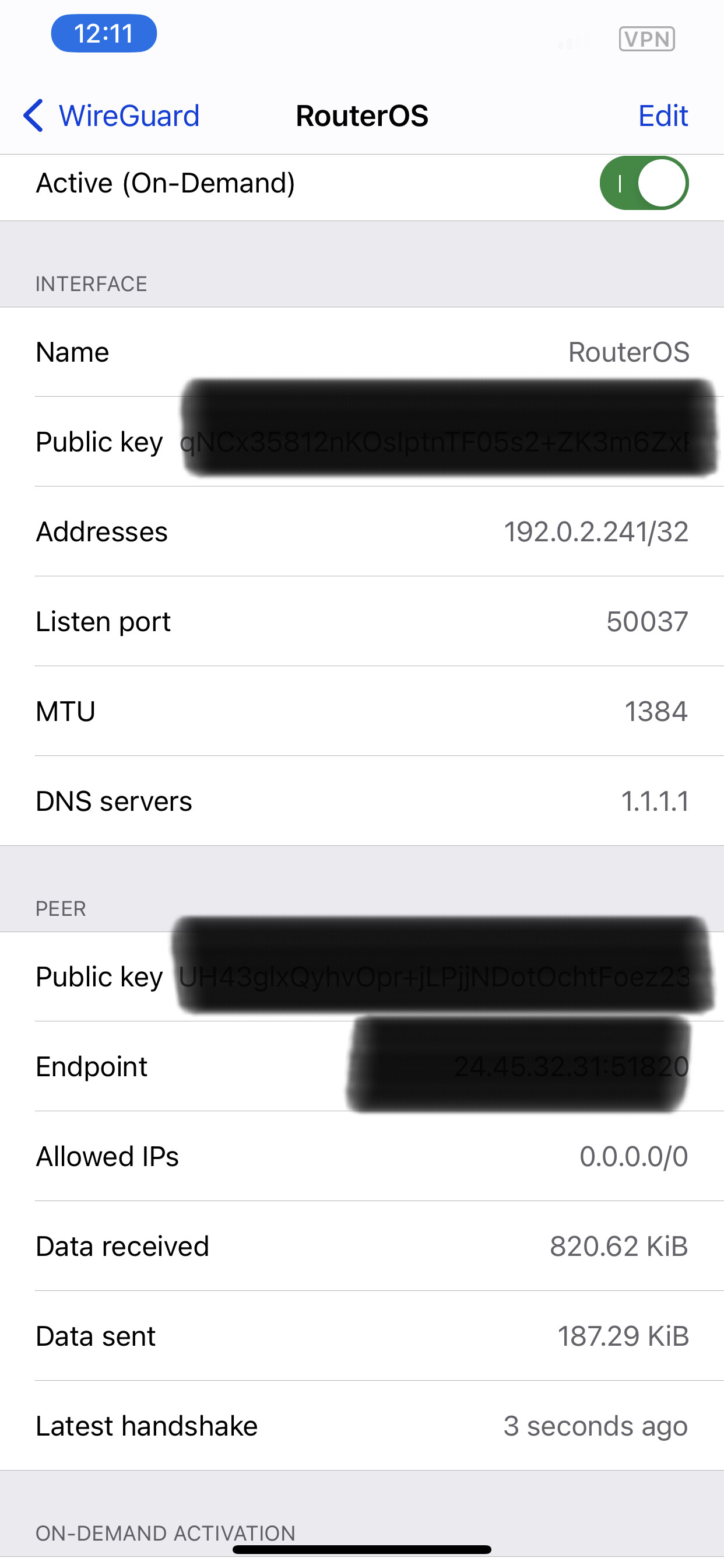
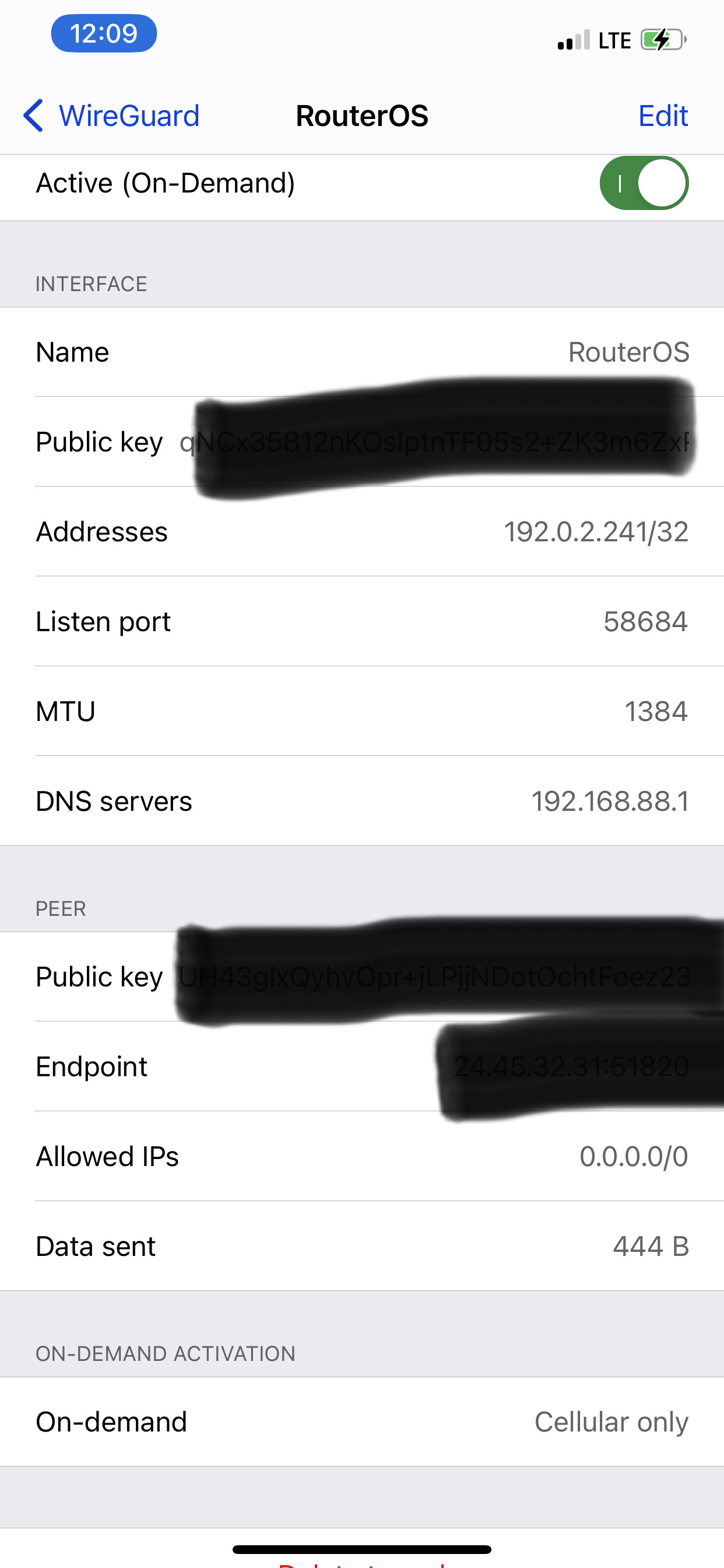
I am not sure if the attachments help illustrate the problem better..

Specifically Data Sent and Data Received entries.. (no dns no data moving..)

From Wireguard I cannot use my dns cache hosted on the router endpoint, using any of the directly connected/configured interfaces..

The dns cache works, there are cache hits within the process.

Lan clients do not have this problem, or any other problem.. just Wireguard clients using the router dns cache.. that seems to be the exclusive problem.

Thank you again..
IMG_8919.jpeg
IMG_8918.jpeg

(1) Keep the MTUs the same on sender receiver, so give it a go with both at default 1420, and then try the funky 1384.

(2) Why did the listening port CHANGE on the two examples ( thought you were showing me using 1.1.1.1 and using 192.168.88.1 and both not working )??

(neither matched config listening port)

Possibly the iOS client works differently..

The port shown is the local ephemeral port.

When you make a change to the client it reconnects and chooses a new local ephemeral port for its outbound connection.

Admittedly I am not a Wireguard contributor, but changing the dns to a server that is not RouterOS works, all mtu’s being configured as shown..

I will just accept that there is a problem and will be unable to use the local interface for dns via Wireguard.

I’m using Wireguard on iOS and I don’t have such issue. Can you access router with Mikrotik iOS app when you are connected over Wireguard?

Edit: Sry for confusion, I see now you have DNS cache issue, not connection… I’m using DNS server (Pi-Hole) running in container which is also set for Wireguard, probably that’s why I don’t have such issue, before I was on ROS DNS but I didn’t noticed cache issue (if was even persisted).

Yup its very strange…
There is something non-standard the oP is doing with DNS setup is the only assumption that I can make.
It works for everyone else, ( and I use IOS quite successfully )

I ended up making a new wg instance..

and all is working as it should..

Thank you for all the responses..

OT:
I’m not sure why more people don’t talk about this..

Why would anyone want to make wg configs by hand..

https://www.wireguardconfig.com

That configuration tool seems to be for generic linux and does not apply to RoS, nor IOS for that matter. nothing burger.
More important to understand the use/significance of each parameter.

Found this today..

https://markeclaudio.github.io/mikrotik-wireguard-config-generator/

Thank you Claudio
F5k9nh3OAf.png

As I said those tools are not all that helpful. Much more important to know how to config the Mikrotik RoS and wireguard is not all that difficult to understand.
https://forum.mikrotik.com/viewtopic.php?t=182340

Adding my wireguard interface to the LAN list resolved the DNS access issue for me, however it doesn’t work with just the input chain firewall rule for my wireguard subnet. My wireguard server subnet is 192.168.222.0/24, the client has 192.168.222.1 (router wireguard interface IP) for DNS and my firewall filter rule is as below:
/ip firewall filter add action=accept chain=input comment=“vpn server” src-address-list=192.168.222.0/24

Shouldn’t this still work without adding the wireguard interface to the LAN list because the firewall rule is accepting traffic from the source subnet without any restriction on ports or destination address?

In addition, which is preferrable for security implications? I only have the defconf drop all not coming from LAN rule using the LAN list at the moment.

You would have to post your config for me to comment accurately.

/export file=anynameyouwish ( minus router serial number and any public WANIP information, keys etc. )

As to the questions… I would do things differently. I would give the MT Wireguard Server the IP address
192.168.222**.1/24** and the IP road warrior 192.168.222.2/32 and the next RW 192.168.222.3/32 etc…

Then try it with your rule and it should work.
Many variations are possible but if you want to keep the wg interface out of the LAN list ( dont know why its so convenient!! )

then
add chain=input action=accept in-interface=wg { allows all wireguard users ability to config router or get DNS }
OR
add chain=input action=accept in-interface=wg src-address=XXXXX ( if you want to narrow down who coming in over wireguard needs access to router for config ).
add chain=input action=accept in-interface=wg dst-port=53 protocol=udp ( allow rest only dns )
add chain=input action=accept in-interface=wg dst-port=53 protocol=tcp ( allow rest only dns )

Allowing DNS from the wireguard interface worked well. I still wasn’t able to access Winbox over the tunnel with the src-address rule, but I can look into that later. I’m not against adding the wireguard interface to the LAN list. I was more just curious why it wasn’t working the other way and which method was preferred. Thank you for your help!