Hello everyone,
I’m new to the forum!
I’ve been exploring Mikrotik products for a while and I’m diving into this world by experimenting for fun.
I’d like to share a configuration that I can’t get to work as I’d like, and I’m providing a very rough diagram in the follow image.
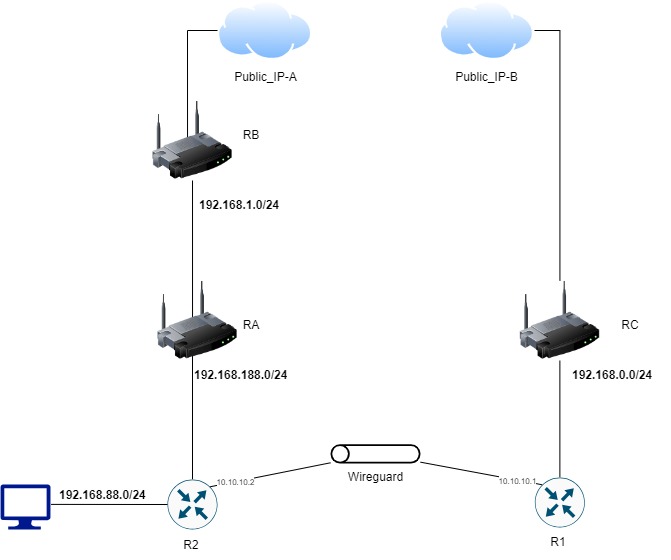
I have two Mikrotik hEX devices, R1 and R2, connected to each other via a WireGuard tunnel.
R2 is a client of RA, which is connected to RB, which has a public interface to the internet. RA and RB are devices outside of my control.
R1 is a client of RC, which I do control, and where I have set up UDP port forwarding to R1 to make the WireGuard tunnel work.
My requirement is to allow client devices connected to R2 to use the connectivity of RC.
With the current configuration of R1 and R2, the WireGuard tunnel establishes correctly; the PCs connected to R2 can browse very quickly on some sites (for example, I can stream full HD videos on YouTube without interruptions, and if I check which public IP they present externally, the correct Public_IP-B appears), but some sites (like mikrotik.com) do not load and go into timeout.
R1-Config
# 2024-11-02 18:54:31 by RouterOS 7.16.1
# software id = xxxx-xxxx
#
# model = RB750Gr3
# serial number = xxxxxxxxxx
/interface bridge
add name=bridge1 port-cost-mode=short
/interface wireguard
add listen-port=13231 mtu=1380 name=wireguard1
/interface lte apn
set [ find default=yes ] ip-type=ipv4 use-network-apn=no
/interface wireless security-profiles
set [ find default=yes ] supplicant-identity=MikroTik
/port
set 0 name=serial0
/interface bridge port
add bridge=bridge1 ingress-filtering=no interface=ether1 internal-path-cost=\
    10 path-cost=10
add bridge=bridge1 ingress-filtering=no interface=ether2 internal-path-cost=\
    10 path-cost=10
add bridge=bridge1 ingress-filtering=no interface=ether3 internal-path-cost=\
    10 path-cost=10
add bridge=bridge1 ingress-filtering=no interface=ether4 internal-path-cost=\
    10 path-cost=10
add bridge=bridge1 ingress-filtering=no interface=ether5 internal-path-cost=\
    10 path-cost=10
/ip firewall connection tracking
set udp-timeout=10s
/ip neighbor discovery-settings
set discover-interface-list=!dynamic
/ipv6 settings
set disable-ipv6=yes max-neighbor-entries=8192
/interface ovpn-server server
set auth=sha1,md5
/interface wireguard peers
add allowed-address=10.10.10.2/32,192.168.88.0/24,0.0.0.0/0 interface=\
    wireguard1 name=R2 public-key=\
    "xxxxxxxxxxxxxxxxxxxxxxxxxxxxxxxxxxxxxxxxxxxx="
/ip address
add address=10.10.10.1/30 interface=wireguard1 network=10.10.10.0
/ip cloud
set ddns-enabled=yes
/ip dhcp-client
add interface=bridge1
/ip firewall nat
add action=masquerade chain=srcnat out-interface=bridge1 src-address=\
    192.168.88.0/24
add action=masquerade chain=srcnat out-interface=bridge1 src-address=\
    10.10.10.0/24
/ip hotspot profile
set [ find default=yes ] html-directory=hotspot
/ip ipsec profile
set [ find default=yes ] dpd-interval=2m dpd-maximum-failures=5
/ip route
add disabled=no dst-address=192.168.88.0/24 gateway=wireguard1 routing-table=\
    main suppress-hw-offload=no
/routing bfd configuration
add disabled=no interfaces=all min-rx=200ms min-tx=200ms multiplier=5
/system clock
set time-zone-name=Europe/Rome
/system identity
set name=R1
/system note
set show-at-login=no
/tool romon
set enabled=yes
R2-Config
# 2024-11-02 18:48:37 by RouterOS 7.16.1
# software id = xxxx-xxxx
#
# model = RB750Gr3
# serial number = xxxxxxxxxx
/interface bridge
add admin-mac=xx:xx:xx:xx:xx:xx auto-mac=no comment=defconf name=bridge \
    port-cost-mode=short
/interface wireguard
add listen-port=13231 mtu=1380 name=wireguard1
/interface list
add comment=defconf name=WAN
add comment=defconf name=LAN
/interface lte apn
set [ find default=yes ] ip-type=ipv4 use-network-apn=no
/interface wireless security-profiles
set [ find default=yes ] supplicant-identity=MikroTik
/ip pool
add name=default-dhcp ranges=192.168.88.10-192.168.88.254
/ip dhcp-server
add address-pool=default-dhcp interface=bridge lease-time=10m name=defconf
/port
set 0 name=serial0
/interface bridge port
add bridge=bridge comment=defconf ingress-filtering=no interface=ether2 \
    internal-path-cost=10 path-cost=10
add bridge=bridge comment=defconf ingress-filtering=no interface=ether3 \
    internal-path-cost=10 path-cost=10
add bridge=bridge comment=defconf ingress-filtering=no interface=ether4 \
    internal-path-cost=10 path-cost=10
add bridge=bridge comment=defconf ingress-filtering=no interface=ether5 \
    internal-path-cost=10 path-cost=10
/ip firewall connection tracking
set udp-timeout=10s
/ip neighbor discovery-settings
set discover-interface-list=LAN
/ipv6 settings
set disable-ipv6=yes max-neighbor-entries=8192
/interface list member
add comment=defconf interface=bridge list=LAN
add comment=defconf interface=ether1 list=WAN
/interface ovpn-server server
set auth=sha1,md5
/interface wireguard peers
add allowed-address=10.10.10.1/32,192.168.88.0/24,0.0.0.0/0 endpoint-address=\
    xxx.xxx.xxx.xxx endpoint-port=13231 interface=wireguard1 \
    name=R1 persistent-keepalive=25s public-key=\
    "xxxxxxxxxxxxxxxxxxxxxxxxxxxxxxxxxxxxxxxxxxxx"
/ip address
add address=192.168.88.1/24 comment=defconf interface=bridge network=\
    192.168.88.0
add address=10.10.10.2/30 interface=wireguard1 network=10.10.10.0
/ip cloud
set ddns-enabled=yes
/ip dhcp-client
add add-default-route=no interface=ether1 use-peer-dns=no use-peer-ntp=no
/ip dhcp-server network
add address=192.168.88.0/24 comment=defconf dns-server=192.168.88.1 gateway=\
    192.168.88.1
/ip dns
set allow-remote-requests=yes servers=192.168.188.1
/ip dns static
add address=192.168.88.1 comment=defconf name=router.lan type=A
/ip ipsec profile
set [ find default=yes ] dpd-interval=2m dpd-maximum-failures=5
/ip route
add dst-address=192.168.0.0/24 gateway=10.10.10.1
add disabled=no distance=2 dst-address=0.0.0.0/0 gateway=wireguard1 \
    routing-table=main scope=30 suppress-hw-offload=no target-scope=10
add disabled=no distance=1 dst-address=xxx.xxx.xxx.xxx/32 gateway=\
    192.168.188.1 routing-table=main scope=30 suppress-hw-offload=no \
    target-scope=10
/routing bfd configuration
add disabled=no interfaces=all min-rx=200ms min-tx=200ms multiplier=5
/system clock
set time-zone-name=Europe/Rome
/system identity
set name=R2
/system note
set show-at-login=no
/tool mac-server
set allowed-interface-list=LAN
/tool mac-server mac-winbox
set allowed-interface-list=LAN
/tool romon
set enabled=yes
After reading many posts on the forum, I tried adjusting the MTU parameter of the WireGuard tunnel, lowering it from 1500 to 1380. This improved the loading of some sites that previously didn’t load, but others still persist in not loading.
Clients on the R2 network have no trouble reaching clients connected to RC.
Could someone guide me on where to focus my attention to try to resolve the issue?
Thank you in advance, and congratulations on the community!