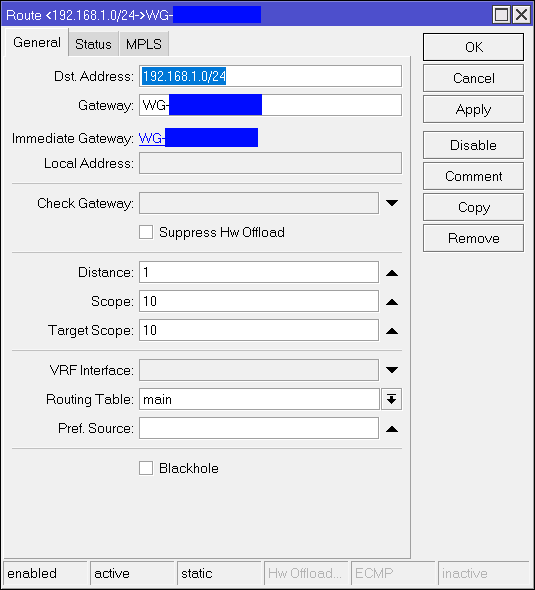
The problem:
Site A has a static internet connection with a static public ipv6, but no ipv4.
Site B has a normal Internet connection, which has to be reconnected every 24 hours.
As soon as the Internet connection has been re-established, the route for Wireguard on Site B no longer works correctly.
Pings from B to A work, but I cannot access an internal website via HTTPS.
The packets no longer come back via the tunnel.
Only when I deactivate the Wireguard VPN on Site B and delete the static route, wait 10-20 seconds, reactivate the VPN and re-enter the route does it work again.
I have tried to automate the procedure via script, but this does not work.
Site A is configured correctly because another client with a Ubiquity router does not have these problems.
Does anyone know the problem?
It’s pretty stupid if I have to restart the VPN manually every day
Assuming Site B is acting as a client to Site A with Wireguard connected over IPv6, it seems like it should work.
Site B has keep-alive configured?
The static route you talk of is for 192.168.1.0/24 via Wireguard1?
You have appropriate black hole routes or filtering for 192.168.1.0/24 otherwise?
Yes Site B acting as client.
I also thought this should work, but somehow either a configuration is missing or I have found a bug.
Yes 25sec
Correct.
No.
I have only created firewall rules to allow access from 192.168.178.0/24 to 192.168.1.0/24.
From 192.168.1.0/24 to 192.168.178.0/24 I have only created one firewall rule so that established and related connections are allowed.
I think I have found a solution.
After all, the route is now set correctly.
I have simply created another static route which has the IP network of the Wireguard VPN.
So 10.13.37.0/24.
This route is useless in itself, but I can copy it and adapt the IP to my required network 192.168.1.0/24.
After a short wait, the route is successfully created via script and the systems on the other side can be reached.
Strange, but it works.
Here is the script:
# Is required to be able to use the VPN again after a router restart.
# Ohne das, funktionieren die Routen nicht sauber.

log info "Set new route for the Wireguard VPN"

# Deactivate Wireguard connection
/interface/wireguard disable WG-XXXXXXXX

# Delete Route
/ip/route remove [find dst-address=192.168.1.0/24]

# Wait 15sec
:delay 15s

# Activate Wireguard again
/interface/wireguard enable WG-XXXXXXXX

# Wait a little so that the connection can be successfully established
:delay 10s

# Clone route and edit the network
/ip/route/ add dst-address=192.168.1.0/24 copy-from=0