WireGuard VPN + home router + travel router + help setup

Hi All,
I want to set up WireGuard VPN for remote work with 2 MikroTik routers: “home router” and “travel router”. Could you review my hardware and and config?

Requirements:

  • “Home router” is connected to the internet in my home
  • “Travel router” will be traveling with me.
  • It should be possible to connect a “travel router” to any available internet - phone tethering (most often), another router, WIFI
  • Traffic from any devices connected to the “travel router” should be visible as traffic from my “home router”.
  • “Home router” will be connected to the router with dynamic public IP

Hardware:
I bought (waiting for delivery) 2 MikroTik router:
MikroTik E50UG, hEX - home router
MikroTik hAP ax2 - travel router


Configuration (based on internet research)
Home router:

/interface wireguard
add listen-port=13231 name=wireguard1
/ip address
add address=192.168.100.1/24 interface=wireguard1
/interface wireguard peers
add interface=wireguard1 public-key="<Traveling_Router_Public_Key>" allowed-address=192.168.100.2/32
/ip firewall nat
add chain=srcnat action=masquerade out-interface=<WAN_Interface>
/ip cloud
set ddns-enabled=yes

Travel router:

/interface wireguard
add listen-port=13231 name=wireguard1
/ip address
add address=192.168.100.2/24 interface=wireguard1
/interface wireguard peers
add interface=wireguard1 public-key="<Home_Router_Public_Key>" endpoint-address=<Home_Router_DDNS_Name> endpoint-port=13231 allowed-address=0.0.0.0/0 persistent-keepalive=25
# WIFI
/interface wireless set [ find default-name=wlan1 ] mode=station ssid=<Your_Hotspot_SSID> security-profile=<Your_Security_Profile>
/ip dhcp-client add interface=wlan1 disabled=no

Kind Regards,
Mariusz

Looks good from what I can see.
The travel router should also be setup with IP DHCP disabled on ether1, just in case you have a wired connection.
Otherwise you will need to figure out how to a. grab wifi WAN from 2.4ghz connection to hotel etc ( the part you may need to ask for WIFI assistance to config) and then distribute (AP) wifi on 5ghz to your devices.
Ether 2,3,4 can be used on the same LAN as the wifi on 5ghz devices
I would use ether5 as a config port or emergency access port OFF the bridge.

@avan thank you for your answer.

The travel router should also be setup with IP DHCP disabled on ether1, just in case you have a wired connection.

The wired connection is definitely what I need to support. Is it not by default ON on ether1?
Should I add something like:

/ip dhcp-client add interface=ether1 disabled=yes


Otherwise you will need to figure out how to a. grab wifi WAN from 2.4ghz connection to hotel etc ( the part you may need to ask for WIFI assistance to config) and then distribute (AP) wifi on 5ghz to your devices.
Ether 2,3,4 can be used on the same LAN as the wifi on 5ghz devices

“travel router” WIFI setup that’s what concerns me. I would like to have the option to connect to any available internet. All my devices will be connected to a “travel router” through WIFI 5, WIFI 6.
“travel router” will be connected to the internet by:

  • phone tethering (most often)
  • another router - cable ether1
  • WIFI 2.4GHz, 5GHz

Does MikroTik hAP ax2 support dual WIFI?
Is there any MikroTik router with dual WIFI?
What if the hotel will have WIFI 6 only and I would like to connect all my devices through WIFI 6 as well?
What I missing is MikroTik router with WIFI 6 and USB tethering.

I would use ether5 as a config port or emergency access port OFF the bridge.

How to do this?

My bad, I thought your standard use was connecting to wifi WAN, and then sending the traffic through wifi to other devices in the room.
IF that is not your go to, then by all means IP DHCP client on ether1 is ENABLED and the 2.4ghz WAN link in wifi is disable.
In both cases wifi to local devices is on 5ghz wifi.

Beyond me for the wifi questions. WIFI 6 is backwards compatible with wifi 5, and also wifi 2.
Many place still only offer wifi2 …??

Got my routers. Did setup but wireguard does not work

Handshake for peer did not complete after 5 seconds

What is wrong? How to debug this problem?

Both routers updated to the latest software/firmware

/system resource print
/system package update check-for-updates
/system package update download
/system package print
/system reboot

/system/routerboard/upgrade
/system reboot

added firewall access to access routers from my private NAT 192.168.178.0

/ip firewall filter print
/ip firewall filter add chain=input src-address=192.168.178.0/24 protocol=tcp dst-port=22 action=accept place-before=0
/ip firewall filter add chain=input src-address=192.168.178.0/24 protocol=tcp dst-port=80 action=accept place-before=0

The following commands were executed: (public-key, and other sensitive data replaced with XXXXXX…)
home router

/interface wireguard add listen-port=13231 name=wireguard1
/ip address add address=192.168.100.1/24 interface=wireguard1
/interface wireguard print
/interface wireguard peers add interface=wireguard1 public-key="XXXXXXX=" allowed-address=192.168.100.2/32
/ip cloud set ddns-enabled=yes

travel router:

/interface wireguard add listen-port=13231 name=wireguard1
/ip address add address=192.168.100.2/24 interface=wireguard1
/interface wireguard print
/interface wireguard peers add interface=wireguard1 public-key="XXXXXXXX" endpoint-address=XXXXXX.sn.mynetname.net endpoint-port=13231 allowed-address=0.0.0.0/0 persistent-keepalive=25

home router export output

# 2025-03-17 22:18:24 by RouterOS 7.18.2
# software id = DW34-FEJY
#
# model = E50UG
# serial number = XXXXXXXX
/interface bridge
add admin-mac=F4:1E:57:6A:59:D3 auto-mac=no comment=defconf name=bridge
/interface wireguard
add listen-port=13231 mtu=1420 name=wireguard1
/interface list
add comment=defconf name=WAN
add comment=defconf name=LAN
/ip pool
add name=default-dhcp ranges=192.168.88.10-192.168.88.254
/ip dhcp-server
add address-pool=default-dhcp interface=bridge name=defconf
/disk settings
set auto-media-interface=bridge auto-media-sharing=yes auto-smb-sharing=yes
/interface bridge port
add bridge=bridge comment=defconf interface=ether2
add bridge=bridge comment=defconf interface=ether3
add bridge=bridge comment=defconf interface=ether4
add bridge=bridge comment=defconf interface=ether5
/ip neighbor discovery-settings
set discover-interface-list=LAN
/interface list member
add comment=defconf interface=bridge list=LAN
add comment=defconf interface=ether1 list=WAN
/interface ovpn-server server
add mac-address=FE:44:B6:D4:3C:E4 name=ovpn-server1
/interface wireguard peers
add allowed-address=192.168.100.2/32 interface=wireguard1 name=peer1 public-key="XXXXXXXXXXXXXXXX"
/ip address
add address=192.168.88.1/24 comment=defconf interface=bridge network=192.168.88.0
add address=192.168.100.1/24 interface=wireguard1 network=192.168.100.0
/ip cloud
set ddns-enabled=yes
/ip dhcp-client
add comment=defconf interface=ether1
/ip dhcp-server network
add address=192.168.88.0/24 comment=defconf dns-server=192.168.88.1 gateway=192.168.88.1
/ip dns
set allow-remote-requests=yes
/ip dns static
add address=192.168.88.1 comment=defconf name=router.lan type=A
/ip firewall filter
add action=accept chain=input dst-port=80 protocol=tcp src-address=192.168.178.0/24
add action=accept chain=input dst-port=22 protocol=tcp src-address=192.168.178.0/24
add action=accept chain=input comment="defconf: accept established,related,untracked" connection-state=established,related,untracked
add action=drop chain=input comment="defconf: drop invalid" connection-state=invalid
add action=accept chain=input comment="defconf: accept ICMP" protocol=icmp
add action=accept chain=input comment="defconf: accept to local loopback (for CAPsMAN)" dst-address=127.0.0.1
add action=drop chain=input comment="defconf: drop all not coming from LAN" in-interface-list=!LAN
add action=accept chain=forward comment="defconf: accept in ipsec policy" ipsec-policy=in,ipsec
add action=accept chain=forward comment="defconf: accept out ipsec policy" ipsec-policy=out,ipsec
add action=fasttrack-connection chain=forward comment="defconf: fasttrack" connection-state=established,related hw-offload=yes
add action=accept chain=forward comment="defconf: accept established,related, untracked" connection-state=established,related,untracked
add action=drop chain=forward comment="defconf: drop invalid" connection-state=invalid
add action=drop chain=forward comment="defconf: drop all from WAN not DSTNATed" connection-nat-state=!dstnat connection-state=new in-interface-list=WAN
/ip firewall nat
add action=masquerade chain=srcnat comment="defconf: masquerade" ipsec-policy=out,none out-interface-list=WAN
/ip ipsec profile
set [ find default=yes ] dpd-interval=2m dpd-maximum-failures=5
/ipv6 firewall address-list
add address=::/128 comment="defconf: unspecified address" list=bad_ipv6
add address=::1/128 comment="defconf: lo" list=bad_ipv6
add address=fec0::/10 comment="defconf: site-local" list=bad_ipv6
add address=::ffff:0.0.0.0/96 comment="defconf: ipv4-mapped" list=bad_ipv6
add address=::/96 comment="defconf: ipv4 compat" list=bad_ipv6
add address=100::/64 comment="defconf: discard only " list=bad_ipv6
add address=2001:db8::/32 comment="defconf: documentation" list=bad_ipv6
add address=2001:10::/28 comment="defconf: ORCHID" list=bad_ipv6
add address=3ffe::/16 comment="defconf: 6bone" list=bad_ipv6
/ipv6 firewall filter
add action=accept chain=input comment="defconf: accept established,related,untracked" connection-state=established,related,untracked
add action=drop chain=input comment="defconf: drop invalid" connection-state=invalid
add action=accept chain=input comment="defconf: accept ICMPv6" protocol=icmpv6
add action=accept chain=input comment="defconf: accept UDP traceroute" dst-port=33434-33534 protocol=udp
add action=accept chain=input comment="defconf: accept DHCPv6-Client prefix delegation." dst-port=546 protocol=udp src-address=fe80::/10
add action=accept chain=input comment="defconf: accept IKE" dst-port=500,4500 protocol=udp
add action=accept chain=input comment="defconf: accept ipsec AH" protocol=ipsec-ah
add action=accept chain=input comment="defconf: accept ipsec ESP" protocol=ipsec-esp
add action=accept chain=input comment="defconf: accept all that matches ipsec policy" ipsec-policy=in,ipsec
add action=drop chain=input comment="defconf: drop everything else not coming from LAN" in-interface-list=!LAN
add action=accept chain=forward comment="defconf: accept established,related,untracked" connection-state=established,related,untracked
add action=drop chain=forward comment="defconf: drop invalid" connection-state=invalid
add action=drop chain=forward comment="defconf: drop packets with bad src ipv6" src-address-list=bad_ipv6
add action=drop chain=forward comment="defconf: drop packets with bad dst ipv6" dst-address-list=bad_ipv6
add action=drop chain=forward comment="defconf: rfc4890 drop hop-limit=1" hop-limit=equal:1 protocol=icmpv6
add action=accept chain=forward comment="defconf: accept ICMPv6" protocol=icmpv6
add action=accept chain=forward comment="defconf: accept HIP" protocol=139
add action=accept chain=forward comment="defconf: accept IKE" dst-port=500,4500 protocol=udp
add action=accept chain=forward comment="defconf: accept ipsec AH" protocol=ipsec-ah
add action=accept chain=forward comment="defconf: accept ipsec ESP" protocol=ipsec-esp
add action=accept chain=forward comment="defconf: accept all that matches ipsec policy" ipsec-policy=in,ipsec
add action=drop chain=forward comment="defconf: drop everything else not coming from LAN" in-interface-list=!LAN
/system clock
set time-zone-name=Europe/Berlin
/system note
set show-at-login=no
/tool mac-server
set allowed-interface-list=LAN
/tool mac-server mac-winbox
set allowed-interface-list=LAN
travel router export output

# 2025-03-17 22:04:59 by RouterOS 7.18.2
# software id = MH37-7DRH
#
# model = C52iG-5HaxD2HaxD
# serial number = XXXXXXXXXXX
/interface bridge
add admin-mac=F4:1E:57:38:84:AB auto-mac=no comment=defconf name=bridge
/interface wifi
set [ find default-name=wifi1 ] channel.band=5ghz-ax .skip-dfs-channels=10min-cac .width=20/40/80mhz configuration.mode=ap .ssid=MikroTik-3884AF disabled=no \
    security.authentication-types=wpa2-psk,wpa3-psk .ft=yes .ft-over-ds=yes
set [ find default-name=wifi2 ] channel.band=2ghz-ax .skip-dfs-channels=10min-cac .width=20/40mhz configuration.mode=ap .ssid=MikroTik-3884AF disabled=no \
    security.authentication-types=wpa2-psk,wpa3-psk .ft=yes .ft-over-ds=yes
/interface wireguard
add listen-port=13231 mtu=1420 name=wireguard1
/interface list
add comment=defconf name=WAN
add comment=defconf name=LAN
/ip pool
add name=default-dhcp ranges=192.168.88.10-192.168.88.254
/ip dhcp-server
add address-pool=default-dhcp interface=bridge name=defconf
/disk settings
set auto-media-interface=bridge auto-media-sharing=yes auto-smb-sharing=yes
/interface bridge port
add bridge=bridge comment=defconf interface=ether2
add bridge=bridge comment=defconf interface=ether3
add bridge=bridge comment=defconf interface=ether4
add bridge=bridge comment=defconf interface=ether5
add bridge=bridge comment=defconf interface=wifi1
add bridge=bridge comment=defconf interface=wifi2
/ip neighbor discovery-settings
set discover-interface-list=LAN
/interface list member
add comment=defconf interface=bridge list=LAN
add comment=defconf interface=ether1 list=WAN
/interface ovpn-server server
add mac-address=FE:54:ED:3B:76:34 name=ovpn-server1
/interface wireguard peers
add allowed-address=0.0.0.0/0 endpoint-address=XXXXXXXXXXX.sn.mynetname.net endpoint-port=13231 interface=wireguard1 name=peer1 persistent-keepalive=25s \
    public-key="XXXXXXXXXXXXXXXXXXXX="
/ip address
add address=192.168.88.1/24 comment=defconf interface=bridge network=192.168.88.0
add address=192.168.100.2/24 interface=wireguard1 network=192.168.100.0
/ip dhcp-client
add comment=defconf interface=ether1
/ip dhcp-server network
add address=192.168.88.0/24 comment=defconf dns-server=192.168.88.1 gateway=192.168.88.1
/ip dns
set allow-remote-requests=yes
/ip dns static
add address=192.168.88.1 comment=defconf name=router.lan type=A
/ip firewall filter
add action=accept chain=input dst-port=80 protocol=tcp src-address=192.168.178.0/24
add action=accept chain=input dst-port=22 protocol=tcp src-address=192.168.178.0/24
add action=accept chain=input comment="defconf: accept established,related,untracked" connection-state=established,related,untracked
add action=drop chain=input comment="defconf: drop invalid" connection-state=invalid
add action=accept chain=input comment="defconf: accept ICMP" protocol=icmp
add action=accept chain=input comment="defconf: accept to local loopback (for CAPsMAN)" dst-address=127.0.0.1
add action=drop chain=input comment="defconf: drop all not coming from LAN" in-interface-list=!LAN
add action=accept chain=forward comment="defconf: accept in ipsec policy" ipsec-policy=in,ipsec
add action=accept chain=forward comment="defconf: accept out ipsec policy" ipsec-policy=out,ipsec
add action=fasttrack-connection chain=forward comment="defconf: fasttrack" connection-state=established,related hw-offload=yes
add action=accept chain=forward comment="defconf: accept established,related, untracked" connection-state=established,related,untracked
add action=drop chain=forward comment="defconf: drop invalid" connection-state=invalid
add action=drop chain=forward comment="defconf: drop all from WAN not DSTNATed" connection-nat-state=!dstnat connection-state=new in-interface-list=WAN
/ip firewall nat
add action=masquerade chain=srcnat comment="defconf: masquerade" ipsec-policy=out,none out-interface-list=WAN
/ip ipsec profile
set [ find default=yes ] dpd-interval=2m dpd-maximum-failures=5
/ipv6 firewall address-list
add address=::/128 comment="defconf: unspecified address" list=bad_ipv6
add address=::1/128 comment="defconf: lo" list=bad_ipv6
add address=fec0::/10 comment="defconf: site-local" list=bad_ipv6
add address=::ffff:0.0.0.0/96 comment="defconf: ipv4-mapped" list=bad_ipv6
add address=::/96 comment="defconf: ipv4 compat" list=bad_ipv6
add address=100::/64 comment="defconf: discard only " list=bad_ipv6
add address=2001:db8::/32 comment="defconf: documentation" list=bad_ipv6
add address=2001:10::/28 comment="defconf: ORCHID" list=bad_ipv6
add address=3ffe::/16 comment="defconf: 6bone" list=bad_ipv6
/ipv6 firewall filter
add action=accept chain=input comment="defconf: accept established,related,untracked" connection-state=established,related,untracked
add action=drop chain=input comment="defconf: drop invalid" connection-state=invalid
add action=accept chain=input comment="defconf: accept ICMPv6" protocol=icmpv6
add action=accept chain=input comment="defconf: accept UDP traceroute" dst-port=33434-33534 protocol=udp
add action=accept chain=input comment="defconf: accept DHCPv6-Client prefix delegation." dst-port=546 protocol=udp src-address=fe80::/10
add action=accept chain=input comment="defconf: accept IKE" dst-port=500,4500 protocol=udp
add action=accept chain=input comment="defconf: accept ipsec AH" protocol=ipsec-ah
add action=accept chain=input comment="defconf: accept ipsec ESP" protocol=ipsec-esp
add action=accept chain=input comment="defconf: accept all that matches ipsec policy" ipsec-policy=in,ipsec
add action=drop chain=input comment="defconf: drop everything else not coming from LAN" in-interface-list=!LAN
add action=accept chain=forward comment="defconf: accept established,related,untracked" connection-state=established,related,untracked
add action=drop chain=forward comment="defconf: drop invalid" connection-state=invalid
add action=drop chain=forward comment="defconf: drop packets with bad src ipv6" src-address-list=bad_ipv6
add action=drop chain=forward comment="defconf: drop packets with bad dst ipv6" dst-address-list=bad_ipv6
add action=drop chain=forward comment="defconf: rfc4890 drop hop-limit=1" hop-limit=equal:1 protocol=icmpv6
add action=accept chain=forward comment="defconf: accept ICMPv6" protocol=icmpv6
add action=accept chain=forward comment="defconf: accept HIP" protocol=139
add action=accept chain=forward comment="defconf: accept IKE" dst-port=500,4500 protocol=udp
add action=accept chain=forward comment="defconf: accept ipsec AH" protocol=ipsec-ah
add action=accept chain=forward comment="defconf: accept ipsec ESP" protocol=ipsec-esp
add action=accept chain=forward comment="defconf: accept all that matches ipsec policy" ipsec-policy=in,ipsec
add action=drop chain=forward comment="defconf: drop everything else not coming from LAN" in-interface-list=!LAN
/system clock
set time-zone-name=Europe/Berlin
/system note
set show-at-login=no
/tool mac-server
set allowed-interface-list=LAN
/tool mac-server mac-winbox
set allowed-interface-list=LAN

Not sure if that change something but my MikroTik “home router” is connected to a DSL router ( NAT 192.168.178.0) that has dynamic public IP

A dynamic IP is not a problem with the home router, and I am assuming its a public IP.
The router provides domainurl mynetname under IP cloud to use as a Wireguard endpoint on the travel router
I will take a look at the config later.

home router config looks pretty normal.
If you are not using IPV6 at all disable IPV6 services and remove all address lists and firewall rules save
add chain=input action=drop
add chain=forward action=drop

change setting to none as shown here
/tool mac-server
set allowed-interface-list=none
/tool mac-server mac-winbox
set allowed-interface-list=LAN

Other than that your firewall rules need work:

I changed the focus of the input chain to explicity ( not implicitly ) allow all LAN users to the router.z
The reason being is that at some point you SHOULD limite access to the router only to the admin (wired and wired and wireguard connections), while the rest of the user only
need access to router services, typically only DNS.

Kept the theme on the forward chain, where we make clear in the rules what is allowed ( the default rule is not enlightening )
The main error I see is NO listening port on the input chain for the wireguard VPN handshake from the travel router.

Another problem is why are you allowing some unknown subnet access to the router services of port 80 and 22???
add action=accept chain=input dst-port=80 protocol=tcp src-address=192.168.178.0/24
add action=accept chain=input dst-port=22 protocol=tcp src-address=192.168.178.0/24

/ip firewall filter
{default rules to keep}
add action=accept chain=input comment=“defconf: accept established,related,untracked” connection-state=established,related,untracked
add action=drop chain=input comment=“defconf: drop invalid” connection-state=invalid
add action=accept chain=input comment=“defconf: accept ICMP” protocol=icmp
add action=accept chain=input comment=“defconf: accept to local loopback (for CAPsMAN)” dst-address=127.0.0.1

(admin rules)
add action=accept chain=input comment=“wireguard handshake” dst-port=13231 protocol=udp
add action=accept chain=input comment=“ALL user to Router” in-interface-list=LAN
add action=drop chain=input comment=“drop all else”
{ insert this rule here last, so you dont lock yourself out }
+++++++++++++++++++++
{ default rules to keep }
add action=fasttrack-connection chain=forward comment=“defconf: fasttrack” connection-state=established,related hw-offload=yes
add action=accept chain=forward comment=“defconf: accept established,related, untracked” connection-state=established,related,untracked
add action=drop chain=forward comment=“defconf: drop invalid” connection-state=invalid

(admin rules)
add action=accept chain=forward comment=“internet traffic” in-interface-list=LAN out-interface-list=WAN
add action=accept chain=forward comment=“wg to LAN” in-interface=wireguard1 dst-address=192.168.88.0/24
add action=drop chain=forward comment=“drop all else”

Travel Router

First problem USING THE SAME SUBNET BEHIND THE ROUTER>
Remember first post I stated: “I would use ether5 as a config port or emergency access port OFF the bridge.”
Doing so allows one to easily change subnets. I know its difficult otherwise!!
1- So REMOVE ether5 from the bridge on the travel router
2- /interface ethernet
set [ find default-name=ether5 ] name=OffBridge5

/ip address
add address=192.168.77.0/30 interface=OffBridge5 network=192.168.77.0

/interface list member
add interface=OffBridge5 list=LAN

Now plug your laptop into ether5, change your IPV4 settings to 192.168.77.2 and you should gain access from a safe spot to make all kinds of changes!!!

+++++++++++++++++++++++++++++++++++++++++++
The one thing your missing is forcing the subnet to go out wireguard,
So you need a table, a routing rule and a route.
I added an additional route so the router is aware if the wireguard tunnel is not available (problem at the home end) and thus if its not available, the router will then by action in the routing rule,
allow travel users to access local internet ( ensure you use browser vpn etc. )
I’m assuming in your ip dhcp settings you have default-route=yes, so a basic route to the local internet exists.
…

# model = C52iG-5HaxD2HaxD
# serial number = XXXXXXXXXXX
/interface bridge
add admin-mac=F4:1E:57:38:84:AB auto-mac=no comment=defconf name=bridge
/interface ethernet
set [ find default-name=ether5 ] name=OffBridge5
/interface wifi
set [ find default-name=wifi1 ] channel.band=5ghz-ax .skip-dfs-channels=10min-cac .width=20/40/80mhz configuration.mode=ap .ssid=MikroTik-3884AF disabled=no \
    security.authentication-types=wpa2-psk,wpa3-psk .ft=yes .ft-over-ds=yes
set [ find default-name=wifi2 ] channel.band=2ghz-ax .skip-dfs-channels=10min-cac .width=20/40mhz configuration.mode=ap .ssid=MikroTik-3884AF disabled=no \
    security.authentication-types=wpa2-psk,wpa3-psk .ft=yes .ft-over-ds=yes
/interface wireguard
add listen-port=13231 mtu=1420 name=wireguardTR
/routing table
add fib name=useWG
/interface list
add comment=defconf name=WAN
add comment=defconf name=LAN
/ip pool
add name=default-dhcp ranges=192.168.38.10-192.168.38.254
/ip dhcp-server
add address-pool=default-dhcp interface=bridge name=defconf
/disk settings
set auto-media-interface=bridge auto-media-sharing=yes auto-smb-sharing=yes
/interface bridge port
add bridge=bridge comment=defconf interface=ether2
add bridge=bridge comment=defconf interface=ether3
add bridge=bridge comment=defconf interface=ether4
add bridge=bridge comment=defconf interface=wifi1
add bridge=bridge comment=defconf interface=wifi2
/ip neighbor discovery-settings
set discover-interface-list=LAN
/interface list member
add comment=defconf interface=bridge list=LAN
add interface=OffBridge5 list=LAN
add comment=defconf interface=ether1 list=WAN
/interface ovpn-server server
add mac-address=FE:54:ED:3B:76:34 name=ovpn-server1
/interface wireguard peers
add allowed-address=0.0.0.0/0 endpoint-address=mynetname endpoint-port=13231 interface=wireguardTR name=peer1 persistent-keepalive=25s \
    public-key="----"
/ip address
add address=192.168.38.1/24 comment=defconf interface=bridge network=192.168.38.0
add address=192.168.100.2/24 interface=wireguardTR network=192.168.100.0
/ip dhcp-client
add comment=defconf interface=ether1
/ip dhcp-server network
add address=192.168.88.0/24 comment=defconf dns-server=192.168.88.1 gateway=192.168.88.1
/ip dns
set allow-remote-requests=yes
/ip firewall filter
add action=accept chain=input comment="defconf: accept established,related,untracked" connection-state=established,related,untracked
add action=drop chain=input comment="defconf: drop invalid" connection-state=invalid
add action=accept chain=input comment="defconf: accept ICMP" protocol=icmp
add action=accept chain=input comment="defconf: accept to local loopback (for CAPsMAN)" dst-address=127.0.0.1
add action=drop chain=input comment="defconf: drop all not coming from LAN" in-interface-list=!LAN
+++++++++++++++++++++++++++++
add action=fasttrack-connection chain=forward comment="defconf: fasttrack" connection-state=established,related hw-offload=yes
add action=accept chain=forward comment="defconf: accept established,related, untracked" connection-state=established,related,untracked
add action=drop chain=forward comment="defconf: drop invalid" connection-state=invalid
add action=accept chain=forward comment="internet traffic" in-interface-list=LAN out-interface-list=WAN\
add action=accept chain=forward comment="wg outbound"  src-address=192.168.38.0/24 out-interface=wireguardTR
add action=drop chain=forward comment="drop all else"
/ip firewall nat
add action=masquerade chain=srcnat comment="defconf: masquerade" ipsec-policy=out,none out-interface-list=WAN
/ip route
add dst-address=0.0.0.0/0 gateway=wireguardTR  routing-table=useWG
add add check-gateway=ping dst-address=192.168.100.1 gateway=wireguardTR routing-table=main  
/routing rule
add min-prefix=0 action=lookup-only-in-table  routing-table=main
add src-address=192.168.38.0/24  lookup routing-table=useWG
/ip ipsec profile
set [ find default=yes ] dpd-interval=2m dpd-maximum-failures=5
/ipv6 services
disabled=yes
/ipv6 firewall filter
add action=drp chain=input 
add action=accept chain=input
/system clock
set time-zone-name=Europe/Berlin
/system note
set show-at-login=no
/tool mac-server
set allowed-interface-list=none
/tool mac-server mac-winbox
set allowed-interface-list=LAN

…
BASED on the above there are two additions needed on teh HOME ROUTER, first to allow not just the wireguard IP but the travel router subnet.
Second is to ensure one provides a route for that subnet so on the HOME ROUTER need the following adjusted.

(on home router)
/interface wireguard peers
add allowed-address=192.168.100.2/32,192.168.38.0/24 interface=wireguard1 name=peer1 public-key=“XXX”

/ip route
add dst-address=192.168.38.0/24 gwy=wireguard1 routing-table=main

@anav Thank you for your answer!
I tried to follow the steps but succeeded only with:

  1. setting access to the “travel router” through ether5 only.
  2. remove ipv6.

Unfortunately, wireguard still does not work. In the logs, I see the following:
“Handshake for peer did not complete after 5 seconds”

Few questions:

  1. How to debug such problems?
  2. Is it possible to import the configuration and overwrite existing settings? (import looks like append to existing)
  3. I removed ipv6 but it looks like there are many not needed entries.

home router

# 2025-03-18 21:31:52 by RouterOS 7.18.2
# software id = DW34-FEJY
#
# model = E50UG
# serial number = XXXXX
/interface bridge
add admin-mac=F4:1E:57:6A:59:D3 auto-mac=no comment=defconf name=bridge
/interface wireguard
add listen-port=13231 mtu=1420 name=wireguard1
/interface list
add comment=defconf name=WAN
add comment=defconf name=LAN
/ip pool
add name=default-dhcp ranges=192.168.88.10-192.168.88.254
/ip dhcp-server
add address-pool=default-dhcp interface=bridge name=defconf
/disk settings
set auto-media-interface=bridge auto-media-sharing=yes auto-smb-sharing=yes
/interface bridge port
add bridge=bridge comment=defconf interface=ether2
add bridge=bridge comment=defconf interface=ether3
add bridge=bridge comment=defconf interface=ether4
add bridge=bridge comment=defconf interface=ether5
/ip neighbor discovery-settings
set discover-interface-list=LAN
/ipv6 settings
set disable-ipv6=yes
/interface list member
add comment=defconf interface=bridge list=LAN
add comment=defconf interface=ether1 list=WAN
/interface ovpn-server server
add mac-address=FE:44:B6:D4:3C:E4 name=ovpn-server1
/interface wireguard peers
add allowed-address=192.168.100.2/32,192.168.88.0/24 interface=wireguard1 name=peer1 public-key="XXXXX"
/ip address
add address=192.168.88.1/24 comment=defconf interface=bridge network=192.168.88.0
add address=192.168.100.1/24 interface=wireguard1 network=192.168.100.0
/ip cloud
set ddns-enabled=yes
/ip dhcp-client
add comment=defconf interface=ether1
/ip dhcp-server network
add address=192.168.88.0/24 comment=defconf dns-server=192.168.88.1 gateway=192.168.88.1
/ip dns
set allow-remote-requests=yes
/ip dns static
add address=192.168.88.1 comment=defconf name=router.lan type=A
/ip firewall filter
add action=accept chain=input dst-port=22 protocol=tcp src-address=192.168.178.0/24
add action=accept chain=input dst-port=80 protocol=tcp src-address=192.168.178.0/24
add action=accept chain=input comment="defconf: accept established,related,untracked" connection-state=established,related,untracked
add action=drop chain=input comment="defconf: drop invalid" connection-state=invalid
add action=accept chain=input comment="defconf: accept ICMP" protocol=icmp
add action=accept chain=input comment="defconf: accept to local loopback (for CAPsMAN)" dst-address=127.0.0.1
add action=drop chain=input comment="defconf: drop all not coming from LAN" in-interface-list=!LAN
add action=accept chain=forward comment="defconf: accept in ipsec policy" ipsec-policy=in,ipsec
add action=accept chain=forward comment="defconf: accept out ipsec policy" ipsec-policy=out,ipsec
add action=fasttrack-connection chain=forward comment="defconf: fasttrack" connection-state=established,related hw-offload=yes
add action=accept chain=forward comment="defconf: accept established,related, untracked" connection-state=established,related,untracked
add action=drop chain=forward comment="defconf: drop invalid" connection-state=invalid
add action=drop chain=forward comment="defconf: drop all from WAN not DSTNATed" connection-nat-state=!dstnat connection-state=new in-interface-list=WAN
/ip firewall nat
add action=masquerade chain=srcnat comment="defconf: masquerade" ipsec-policy=out,none out-interface-list=WAN
/ip ipsec profile
set [ find default=yes ] dpd-interval=2m dpd-maximum-failures=5
/ip route
add dst-address=192.168.88.0/24 gateway=wireguard1 routing-table=main
/system clock
set time-zone-name=Europe/Berlin
/system note
set show-at-login=no
/tool mac-server
set allowed-interface-list=LAN
/tool mac-server mac-winbox
set allowed-interface-list=LAN

travel router export

# 2025-03-18 21:31:16 by RouterOS 7.18.2
# software id = MH37-7DRH
#
# model = C52iG-5HaxD2HaxD
# serial number = XXXXX
/interface bridge
add admin-mac=F4:1E:57:38:84:AB auto-mac=no comment=defconf name=bridge
/interface ethernet
set [ find default-name=ether5 ] name=OffBridge5
/interface wifi
set [ find default-name=wifi1 ] channel.band=5ghz-ax .skip-dfs-channels=10min-cac .width=20/40/80mhz configuration.mode=ap .ssid=MikroTik-3884AF disabled=no \
    security.authentication-types=wpa2-psk,wpa3-psk .ft=yes .ft-over-ds=yes
set [ find default-name=wifi2 ] channel.band=2ghz-ax .skip-dfs-channels=10min-cac .width=20/40mhz configuration.mode=ap .ssid=MikroTik-3884AF disabled=no \
    security.authentication-types=wpa2-psk,wpa3-psk .ft=yes .ft-over-ds=yes
/interface wireguard
add listen-port=13231 mtu=1420 name=wireguard1
/interface list
add comment=defconf name=WAN
add comment=defconf name=LAN
/ip pool
add name=default-dhcp ranges=192.168.88.10-192.168.88.254
/ip dhcp-server
add address-pool=default-dhcp interface=bridge name=defconf
/routing table
add fib name=useWG
/disk settings
set auto-media-interface=bridge auto-media-sharing=yes auto-smb-sharing=yes
/interface bridge port
add bridge=bridge comment=defconf interface=ether2
add bridge=bridge comment=defconf interface=ether3
add bridge=bridge comment=defconf interface=ether4
add bridge=bridge comment=defconf interface=wifi1
add bridge=bridge comment=defconf interface=wifi2
/ip neighbor discovery-settings
set discover-interface-list=LAN
/ipv6 settings
set disable-ipv6=yes
/interface list member
add comment=defconf interface=bridge list=LAN
add comment=defconf interface=ether1 list=WAN
add interface=OffBridge5 list=LAN
/interface ovpn-server server
add mac-address=FE:54:ED:3B:76:34 name=ovpn-server1
/interface wireguard peers
add allowed-address=0.0.0.0/0 endpoint-address=XXXXX.sn.mynetname.net endpoint-port=13231 interface=wireguard1 name=peer1 persistent-keepalive=25s \
    public-key="XXXXX"
/ip address
add address=192.168.88.1/24 comment=defconf interface=bridge network=192.168.88.0
add address=192.168.100.2/24 interface=wireguard1 network=192.168.100.0
add address=192.168.77.0/30 interface=OffBridge5 network=192.168.77.0
/ip dhcp-client
add comment=defconf interface=ether1
/ip dhcp-server network
add address=192.168.88.0/24 comment=defconf dns-server=192.168.88.1 gateway=192.168.88.1
/ip dns
set allow-remote-requests=yes
/ip dns static
add address=192.168.88.1 comment=defconf name=router.lan type=A
/ip firewall filter
add action=accept chain=input comment="defconf: accept established,related,untracked" connection-state=established,related,untracked
add action=drop chain=input comment="defconf: drop invalid" connection-state=invalid
add action=accept chain=input comment="defconf: accept ICMP" protocol=icmp
add action=accept chain=input dst-port=13231 protocol=udp
add action=accept chain=input in-interface-list=LAN
add action=accept chain=input comment="defconf: accept to local loopback (for CAPsMAN)" dst-address=127.0.0.1
add action=drop chain=input comment="defconf: drop all not coming from LAN" in-interface-list=!LAN
add action=drop chain=input comment="drop all else"
add action=accept chain=forward comment="defconf: accept in ipsec policy" ipsec-policy=in,ipsec
add action=accept chain=forward comment="defconf: accept out ipsec policy" ipsec-policy=out,ipsec
add action=fasttrack-connection chain=forward comment="defconf: fasttrack" connection-state=established,related hw-offload=yes
add action=accept chain=forward comment="defconf: accept established,related, untracked" connection-state=established,related,untracked
add action=drop chain=forward comment="defconf: drop invalid" connection-state=invalid
add action=drop chain=forward comment="defconf: drop all from WAN not DSTNATed" connection-nat-state=!dstnat connection-state=new in-interface-list=WAN
add action=accept chain=forward in-interface-list=LAN out-interface-list=WAN
add action=accept chain=forward comment="wg to LAN" dst-address=192.168.88.0/24 in-interface=wireguard1
add action=drop chain=forward comment="drop all else"
/ip firewall nat
add action=masquerade chain=srcnat comment="defconf: masquerade" ipsec-policy=out,none out-interface-list=WAN
/ip ipsec profile
set [ find default=yes ] dpd-interval=2m dpd-maximum-failures=5
/ip route
add dst-address=0.0.0.0/0 gateway=wireguard1 routing-table=useWG
add check-gateway=ping dst-address=192.168.100.1 gateway=wireguard1 routing-table=main
/system clock
set time-zone-name=Europe/Berlin
/system note
set show-at-login=no
/tool mac-server
set allowed-interface-list=none
/tool mac-server mac-winbox
set allowed-interface-list=LAN

You failed to hoist in this point properly…
Travel Router
First problem USING THE SAME SUBNET BEHIND THE ROUTER>

Now that you have access on ether5, you should have changed the subnet on the Travel Router, I had suggested to 192.168.38.0/24.
THis would be reflected in the allowed addresses on the HOME ROUTER as .38 not .88
/interface wireguard peers
add allowed-address=192.168.100.2/32,192.168**.38.**0/24 interface=wireguard1 name=peer1 public-key=“XXXXX”

On the router you left the ports 22 and 80 accessible to unknown subnet?
Should I assume that this is some OVPN type subnet?
If so, then you already have a need for an improved input chain setup.
From:
/ip firewall filter
add action=accept chain=input dst-port=22 protocol=tcp src-address=192.168.178.0/24
add action=accept chain=input dst-port=80 protocol=tcp src-address=192.168.178.0/24
add action=accept chain=input comment=“defconf: accept established,related,untracked” connection-state=established,related,untracked
add action=drop chain=input comment=“defconf: drop invalid” connection-state=invalid
add action=accept chain=input comment=“defconf: accept ICMP” protocol=icmp
add action=accept chain=input comment=“defconf: accept to local loopback (for CAPsMAN)” dst-address=127.0.0.1
add action=drop chain=input comment=“defconf: drop all not coming from LAN” in-interface-list=!LAN

TO:
/ip firewall address-list { using static DHCP leases where applicable }
add address=192.68.179.0/24 list=Authorized
add address=192.168.88.X list=Authorized comment=“admin local wired pc”
add address=192.168.88.Y list=Authorized comment=“admin local wifi pc”
add address=192.168.88.Z list=Authorized comment=“admin local smartphone/ipad”

add address=192.168.100.2 list=Authorized comment="admin remote travel router" { if srcnat wireguard at travel router }
add address=192.168.38.0/24 list=Authorized comment=“admin remote travel subnet” { if srcnat wireguard at travel router not used}

/ip firewall filter
{default rules to keep}
add action=accept chain=input connection-state=established,related,untracked
add action=drop chain=input connection-state=invalid
add action=accept chain=input protocol=icmp
add action=accept chain=input dst-address=127.0.0.1
(admin rules)

add chain=input action=accept comment=“admin access” src-address-list=Authorized
add chain=input action=accept comment=“users to services” in-interface-list=LAN dst-port=53 protocol=udp
add chain=input action=accept comment=“users to services” in-interface-list=LAN dst-port=53 protocol=tcp
add action=drop chain=input comment=“drop all else”

As stated this should be 38, or whatever you choose for the subnet on Travel router.
/ip route
add dst-address=192.168.38.0/24 gateway=wireguard1 routing-table=main

Also noted this ( just mac-server ) should be changed to none, its not a secure access method
/tool mac-server
set allowed-interface-list=LAN
/tool mac-server mac-winbox
set allowed-interface-list=LAN

+++++++++++++++++++++++++++++++++++++++++++

On the travel router change the subnet to .38 or whatever subnet you want, just not the same as home router!!!
/ip address
add address=192.168.38.1/24 comment=defconf interface=bridge network=192.168.38.0

Of course things didnt work, you made very little of the recommended changes and based on that, I dont think I can help much further.
The main error was pointed out again. Good luck!

@avan Thank you for your answers. I am so sorry I am new to MikroTik. Could you check what is missing now?

  • Changed to 38 on the travel router
  • I do not understand " if srcnat…" added 2 rules
add address=192.168.100.2 list=Authorized comment="admin remote travel router" { if srcnat wireguard at travel router }
add address=192.168.38.0/24 list=Authorized comment="admin remote travel subnet" { if srcnat wireguard at travel router not used}

Try to apply all recommended settings but still wireguard does not work.
“Handshake for peer did not complete after 5 seconds”

home router:

# 2025-03-19 16:55:49 by RouterOS 7.18.2
# software id = DW34-FEJY
#
# model = E50UG
# serial number = XXXX
/interface bridge
add admin-mac=F4:1E:57:6A:59:D3 auto-mac=no comment=defconf name=bridge
/interface wireguard
add listen-port=13231 mtu=1420 name=wireguard1
/interface list
add comment=defconf name=WAN
add comment=defconf name=LAN
/ip pool
add name=default-dhcp ranges=192.168.88.10-192.168.88.254
/ip dhcp-server
add address-pool=default-dhcp interface=bridge name=defconf
/disk settings
set auto-media-interface=bridge auto-media-sharing=yes auto-smb-sharing=yes
/interface bridge port
add bridge=bridge comment=defconf interface=ether2
add bridge=bridge comment=defconf interface=ether3
add bridge=bridge comment=defconf interface=ether4
add bridge=bridge comment=defconf interface=ether5
/ip neighbor discovery-settings
set discover-interface-list=LAN
/ipv6 settings
set disable-ipv6=yes
/interface list member
add comment=defconf interface=bridge list=LAN
add comment=defconf interface=ether1 list=WAN
/interface ovpn-server server
add mac-address=FE:44:B6:D4:3C:E4 name=ovpn-server1
/interface wireguard peers
add allowed-address=192.168.100.2/32,192.168.38.0/24 interface=wireguard1 name=peer1 public-key="XXXXX"
/ip address
add address=192.168.88.1/24 comment=defconf interface=bridge network=192.168.88.0
add address=192.168.100.1/24 interface=wireguard1 network=192.168.100.0
/ip cloud
set ddns-enabled=yes
/ip dhcp-client
add comment=defconf interface=ether1
/ip dhcp-server network
add address=192.168.88.0/24 comment=defconf dns-server=192.168.88.1 gateway=192.168.88.1
/ip dns
set allow-remote-requests=yes
/ip dns static
add address=192.168.88.1 comment=defconf name=router.lan type=A
/ip firewall address-list
add address=192.168.178.0/24 list=Authorized
add address=192.168.100.2 comment="admin remote travel router" list=Authorized
add address=192.168.38.0/24 comment="admin remote travel subnet" list=Authorized
/ip firewall filter
add action=accept chain=input comment="defconf: accept established,related,untracked" connection-state=established,related,untracked
add action=drop chain=input comment="defconf: drop invalid" connection-state=invalid
add action=accept chain=input comment="defconf: accept ICMP" protocol=icmp
add action=accept chain=input comment="defconf: accept to local loopback (for CAPsMAN)" dst-address=127.0.0.1
add action=accept chain=input comment="admin access" src-address-list=Authorized
add action=accept chain=input comment="users to services" dst-port=53 in-interface-list=LAN protocol=udp
add action=accept chain=input comment="users to services" dst-port=53 in-interface-list=LAN protocol=tcp
add action=accept chain=input dst-port=13231 protocol=udp
add action=drop chain=input comment="drop all else"
add action=accept chain=forward comment="defconf: accept in ipsec policy" ipsec-policy=in,ipsec
add action=accept chain=forward comment="defconf: accept out ipsec policy" ipsec-policy=out,ipsec
add action=fasttrack-connection chain=forward comment="defconf: fasttrack" connection-state=established,related hw-offload=yes
add action=accept chain=forward comment="defconf: accept established,related, untracked" connection-state=established,related,untracked
add action=drop chain=forward comment="defconf: drop invalid" connection-state=invalid
add action=drop chain=forward comment="defconf: drop all from WAN not DSTNATed" connection-nat-state=!dstnat connection-state=new in-interface-list=WAN
/ip firewall nat
add action=masquerade chain=srcnat comment="defconf: masquerade" ipsec-policy=out,none out-interface-list=WAN
/ip ipsec profile
set [ find default=yes ] dpd-interval=2m dpd-maximum-failures=5
/ip route
add dst-address=192.168.38.0/24 gateway=wireguard1 routing-table=main
/system clock
set time-zone-name=Europe/Berlin
/system note
set show-at-login=no
/tool mac-server
set allowed-interface-list=none
/tool mac-server mac-winbox
set allowed-interface-list=LAN

travel router:

# 2025-03-19 16:37:28 by RouterOS 7.18.2
# software id = MH37-7DRH
#
# model = C52iG-5HaxD2HaxD
# serial number = xxxxx
/interface bridge
add admin-mac=F4:1E:57:38:84:AB auto-mac=no comment=defconf name=bridge
/interface ethernet
set [ find default-name=ether5 ] name=OffBridge5
/interface wifi
set [ find default-name=wifi1 ] channel.band=5ghz-ax .skip-dfs-channels=10min-cac .width=20/40/80mhz configuration.mode=ap .ssid=MikroTik-3884AF disabled=no \
    security.authentication-types=wpa2-psk,wpa3-psk .ft=yes .ft-over-ds=yes
set [ find default-name=wifi2 ] channel.band=2ghz-ax .skip-dfs-channels=10min-cac .width=20/40mhz configuration.mode=ap .ssid=MikroTik-3884AF disabled=no \
    security.authentication-types=wpa2-psk,wpa3-psk .ft=yes .ft-over-ds=yes
/interface wireguard
add listen-port=13231 mtu=1420 name=wireguard1
/interface list
add comment=defconf name=WAN
add comment=defconf name=LAN
/ip pool
add name=default-dhcp ranges=192.168.38.10-192.168.38.254
/ip dhcp-server
add address-pool=default-dhcp interface=bridge name=defconf
/routing table
add fib name=useWG
/disk settings
set auto-media-interface=bridge auto-media-sharing=yes auto-smb-sharing=yes
/interface bridge port
add bridge=bridge comment=defconf interface=ether2
add bridge=bridge comment=defconf interface=ether3
add bridge=bridge comment=defconf interface=ether4
add bridge=bridge comment=defconf interface=wifi1
add bridge=bridge comment=defconf interface=wifi2
/ip neighbor discovery-settings
set discover-interface-list=LAN
/ipv6 settings
set disable-ipv6=yes
/interface list member
add comment=defconf interface=bridge list=LAN
add comment=defconf interface=ether1 list=WAN
add interface=OffBridge5 list=LAN
/interface ovpn-server server
add mac-address=FE:54:ED:3B:76:34 name=ovpn-server1
/interface wireguard peers
add allowed-address=0.0.0.0/0 endpoint-address=xxxxxx.sn.mynetname.net endpoint-port=13231 interface=wireguard1 name=peer1 persistent-keepalive=25s \
    public-key="XXXXX"
/ip address
add address=192.168.38.1/24 comment=defconf interface=bridge network=192.168.38.0
add address=192.168.100.2/24 interface=wireguard1 network=192.168.100.0
add address=192.168.77.0/30 interface=OffBridge5 network=192.168.77.0
/ip dhcp-client
add comment=defconf interface=ether1
/ip dhcp-server network
add address=192.168.38.0/24 comment=defconf dns-server=192.168.38.1 gateway=192.168.38.1
/ip dns
set allow-remote-requests=yes
/ip dns static
add address=192.168.38.1 comment=defconf name=router.lan type=A
/ip firewall filter
add action=accept chain=input comment="defconf: accept established,related,untracked" connection-state=established,related,untracked
add action=drop chain=input comment="defconf: drop invalid" connection-state=invalid
add action=accept chain=input comment="defconf: accept ICMP" protocol=icmp
add action=accept chain=input dst-port=13231 protocol=udp
add action=accept chain=input in-interface-list=LAN
add action=accept chain=input comment="defconf: accept to local loopback (for CAPsMAN)" dst-address=127.0.0.1
add action=drop chain=input comment="defconf: drop all not coming from LAN" in-interface-list=!LAN
add action=drop chain=input comment="drop all else"
add action=accept chain=forward comment="defconf: accept in ipsec policy" ipsec-policy=in,ipsec
add action=accept chain=forward comment="defconf: accept out ipsec policy" ipsec-policy=out,ipsec
add action=fasttrack-connection chain=forward comment="defconf: fasttrack" connection-state=established,related hw-offload=yes
add action=accept chain=forward comment="defconf: accept established,related, untracked" connection-state=established,related,untracked
add action=drop chain=forward comment="defconf: drop invalid" connection-state=invalid
add action=accept chain=forward in-interface-list=LAN out-interface-list=WAN
add action=accept chain=forward comment="wg to LAN" dst-address=192.168.38.0/24 in-interface=wireguard1
add action=drop chain=forward comment="drop all else"
/ip firewall nat
add action=masquerade chain=srcnat comment="defconf: masquerade" ipsec-policy=out,none out-interface-list=WAN
/ip ipsec profile
set [ find default=yes ] dpd-interval=2m dpd-maximum-failures=5
/ip route
add dst-address=0.0.0.0/0 gateway=wireguard1 routing-table=useWG
add check-gateway=ping dst-address=192.168.100.1 gateway=wireguard1 routing-table=main
/system clock
set time-zone-name=Europe/Berlin
/system note
set show-at-login=no
/tool mac-server
set allowed-interface-list=none
/tool mac-server mac-winbox
set allowed-interface-list=LAN

Getting there LOL.

On the HOME router you failed to put in the forward chain rules I had recommended earlier.
{ default rules to keep }
add action=fasttrack-connection chain=forward comment=“defconf: fasttrack” connection-state=established,related hw-offload=yes
add action=accept chain=forward comment=“defconf: accept established,related, untracked” connection-state=established,related,untracked
add action=drop chain=forward comment=“defconf: drop invalid” connection-state=invalid
(admin rules)
add action=accept chain=forward comment=“internet traffic” in-interface-list=LAN out-interface-list=WAN
add action=accept chain=forward comment=“wg to LAN” in-interface=wireguard1 dst-address=192.168.88.0/24
add action=drop chain=forward comment=“drop all else”

and get rid of this default rule there now.
add action=drop chain=forward comment=“defconf: drop all from WAN not DSTNATed” connection-nat-state=!dstnat connection-state=new in-interface-list=WAN

+++++++++++++++++++++++++++

On the travel router, you dont need the wg input chain rule…so remove this rule.
add action=accept chain=input dst-port=13231 protocol=udp

On input chain rules you have two three rules aimed at similar purposes remove the !not silly bugger rule ( the one in orange)

add action=accept chain=input in-interface-list=LANadd action=accept chain=input comment=“defconf: accept to local loopback (for CAPsMAN)” dst-address=127.0.0.1 { this should go before the rule above }
add action=drop chain=input comment=“defconf: drop all not coming from LAN” in-interface-list=!LAN
add action=drop chain=input comment=“drop all else”

THE PROBLEM #1 is that you simply did a copy and past of all things in the travel router like find all 192.168.88 and changed it to 192.168.38 vice actually looking at each line to ensure it was copacetic to change. If you had you would realize that the firewall rule allowing your travel LAN , to go to destination 192.168.88.0/24 got changed to …

If you saw it, then it would have been obvious your allowing your subnet to reach itself ;-PPP
add action=accept chain=forward comment=“wg to LAN” dst-address=192.168**.38.**0/24 in-interface=wireguard1

Should be 192.168.88 the subnet at the home router!!!

Problem #2, YOu have a table, and a route but NO ROUTING RULES.. Partially my fault in that in the text in post #8 I stated the need for it and forget to add the rule to the config provided, I have since added it in, for accuracy.

/routing rule
add min-prefix=0 action=lookup-only-in-table routing-table=main
add src-address=192.168.38.0/24 lookup routing-table=useWG

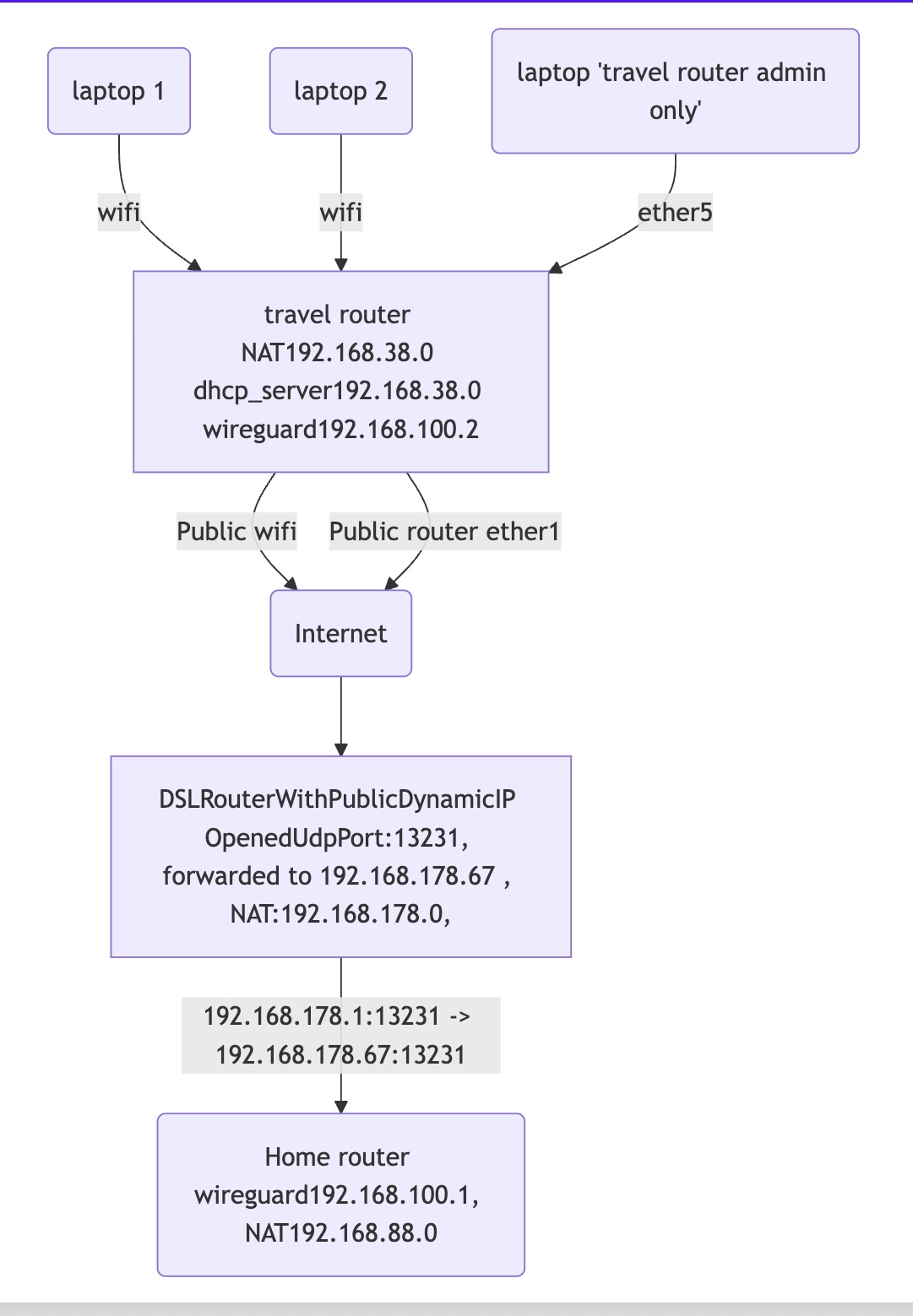
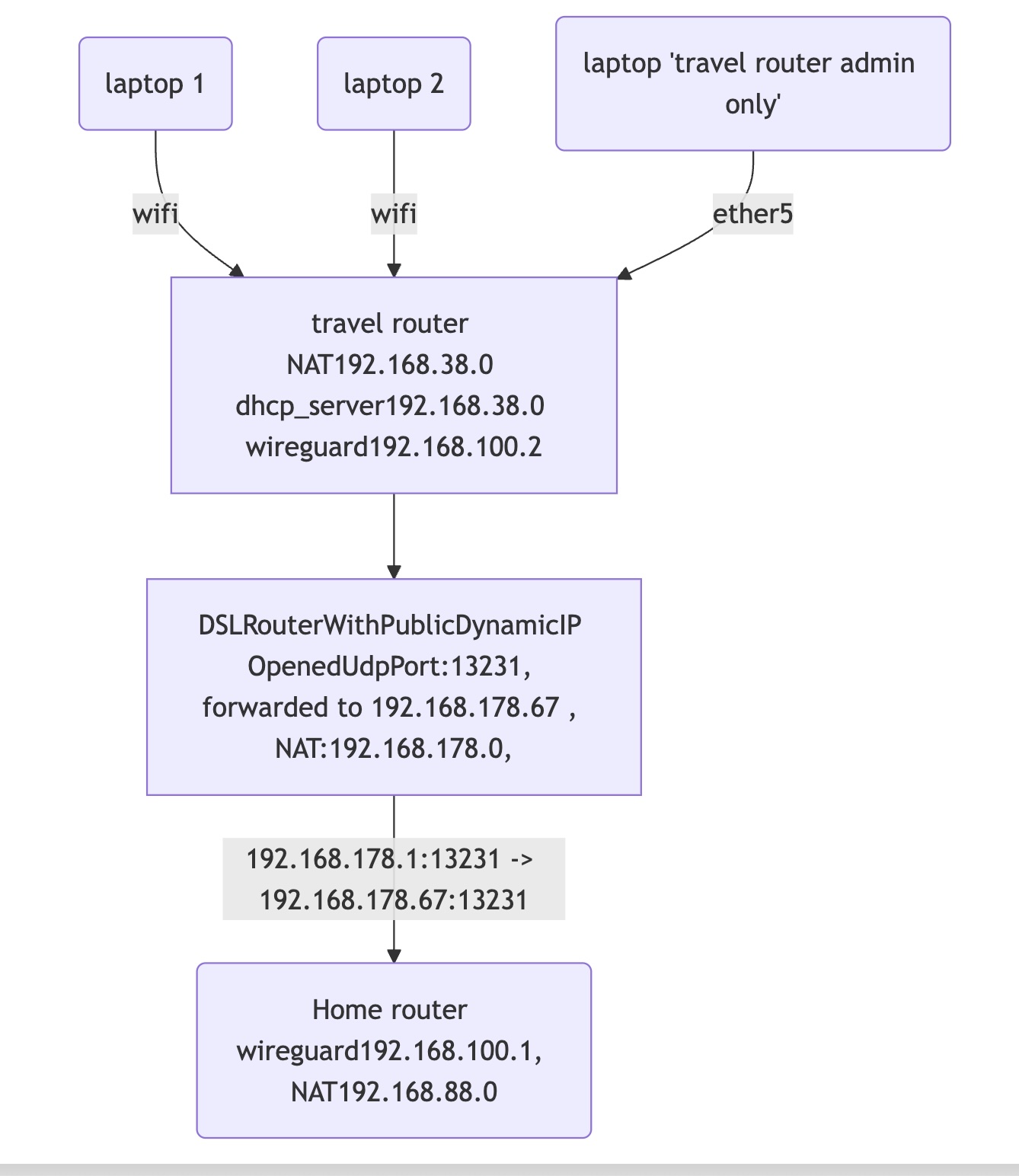
Few diagrams.
Goal:
diag1.jpg
Current test setup both routers connected to DSL router
diag2.jpg

Thank you. I tried my best… but still does not work …
“Handshake for peer did not complete after 5 seconds”


The below command did not work

/routing rule
add min-prefix=0 action=lookup-only-in-table routing-table=main
add src-address=192.168.38.0/24 lookup routing-table=useWG

I called this

/routing rule
add action=lookup-only-in-table min-prefix=0 routing-mark=main
add routing-mark=useWG src-address=192.168.38.0/24

home router:

# 2025-03-19 19:13:26 by RouterOS 7.18.2
# software id = DW34-FEJY
#
# model = E50UG
# serial number = XXXX
/interface bridge
add admin-mac=F4:1E:57:6A:59:D3 auto-mac=no comment=defconf name=bridge
/interface wireguard
add listen-port=13231 mtu=1420 name=wireguard1
/interface list
add comment=defconf name=WAN
add comment=defconf name=LAN
/ip pool
add name=default-dhcp ranges=192.168.88.10-192.168.88.254
/ip dhcp-server
add address-pool=default-dhcp interface=bridge name=defconf
/disk settings
set auto-media-interface=bridge auto-media-sharing=yes auto-smb-sharing=yes
/interface bridge port
add bridge=bridge comment=defconf interface=ether2
add bridge=bridge comment=defconf interface=ether3
add bridge=bridge comment=defconf interface=ether4
add bridge=bridge comment=defconf interface=ether5
/ip neighbor discovery-settings
set discover-interface-list=LAN
/ipv6 settings
set disable-ipv6=yes
/interface list member
add comment=defconf interface=bridge list=LAN
add comment=defconf interface=ether1 list=WAN
/interface ovpn-server server
add mac-address=FE:44:B6:D4:3C:E4 name=ovpn-server1
/interface wireguard peers
add allowed-address=192.168.100.2/32,192.168.38.0/24 interface=wireguard1 name=peer1 public-key="XXXX"
/ip address
add address=192.168.88.1/24 comment=defconf interface=bridge network=192.168.88.0
add address=192.168.100.1/24 interface=wireguard1 network=192.168.100.0
/ip cloud
set ddns-enabled=yes
/ip dhcp-client
add comment=defconf interface=ether1
/ip dhcp-server network
add address=192.168.88.0/24 comment=defconf dns-server=192.168.88.1 gateway=192.168.88.1
/ip dns
set allow-remote-requests=yes
/ip dns static
add address=192.168.88.1 comment=defconf name=router.lan type=A
/ip firewall address-list
add address=192.168.178.0/24 list=Authorized
add address=192.168.100.2 comment="admin remote travel router" list=Authorized
add address=192.168.38.0/24 comment="admin remote travel subnet" list=Authorized
/ip firewall filter
add action=accept chain=input comment="allow WireGuard traffic" src-address=192.168.100.0/24
add action=accept chain=input comment="defconf: accept established,related,untracked" connection-state=established,related,untracked
add action=drop chain=input comment="defconf: drop invalid" connection-state=invalid
add action=accept chain=input comment="defconf: accept ICMP" protocol=icmp
add action=accept chain=input comment="defconf: accept to local loopback (for CAPsMAN)" dst-address=127.0.0.1
add action=accept chain=input comment="admin access" src-address-list=Authorized
add action=accept chain=input comment="users to services" dst-port=53 in-interface-list=LAN protocol=udp
add action=accept chain=input comment="users to services" dst-port=53 in-interface-list=LAN protocol=tcp
add action=accept chain=input dst-port=13231 protocol=udp
add action=drop chain=input comment="drop all else"
add action=accept chain=forward comment="defconf: accept in ipsec policy" ipsec-policy=in,ipsec
add action=accept chain=forward comment="defconf: accept out ipsec policy" ipsec-policy=out,ipsec
add action=fasttrack-connection chain=forward comment="defconf: fasttrack" connection-state=established,related hw-offload=yes
add action=accept chain=forward comment="defconf: accept established,related, untracked" connection-state=established,related,untracked
add action=drop chain=forward comment="defconf: drop invalid" connection-state=invalid
add action=accept chain=forward comment="internet traffic" in-interface-list=LAN out-interface-list=WAN
add action=accept chain=forward comment="wg to LAN" dst-address=192.168.88.0/24 in-interface=wireguard1
add action=drop chain=forward comment="drop all else"
/ip firewall nat
add action=masquerade chain=srcnat comment="defconf: masquerade" ipsec-policy=out,none out-interface-list=WAN
/ip ipsec profile
set [ find default=yes ] dpd-interval=2m dpd-maximum-failures=5
/ip route
add dst-address=192.168.38.0/24 gateway=wireguard1 routing-table=main
/system clock
set time-zone-name=Europe/Berlin
/system note
set show-at-login=no
/tool mac-server
set allowed-interface-list=none
/tool mac-server mac-winbox
set allowed-interface-list=LAN

travel router

# 2025-03-19 19:15:30 by RouterOS 7.18.2
# software id = MH37-7DRH
#
# model = C52iG-5HaxD2HaxD
# serial number = XXXX
/interface bridge
add admin-mac=F4:1E:57:38:84:AB auto-mac=no comment=defconf name=bridge
/interface ethernet
set [ find default-name=ether5 ] name=OffBridge5
/interface wifi
set [ find default-name=wifi1 ] channel.band=5ghz-ax .skip-dfs-channels=10min-cac .width=20/40/80mhz configuration.mode=ap .ssid=MikroTik-3884AF \
    disabled=no security.authentication-types=wpa2-psk,wpa3-psk .ft=yes .ft-over-ds=yes
set [ find default-name=wifi2 ] channel.band=2ghz-ax .skip-dfs-channels=10min-cac .width=20/40mhz configuration.mode=ap .ssid=MikroTik-3884AF \
    disabled=no security.authentication-types=wpa2-psk,wpa3-psk .ft=yes .ft-over-ds=yes
/interface wireguard
add listen-port=13231 mtu=1420 name=wireguard1
/interface list
add comment=defconf name=WAN
add comment=defconf name=LAN
/ip pool
add name=default-dhcp ranges=192.168.38.10-192.168.38.254
/ip dhcp-server
add address-pool=default-dhcp interface=bridge name=defconf
/routing table
add fib name=useWG
/disk settings
set auto-media-interface=bridge auto-media-sharing=yes auto-smb-sharing=yes
/interface bridge port
add bridge=bridge comment=defconf interface=ether2
add bridge=bridge comment=defconf interface=ether3
add bridge=bridge comment=defconf interface=ether4
add bridge=bridge comment=defconf interface=wifi1
add bridge=bridge comment=defconf interface=wifi2
/ip neighbor discovery-settings
set discover-interface-list=LAN
/ipv6 settings
set disable-ipv6=yes
/interface list member
add comment=defconf interface=bridge list=LAN
add comment=defconf interface=ether1 list=WAN
add interface=OffBridge5 list=LAN
/interface ovpn-server server
add mac-address=FE:54:ED:3B:76:34 name=ovpn-server1
/interface wireguard peers
add allowed-address=0.0.0.0/0 endpoint-address=XXXX.sn.mynetname.net endpoint-port=13231 interface=wireguard1 name=peer1 \
    persistent-keepalive=25s public-key="XXXX"
/ip address
add address=192.168.38.1/24 comment=defconf interface=bridge network=192.168.38.0
add address=192.168.100.2/24 interface=wireguard1 network=192.168.100.0
add address=192.168.77.0/30 interface=OffBridge5 network=192.168.77.0
/ip dhcp-client
add comment=defconf interface=ether1
/ip dhcp-server network
add address=192.168.38.0/24 comment=defconf dns-server=192.168.38.1 gateway=192.168.38.1
/ip dns
set allow-remote-requests=yes
/ip dns static
add address=192.168.38.1 comment=defconf name=router.lan type=A
/ip firewall filter
add action=accept chain=input comment="defconf: accept established,related,untracked" connection-state=established,related,untracked
add action=drop chain=input comment="defconf: drop invalid" connection-state=invalid
add action=accept chain=input comment="defconf: accept ICMP" protocol=icmp
add action=accept chain=input comment="defconf: accept to local loopback (for CAPsMAN)" dst-address=127.0.0.1
add action=accept chain=input in-interface-list=LAN
add action=drop chain=input comment="defconf: drop all not coming from LAN" in-interface-list=!LAN
add action=drop chain=input comment="drop all else"
add action=accept chain=forward comment="defconf: accept in ipsec policy" ipsec-policy=in,ipsec
add action=accept chain=forward comment="defconf: accept out ipsec policy" ipsec-policy=out,ipsec
add action=fasttrack-connection chain=forward comment="defconf: fasttrack" connection-state=established,related hw-offload=yes
add action=accept chain=forward comment="defconf: accept established,related, untracked" connection-state=established,related,untracked
add action=drop chain=forward comment="defconf: drop invalid" connection-state=invalid
add action=accept chain=forward in-interface-list=LAN out-interface-list=WAN
add action=accept chain=forward comment="wg to LAN" dst-address=192.168.88.0/24 in-interface=wireguard1
add action=drop chain=forward comment="drop all else"
/ip firewall nat
add action=masquerade chain=srcnat comment="defconf: masquerade" ipsec-policy=out,none out-interface-list=WAN
/ip ipsec profile
set [ find default=yes ] dpd-interval=2m dpd-maximum-failures=5
/ip route
add dst-address=0.0.0.0/0 gateway=wireguard1 routing-table=useWG
add check-gateway=ping dst-address=192.168.100.1 gateway=wireguard1 routing-table=main
/routing rule
add action=lookup-only-in-table min-prefix=0 routing-mark=main
add routing-mark=useWG src-address=192.168.38.0/24
/system clock
set time-zone-name=Europe/Berlin
/system note
set show-at-login=no
/tool mac-server
set allowed-interface-list=none
/tool mac-server mac-winbox
set allowed-interface-list=LAN

Can you please forget about whatever you are doing with OPVN, it makes no sense to me and is getting in the way.
There is no port forwarding ON any of your configs. Also the diagram showing input chain rule on travel router is wrong.

I will have a look at the configs.

Home router looks okay!
One subtle nuance, if you want to be able to use the internet at the home router while remote, then you need to add wireguard to the LAN interface list.
Right now you should only get access to the router itself, or the subnet.
/interface list member
add comment=defconf interface=bridge list=LAN
add interface=wireguard1 list=LAN
add comment=defconf interface=ether1 list=WAN

+++++++++++++++++++++++++

Travel Router

Not sure why this rule is still in the input chain.
add action=drop chain=input comment=“defconf: drop all not coming from LAN” in-interface-list=!LAN

Just above this rule we state ALLOW ALL FROM LAN
Just below this rule we state DROP ALL ELSE.

The rule is NOT required and should be removed. I even drew it in orange for you to pick out to delete LOL.

Now I dont know how you got to this line in the routing rule…
add routing-mark=useWG src-address=192.168.38.0/24

REMOVE and put back the proper rule.
add src-address=192.168.38.0/24 action=lookup table=useWG

+++++++++++++++++++++++++++++++++++++++++++++++++++++++++++++

Now to ensure you get internet from the home router we need to modify the single forward chain firewall rule as per below ( remove the dst address so there is no restriction )
add action=fasttrack-connection chain=forward comment=“defconf: fasttrack” connection-state=established,related hw-offload=yes
add action=accept chain=forward comment=“defconf: accept established,related, untracked” connection-state=established,related,untracked
add action=drop chain=forward comment=“defconf: drop invalid” connection-state=invalid
add action=accept chain=forward in-interface-list=LAN out-interface-list=WAN

add action=accept chain=forward comment=“wg to home router” in-interface-list=LAN out-interface=wireguard1
add action=drop chain=forward comment=“drop all else”

I predict success with the above changes. :slight_smile:

Can you please forget about whatever you are doing with OPVN, it makes no sense to me and is getting in the way.
There is no port forwarding ON any of your configs.

I do nothing with OPVN (OpenVPN)
I added “add address=192.168.178.0/24 list=Authorized” to access “Mikrotik home router” from my laptop that is connected to DSL router (laptop->DSLHomeRouter->MikroTikHomeRouter).


Also the travel router needs NO input chain rule for wireguard its initiating the handshake not receiving it!!

I do not see input chain rule for wireguard and travel router


I will have a look at the configs.

Thank you!!!


One subtle nuance, if you want to be able to use the internet at the home router while remote, then you need to add wireguard to the LAN interface list.
Right now you should only get access to the router itself, or the subnet.

My goal it to have all devices connected from travel router to be visible from outside as devices connected to “home DSL router” or “home MikroTik” router.
But ok I will add
“add interface=wireguard1 list=LAN”

No success.
“Handshake for peer did not complete after 5 seconds”

Home router:

# 2025-03-19 20:13:33 by RouterOS 7.18.2
# software id = DW34-FEJY
#
# model = E50UG
# serial number = XXXX
/interface bridge
add admin-mac=F4:1E:57:6A:59:D3 auto-mac=no comment=defconf name=bridge
/interface wireguard
add listen-port=13231 mtu=1420 name=wireguard1
/interface list
add comment=defconf name=WAN
add comment=defconf name=LAN
/ip pool
add name=default-dhcp ranges=192.168.88.10-192.168.88.254
/ip dhcp-server
add address-pool=default-dhcp interface=bridge name=defconf
/disk settings
set auto-media-interface=bridge auto-media-sharing=yes auto-smb-sharing=yes
/interface bridge port
add bridge=bridge comment=defconf interface=ether2
add bridge=bridge comment=defconf interface=ether3
add bridge=bridge comment=defconf interface=ether4
add bridge=bridge comment=defconf interface=ether5
/ip neighbor discovery-settings
set discover-interface-list=LAN
/ipv6 settings
set disable-ipv6=yes
/interface list member
add comment=defconf interface=bridge list=LAN
add comment=defconf interface=ether1 list=WAN
add interface=wireguard1 list=LAN
/interface ovpn-server server
add mac-address=FE:44:B6:D4:3C:E4 name=ovpn-server1
/interface wireguard peers
add allowed-address=192.168.100.2/32,192.168.38.0/24 interface=wireguard1 name=peer1 public-key="XXXX"
/ip address
add address=192.168.88.1/24 comment=defconf interface=bridge network=192.168.88.0
add address=192.168.100.1/24 interface=wireguard1 network=192.168.100.0
/ip cloud
set ddns-enabled=yes
/ip dhcp-client
add comment=defconf interface=ether1
/ip dhcp-server network
add address=192.168.88.0/24 comment=defconf dns-server=192.168.88.1 gateway=192.168.88.1
/ip dns
set allow-remote-requests=yes
/ip dns static
add address=192.168.88.1 comment=defconf name=router.lan type=A
/ip firewall address-list
add address=192.168.178.0/24 list=Authorized
add address=192.168.100.2 comment="admin remote travel router" list=Authorized
add address=192.168.38.0/24 comment="admin remote travel subnet" list=Authorized
/ip firewall filter
add action=accept chain=input comment="allow WireGuard traffic" src-address=192.168.100.0/24
add action=accept chain=input comment="defconf: accept established,related,untracked" connection-state=established,related,untracked
add action=drop chain=input comment="defconf: drop invalid" connection-state=invalid
add action=accept chain=input comment="defconf: accept ICMP" protocol=icmp
add action=accept chain=input comment="defconf: accept to local loopback (for CAPsMAN)" dst-address=127.0.0.1
add action=accept chain=input comment="admin access" src-address-list=Authorized
add action=accept chain=input comment="users to services" dst-port=53 in-interface-list=LAN protocol=udp
add action=accept chain=input comment="users to services" dst-port=53 in-interface-list=LAN protocol=tcp
add action=accept chain=input dst-port=13231 protocol=udp
add action=drop chain=input comment="drop all else"
add action=accept chain=forward comment="defconf: accept in ipsec policy" ipsec-policy=in,ipsec
add action=accept chain=forward comment="defconf: accept out ipsec policy" ipsec-policy=out,ipsec
add action=fasttrack-connection chain=forward comment="defconf: fasttrack" connection-state=established,related hw-offload=yes
add action=accept chain=forward comment="defconf: accept established,related, untracked" connection-state=established,related,untracked
add action=drop chain=forward comment="defconf: drop invalid" connection-state=invalid
add action=accept chain=forward comment="internet traffic" in-interface-list=LAN out-interface-list=WAN
add action=accept chain=forward comment="wg to LAN" dst-address=192.168.88.0/24 in-interface=wireguard1
add action=drop chain=forward comment="drop all else"
/ip firewall nat
add action=masquerade chain=srcnat comment="defconf: masquerade" ipsec-policy=out,none out-interface-list=WAN
/ip ipsec profile
set [ find default=yes ] dpd-interval=2m dpd-maximum-failures=5
/ip route
add dst-address=192.168.38.0/24 gateway=wireguard1 routing-table=main
/system clock
set time-zone-name=Europe/Berlin
/system note
set show-at-login=no
/tool mac-server
set allowed-interface-list=none
/tool mac-server mac-winbox
set allowed-interface-list=LAN

Travel router:

# 2025-03-19 20:15:09 by RouterOS 7.18.2
# software id = MH37-7DRH
#
# model = C52iG-5HaxD2HaxD
# serial number = XXXX
/interface bridge
add admin-mac=F4:1E:57:38:84:AB auto-mac=no comment=defconf name=bridge
/interface ethernet
set [ find default-name=ether5 ] name=OffBridge5
/interface wifi
set [ find default-name=wifi1 ] channel.band=5ghz-ax .skip-dfs-channels=10min-cac .width=20/40/80mhz configuration.mode=ap .ssid=\
    MikroTik-3884AF disabled=no security.authentication-types=wpa2-psk,wpa3-psk .ft=yes .ft-over-ds=yes
set [ find default-name=wifi2 ] channel.band=2ghz-ax .skip-dfs-channels=10min-cac .width=20/40mhz configuration.mode=ap .ssid=MikroTik-3884AF \
    disabled=no security.authentication-types=wpa2-psk,wpa3-psk .ft=yes .ft-over-ds=yes
/interface wireguard
add listen-port=13231 mtu=1420 name=wireguard1
/interface list
add comment=defconf name=WAN
add comment=defconf name=LAN
/ip pool
add name=default-dhcp ranges=192.168.38.10-192.168.38.254
/ip dhcp-server
add address-pool=default-dhcp interface=bridge name=defconf
/routing table
add fib name=useWG
/disk settings
set auto-media-interface=bridge auto-media-sharing=yes auto-smb-sharing=yes
/interface bridge port
add bridge=bridge comment=defconf interface=ether2
add bridge=bridge comment=defconf interface=ether3
add bridge=bridge comment=defconf interface=ether4
add bridge=bridge comment=defconf interface=wifi1
add bridge=bridge comment=defconf interface=wifi2
/ip neighbor discovery-settings
set discover-interface-list=LAN
/ipv6 settings
set disable-ipv6=yes
/interface list member
add comment=defconf interface=bridge list=LAN
add comment=defconf interface=ether1 list=WAN
add interface=OffBridge5 list=LAN
/interface ovpn-server server
add mac-address=FE:54:ED:3B:76:34 name=ovpn-server1
/interface wireguard peers
add allowed-address=0.0.0.0/0 endpoint-address=XXXX.sn.mynetname.net endpoint-port=13231 interface=wireguard1 name=peer1 \
    persistent-keepalive=25s public-key="XXXX"
/ip address
add address=192.168.38.1/24 comment=defconf interface=bridge network=192.168.38.0
add address=192.168.100.2/24 interface=wireguard1 network=192.168.100.0
add address=192.168.77.0/30 interface=OffBridge5 network=192.168.77.0
/ip dhcp-client
add comment=defconf interface=ether1
/ip dhcp-server network
add address=192.168.38.0/24 comment=defconf dns-server=192.168.38.1 gateway=192.168.38.1
/ip dns
set allow-remote-requests=yes
/ip dns static
add address=192.168.38.1 comment=defconf name=router.lan type=A
/ip firewall filter
add action=accept chain=input comment="defconf: accept established,related,untracked" connection-state=established,related,untracked
add action=drop chain=input comment="defconf: drop invalid" connection-state=invalid
add action=accept chain=input comment="defconf: accept ICMP" protocol=icmp
add action=accept chain=input comment="defconf: accept to local loopback (for CAPsMAN)" dst-address=127.0.0.1
add action=accept chain=input in-interface-list=LAN
add action=drop chain=input comment="drop all else"
add action=accept chain=forward comment="defconf: accept in ipsec policy" ipsec-policy=in,ipsec
add action=accept chain=forward comment="defconf: accept out ipsec policy" ipsec-policy=out,ipsec
add action=fasttrack-connection chain=forward comment="defconf: fasttrack" connection-state=established,related hw-offload=yes
add action=accept chain=forward comment="defconf: accept established,related, untracked" connection-state=established,related,untracked
add action=drop chain=forward comment="defconf: drop invalid" connection-state=invalid
add action=accept chain=forward in-interface-list=LAN out-interface-list=WAN
add action=accept chain=forward comment="wg to home router" in-interface-list=LAN out-interface=wireguard1
add action=drop chain=forward comment="drop all else"
/ip firewall nat
add action=masquerade chain=srcnat comment="defconf: masquerade" ipsec-policy=out,none out-interface-list=WAN
/ip ipsec profile
set [ find default=yes ] dpd-interval=2m dpd-maximum-failures=5
/ip route
add dst-address=0.0.0.0/0 gateway=wireguard1 routing-table=useWG
add check-gateway=ping dst-address=192.168.100.1 gateway=wireguard1 routing-table=main
/routing rule
add action=lookup-only-in-table min-prefix=0 routing-mark=main
add action=lookup src-address=192.168.38.0/24 table=useWG
/system clock
set time-zone-name=Europe/Berlin
/system note
set show-at-login=no
/tool mac-server
set allowed-interface-list=none
/tool mac-server mac-winbox
set allowed-interface-list=LAN

Those rules looks suspicious for travel router

add action=accept chain=forward in-interface-list=LAN out-interface-list=WAN
add action=accept chain=forward in-interface-list=LAN out-interface=wireguard1 comment="wg to home router"