[Wireguard VPN] route all your traffic through VPN tunnel

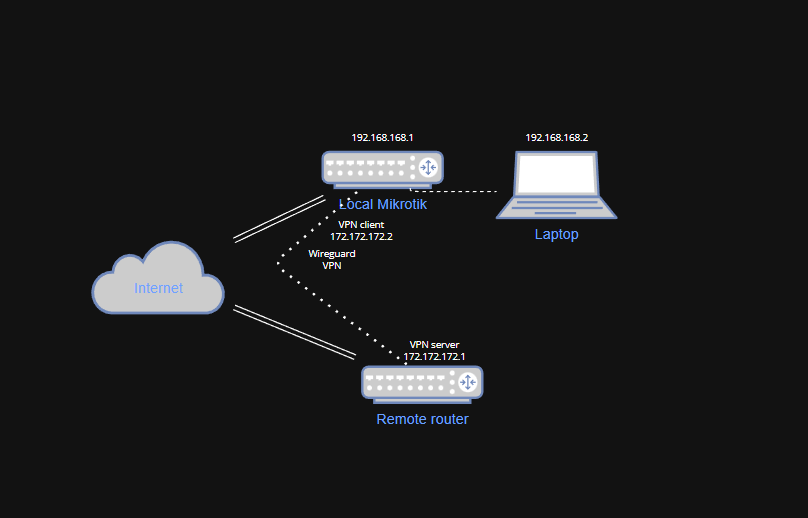
Hey guys, I have a question regarding properly setting up a wireguard VPN tunnel.

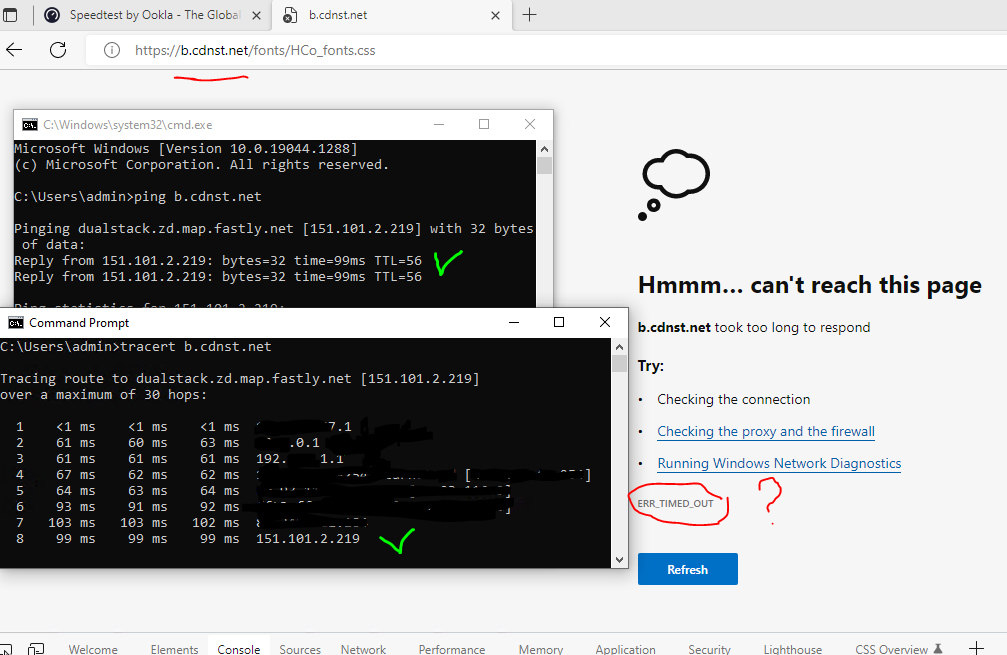
So I have a HA3 connected to internet and I have a wireguard VPN client running on it. VPN is up and running normally. The issue is that I have a PC on the br-lan which is mangled to go through VPN, at least the idea is to have all traffic on that PC routed through VPN but when I run speedtest.net the HTML file is loaded but all the JS files timeout (.
So the question is how can I check why not all content is downloadable through VPN?
The destination IP is pingable from the PC no problem also tracert shows that the requests are going actually through VPN connection like [mik router] > [VPN] > [remote router] > [internet] but when I paste the URL into my browser the content is not loaded

THE CONFIG DOESN NOT MATTER AS LONG AS YOU CAN PING THE OTHER SIDE AND AT LEAST OPEN YOUTUBE OR GOOGLE!!!

on tracert cmd the we have the whole path as

  1. is local LAN
  2. is VPN tunnel
  3. is remote LAN
  4. is remote ISP
    Also configuring the same Wireguard connection on the PC directly with the exact same settings as used in mikrotik’s wireguard makes all the issues to be gone, which makes me think that something wrong is on my router


SOLUTION: [b]JUST SET THE SERVER'S MTU TO 1500[/b] should fix the issue

img3.PNG
img2.PNG
img1.PNG

Note Steps 2 and 1.
https://forum.mikrotik.com/viewtopic.php?t=182601

snip useless replay

Full config (minus serial # and any public WANIP info) ???

snip useless replay

(1) I prefer vlans to bridges, but everyone has their own fetish.
(2) Where is the pool, dhcp server, for bridge IOT, I only see it included in IP address and dhcp-server network???

(3) Where is interfaces WG-Client-Hassio Defined???
It has to come from somewhere and cannot just be added to interface lists without actually existing??

(4) Remember the purpose of interface lists is to normally simplify the firewall rules such that
a. two or more whole subnets can be described by an interface list
b. an exception is usually just the management interface when used.
c. address lists are better for less than whole subnets ( a subset of IP addresses, within or accross subnets), or with a mix of users described by both subnets and subsets of IP addresses).
d. Single subnets are best decribed by the interface its on, such as vlanX or ether3, or by dst or src address=subnet.

Not sure what you are doing but it feels overly complex and messy than what is required.

(5) Overall I think you are being too cute with sourcenat rules but I am not expert so will ask the questions…

a. What is the purpose of this source nat rule which contains both the same src address and dst address? Hairpin nat?
add action=masquerade chain=srcnat comment=“defconf: masquerade” dst-address=
!192.168.0.0/16 ipsec-policy=out,none out-interface-list=WAN src-address=
192.168.0.0/16

b. What is the purpose of this rule…
add action=masquerade chain=srcnat dst-address=!10.20.60.0/24 ipsec-policy=
out,none out-interface-list=WAN src-address=10.20.60.0/24

Do you want all the incoming remote wireguard users coming into the router to go out your internet natted with the IP of your WAN?
There are a number of ways to accomplish this.
One is to include the interface as part of the WAN list
add interface=WG-Server list=WAN

However why would you want to do this? The router is aware of the clients within it that you have identified. Considering the single clients have an IP address of 10.20.60.X
The router already has a route back to the tunnel.
Where making additional route rules comes into play is if you have subnets coming into the router lets say from a remote MT Router device with client subnets, well they are identified on the local router peer lists.
So its real simple to simply put
add dst-address=remotesubnet (.0/24) gwy=WG-Server server table=main DONE.
Any return traffic from the internet or local subnets will get routed appropriately.

In addition you already added the WG Server interface to the LAN list where it makes more sense with firewall rules.

(6) This naturally falls out in a conversation about the next rule.
Here you want to ensure that users from the local bridge going out the wg tunnel are given a source IP address (natted) to that of the wireguard and not the actual subnet source addresses.
For various reasons… like going to third party VPN etc…
So this makes more sense to me. EXCEPT it looks like the format is wrong!!
add action=masquerade chain=srcnat comment=“masquarade vpn”
out-interface-list=VPN to-addresses=10.7.0.4

This should be better
add action=src-nat chain=srcnat dst-address=10.7.0.4 in-interface=brg-local

Thus any traffic heading out the wireguard interface from local users will get the IP address 10.7.0.4 as source address.

******************** The assumption here is that you want to send all local bridge users out the wireguard for internet ???


(7) I cannot comment on routes until assumptions are cleared up on user requirements.
For all I know you want remote users coming in on WG-Server to go out WG-Client tunnel not local users.

The better you state the requirements, the better the config will be!!

(8) Same goes for your mangling.
snip useless replay

Could be an MTU problem. On the WG-Client connection on the local router and on the client router set both MTU to 1500 (default is 1420 - which works fine in 95% of cases) and see if that fixes the web issues…

Set MTU to 1420
Try use mangle rules to mark routes exacly to wireguard.
Also turn off fasttrack if enabled, in my case fasttrack was a source of all problems with wireguard.

snip useless replay

Okay so keep the mtu to defaults 1420, get rid of the mangles noted above and put fastrack back in.

We are going to try MSS Clamp!
Go to client mikrotik, thi is not done on server so on the WG-Client interface…

Go to mangle rules and addd new mangle rule

add chain=forward protocol=tcp out-interface=WG-Client
Then go to ADVANCED TAB at top,

Go to TCP Flags
select from the pull down → syn

Go to ACTION TAB at top…
select ----> CHANGE MSS

GO TO new TCP MSS:
select → clamp to pmtu

(if that doesnt work try setting it to 40 less than MTU setting in this case 1420-40=1380)

++++++++++++++++++++++++++++++++++++++++++++++++++++++++++++++++++++++++++++++++++

What is WG client interface connecting to… whats at the other end another MT router if so please post its config…
If not what is it??? and what settings did they give you to use??

YEP set server to 1500 resolved the issue.

THANKS!!!

You still have not stated what the WG-Client is connecting to, nor posted details about that end.

snip useless replay

snip useless replay

What settings does it have…
I am thinking maybe its DNS issues…
What DNS settings are on that thing what IP address or what gateway is it using for DNS??

As for the mangles get rid of it for now as I stated, we will fix your routing issue a better way.
Do you need a whole subnet to go out the wireguard client to the promox or just a single client??

WHat allowed IPs are set at the promox for the WG-client.???

snip useless replay

Okay since you have not included the local router subnet or users, on the allowed IPs on the promox wg server, it will be necessary to sourcenat those users to 10.0.7.4 or whatever the wireguard interface address is… Not the best way to do that as sourcenat is often used when one doesnt have control over the other side… much clearer and better to set allowed IPs if able…

Yes, understood, you have set it so that the entire subnet will go out the wg-client tunnel to promox… when you say local traffic assume you mean bridge local.

Really tired of the BS,
a. you have no firewall address list in your config and further you have not answered many questions.
b. DNS on promox where does it get it from what gateway
c. What the heck is hassio-client interface not defined anywhere

if not going to be cooperative I will move on.