That was an error, i just checked and that box, Use local IP was checked, i unchecked it and rebooted the router. Now it’s working.
Now I’m trying to make site to site link, i have wAP LTE kit that i will use for remote site and in R2 (wAP LTE) in interface menu i selected L2TP client, then i entered user, password, IPsec key and address to connect.
Maybe in the future i add another router for another remote site.
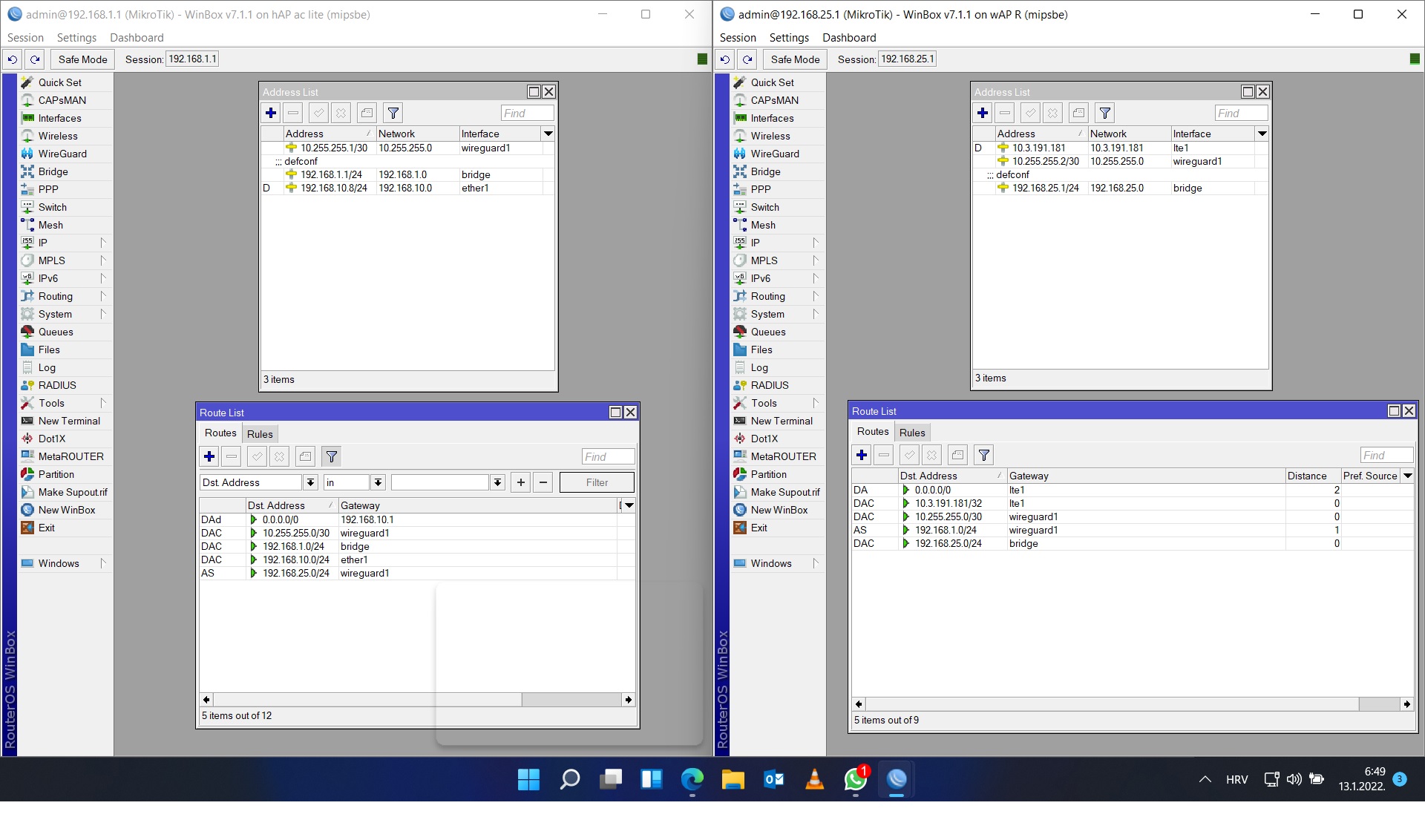
Routers connect immediately but i can’t ping anything. I added firewall rules to the R2. Here is the configuration of office router R1 and remote site router R2
R2 (wAP LTE KIT)
# jan/12/2022 07:18:27 by RouterOS 7.1.1
# software id = J61H-4XD4
#
# model = RBwAPR-2nD
# serial number = XXXXXXXXXXXX
/interface bridge
add admin-mac=XX:XX:XX:XX:XX:XX auto-mac=no comment=defconf name=bridge
/interface lte
set [ find ] allow-roaming=no band="" name=lte1
/interface l2tp-client
add connect-to=xxxxxxxxxxxxxxxxxxxxxxx disabled=no name=l2tp-out1 use-ipsec=yes \
    user="**************"
/interface wireless
set [ find default-name=wlan1 ] band=2ghz-b/g/n channel-width=20/40mhz-XX \
    distance=indoors frequency=auto installation=outdoor mode=ap-bridge ssid=\
    MikroTik-7FCF0A wireless-protocol=802.11
/interface list
add comment=defconf name=WAN
add comment=defconf name=LAN
/interface lte apn
set [ find default=yes ] apn=internet.isp.provider ip-type=ipv4 name=ISPName
/interface wireless security-profiles
set [ find default=yes ] supplicant-identity=MikroTik
/ip pool
add name=dhcp ranges=192.168.25.244-192.168.25.254
add name=vpn ranges=192.168.89.2-192.168.89.255
/ip dhcp-server
add address-pool=dhcp interface=bridge name=defconf
/ppp profile
set *FFFFFFFE local-address=192.168.89.1 remote-address=vpn
/interface bridge port
add bridge=bridge comment=defconf ingress-filtering=no interface=ether1
add bridge=bridge comment=defconf ingress-filtering=no interface=wlan1
/ip neighbor discovery-settings
set discover-interface-list=LAN
/ip settings
set max-neighbor-entries=8192
/ipv6 settings
set disable-ipv6=yes max-neighbor-entries=8192
/interface l2tp-server server
set use-ipsec=yes
/interface list member
add comment=defconf interface=bridge list=LAN
add comment=defconf interface=lte1 list=WAN
/interface sstp-server server
set default-profile=default-encryption
/ip address
add address=192.168.25.1/24 comment=defconf interface=bridge network=\
    192.168.25.0
/ip cloud
set ddns-enabled=yes
/ip dhcp-server network
add address=192.168.25.0/24 gateway=192.168.25.1 netmask=24
add address=192.168.88.0/24 comment=defconf gateway=192.168.88.1
/ip dns
set allow-remote-requests=yes
/ip dns static
add address=192.168.25.1 comment=defconf name=router.lan
/ip firewall filter
add action=accept chain=input comment=\
    "defconf: accept established,related,untracked" connection-state=\
    established,related,untracked
add action=accept chain=input comment="allow IPsec NAT" dst-port=4500 \
    protocol=udp
add action=accept chain=input comment="allow IKE" dst-port=500 protocol=udp
add action=accept chain=input comment="allow l2tp" dst-port=1701 \
    ipsec-policy=in,ipsec protocol=udp
add action=accept chain=input comment="allow ipsec-esp" protocol=ipsec-esp
add action=accept chain=input comment="allow pptp" disabled=yes dst-port=1723 \
    protocol=tcp
add action=accept chain=input comment="allow sstp" disabled=yes dst-port=443 \
    protocol=tcp
add action=drop chain=input comment="defconf: drop invalid" connection-state=\
    invalid
add action=accept chain=input comment="defconf: accept ICMP" protocol=icmp
add action=accept chain=input comment=\
    "defconf: accept to local loopback (for CAPsMAN)" dst-address=127.0.0.1
add action=drop chain=input comment="defconf: drop all not coming from LAN" \
    in-interface-list=!LAN
add action=accept chain=forward comment="defconf: accept in ipsec policy" \
    ipsec-policy=in,ipsec
add action=accept chain=forward comment="defconf: accept out ipsec policy" \
    ipsec-policy=out,ipsec
add action=fasttrack-connection chain=forward comment="defconf: fasttrack" \
    connection-state=established,related hw-offload=yes
add action=accept chain=forward comment=\
    "defconf: accept established,related, untracked" connection-state=\
    established,related,untracked
add action=drop chain=forward comment="defconf: drop invalid" \
    connection-state=invalid
add action=drop chain=forward comment=\
    "defconf: drop all from WAN not DSTNATed" connection-nat-state=!dstnat \
    connection-state=new in-interface-list=WAN
/ip firewall nat
add action=masquerade chain=srcnat comment="defconf: masquerade" \
    ipsec-policy=out,none out-interface-list=WAN
add action=masquerade chain=srcnat comment="masq. vpn traffic" src-address=\
    192.168.89.0/24
/ip upnp
set enabled=yes
/ip upnp interfaces
add interface=bridge type=internal
add interface=lte1 type=external
/ppp secret
add name=vpn
/system clock
set time-zone-name=Europe/Zagreb
/system leds
# using RSRP, modem-signal-threshold ignored
add interface=lte1 leds=led1 type=modem-signal
# using RSRP, modem-signal-threshold ignored
add interface=lte1 leds=led2 modem-signal-threshold=-71 type=modem-signal
# using RSRP, modem-signal-threshold ignored
add interface=lte1 leds=led3 modem-signal-threshold=-51 type=modem-signal
/tool mac-server
set allowed-interface-list=LAN
/tool mac-server mac-winbox
set allowed-interface-list=LAN
R1 (Office router)
[code]# jan/12/2022 07:24:41 by RouterOS 7.1.1
# software id = CD7M-66CD
#
# model = RB952Ui-5ac2nD
# serial number = xxxxxxxxxxxxxxxxxxxxxx
/interface bridge
add admin-mac=xxxxxxxxxxxxxxxxxxxxxxxx auto-mac=no comment=defconf name=bridge
/interface wireless
set [ find default-name=wlan1 ] band=2ghz-g/n country=croatia disabled=no \
    distance=indoors frequency=2472 installation=indoor mode=ap-bridge ssid=\
    "Fidens 2.4G" wireless-protocol=802.11
set [ find default-name=wlan2 ] band=5ghz-a/n/ac channel-width=\
    20/40/80mhz-XXXX country=croatia disabled=no distance=indoors frequency=\
    auto installation=indoor mode=ap-bridge ssid="Fidens 5G" \
    wireless-protocol=802.11
/interface list
add comment=defconf name=WAN
add comment=defconf name=LAN
/interface lte apn
set [ find default=yes ] ip-type=ipv4
/interface wireless security-profiles
set [ find default=yes ] authentication-types=wpa-psk,wpa2-psk mode=\
    dynamic-keys supplicant-identity=MikroTik
/ip pool
add name=dhcp ranges=192.168.1.1-192.168.1.254
add name=vpn ranges=192.168.89.2-192.168.89.255
/ip dhcp-server
add address-pool=dhcp interface=bridge name=defconf
/ppp profile
add local-address=192.168.89.1 name=VPN_Ured remote-address=vpn
set *FFFFFFFE local-address=192.168.89.1 remote-address=vpn
/interface bridge port
add bridge=bridge comment=defconf ingress-filtering=no interface=ether2
add bridge=bridge comment=defconf ingress-filtering=no interface=ether3
add comment=defconf ingress-filtering=no interface=ether4
add bridge=bridge comment=defconf ingress-filtering=no interface=ether5
add bridge=bridge comment=defconf ingress-filtering=no interface=wlan1
add bridge=bridge comment=defconf ingress-filtering=no interface=wlan2
/ip neighbor discovery-settings
set discover-interface-list=LAN
/ip settings
set max-neighbor-entries=8192
/ipv6 settings
set disable-ipv6=yes max-neighbor-entries=8192
/interface detect-internet
set detect-interface-list=all
/interface l2tp-server server
set authentication=mschap2 default-profile=VPN_Ured enabled=yes use-ipsec=\
    required
/interface list member
add comment=defconf interface=bridge list=LAN
add comment=defconf interface=ether1 list=WAN
/interface sstp-server server
set default-profile=default-encryption
/ip address
add address=192.168.1.1/24 comment=defconf interface=bridge network=\
    192.168.1.0
/ip arp
xxxxxxxxxxxxxxxxxxxxxxxxxxxxxxxxxxxxxxxxxxxxxxxxxxxxxxxxx
/ip cloud
set ddns-enabled=yes ddns-update-interval=15m
/ip dhcp-client
add comment=defconf interface=ether1
/ip dhcp-server lease
xxxxxxxxxxxxxxxxxxxxxxxxxxxxxxxxxxxxxxx
/ip dhcp-server network
add address=192.168.1.0/24 comment=defconf gateway=192.168.1.1 netmask=24
/ip dns
set allow-remote-requests=yes
/ip dns static
add address=192.168.1.1 comment=defconf name=router.lan
/ip firewall filter
add action=accept chain=input comment=\
    "defconf: accept established,related,untracked" connection-state=\
    established,related,untracked
add action=accept chain=input comment="allow IPsec NAT" dst-port=4500 \
    protocol=udp
add action=accept chain=input comment="allow IKE" dst-port=500 protocol=udp
add action=accept chain=input comment="allow l2tp" dst-port=1701 \
    ipsec-policy=in,ipsec protocol=udp
add action=accept chain=input comment="allow pptp" disabled=yes dst-port=1723 \
    protocol=tcp
add action=accept chain=input comment="allow sstp" disabled=yes dst-port=443 \
    protocol=tcp
add action=accept chain=forward comment="defconf: accept in ipsec policy" \
    ipsec-policy=in,ipsec
add action=accept chain=forward comment="defconf: accept out ipsec policy" \
    ipsec-policy=out,ipsec
add action=accept chain=input comment="allow ipsec-esp" protocol=ipsec-esp
add action=drop chain=input comment="defconf: drop invalid" connection-state=\
    invalid
add action=accept chain=input comment="defconf: accept ICMP" protocol=icmp
add action=accept chain=input comment=\
    "defconf: accept to local loopback (for CAPsMAN)" dst-address=127.0.0.1
add action=drop chain=input comment="defconf: drop all not coming from LAN" \
    in-interface-list=!LAN
add action=fasttrack-connection chain=forward comment="defconf: fasttrack" \
    connection-state=established,related hw-offload=yes
add action=accept chain=forward comment=\
    "defconf: accept established,related, untracked" connection-state=\
    established,related,untracked
add action=drop chain=forward comment="defconf: drop invalid" \
    connection-state=invalid
add action=drop chain=forward comment=\
    "defconf: drop all from WAN not DSTNATed" connection-nat-state=!dstnat \
    connection-state=new in-interface-list=WAN
/ip firewall nat
add action=masquerade chain=srcnat comment="defconf: masquerade" \
    ipsec-policy=out,none out-interface-list=WAN
add action=dst-nat chain=dstnat comment="Port 21 za FTP server" dst-address=\
    192.168.10.8 dst-port=21 in-interface=ether1 protocol=tcp to-addresses=\
    192.168.1.39 to-ports=21
add action=masquerade chain=srcnat comment="masq. vpn traffic" src-address=\
    192.168.89.0/24
add action=dst-nat chain=dstnat comment="Divar IP kockica" disabled=yes \
    dst-address=192.168.10.8 dst-port=442 in-interface=ether1 protocol=tcp \
    to-addresses=192.168.1.139 to-ports=442
add action=dst-nat chain=dstnat comment="VDC BL2/0 - VPN" disabled=yes \
    dst-address=192.168.10.8 dst-port=500 in-interface=ether1 protocol=udp \
    to-addresses=192.168.1.6 to-ports=500
add action=dst-nat chain=dstnat disabled=yes dst-address=192.168.10.8 \
    dst-port=4500 in-interface=ether1 protocol=udp to-addresses=192.168.1.6 \
    to-ports=4500
/ip firewall service-port
set udplite ports=500
/ip upnp
set enabled=yes
/ip upnp interfaces
add interface=bridge type=internal
add interface=ether1 type=external
/ppp secret
add name="Kre\9Ao@VPN" profile=VPN_Ured service=l2tp
/system clock
set time-zone-name=Europe/Zagreb
/system ntp client
set enabled=yes
/system ntp client servers
add address=161.53.128.17
add address=45.87.77.15
/tool mac-server
set allowed-interface-list=LAN
/tool mac-server mac-winbox
set allowed-interface-list=LAN
/tool netwatch
add comment="Divar IP3000 \"Kockica\"" host=192.168.1.139
add comment="NAS server" host=192.168.1.39
add comment="Biostar 2 server" host=192.168.1.20
add comment="Dinioin IP4000" down-script="Ispad kamere" host=192.168.20.108 \
    up-script="Kamera ukljucena"
[/code]