Why is the dude determinating our 5Ghz links speed to 11Mbps???
For example:
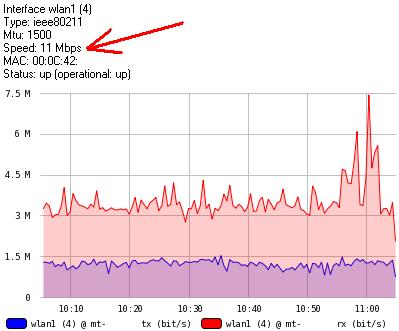
This link is between an RB433 with R52 and an RB411 with R52
Why is the dude determinating our 5Ghz links speed to 11Mbps???
For example:
This link is between an RB433 with R52 and an RB411 with R52
5ghz? 11Mbps?
Do you mean 54mbps instead of 11mbps.
Is someone connected to the access point with low signal?
this value changes depending on link quality I think
I can put around 20 mbits (tcp) through this links. So I can say the quality is good, and the 11mbit determined speed is wrong.
I think i found the answer. I made an SNMPWALK on the device and at the 1.3.6.1.2.1.2.2.1.5.2 oid there is 11000000 as value. Who can answer me, why is the RB411AH “telling” this speed about an interface named wlan1??? Not only RB411, lot of RBs are giving the wrong value on snmp…
I don’t have any Router boards but is there any other interface that will work?
I have a couple wireless bridges that have several interfaces when I made the link between them and selected the interface the only one that gave an accurate speed was call ipx0 the other ones are named ath0, br0, lo0 and wifi0. None of the other ones report the correct link speed.
These are Solectek radios so it is definatly different than a RB but maybe a different interface will represent the correct link speed otherwise I agree with you that the snmp information is not updating correctly.
All the other (ether) interfaces give back 100000000 (100Mbps), so they are good.
My greatest problem is that: I draw this links in dude, and if there is more than 5-6 Mbps traficc on them, the links’s color goes to red.
But after I found that snmp error, I think it is RouterOS error, not Dude error.
You could just click in the settings for the link and force speed if you don’t want it to show up red but I think your correct about RB being wrong.
It will still show 11mb in the popup but it will measure the speed based on the manual setting.
This works, thank you!!!
I have noticed that when displaying the link speed, SNMP mastering reports 11Mbps, RouterOS mastering reports 10Mbps. When specifying the link speed, it has no effect on that display, i.e. it reports 11 or 10Mbps no matter what.
HOWEVER, it drastically improves the bandwidth reporting for the longer periods. Almost any link that doesnt specify speed will have a yearly maximum average bandwidth of maximum 400k on the chart. When specifying, e.g. 24000000 for 24Mbps operating bitrate, the smoothing over the long periods is drastically reduced, and more reasonable bitrates are produced for especially year and month, and more accurate on all other time periods.
This has not always been the case. Using Dude 3.4 on x86 based RouterOS 3.23 on a Dell 750 with 2.8GHz proc w/512MB RAM…
Dont know how the actual bitrate can be determined on the fly, and maintain bandwidth graphs that are accurate. It seems that just specifying a link speed, like 54000000 for an ‘802.11a’ type connection, and I specified ‘unknown’ for link type, reports the same improved graphs no matter what speed is indicated. I will monitor this over time to see if there is any difference over a longer period of time.